17 min read
—


Price per token is the wrong number. Compare 14 models on accuracy per dollar, see what one job really costs on each, and download the free LLM cost guide.

Andrea Azzini
Head of Product
V7 Go
A smarter way to manage due diligence and underwriting
LLM cost optimization usually starts in the wrong place. Teams trim prompts, shorten system messages and argue about caching, while the biggest line on the invoice is a choice nobody revisited: which model runs which job.
The price gap between models is now far wider than any saving you can squeeze out of a prompt. At current list prices, GPT-6 Astra costs 50 times more per input token than GPT-5.6 Luna. Claude Opus 5 costs five times more than Claude Haiku 4.5. If a team sends every task to the most capable model it can access, a classification step that a small model handles well is billed at frontier rates, thousands of times a month.
The opposite mistake is just as expensive, only harder to see. Send hard analysis to the cheapest model and you pay in rework, reviewer time and answers nobody trusts. The cheapest model per token is not the cheapest model per correct answer.
This guide is about getting that choice right. It is built on an internal reference V7's product team keeps for choosing models when building document workflows. The reference scores 13 models from OpenAI, Anthropic and Google on accuracy, price and accuracy per dollar, and gives each one a job. We have refreshed its prices against the official pricing pages as of 24 September 2026, added the newest Claude model, and turned it into a one-page LLM cost guide you can download free, with no form to fill in.
In this article:
How AI token costs work: input, output, reasoning and cached tokens, and the price tiers most comparisons leave out
Why accuracy per dollar is a better number than price per token
Which model to use for which job, with a worked example of one extraction job on three models
Seven ways to reduce LLM API costs without losing accuracy
How to govern spend once more than one team is using models
It is written for operations, finance and technology leads who own an AI budget, and for the people building document workflows who get asked why last month's bill doubled.
How AI token costs actually work
Every major model provider charges per token. A token is a chunk of text, roughly four characters of English, so 1,000 tokens is about 750 words. Prices are quoted per million tokens, and they are quoted separately for what you send and what you get back.
Four kinds of token show up on an invoice:
Input tokens are everything you send: instructions, the document, any examples and the conversation so far. On a document-heavy job, input is usually most of the volume.
Output tokens are what the model writes back. They cost five to eight times more than input tokens at the three big providers.
Reasoning tokens are the model's working before it answers. They are billed as output tokens, even when you never see them, so a model that thinks at length can cost several times its list price suggests.
Cached input tokens are repeated prefixes, such as a fixed set of instructions, that the provider has stored. Reading from the cache costs about a tenth of the normal input price at OpenAI and Anthropic.
Because input and output are priced differently, comparing models on one of them misleads. The guide uses a blended price: three parts input to one part output, which is a reasonable shape for extraction and analysis work. The formula is (3 x input price + output price) / 4. For GPT-5.6 Sol at $4 input and $20 output per million tokens, that is (12 + 20) / 4 = $8 per million blended tokens.
Two more numbers belong next to the price. The context window is the most a model can read and write in one request: about 1 million tokens for most current models, and 200,000 for Claude Haiku 4.5. The maximum output is how much it can write back, from 64,000 to 128,000 tokens depending on the model. A long document that fits the window can still be expensive to send in full, which is where the next section comes in.
The price tiers most comparisons leave out
List prices are the headline. Three details change the real number, and they rarely appear in price tables:
Long-context surcharges. On OpenAI's GPT-5.6 models, a request with more than 272,000 input tokens is billed at twice the input price and one and a half times the output price. Gemini 3.1 Pro moves from $2 / $12 to $4 / $18 above 200,000 tokens. Sending a whole data room in one call can double its cost.
Promotional and introductory prices. GPT-5.6 Sol's $4 / $20 is a promotional price available at least until 21 November 2026, against a list price of $5 / $30. Gemini 3.8 Flash's $0.75 / $3.75 runs until 31 December 2026, then doubles. A model choice made on this month's price may be wrong next quarter.
Batch discounts. OpenAI, Anthropic and Google all charge 50% less for work submitted through their batch APIs, in exchange for results within hours instead of seconds.
Current rates are on the OpenAI API pricing page, Anthropic's Claude pricing documentation and the Gemini API pricing page. Prices in this article were checked against those pages on 24 September 2026.
Why price per token is the wrong number for LLM cost optimization
A price table tells you what a million tokens cost. It does not tell you what you get for them. Two models at the same price can differ by 12 points on accuracy, and a model at a tenth of the price can come close to one that costs ten times more.
The guide puts the two numbers together. Accuracy is each model's score on the Artificial Analysis Intelligence Index (version 4.3, as recorded on 16 September 2026), a composite of independent evaluations covering reasoning, knowledge, maths and coding. Value is accuracy divided by blended price: the accuracy points you get per dollar per million tokens.
Model | Accuracy | Blended $ / 1M | Value |
|---|---|---|---|
GPT-6 Astra | 53 | $20.00 | 2.6 |
Claude Opus 5 | 51 | $10.00 | 5.1 |
GPT-5.6 Sol | 47 | $8.00 | 5.9 |
GPT-5.6 Terra | 42 | $4.50 | 9.3 |
Gemini 3.8 Flash | 41 | $1.50 | 27.3 |
GPT-5.6 Luna | 38 | $0.45 | 84.4 |
Gemini 3.5 Flash Lite | 23 | $0.85 | 27.1 |
Selected rows. The full table of 14 models, with context windows and a watch list of temporary prices, is in the downloadable guide.
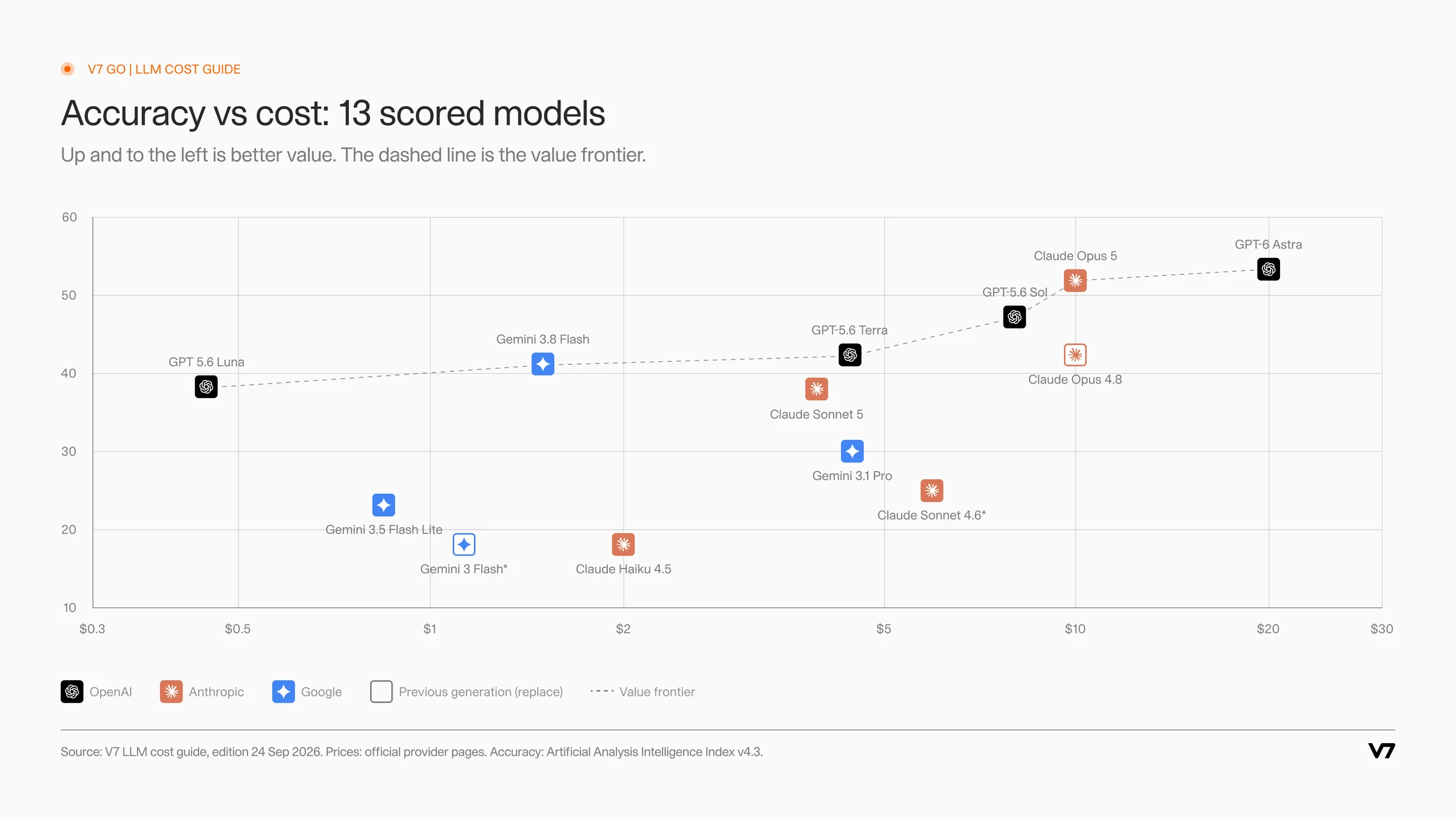
The value frontier: no model below the dashed line is both cheaper and more accurate than one on it.
Two things stand out. First, the spread on value is enormous: GPT-5.6 Luna delivers more than 30 times as many accuracy points per dollar as GPT-6 Astra. Second, the top of the accuracy scale is flat. Astra scores 6 points above Sol and costs two and a half times as much. Whether those 6 points are worth it depends entirely on the job.
Plot every model on accuracy against price and a line appears along the upper-left edge: the models for which no alternative is both cheaper and more accurate. In the guide, that value frontier runs through GPT-5.6 Luna, Gemini 3.8 Flash, GPT-5.6 Terra, GPT-5.6 Sol, Claude Opus 5 and GPT-6 Astra. Every other model is beaten on both price and score by something on the line. That does not make it useless, since a model can still be the right answer for a specific task, but it means the choice needs a reason.
One caveat matters more than the rest. A general benchmark measures general ability. Your job is specific: pulling 30 fields from a fund report, classifying emails, drafting a credit memo. Use the index to shortlist, then test the shortlist on a sample of your own work. The guide to comparing AI models covers how to set up that kind of test.
Which model for which job
Most document and knowledge work breaks into a small number of job types, and each has a sensible default. The table below is the guide's role table, with the reasoning behind each assignment.
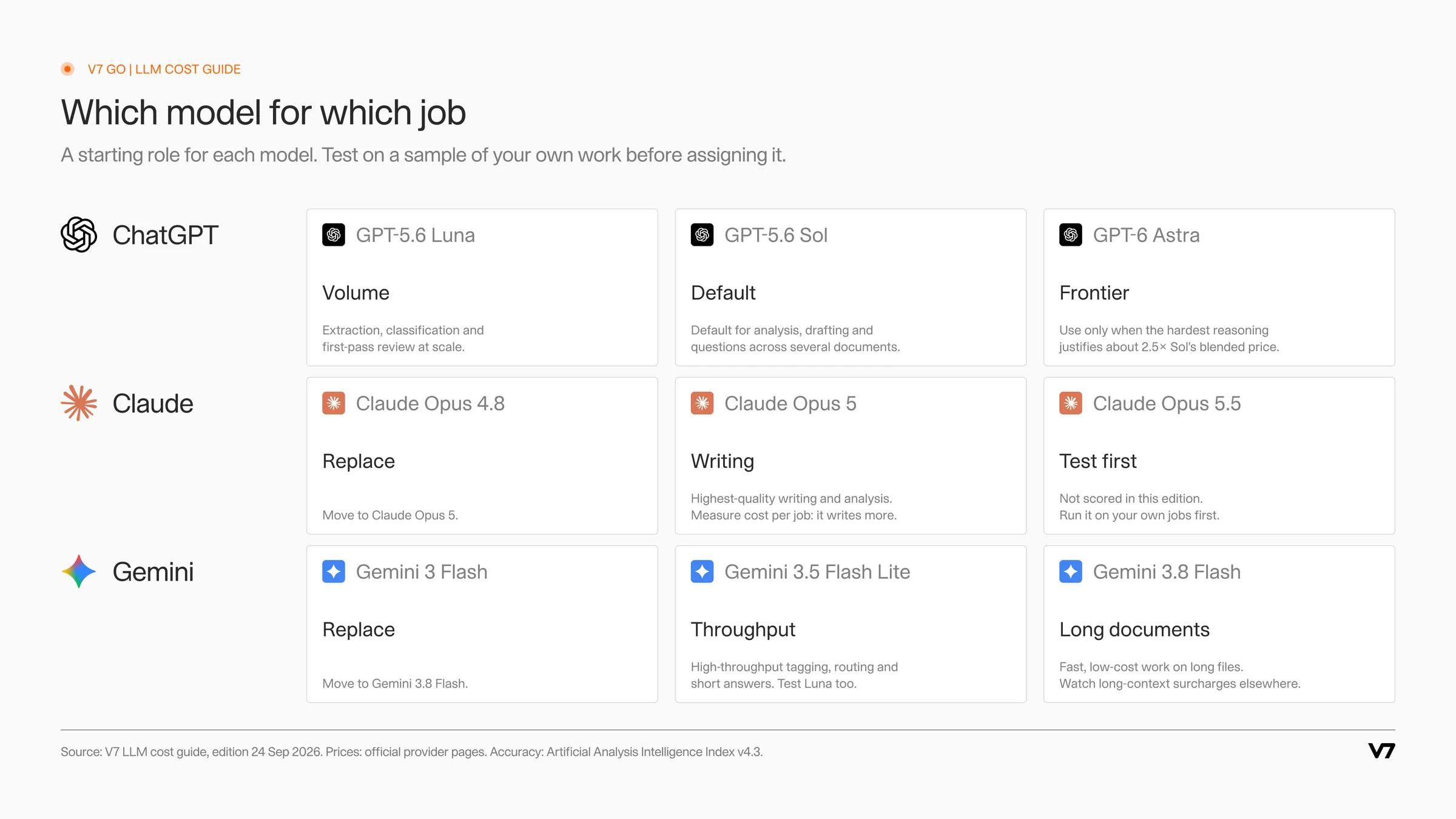
The guide's starting role for each model. Treat it as a shortlist, then test on your own work.
Type of work | Start with | Why |
|---|---|---|
Extraction, classification and first-pass review at volume | GPT-5.6 Luna | Highest value in the set, at $0.45 blended. Accuracy is enough for structured tasks with clear instructions and a typed output. |
Demanding everyday work: analysis, drafting, questions across several documents | GPT-5.6 Sol | Near-frontier accuracy at $8 blended on the current promotional price. The default when a task needs judgement. |
Long files and high volume in the Google stack | Gemini 3.8 Flash | 41 on the index at $1.50 blended, with a 1M-token context window. Check the price after 31 December 2026. |
Highest-quality writing and analysis | Claude Opus 5 | Second-highest score in the set. It tends to write more, so compare cost per finished job, not per token. |
The hardest reasoning, coding and multi-step work | GPT-6 Astra | Top score in the set, at two and a half times Sol's price. Reserve it for steps where the extra accuracy changes the outcome. |
Routing, tagging and short answers at high throughput | Gemini 3.5 Flash Lite or Claude Haiku 4.5 | Low cost per call for simple decisions. Luna scores higher on the index at a lower blended price, so test it too. |
Previous-generation models already in use | Their successor | Claude Opus 4.8 scores 9 points below Claude Opus 5 at the same price. Gemini 3 Flash scores 23 points below Gemini 3.8 Flash for a small premium. |
The most important idea in that table is that the unit of choice is the step, not the team or the tool. A due diligence workflow might classify 400 documents in a data room, extract terms from 60 of them, and write a four-page summary. Those are three different jobs. Running all three on a frontier model overpays for the first two. Running all three on a volume model underserves the third.
Two situations call for more model, not less. Keep the stronger model where an error is expensive to find later, such as a covenant missed in a credit agreement, and where the output goes straight to a client or an investment committee without further review. Everywhere else, start cheap, measure, and move up only if the numbers say so.
The newest model on the market is not always the answer either. Claude Opus 5.5 is not scored in this edition of the guide, and it lists at a lower price than Claude Opus 5. It is in the guide with its price and no score. The right move with any new model is the same: run it on your own sample before giving it a role.
Verbosity deserves a separate word. Two models with the same price per token can produce very different bills, because one answers in 300 tokens and the other in 1,500, or because one reasons at length before it answers. The advisor notes this about Claude Opus 5: its writing quality is the reason to pick it, and its length is the reason to measure cost per finished job rather than per token. The same applies to any model run at high reasoning effort.
Worked example: one extraction job on three models
Take a common private markets task: extracting 30 fields from a quarterly fund report of about 40 pages. Assume each report is 30,000 input tokens once instructions are included, the answer is 2,000 output tokens, and the team processes 1,000 reports a month. At current list prices:
Model | Cost per report | Cost per 1,000 reports | Accuracy score |
|---|---|---|---|
GPT-5.6 Luna | $0.0084 | $8.40 | 38 |
GPT-5.6 Sol | $0.16 | $160.00 | 47 |
GPT-6 Astra | $0.40 | $400.00 | 53 |
The arithmetic for Sol: 30,000 input tokens at $4 per million is $0.12, and 2,000 output tokens at $20 per million is $0.04, so $0.16 per report. The same calculation gives $0.0084 for Luna and $0.40 for Astra. Astra costs almost 50 times as much as Luna for this job.
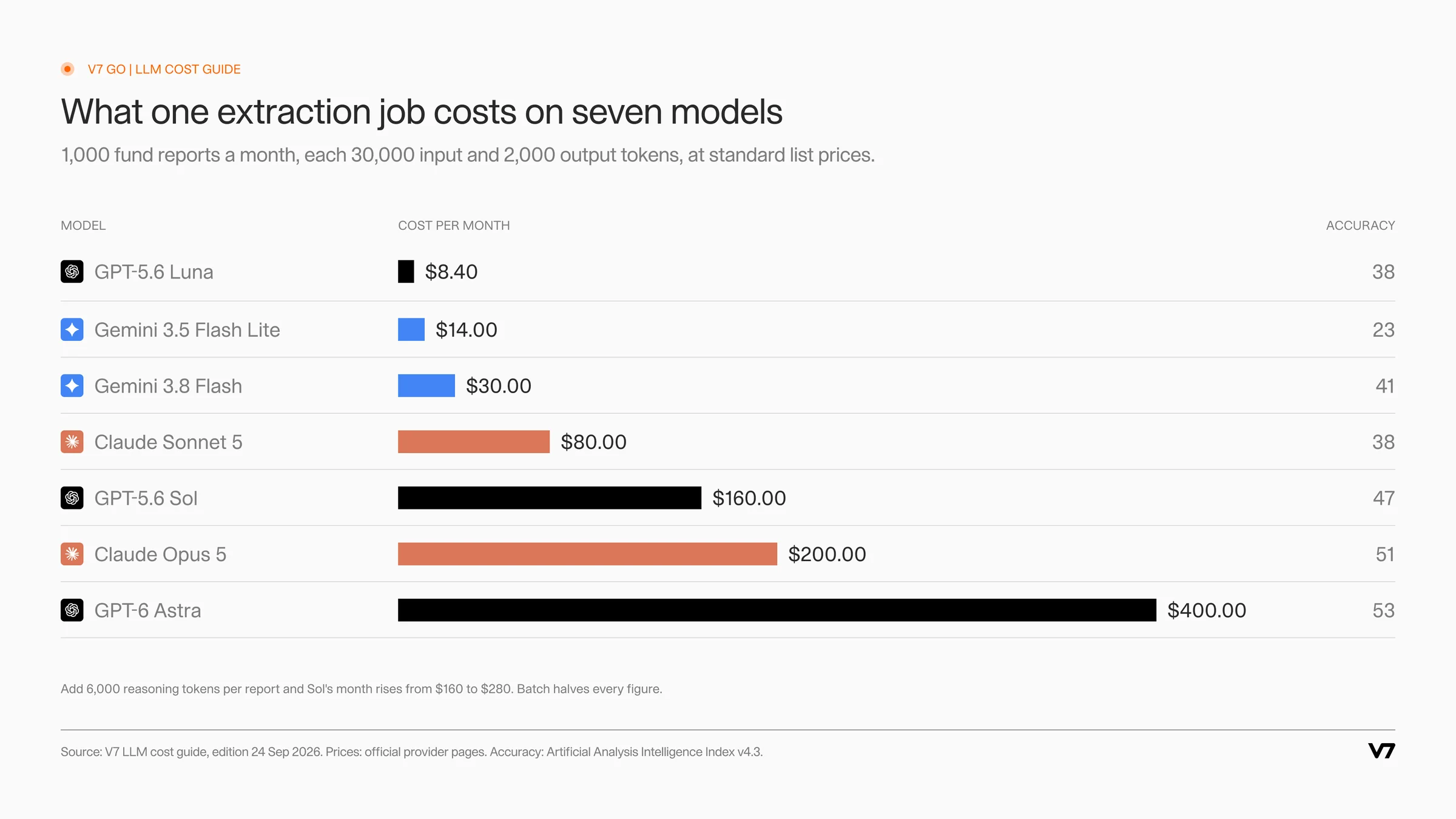
The same job on seven models. The cost spread is almost 50 to 1, the accuracy spread 30 points.
Now add the effects that price tables miss:
Reasoning. If Sol thinks through 6,000 extra tokens per report before answering, output rises to 8,000 tokens and the monthly cost goes from $160 to $280.
Errors. Suppose, for illustration, that Luna's output needs rerunning on Sol for one report in ten. The month costs $8.40 plus 100 reruns at $0.16, or $24.40. That is still a fraction of running everything on Sol, as long as your checks catch the failures.
Price changes. When Sol's promotional price ends, the same month at the $5 / $30 list price costs $210.
Batch. If the reports can wait a few hours, the batch API halves every figure. Luna's month drops to $4.20.
The lesson is not that the cheapest model always wins. For a structured extraction with a typed schema and a validation step, a volume model plus a targeted rerun is usually the better economics. For a judgement-heavy summary of the same report, the calculation flips. The right answer comes from running the numbers per step, which is exactly what the downloadable guide is built to help with.











Seven ways to reduce LLM API costs without losing accuracy
Model choice is the largest lever. These seven, in rough order of impact, are how teams turn it into lower bills.
1. Right-size the model for each step
Split each workflow into its steps and give each one the cheapest model that passes your accuracy threshold on a test sample. In most document workflows the high-volume steps, such as classifying, splitting and extracting, are also the simplest, which is where most of the saving sits.
2. Route by difficulty
Model routing sends each request to a model based on how hard it looks. A simple version needs no router model at all: run the volume model first, validate the output against rules, and escalate only the cases that fail to a stronger model. The worked example above is a routing pattern. The cost is dominated by the cheap pass, while the hard cases still get the accuracy they need.
Routing works best when the checks are explicit. Validate extracted values against types and ranges, compare totals against the sum of their parts, and flag missing fields. Anything that fails goes up a tier. Anything that passes is done at the lowest price.
3. Retrieve, don't stuff
Sending an entire data room or a 300-page contract with every question is the fastest way into long-context surcharges. Retrieval-augmented generation finds the passages relevant to a question and sends only those. It cuts input tokens and often improves accuracy, because the model is not searching a haystack. The guide to RAG explains how retrieval works.
4. Cache the stable prefix
If every call starts with the same instructions, schema and examples, put them at the start of the prompt so the provider can cache them. Cached reads cost about a tenth of normal input at OpenAI and Anthropic. In the worked example, caching a 6,000-token instruction block on Sol saves about 14% of the monthly bill. Writing to the cache can cost more than normal input on some models, so caching pays off only when the prefix is reused often.
5. Batch anything that can wait
Overnight extraction, month-end reporting and back-file processing rarely need answers in seconds. All three major providers discount batch work by 50%. For a team with large backlogs, this is the simplest saving available.
6. Cap output and reasoning
Output tokens are the expensive ones. Ask for structured output with defined fields instead of prose, set maximum output lengths, and choose the lowest reasoning effort that passes your tests. A model that returns 30 typed fields writes far less than one asked to "summarise the key terms".
7. Move arithmetic and formatting into code
Language models are an expensive way to add up a column, convert a date or reformat a table, and they can get it wrong. Let the model extract the numbers, then do the calculation in Python. It costs nothing in tokens and returns the same answer every time.
Governing spend: budgets, reporting and model refreshes
Once more than one team is using models, AI cost optimization becomes a governance problem. Nobody overspends on purpose. Spend grows because a pilot became a production workflow, a new team copied an expensive configuration, or a price changed and no one noticed.
Four practices keep spend visible and deliberate:
Estimate before launch. For each new workflow, write down the expected volume, tokens per run and the model per step, and calculate the monthly cost. It takes ten minutes and gives you a baseline to compare against.
Report by model and workflow. A single monthly total hides where money goes. Break spend down by model, by workflow and by user or chat, so one runaway configuration shows up as a line of its own.
Set budgets with alerts. Caps on a workspace or a single workflow, with alerts before the limit, turn a surprise invoice into a conversation mid-month.
Refresh model choices every quarter. Prices, promotions and model generations move fast. Between the internal reference dated 16 September and this refresh eight days later, one price no longer matched the provider's page, two prices turned out to be time-limited and a newer Claude model was missing. A quarterly review against the latest guide catches changes like these.
An estimate needs only four inputs per step: runs per month, input tokens per run, output tokens per run (including reasoning), and the model's input and output prices. Multiply and add across steps. Take the fund report workflow above with three steps per report: a classification step on GPT-5.6 Luna that reads the first 5,000 tokens and returns a label, extraction on Luna with one report in ten rerun on GPT-5.6 Sol, and an 800-token summary on Sol. For 1,000 reports the month comes to about $161 at current prices. The same workflow with every step on GPT-6 Astra comes to about $790, roughly five times as much. Writing the estimate down is what makes the difference visible.
None of this has to slow teams down. The point is that model choice becomes a decision someone owns, with the numbers in front of them. The guide to AI document processing ROI covers how to put those numbers next to the time saved.
Where V7 Go fits: cost control inside document workflows
V7 Go is the infrastructure layer for using AI in document-heavy work: due diligence, underwriting and back-office processes in finance, insurance and other industries. Teams use it to turn that work into repeatable workflows that run on their own documents and data. Everything in this guide becomes a setting inside those workflows rather than a habit people have to remember, in three ways.
Context Graph. The Context Graph keeps a firm's documents, entities and relationships indexed with their sources. A workflow step retrieves the passages it needs, for this fund or this deal, instead of resending a data room with every call. That keeps requests small and below long-context price tiers.
Deterministic workflows. A V7 Go workflow breaks a process such as a diligence review or a submission triage into defined steps, and each step runs the same way every time. Because steps are separate, each can use the tool that fits it: classification can run on a volume model, analysis on a stronger one, and calculations in Python, so the numbers come out the same every time and cost nothing in tokens. Outputs are typed fields rather than free text, which keeps output tokens down and makes validation straightforward. Models run on your own API keys with OpenAI, Anthropic and Google, so you pay provider rates directly and can move a step to a new model when the numbers change.
Visibility and limits. Reports break spend down to the individual chat, showing its cost in tokens and dollars and the models it used. Budgets cap spend on a whole workspace or a single workflow, in dollars or tokens, with daily, weekly or monthly limits and alerts at 75%, 90% and 100%.
Setting it up with you
V7's solutions engineers build the first workflows with each team: mapping the process, connecting the document sources, defining the outputs and testing each step on a sample of the team's own documents. Choosing the model for each step, on accuracy and cost per job, is part of that work. When prices or models change, the same review moves steps to a better option.
For a wider look at deploying models in finance workflows, see the guide to LLM applications, the comparison of building versus buying for private markets and how workflows reduce operational costs.
Download the LLM cost guide. One page with 14 models from OpenAI, Anthropic and Google: accuracy, input, output and blended prices, value, context windows, what one job costs on seven models, a watch list of temporary prices, and a recommended job for each. Download the PDF, free and with no form.
Pin it next to your next workflow design, and check it again next quarter. The right model for a job this month may not be the right one in three.
How much is 1 million tokens?
One million tokens is roughly 750,000 words of English text, or about 1,500 pages of dense prose. What it costs depends on the model and on whether the tokens are input or output. At list prices checked in September 2026, a million input tokens costs $0.20 on GPT-5.6 Luna, $0.75 on Gemini 3.8 Flash, $4 on GPT-5.6 Sol (promotional price), $5 on Claude Opus 5 and $10 on GPT-6 Astra. Output tokens cost five to eight times more than input on the same model. Because most jobs mix the two, a blended price at three parts input to one part output is a more useful comparison. On that basis the range runs from $0.45 per million for Luna to $20 per million for Astra.
+
How much does a token cost?
A single token costs a tiny fraction of a cent, which is why providers quote prices per million tokens. For example, GPT-5.6 Sol charges $4 per million input tokens, so one input token costs $0.000004. The more useful question is what a whole job costs. Multiply the input tokens by the input price and the output tokens by the output price, then add any reasoning tokens, which are billed as output. A 30,000-token document with a 2,000-token answer costs $0.16 on Sol, under one cent on GPT-5.6 Luna and $0.40 on GPT-6 Astra. Long-context surcharges, cached input and batch discounts then move that figure up or down, so check them for the models you use.
+
Why are LLMs so expensive?
Individual calls are cheap, but costs grow quickly for three reasons. The first is volume: a workflow that runs thousands of times a month multiplies every cent. The second is model choice: frontier models cost 20 to 50 times more per token than volume models, and teams often use them for every task by default. The third is hidden tokens. Long documents sent in full, conversation history resent with every message, and reasoning tokens that never appear in the answer are all billed. Most organisations can cut spend substantially by matching each step to the cheapest model that meets its accuracy bar, sending only the relevant passages instead of whole files, and batching work that is not urgent. The model itself is rarely the problem. How it is used usually is.
+
How do you optimize LLM costs?
Start with model choice, because it has the largest effect. Break each workflow into steps, test candidate models on a sample of your own work, and give each step the cheapest model that meets your accuracy threshold. Then apply the supporting levers. Route easy requests to a volume model and escalate only the failures. Retrieve relevant passages instead of sending whole documents. Cache instructions that repeat on every call. Send non-urgent work through batch APIs, which cost half as much at OpenAI, Anthropic and Google. Ask for structured output and cap reasoning effort, and move arithmetic into code. Finally, report spend by model and workflow, set budgets with alerts, and review model choices every quarter as prices change.
+
What is the cheapest LLM API?
Review model choices at least every quarter, and whenever a provider announces a new model or a price change. The market moves quickly. Promotional prices expire, as GPT-5.6 Sol's does after 21 November 2026 at the earliest, and introductory prices end, as Gemini 3.8 Flash's does on 31 December 2026. New models can outperform older ones at the same or a lower price, which is why previous-generation models such as Claude Opus 4.8 and Gemini 3 Flash are marked for replacement in the guide. A review does not need to be heavy: compare current spend by model and workflow against the latest prices, rerun your test sample on any promising new model, and move steps where the numbers justify it.
+
How often should you review which LLM you use?
Go is more accurate and robust than calling a model provider directly. By breaking down complex tasks into reasoning steps with Index Knowledge, Go enables LLMs to query your data more accurately than an out of the box API call. Combining this with conditional logic, which can route high sensitivity data to a human review, Go builds robustness into your AI powered workflows.
+
Andrea Azzini
Head of Product at V7