22 min read
—



Casimir Rajnerowicz
Content Creator
V7 Go
A smarter way to manage due diligence and underwriting
You already use Claude. The Excel add-in is installed, the team has a Projects folder per deal, and someone on the investment team has quietly become the person who writes the good prompts. Claude for finance stopped being a question about whether the model is capable somewhere around the second week.
Then a data room lands with 380 documents in it.
This is where the conversation changes, and it changes in a way that is easy to misdiagnose. The output is still good. It is just no longer the same output twice. One analyst gets a clean extraction across all twelve portfolio companies; another runs what looks like the same prompt and gets nine, with the last three summarised rather than extracted. A DDQ answered thoroughly for the first thirty questions gets noticeably thinner around question forty. Nobody can say exactly which run produced which number, and the compliance officer wants to know before it goes to the investment committee.
The instinct is to blame the model, or the prompt, or the person writing the prompt. All three are usually innocent.
The real issue is architectural. A chat assistant works out how to approach your problem each time you ask it. That flexibility is what makes it good at the exploratory half of investment work, and what makes it unreliable at the repeatable half. Ask the same question on Monday and on Thursday and it may take two different routes to two differently shaped answers. Both can be correct. Neither is comparable to the other.
This guide covers the second half of that problem: what you build around Claude so the work holds at 500 documents, survives an audit, and returns the same structure every time. It sets out what Anthropic actually ships for financial services, where the ceiling sits and why a larger context window does not move it, and what a production workflow layer has to do differently. It is written for people who like Claude and want more from it.
In this article:
What Claude for Financial Services includes: connectors, Office add-ins, Agent Skills, and Managed Agents.
The three ceilings that appear at volume, in Anthropic's own words.
What a production workflow layer does that a chat window cannot.
How V7 Go and Claude run together, in both directions.
Three workflows end to end: deal screening, submission ingestion, and portfolio monitoring.
What your compliance team will ask, and which answers hold up.
What Claude for Financial Services actually includes
Anthropic has built considerably more finance-specific infrastructure than most teams using Claude have switched on. Before deciding what to build around it, it is worth knowing what you already have.
The Financial Analysis Solution launched in July 2025 as a bundle rather than a model: expanded usage limits, pre-built connectors, and implementation support. Since then it has grown in three directions that matter to private markets teams.
Connectors, and which ones matter for private markets
Claude connects to market data and internal systems through governed connectors. The public list runs to FactSet, S&P Capital IQ, PitchBook, Morningstar, Daloopa, MSCI, LSEG, Moody's, Box, Databricks, Snowflake, Egnyte, and others, with a Moody's MCP app covering credit data on more than 600 million public and private companies.
Two are worth singling out if you invest in private markets rather than public equities. Chronograph brings portfolio monitoring data, valuations, and fund-level performance into Claude directly. SS&C Intralinks exposes DealCenter data rooms for document search and diligence questions. Most articles about Claude in finance are written for equity research, where FactSet and Daloopa dominate. If your day is CIMs and quarterly reports rather than earnings calls, those two are the ones to ask about first.
Claude inside Excel, PowerPoint, and Word
Claude for Excel runs as a sidebar in the workbook. It reads and modifies models while preserving formula dependencies, debugs broken cells, populates templates with new assumptions, and lets you click through to the exact cell it referenced in an explanation. That last detail matters more than it sounds, and it comes up again later in this guide.
The add-ins now extend across PowerPoint, Word, and Outlook, with context carrying between them. An analyst who builds a model in Excel does not re-explain it when the work moves into a deck.
Spreadsheets deserve a specific note, because they are where most finance AI tools quietly fail. A model is not a table of numbers. It is a dependency graph with assumptions at one end and outputs at the other, and a tool that reads it as flattened text will produce a confident answer about a cell without understanding what feeds it. Claude preserving formula dependencies when it edits is the distinction that matters, and it is the reason the Excel add-in landed better with investment teams than most people expected. We have compared the wider options for AI in Excel separately.
Agent Skills and the ten agent templates
Agent Skills are folders of instructions, scripts, and resources that Claude loads for a given task. The finance set covers comparable company analysis, discounted cash flow models with WACC and sensitivity tables, due diligence data packs, company teasers, earnings analyses, and initiating coverage reports.
In May 2026 Anthropic added ten ready-to-run agent templates: pitch builder, meeting preparer, earnings reviewer, model builder, market researcher, valuation reviewer, general ledger reconciler, month-end closer, statement auditor, and KYC screener. Each ships as a plugin for Claude Cowork and Claude Code, and as a cookbook for Claude Managed Agents.
The architecture of those templates is the interesting part. Anthropic describes each one as a reference architecture packaging three things: skills, connectors, and subagents. Instructions, governed data access, and additional models called for specific sub-tasks. That is a workflow layer, and it is a tacit acknowledgement that the model alone was never going to be the whole answer. Anyone who has built document automation will recognise the shape immediately.
Managed Agents
The same templates can run autonomously on the Claude Platform as Managed Agents, with long-running sessions that survive a multi-hour deal close, per-tool permissions, managed credential vaults, and a full audit log in the Claude Console where compliance and engineering can inspect every tool call.
This is real infrastructure and it deserves to be treated as such. If you have not looked at it, look at it before you look at anything else.
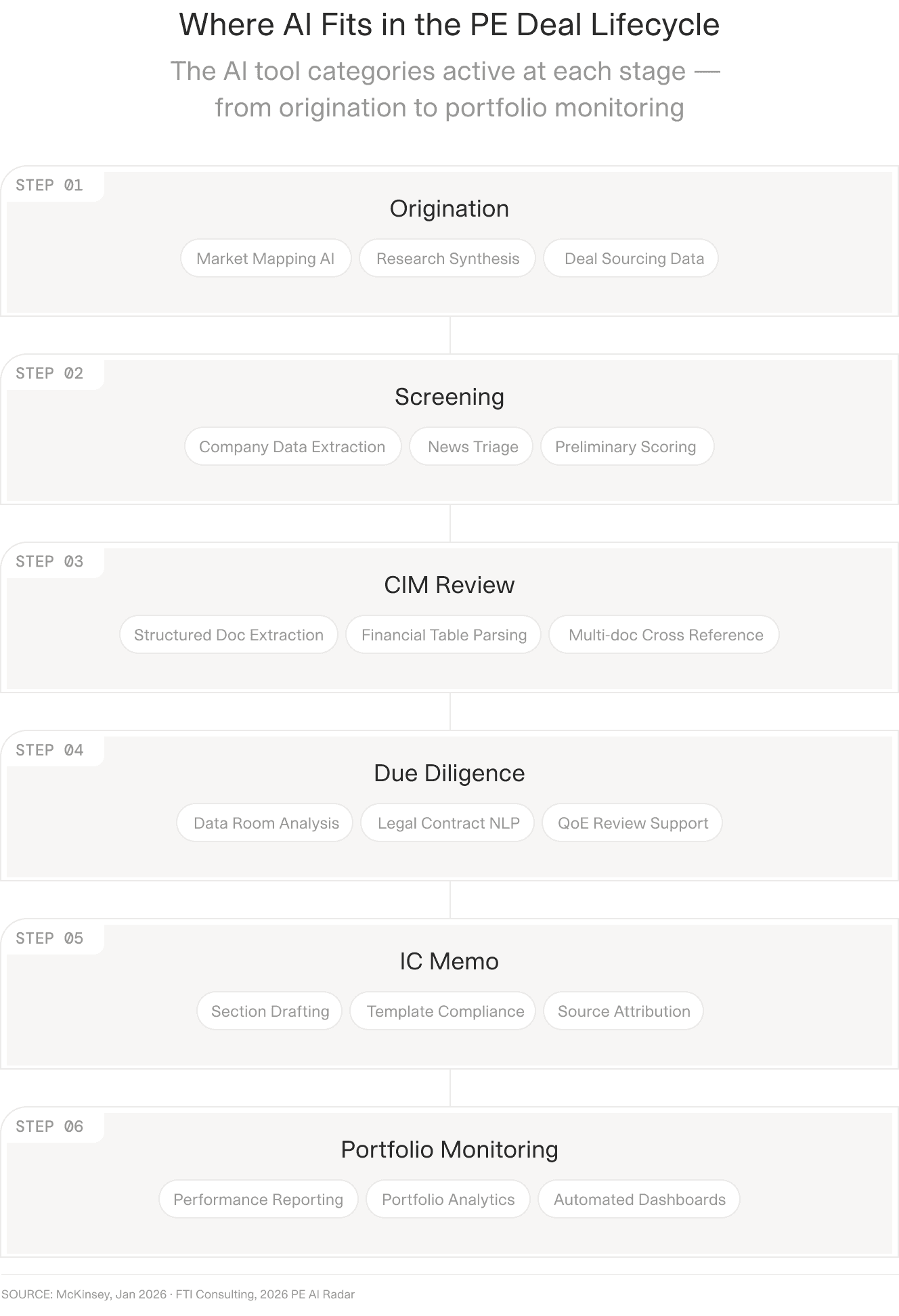
Claude reaches into most of these stages. The question this guide is about is which of them tolerate a different answer each time you run them.
Where Claude alone stops being enough
There are three ceilings, and none of them is a criticism of the model. Anthropic documents the first one itself.
In the official Claude for financial services overview, under a heading called Current limitations, the support documentation lists three items. PowerPoint creation has limited support for complex templates. Excel models may require manual review for complex formulas. And this one:
Large files or numerous documents may exceed the input limit of Claude.
So the obvious conclusion is that this is a capacity problem, and that each new model generation with a larger context window shrinks it until it disappears.
Wrong. And the reason it is wrong is the single most useful thing in this guide.
The ceiling is orchestration, not capacity
Consider a 380-document data room where you need eighteen fields from each document. That is 6,840 extractions. Suppose every document fits comfortably in context, and suppose the context window is large enough to hold all 380 at once. The problem does not go away.
It does not go away because a single long conversation has no mechanism to guarantee that document 297 receives the same treatment as document 3. Attention is finite and unevenly distributed across a long context. Earlier instructions decay. The model begins summarising where it was previously extracting, because summarising is a reasonable response to a great deal of material and nothing in the conversation told it otherwise. In V7's own side-by-side on a due diligence questionnaire, a chat assistant answered 41 of 63 questions and returned nothing at all for the sales and marketing section. It did not fail loudly. It just quietly stopped doing the thing it had been doing.
A bigger window makes the failure later. It does not make it stop.
Repeatability is a separate problem from accuracy
Accuracy gets all the attention, and it is measurable. On Vals AI's Finance Agent benchmark, which tests models on the work of an entry-level financial analyst, the leading frontier models score somewhere in the range of fifty to sixty-five percent depending on the benchmark version. Claude has led it. That is both genuinely state of the art and nowhere near good enough to accept unreviewed, which tells you the review step is not going anywhere.
Repeatability is the quieter problem and the one that actually blocks deployment. Two analysts, same prompt, same document, different week. The paths diverge. One asks a clarifying sub-question internally and pulls a figure from the footnote; the other takes the headline number from the summary table. Both are defensible. The outputs are not comparable, and a portfolio of forty funds where each was processed slightly differently is not a portfolio you can run variance analysis on.
This is also the compliance problem. Not "was the answer right" but "will the same input produce the same answer, and can you show me why it produced that one".
The last mile of verification
Every extracted figure eventually needs checking against its source. The realistic question is how expensive that check is.
If verification means reopening a 140-page PDF and searching for a number, the analyst will spot-check five values out of two hundred and trust the rest. That is not a governance failure on their part. It is an entirely rational response to the cost of checking. Lower the cost of checking and the behaviour changes on its own.
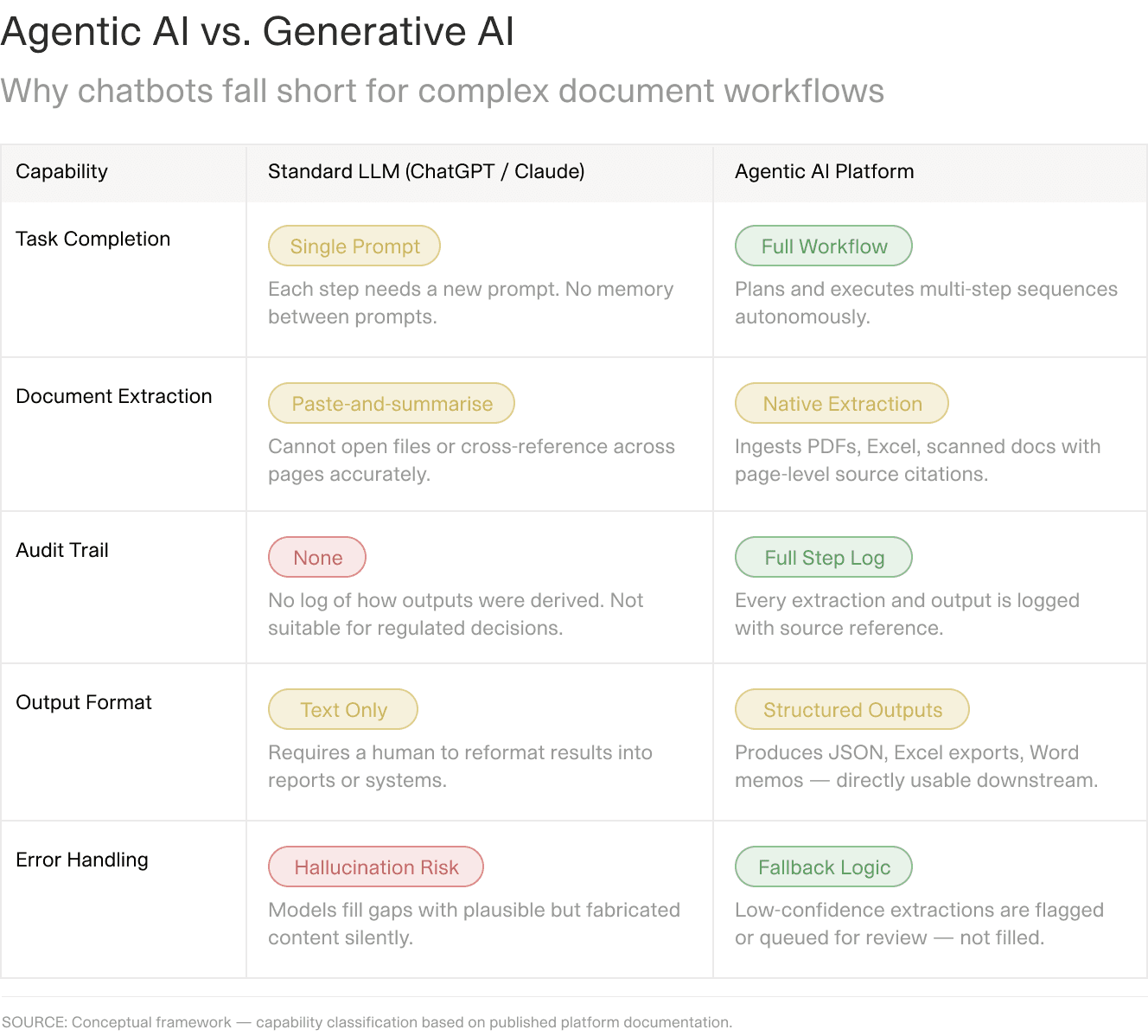
The distinction is not model quality. It is whether the system is designed to complete a defined sequence or to respond to a request.
What the three ceilings look like on one task
They rarely arrive one at a time. A screening memo built from a fund report will show all three at once, and a controlled comparison run by a V7 customer is a useful way to see how they interact: ten memos, the same source documents, the same instructions, and the same token budget, produced once by a chat assistant working alone and once by the same model running inside a configured workflow.
Three failure patterns showed up in the chat-only set, and each maps to a ceiling. Whole sections were declared unavailable when the underlying data was present, which is extraction quietly becoming summarisation. Figures belonging to different fund vehicles were merged into one, which is what happens when nothing forces each field to resolve against a defined entity. And a pricing model inherited an overstated NAV base, so every derived price, multiple, and return built on top of it was wrong as well.
That third one is not really an accuracy failure. A single bad input propagated silently through every downstream calculation, because nothing in a conversation validates an input before building on it.
Tone and structure scored well in the same memos. The writing was good. The numbers underneath it were not, and a reader would have had no way to tell the difference.
None of which means the answer is to do less with AI. Moderne Ventures runs its investment diligence this way in production, and their team walks through what changed when the review moved from a chat window into a defined workflow:
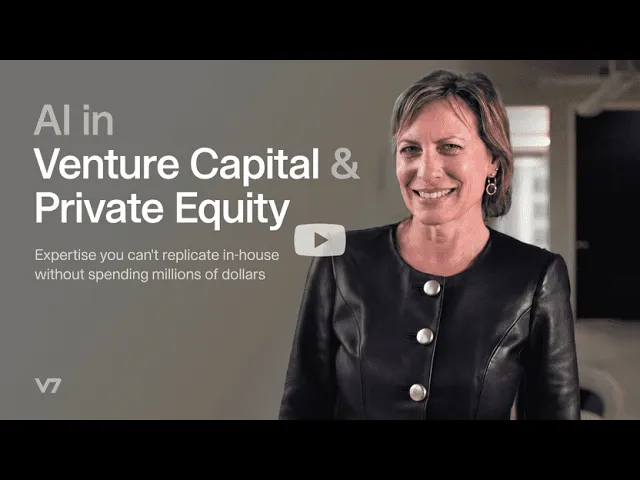
Moderne Ventures on running investment due diligence through a configured workflow rather than an open-ended prompt.
The rest of this guide is about what sits between those two states.











What a production workflow layer has to do
A workflow layer earns its place by removing decisions from runtime. Everything below follows from that one idea. You specify the steps once; the system stops choosing them.
This is the difference that separates a configured workflow from a well-written prompt, and it is worth being precise about it. Skills and MCP make an assistant more capable and better connected, and both are worth using. Neither changes the fact that the assistant still picks its own route through the task. You can hand it excellent instructions and excellent tools, and it will still decide, at runtime, which order to do things in and how much of each thing to do.
A workflow layer takes that decision away on purpose.
One agent run per field, not one conversation per document
In V7 Go, a workflow is a set of properties. Each property is a field you want back, and each carries its own instruction, its own tool, and its own output type. When a document arrives, the fields do not share a conversation. Each one gets a scoped run against the source.
The consequence is the whole argument. Field 263 is not the tail end of a long context that started 262 fields ago. It is its own call, with the same instruction it had on the first document and the two hundredth. There is no drift, because there is no accumulating conversation to drift within. The DDQ that went thin at question forty completes instead, because question forty is not downstream of question thirty-nine.
This also changes what failure looks like. A field that cannot be answered returns empty and flags, rather than being silently omitted from a summary. You get a gap you can see instead of a gap you have to notice.
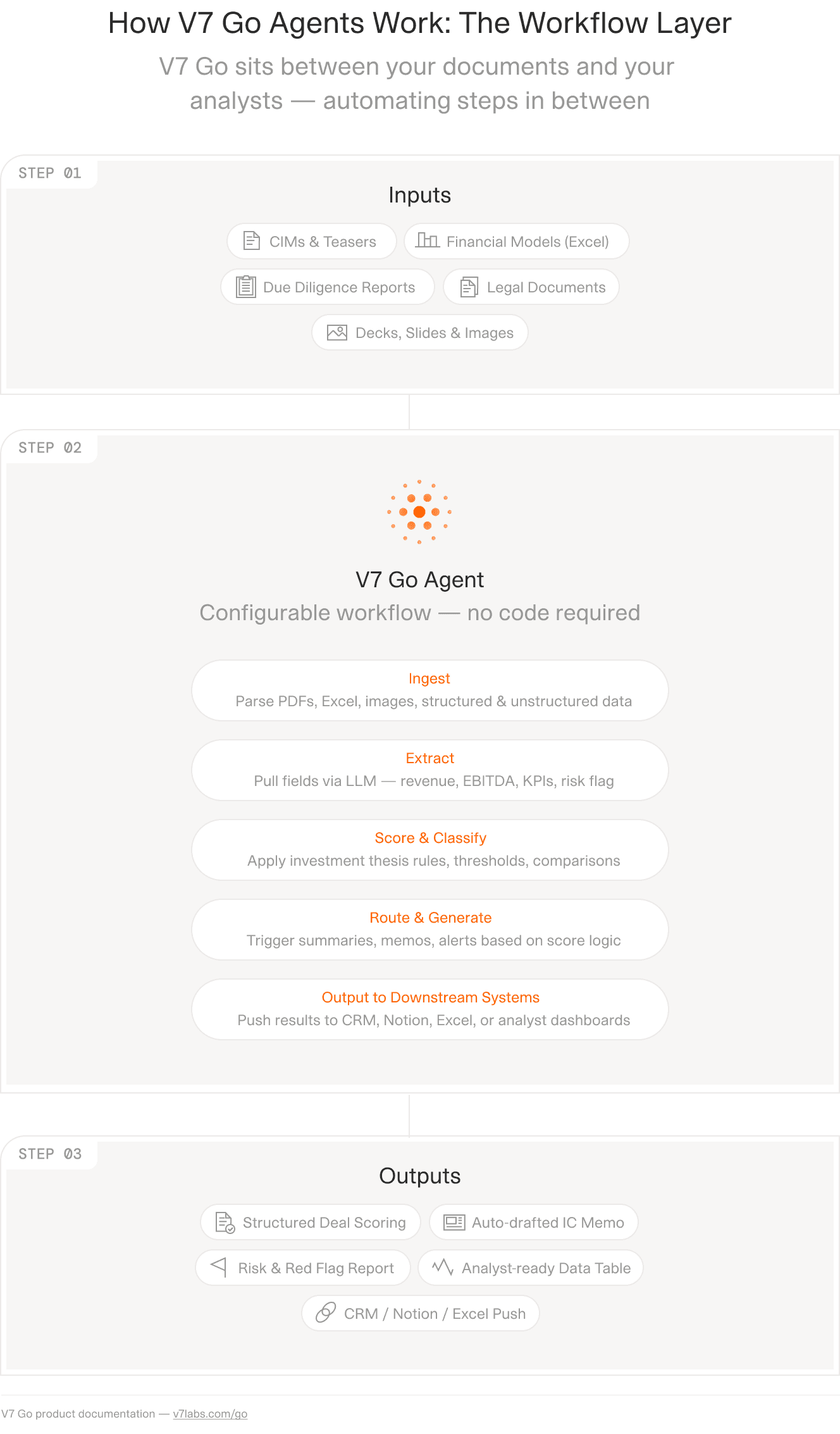
Inputs on the left, the defined sequence in the middle, structured output on the right. The middle is the part you specify rather than the part the model improvises.
The right tool for each step, including no model at all
Once each field is its own step, two things become possible that a single conversation cannot offer.
The first is choosing a model per field. Not every extraction needs the same one. In V7 Go's shipped fund report workflow, the fund name and reporting period run on Claude Sonnet 4.5, while a numeric field like the management expense ratio runs on a different model entirely. Reasoning effort is set per field too: disabled where it only adds latency, medium or high where the judgment is real. Firms that have standardised on Anthropic can run Claude across every field and bring their own API key, so usage sits on their existing commercial terms.
The second is deciding not to use a model. Arithmetic, date normalisation, cross-footing, threshold checks, currency conversion, and validation against a prior period are all better served by code. In the same shipped workflows, some properties run a Python tool, others run OCR or PDF conversion, alongside the model-backed fields. A language model should decide whether a covenant has been breached. It should not be the component that subtracts two numbers.
That distinction is worth stating plainly, because it is the one most often skipped. Every deterministic step you move out of inference is a step that cannot hallucinate, cannot vary between runs, and costs nothing to re-run.
Outputs are typed for the same reason. Fields, numbers, single and multi-selects, tables, and nested JSON are declared before the first document arrives. A quarterly report that returns nine of twelve holdings does not quietly return a shorter list. It returns a table with three rows flagged, which is a different thing entirely.
A citation that opens the source
Grounding is where the verification cost collapses. V7 Go's citations are positional: a figure links to the exact sentence in the source PDF, or the exact cell in the source spreadsheet. Checking a number is a click, not a search.
Anthropic offers a version of this too, with direct hyperlinks to source materials and cell navigation in Excel. The distinction is granularity and coverage. When every field in a 6,840-extraction run carries its own positional citation, an analyst can review the twelve values the system flagged as low-confidence and spot-check ten more, and genuinely be finished. The behaviour changes because the economics of checking changed.
For regulated firms this stops being a convenience. An extraction you cannot trace is an extraction you cannot put in an IC memo.
The context problem a bigger window does not solve
Determinism handles the document in front of you. It does nothing for the fifteen years of documents behind you.
Even the largest context windows top out around a million tokens. A mid-market firm that reviews 400 to 600 CIMs a year and passes on 98% of them has a decade of pass rationale, sector views, and diligence findings that will never fit, and that currently lives in the heads of whoever was on the deal team at the time. When that person leaves, it leaves.
The Context Graph is V7 Go's answer: a persistent, entity-resolved layer built on the firm's own documents. Funds, companies, GPs, LPs, and the relationships between them, with every claim traced back to the document it came from. When a new CIM arrives, the screening agent queries it before it starts, so the memo comes back knowing the firm looked at this sector in 2023 and passed on margin structure, and that two portfolio companies already sell into the same buyer.
Worth being precise on terminology, because the category and the product get conflated. A knowledge graph is the general concept. Context Graph is V7's implementation of it.
The practical test for whether you need one is simple. Ask whether your firm has ever paid twice to learn the same thing. Diligence on a target that a different team screened eighteen months ago. A sector view rebuilt from scratch because the analyst who held it moved to a competitor. A management team met twice, three years apart, with no record of the first impression. Every firm above a certain size has stories like this, and they are usually told as anecdotes rather than counted as a cost.
The graph is built per firm and per asset class. What it knows is what your documents told it.
Running Claude and V7 Go together
This is not a choice between two products, and the integration runs in both directions.
It helps to see the shape of it before the mechanics. A V7 Go workspace holds four things: the knowledge layer that acts as the system of record, the agents that carry the repeatable workflows, the skills that make up individual workflow steps, and the integrations that connect to wherever the documents already live. Claude sits outside that box and can reach into any of it.
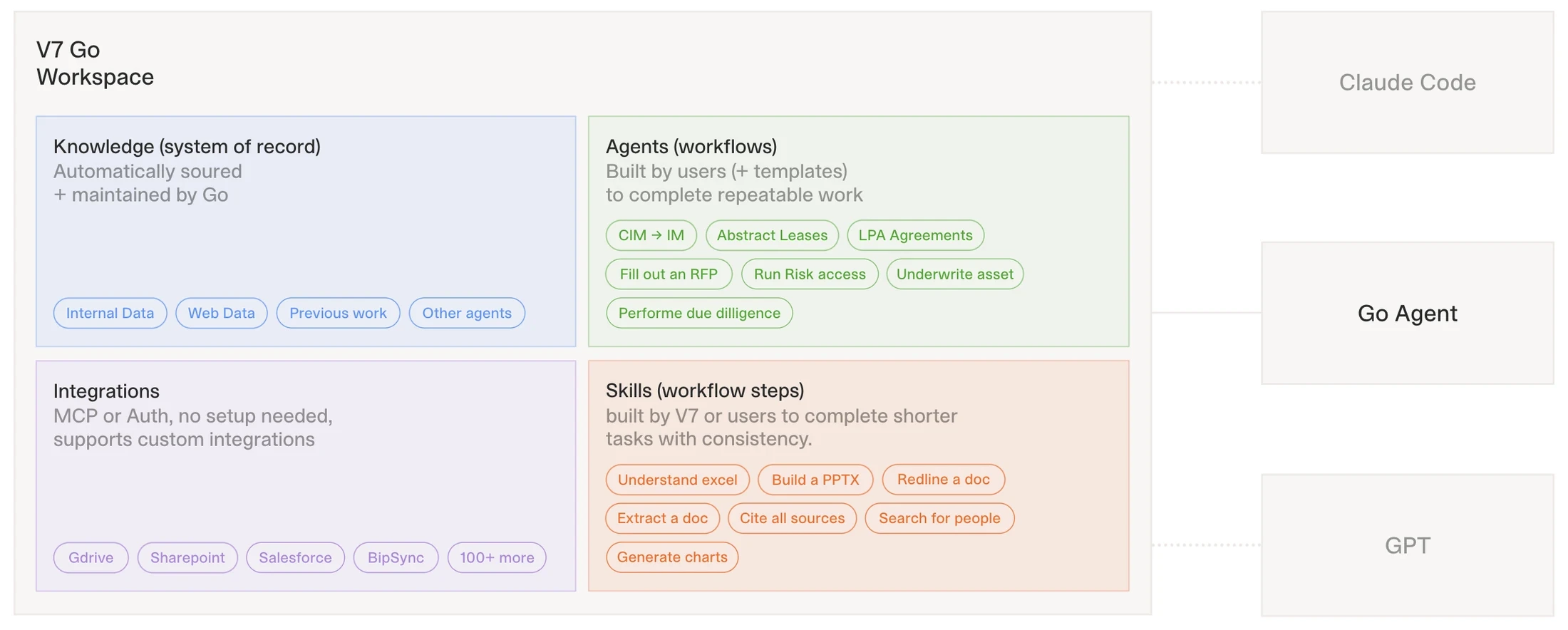
The skills block is the granular end: understand an Excel file, redline a document, cite all sources. The agents block chains those steps into workflows a deal team runs repeatedly.
Note where the arrows point. Claude is not embedded inside the workspace as a feature, and the workspace is not a wrapper around Claude. They are separate systems that address each other, which is why the relationship works in both directions rather than one.
V7 Go runs on Claude
Claude models are selectable per field inside V7 Go workflows, and they appear throughout the shipped finance templates. Firms with an existing Anthropic commitment can bring their own key, so consumption lands on the agreement and the data processing terms procurement already signed. That detail rarely excites the investment team and frequently unblocks the security review.
Claude runs V7 Go
Since July 2026, V7 Go is also an MCP server. Connect it to Claude and you can inspect and query workflows, pull rows and entities, trigger runs including ones that take file inputs, build and edit workflow properties conversationally, and ask questions of a Context Graph in natural language. Authentication is OAuth with a V7 Go login; in Claude it is added under Settings, then Connectors, then Add custom connector.
The practical shape of this is worth picturing. An analyst asks Claude a question about the portfolio. Claude queries the Context Graph through the connector, gets back structured data that came from a deterministic pipeline with citations attached, and reasons over it in the chat window where the analyst already works. The exploratory interface stays. The numbers underneath it stop being improvised.
That combination is the point of this entire guide, and it is worth stating once without hedging. You do not have to choose between the interface your team likes and the reliability your compliance function requires. The chat window is a good place to ask questions. It is a poor place to store the answers.
Which work belongs where
The honest division is easier than most vendors make it sound.
Exploratory analysis, one-off questions, drafting, model critique, and anything where the question is still forming belongs in Claude. It is better at that than a configured workflow will ever be, because a configured workflow is defined in advance and exploration is not.
Work that runs more than roughly twenty times, or that someone will audit, belongs in a workflow. The threshold is not sophistication. It is repetition plus consequence.
A useful diagnostic: if two people on your team would produce meaningfully different outputs from the same source document and the same instruction, and that difference would matter to somebody downstream, the task wants a defined sequence. If the difference between two analysts is the interesting part, leave it in chat.
Laid out against the specific demands of private markets work, the split falls into place fairly cleanly.
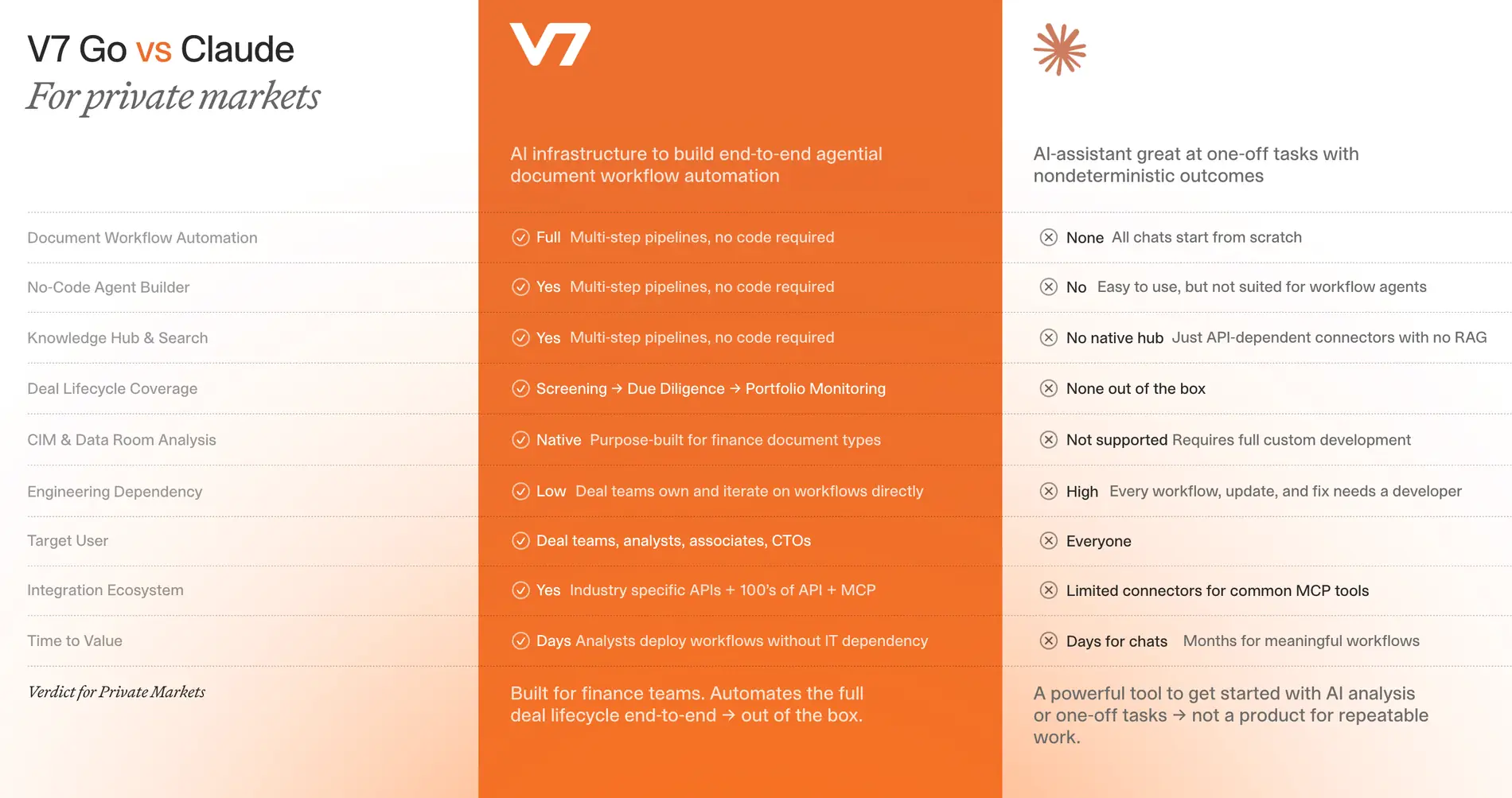
Read the right-hand column as a description of design intent rather than a list of shortcomings. An assistant that started every conversation from a fixed pipeline would be a worse assistant.
The row worth pausing on is deal lifecycle coverage. Screening, diligence, and portfolio monitoring are not three separate tasks that happen to involve documents. They are one sequence in which the output of each stage becomes the input to the next, and the value compounds only if the shape stays consistent across all three. That is a workflow property, not a model property, and no amount of prompting produces it.
And there is a case for doing none of this. A two-person firm closing four deals a year should stay in Claude, keep the Excel add-in, and stop reading here. Configuration has a cost, it is paid up front, and it only returns on volume. Anyone who tells you otherwise is selling something.
Somebody has to configure it
The workflow does not define itself, and this is where most platform evaluations quietly go wrong. A firm buys the licence, an associate is handed the task alongside their day job, and the pilot dies of neglect rather than of any technical failure.
V7's implementation model treats that as the vendor's problem. Solutions engineers scope the use case, build a proof of concept against the firm's own documents before any commitment, configure the workflows, connect the source systems and the output destinations, and stay involved after go-live. Technology partners including Bipsync and PitchBook sit alongside 300-plus system integrations, so the outputs land where the team already works rather than in another tab.
Three workflows, end to end
Abstract architecture is easy to agree with and hard to act on. Here is what the pattern looks like in three specific places, each with the human decision point marked.
Deal screening in private equity
A CIM arrives. The workflow extracts to a fixed schema, the same eighteen or forty fields every time, so this CIM is comparable to the last two hundred. It scores against the mandate: sector, size, geography, margin profile, and whatever else the investment committee has told you it cares about. It queries the Context Graph for prior looks at the sector, portfolio overlap, and any relationship with the banker running the process. It drafts the screening memo into the firm's own template.
Then a partner decides. That step does not move, and the point of everything before it is that the partner spends their attention on the decision rather than on assembling the inputs to it.
The fixed schema is doing more work here than it appears to. A firm that has extracted the same forty fields from nine hundred CIMs has, without setting out to, built a proprietary dataset on its own market: margin distributions by sub-sector, how sponsors present customer concentration, which bankers consistently understate churn. None of that is available to a firm whose screening output is nine hundred differently-shaped summaries. Related reading: AI platforms for deal screening, and the CIM review automation.
Submission ingestion in insurance underwriting
A broker submission lands as an email with attachments in six formats. The workflow classifies the submission, parses the schedule of values, reconciles it against the slip, flags discrepancies between the two, and aggregates exposure against the existing book.
Then an underwriter prices it. The reconciliation step is the one worth noticing, because it is arithmetic and comparison rather than judgment, which makes it exactly the kind of step that should run as code and be identical every time. A model asked to compare two schedules will occasionally decide that a rounding difference is immaterial. Code asked the same question returns the difference and lets the underwriter decide whether it matters. More on this in our guide to insurance submission triage.
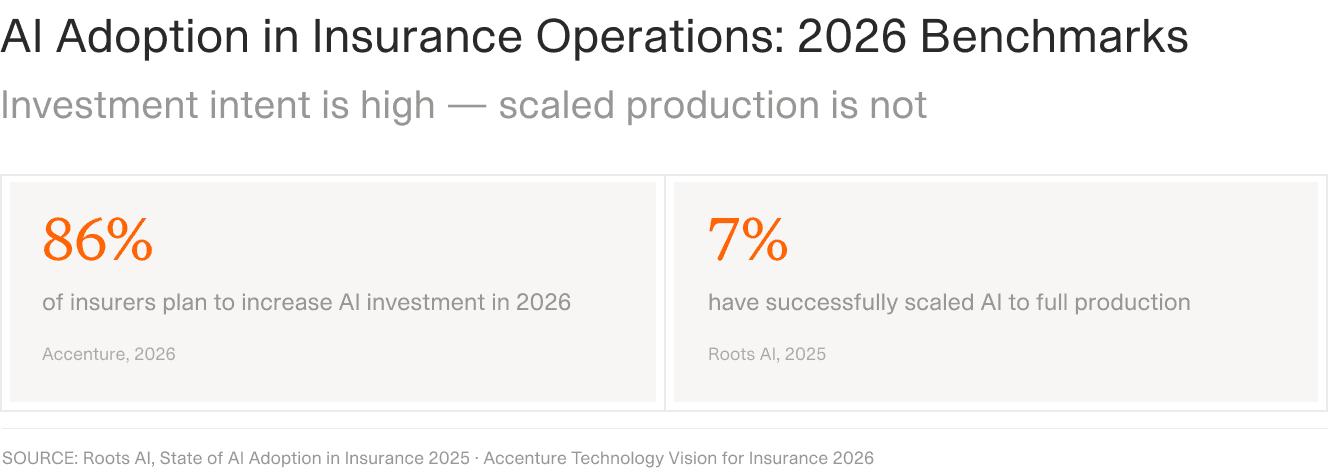
The gap between the two figures is the gap between running a pilot and being able to defend the output. Sources: Accenture Technology Vision for Insurance 2026; Roots AI, State of AI Adoption in Insurance 2025.
Portfolio monitoring for PE, VC, endowments, and family offices
Quarterly reports arrive from thirty managers in thirty formats. The workflow normalises them to a single schema, computes the derived metrics, compares against the prior quarter and against the commitment, and flags variances beyond a threshold you set.
Then the IR team reviews the flags rather than re-keying the whole set. This is the workflow where determinism pays most obviously, because the entire exercise is a comparison, and a comparison between differently-shaped extractions is not a comparison at all. See portfolio monitoring in private equity for the longer version.
The argument for defined sequences over single prompts is made at more length, with the underlying benchmarks, in this walkthrough of how V7 Go handles finance workflows:
The DDQ and CIM comparisons referenced earlier are covered from around the midpoint.
What your compliance team will ask
Raise this before they do. Security comes up in roughly a quarter of enterprise AI conversations, and waiting to be asked reads as evasion rather than discretion.
Four questions come up almost every time, and they have concrete answers.
Does our data train the model? On Anthropic's commercial plans, no. Team, Enterprise, and API usage is excluded from generative model training by default. Consumer tiers are a different matter, which is the actual risk in most firms: not the enterprise deployment, but the analyst with a personal Pro subscription and a deadline. We covered that exposure in detail in our piece on what happens when deal data goes into consumer AI tools.
Where does the data go if we bring our own key? Straight to the model provider you already contracted with, under the terms you already negotiated. For firms with an existing Anthropic agreement this collapses a procurement conversation into a configuration setting.
Can we show an auditor how a number was produced? This is where deterministic workflows and positional citations stop being engineering preferences. A defined sequence with a per-field audit trail can answer which step produced a value, which model or code path ran it, and which sentence of which document it came from. A chat transcript cannot, however good the answer was.
What happens when it gets something wrong? It will. The relevant question is whether the system tells you where to look. Typed outputs with confidence flags and review gates turn errors into a queue an analyst works through. The alternative is a plausible table with no indication which rows deserve scrutiny, which is worse than a visible gap even when it is more accurate on average.
Human review is a control, not a limitation. Every workflow described in this guide has a named person making the decision at the end of it, and that is a design choice rather than a concession.
Where to start on Monday
If you take one thing from this guide, take the distinction rather than the product recommendation.
Look at what your team does with Claude this week and sort it into two piles. The first is work where the question is still forming: reading into a new sector, pressure-testing a model someone else built, drafting something that has never been drafted before. Leave that in Claude. Buy more seats for it. It is the best tool available for that work and a configured workflow would only get in the way.
The second pile is work that recurs and gets checked. Every CIM that arrives. Every quarterly report from every manager. Every broker submission. Every DDQ. That work does not need a smarter model. It needs a defined sequence, the same one every time, with the arithmetic in code and a citation on every field.
Most firms are running the second pile through a tool designed for the first, then wondering why the results will not survive a compliance review. The model was never the problem.
Pick the single workflow in that second pile that costs your team the most hours this month. Not the most interesting one. The most expensive one. That is where a configured pipeline pays for itself first, and it is a small enough scope that you will know inside a few weeks whether the approach works on your documents.
If you want to see what that looks like against your own files rather than a demo dataset, V7's solutions engineers build a proof of concept before any commitment. Book a working session and bring the documents that are actually causing the problem.
Is Claude good for financial analysis?
Yes, and it currently leads the independent benchmarks for the work. On Vals AI's Finance Agent benchmark, which tests models on tasks equivalent to an entry-level financial analyst answering questions on public company filings, Claude models have topped the leaderboard. The scores are worth understanding properly though. Leading frontier models sit somewhere in the fifty to sixty-five percent range depending on the benchmark version, which is state of the art and simultaneously nowhere near a level any firm would accept without review. That is the useful takeaway rather than a reason for scepticism. Claude is strong at reading financial documents, drafting analysis, building and critiquing models, and reasoning through an unfamiliar sector. It is less suited to work that has to produce an identical result every time it runs, because a chat assistant plans its own approach on each request. For that kind of work you want a defined sequence around the model rather than a better prompt.
+
Can Claude build financial models in Excel?
Yes. Claude for Excel runs as a sidebar inside the workbook and can read, modify, and create models. It preserves formula dependencies when it edits, debugs broken cells, populates templates with new assumptions, runs sensitivity analyses, and lets you click through to the exact cell it referenced in an explanation. Anthropic has published customer commentary from firms including Citadel and Hg describing it as a step change for coverage models and diligence work. Anthropic's own documentation also notes a caveat worth taking seriously: Excel models may require manual review and adjustment for complex formulas. Treat it as a capable analyst producing a first version rather than a finished deliverable. The click-through-to-cell behaviour is the feature to lean on, because it makes checking the work cheap enough that people actually do it.
+
Is Claude safe for confidential deal documents?
On Anthropic's commercial plans, your data is not used to train generative models by default. That covers Team, Enterprise, and API usage. Consumer plans are treated differently, and in practice that is where the exposure sits in most firms: not the sanctioned enterprise deployment, but an analyst using a personal subscription to hit a deadline. Beyond the training question, look at governed access controls, audit logging, and where the data physically goes. If your firm already has an Anthropic agreement, running Claude through a workflow platform on your own API key keeps consumption on the contract and the data processing terms your procurement team already reviewed, which is usually a faster path than a fresh vendor assessment. Whichever route you take, write down which systems and document types the AI is permitted to touch before rollout rather than after.
+
What is the difference between Claude and Claude for Financial Services?
Claude is the underlying assistant and the models behind it. Claude for Financial Services is a bundle built on top: expanded usage limits, pre-built connectors to financial data providers, finance-specific Agent Skills, ready-made agent templates, implementation support, and availability through cloud marketplaces for procurement. The connectors are the part most teams underuse. They cover market and research data from providers including FactSet, S&P Capital IQ, PitchBook, Morningstar, and Daloopa, plus systems like Box, Snowflake, and Databricks. For private markets specifically, Chronograph covers portfolio monitoring data and SS&C Intralinks exposes data rooms. The Agent Skills add pre-built capability for comparable company analysis, discounted cash flow models, due diligence data packs, earnings analyses, and initiating coverage reports. Most of it requires a Max, Team, or Enterprise plan.
+
Can Claude process a whole data room?
There are three routes and they suit different situations. Projects let you upload source materials so Claude can reference them across conversations, which works well for a single deal or thesis. Connectors give governed, real-time access to third-party platforms and internal systems, including document stores like Box and Egnyte and data rooms through SS&C Intralinks. The Model Context Protocol covers everything else, and it runs both ways: you can connect external tools into Claude, and you can expose a platform to Claude as an MCP server. V7 Go works the second way. Connect it and you can query workflows, trigger runs on files, edit workflow properties conversationally, and ask questions of a Context Graph built on your own deal history, all from the chat window. Authentication is OAuth, configured under Settings, then Connectors, then Add custom connector.
+
How do I connect Claude to my firm's own documents and systems?
Go is more accurate and robust than calling a model provider directly. By breaking down complex tasks into reasoning steps with Index Knowledge, Go enables LLMs to query your data more accurately than an out of the box API call. Combining this with conditional logic, which can route high sensitivity data to a human review, Go builds robustness into your AI powered workflows.
