22 min read
—
A practitioner's guide to business valuation software for certified appraisers, M&A advisors, and valuation professionals. We evaluate BizEquity, Equidam, ValuAdder, BizEx, and show how AI agents are solving the data ingestion bottleneck that limits every platform.

Casimir Rajnerowicz
Content Creator
V7 Go
A smarter way to manage due diligence and underwriting
If you ask a certified business appraiser where their valuation logic lives, they will point to an Excel workbook. If you ask where their data comes from, they will point to a stack of PDFs: scanned financial statements, RMA industry reports, transaction databases exported to CSV, and handwritten notes from management interviews.
This is the operational reality of business valuation in 2025. Despite a market for specialized software valued at USD 1.2 billion in 2023 and projected to reach USD 3.5 billion by 2033, most credentialed appraisers still spend days manually reconciling data before they can begin their analysis.
The bottleneck is not the calculation. Modern software handles discounted cash flow (DCF) models, market multiples, and asset-based approaches with ease. The bottleneck is getting clean data into the model. When your source documents are scanned balance sheets, poorly formatted transaction comps, and inconsistent industry benchmarks, no amount of sophisticated valuation logic helps until someone has re-keyed every figure into a standardized format.
In this article:
The Core Challenge: Why valuation software fails when data ingestion remains manual, and how the "black box" problem undermines USPAP compliance.
Software Deep Dives: Detailed reviews of BizEquity, Equidam, ValuAdder, BizEx, and legacy enterprise platforms.
The AI Solution: How intelligent document processing finally automates the data extraction layer that limits every valuation platform.
Implementation Guide: A 12-week roadmap for migrating from Excel templates to a modern stack.
The Core Challenge: Why Valuation Software Fails
To select the right software, you must first understand why so many implementations fail. The core issue is a fundamental misunderstanding of what business valuation software is designed to do versus what the day-to-day workflow of a valuation professional actually requires.
The "Calculation Engine" vs. "Data Pipeline" Problem
Most traditional valuation platforms are designed as calculation engines. They excel at applying valuation methodologies once you have clean, structured data. BizEquity can run an automated valuation in ten minutes. ValuAdder can produce a detailed DCF with mid-year discounting conventions and working capital adjustments. The math works.
The daily workflow of a business appraiser, however, is not about calculations. It is about data wrangling. A typical estate planning engagement arrives with the following materials:
Three years of corporate tax returns (Form 1120) as scanned PDFs, some rotated 90 degrees, others with faded ink from old copiers
Internal financial statements exported from QuickBooks in CSV format, with account codes that do not map to standard financial statement categories
Industry benchmark data from RMA Annual Statement Studies as a printed report that needs manual transcription
A list of comparable transactions from BizComps with incomplete information about deal structure, earnouts, and asset versus stock sales
Before any valuation methodology can be applied, the appraiser must read each document, interpret variations in formatting and terminology, reconcile differences between tax and GAAP figures, identify non-operating items requiring adjustment, and re-key everything into a standardized format. For a straightforward valuation of a small manufacturing company, this process takes 8-12 hours. For complex situations with multiple entities or unusual capital structures, it can take days.
V7 Go's agent library showing pre-built workflows for document processing, OCR extraction, and batch analysis. These agents address the data ingestion gap that valuation software ignores.
The "Black Box" Problem
A second critical failure mode is opacity. Many valuation platforms, particularly those marketed to non-specialists, use proprietary algorithms to generate valuations. For a certified appraiser working under USPAP (Uniform Standards of Professional Appraisal Practice) or IBA standards, this creates professional liability.
Consider what happens when opposing counsel in a divorce proceeding asks: "How did you arrive at this discount rate?" or "Why did you select these specific guideline companies?" If your answer is "because the software said so," you have just undermined your entire engagement. USPAP requires that a qualified appraiser understand and be able to defend every assumption, every adjustment, and every data source. If the software hides its logic behind proprietary formulas, it becomes a liability rather than an asset.
The concern is not hypothetical. As one ABV-credentialed appraiser noted on Reddit's r/Valuation forum: "When my client asked for details on the model's assumptions, saying 'the software said so' wasn't acceptable. I had to rebuild everything in-house." Another practitioner observed: "There simply isn't a formula, even if outfitted with all sorts of conditional statements, that is a one-size-fits-all approach to performing valuations."
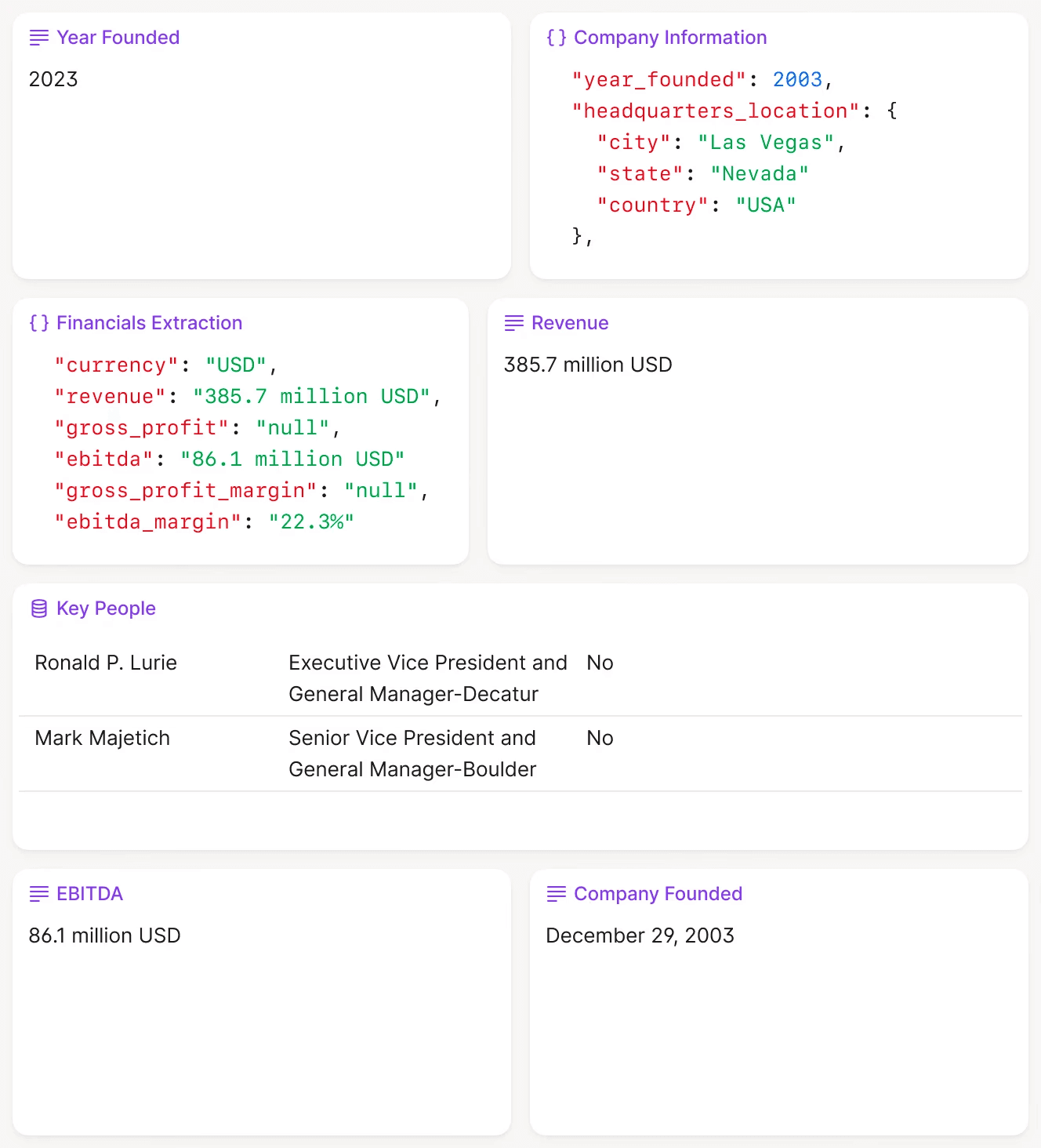
V7 Go extracting company data from a confidential information memorandum and structuring it into fields with full source traceability. Every extracted figure links back to the specific page and paragraph in the source document.
The Modern Solution: A Modular Stack
Leading valuation practices in 2025 are moving away from "all-in-one" monoliths. Instead, they are building composable tech stacks that separate concerns:
The Intelligence Layer (Data Ingestion): Tools like V7 Go sit at the top of the funnel. They read scanned documents, extract financial data using OCR and large language models, normalize account structures, and output clean, structured datasets. The appraiser reviews extracted data against source documents and approves or modifies before passing downstream.
The Calculation Layer (Valuation Logic): Specialized software like ValuAdder or custom Excel models apply the actual valuation methodologies to clean data. This layer remains transparent and auditable. Every formula is visible, every assumption is documented, and every adjustment can be traced to its rationale.
The Reporting Layer (Client Deliverables): Tools like Microsoft Word with linked data sources or dedicated report generators produce USPAP-compliant appraisal reports. Charts and tables update automatically when underlying data changes, eliminating the risk of stale figures in final deliverables.
This modular approach solves both problems. The intelligence layer handles the messy reality of document ingestion and data normalization without hiding methodology. The calculation layer remains transparent and auditable. The reporting layer ensures compliance with professional standards.
Understanding the Valuation Software Landscape
The business valuation software market is fragmented across three distinct segments. Each serves different user needs, price points, and regulatory requirements. Understanding where your practice fits determines which tools make sense.
Segment 1: Cloud-Based Automation Tools
These platforms target small to mid-sized valuation firms and independent appraisers who need fast turnaround times and minimal IT overhead. They prioritize ease of use and speed over deep customization. BizEquity, Equidam, and ValuSource's cloud offerings fall into this category.
The typical user is a CPA performing occasional valuations for estate planning or divorce proceedings, or a business broker needing quick preliminary valuations for prospective sellers. The workflow looks like this:
Enter basic financial data: revenue, EBITDA, total assets, industry code
The platform applies pre-configured valuation methodologies using internal industry multiples
Within minutes, the system generates a valuation range and summary report
The trade-off is depth. While these platforms can handle straightforward valuations of operating companies with clean financials, they struggle with complex capital structures (preferred equity, warrants, convertible notes), non-operating assets that require separate valuation (excess cash, real estate, marketable securities), or situations requiring significant normalization adjustments (related-party transactions, above-market owner compensation, one-time expenses).
Pricing typically runs $50-200 per month for subscription access, with some platforms offering per-report pricing around $300-500 for occasional users.
Segment 2: Desktop Applications for Specialists
Desktop applications like ValuAdder and BizEx cater to certified appraisers who need granular control over every assumption and adjustment. These tools provide comprehensive libraries of valuation methods, detailed industry data integration, and extensive customization options.
The typical user holds ASA (Accredited Senior Appraiser), ABV (Accredited in Business Valuation), or CVA (Certified Valuation Analyst) credentials. They perform valuations for litigation support, tax reporting (estate and gift, S corp elections, charitable contributions), or financial reporting (purchase price allocations, goodwill impairment, stock compensation). These engagements require full USPAP compliance and the ability to defend every methodological choice in court or before the IRS.
The workflow is substantially different from cloud tools:
Manually input or import three to five years of historical financial statements
Make normalization adjustments: recast owner compensation to market rates, remove non-recurring items, adjust related-party transactions to arm's length
Select and configure valuation methods: DCF with explicit forecast period and terminal value, guideline public company method with adjustments for size and growth, guideline transaction method with deal-specific considerations
Build up discount rates using the build-up method or CAPM, incorporating size premiums, industry risk premiums, and company-specific risk factors
Apply discounts for lack of control (DLOC) and lack of marketability (DLOM) based on empirical studies and subject company characteristics
Generate a detailed appraisal report linking every conclusion back to supporting data
The trade-off is complexity. These platforms have steep learning curves and require significant time investment to master. Expect to spend one to two weeks learning the software before running your first engagement. Licensing fees range from $500-2,000 upfront plus annual maintenance, making sense only for professionals performing multiple valuations per month.
Segment 3: Enterprise Platforms
Enterprise platforms like SAP Business Objects, Oracle Financials Cloud, and IBM Cognos Analytics are not purpose-built for business valuation but are used by large corporations and financial institutions for portfolio valuation and financial reporting. These systems integrate valuation logic into broader financial management and business intelligence frameworks.
The typical user is a corporate development team at a Fortune 500 company, a private equity firm managing a portfolio of operating companies, or a fund administrator requiring quarterly NAV calculations. Valuations are performed as part of quarterly financial reporting (ASC 820 fair value measurements), impairment testing (ASC 350 goodwill, ASC 360 long-lived assets), or acquisition analysis.
Valuation models typically live inside these systems as custom-built modules. A private equity firm might configure a DCF template that automatically pulls operating company financials from the portfolio accounting system, applies standardized assumptions (discount rate by sector, terminal multiple by growth profile), and outputs quarterly marks for LP reporting.
The trade-off is flexibility and cost. These platforms require IT resources and long implementation cycles, often 6-18 months for full deployment. Annual licensing runs $100,000 to over $500,000 for enterprise deployments. They are overkill for independent appraisers and small firms but essential for organizations processing hundreds of valuations quarterly.
Deal documents and management presentations often arrive in formats that require significant preprocessing before any valuation methodology can be applied. The following video demonstrates how AI handles this preprocessing step, extracting structured data from CIMs and feeding it into downstream analysis tools.
CIM due diligence workflow showing V7 Go's Cases interface with extracted company information and entity analysis. This preprocessing step feeds clean data into valuation software downstream.











Deep Dive: Comparing Data Ingestion Capabilities
To truly understand which software fits your practice, you must look at how platforms handle data ingestion. This is where the most operational friction occurs and where the differences become stark.
The Manual Approach (Most Desktop Applications)
Traditional desktop applications like ValuAdder assume you will manually enter all financial data. The workflow proceeds as follows:
Financial Statement Input: Open the software, navigate to the financial statement input screen, and type in revenue, cost of goods sold, operating expenses, depreciation, interest, taxes, and balance sheet items line by line. If you need three years of historical data for trend analysis, repeat this process three times.
Industry Benchmarks: Separately access RMA Annual Statement Studies or another data provider. Find the relevant industry code (SIC or NAICS), locate the median ratios for companies in your size bracket, and manually transcribe current ratio, quick ratio, gross margin, operating margin, and return on assets into the software's comparison module.
Comparable Transactions: Search a database like BizComps, DealStats (formerly Pratt's Stats), or the IBA Market Data. Export the results to Excel. Filter for relevant transactions by industry, size, and deal date. Re-key the relevant multiples (revenue multiple, SDE multiple, EBITDA multiple) into your valuation model.
Guideline Public Companies: Pull financial data from SEC filings or a service like Capital IQ. Calculate relevant multiples, make adjustments for size and growth differentials, and input into the market approach section.
This approach is transparent and gives you complete control. But for a straightforward valuation of a small operating company, expect 4-6 hours of data entry before you even begin the analysis. A complex engagement with multiple entities, significant normalization adjustments, or disputed figures can require 15-20 hours of data preparation.
The Semi-Automated Approach (Cloud Platforms)
Cloud-based platforms like BizEquity and Equidam attempt to reduce manual entry by integrating with accounting software and financial data providers. The workflow improves somewhat:
Accounting Integration: Connect your client's QuickBooks or Xero account. The platform pulls income statement and balance sheet data directly. Revenue, expenses, and asset categories populate automatically.
Industry Data: The platform includes pre-loaded industry benchmark data that updates automatically. Select the industry classification, and relevant comparables appear without manual transcription.
Automated Calculations: Basic valuation methodologies apply automatically based on the data pulled. The system generates a preliminary valuation range.
This works well when the client uses supported accounting software and has clean, up-to-date books. It breaks down in common real-world scenarios:
PDF-only financials: In litigation or estate planning engagements, you often receive financial statements as PDFs or scans, not live accounting data. The integration provides no help.
Unsupported accounting systems: Clients using regional software, industry-specific packages, or legacy systems cannot connect.
Normalization requirements: The automated pull does not distinguish between operating and non-operating items. Related-party transactions flow through at book value. Owner compensation appears as recorded, not adjusted to market rates.
Historical data: Many integrations pull only current-period data. If you need five years of history for trend analysis, you still need to manually input prior years.
The semi-automated approach saves time on straightforward engagements but still requires substantial manual intervention for anything outside the happy path.
The AI Approach (V7 Go + Valuation Software)
The emerging best practice is to use an AI agent as a preprocessing layer. V7 Go can ingest scanned financial statements, tax returns, and industry reports in any format and extract the relevant data using OCR and large language models.
The agent does not just extract numbers. It understands financial statement structure. It can map a client's custom chart of accounts to standard categories (mapping "Salary - Owner" to owner's compensation, "Rent - Related Party" to related-party transactions requiring adjustment). It can identify and flag non-operating items that require separate valuation. It can cross-reference multiple years of data and highlight inconsistencies that need investigation.
The workflow transforms:
Document Ingestion: Upload all source documents to a V7 Go Case. Tax returns, internal financials, industry reports, and transaction comps go into a single workspace. The platform uses AI data extraction to read and parse each document.
Data Extraction: The Financial Data Extraction Agent pulls key metrics from each document. Revenue, gross profit, operating expenses, EBITDA, depreciation, interest, taxes, total assets, total liabilities, and owner's compensation appear in structured format.
Normalization Flagging: The agent identifies potential normalization adjustments by flagging unusual items: rent expense that differs significantly from market rates (possible related-party), owner compensation that exceeds industry benchmarks, one-time legal settlements or insurance recoveries, and assets that appear non-operating (marketable securities, real estate held for investment).
Reconciliation: The agent cross-references data across multiple documents and highlights discrepancies. If revenue on the tax return does not match revenue on the internal financial statements (common due to accrual vs. cash basis, fiscal year differences, or intercompany eliminations), the system flags it for investigation.
Export: Once reviewed and approved, clean data exports to your valuation software. The calculation layer remains transparent and under your control, but the data ingestion bottleneck disappears.
This workflow reduces data preparation time from 8-12 hours to 1-2 hours for a typical engagement. More importantly, it reduces errors. The AI agent does not get tired at hour six or skip a line on page 47 of a tax return.
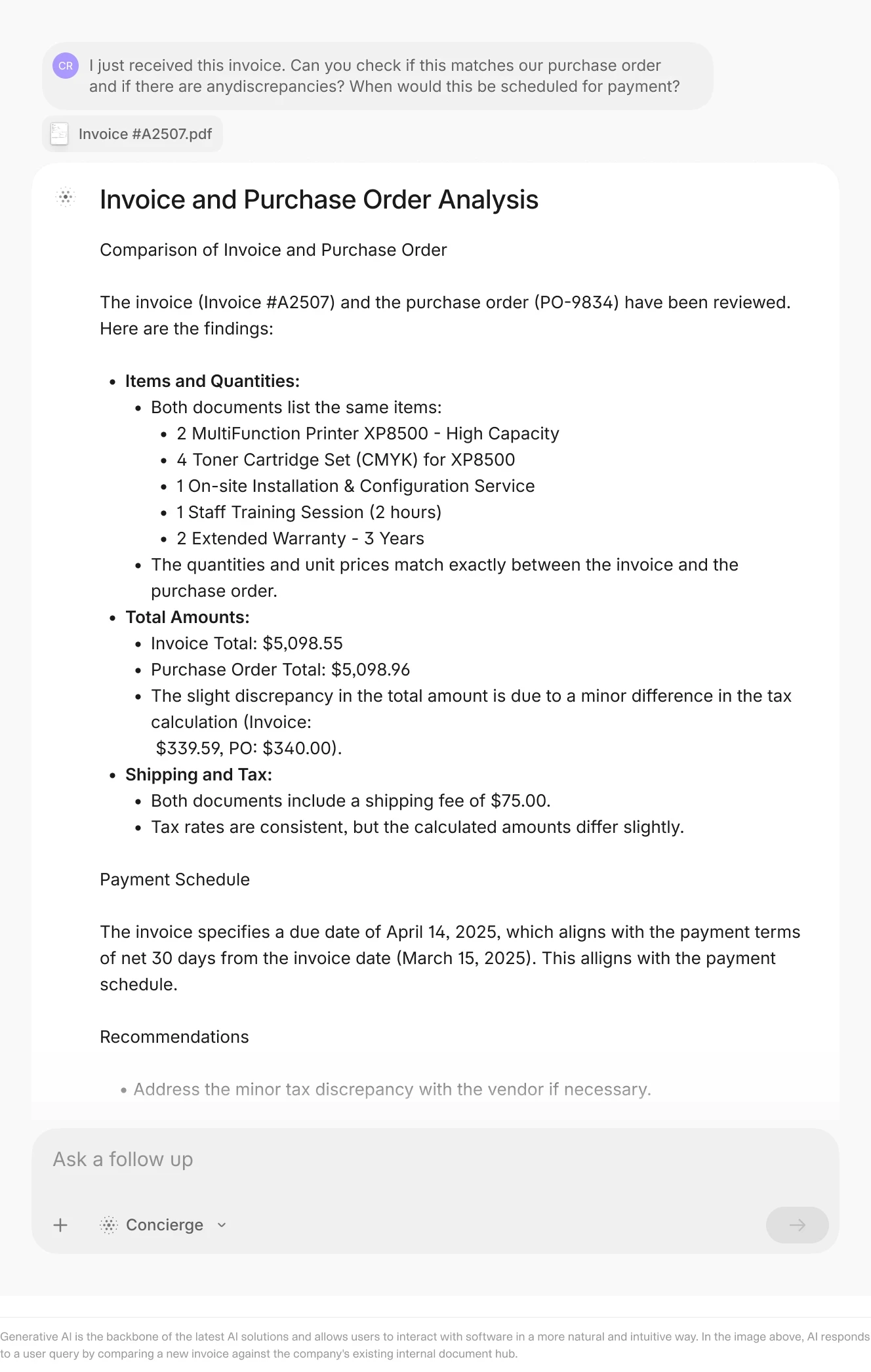
V7 Go's document comparison capability. The same technology that reconciles invoices against purchase orders can reconcile financial statements across multiple periods or identify figures requiring normalization adjustment.
Software Reviews: The Leading Platforms
BizEquity: Best for Quick Preliminary Valuations
Website: https://www.bizequity.com/
Core Positioning: BizEquity is a cloud-based platform designed for speed and accessibility. It targets business brokers, CPAs, and financial advisors who need to generate preliminary valuations quickly, often as part of a broader advisory engagement.
Top Features:
Automated Valuation Algorithms: BizEquity uses proprietary algorithms that combine income, market, and asset approaches to generate a valuation range in minutes. The platform requires minimal input (basic financial data and industry classification) and handles methodology selection automatically.
Scenario Analysis: Users can model different scenarios (revenue growth rates, margin improvement, exit timing) and see how they impact valuation. This is useful for advising clients on value-building strategies or demonstrating the sensitivity of conclusions to key assumptions.
Industry Benchmarking: The platform includes pre-loaded industry data that allows users to compare the subject company against peers on key metrics like revenue multiples, EBITDA margins, and growth rates.
Pricing: Tiered subscription pricing starts at approximately $89/month for basic access. Higher tiers provide additional features including unlimited valuations and white-label reporting for client delivery.
Practitioner Assessment: Users praise BizEquity for simplicity and speed. A business broker on Reddit noted: "I can generate a preliminary valuation in 10 minutes, which is perfect for initial client conversations." The visual reports are professional and easy for non-technical clients to understand.
The limitation is depth. Certified appraisers note that the automated algorithms are too simplistic for complex valuations. One ASA-credentialed practitioner commented: "BizEquity is fine for a ballpark number, but I would never use it for a litigation or tax engagement. There is no way to adjust for non-operating assets or apply company-specific risk premiums."
Best For: Business brokers and advisors who need fast, defensible preliminary valuations for prospective sellers or estate planning clients. Not suitable for USPAP-compliant appraisals or complex capital structures.
Equidam: Best for Startup and Growth Company Valuations
Website: https://www.equidam.com/
Core Positioning: Equidam is a cloud-based platform optimized for valuing early-stage and growth companies. It is popular among venture capital analysts, startup founders, and investment bankers working on seed and Series A financings.
Top Features:
Startup-Specific Methodologies: The platform includes the Venture Capital Method, Berkus Method, Scorecard Method, and Risk Factor Summation. These approaches are appropriate for pre-revenue or early-revenue companies where traditional DCF analysis fails due to lack of historical data.
Real-Time Sensitivity Analysis: Users can adjust key assumptions (discount rate, terminal growth rate, exit multiple, probability of exit scenarios) and see the impact on valuation in real time. This is particularly useful for scenario planning in fundraising negotiations.
Collaborative Dashboards: Multiple team members can work on the same valuation simultaneously, with version control and audit trails. Investment committees can review assumptions and conclusions without passing Excel files back and forth.
Pricing: Subscription-based pricing starts at approximately $49/month for basic plans. Enterprise options are available for larger teams and more complex needs, with custom pricing based on volume.
Practitioner Assessment: Users appreciate the modern interface and the focus on startup-specific methodologies. One VC analyst noted: "Equidam understands that early-stage companies do not have three years of audited financials. The platform is built for the reality of startup valuation."
The platform is less suitable for mature operating companies or asset-heavy businesses. One user commented: "If you are valuing a manufacturing company with significant fixed assets, Equidam is not the right tool. It is optimized for high-growth, asset-light businesses."
Best For: Venture capital firms, startup founders, and investment bankers working on early-stage financings. Not ideal for traditional business appraisals of mature companies.
ValuAdder: Best for Certified Appraisers Requiring Deep Customization
Website: https://www.valuadder.com/
Core Positioning: ValuAdder is a desktop application designed for certified business appraisers who need comprehensive control over every aspect of the valuation process. It is built for USPAP compliance and supports all major valuation methodologies.
Top Features:
In-Depth Discounted Cash Flow Analysis: ValuAdder provides extensive DCF modeling capabilities. Users can configure multi-stage growth models (different growth rates for explicit forecast period, transition period, and terminal period), select mid-year or end-of-year discounting conventions, build detailed working capital adjustments, and model capital expenditure requirements separately from maintenance capex.
Peer Company Comparison: The platform includes tools for selecting and analyzing guideline public companies. Users can apply adjustments for size (using data from Duff & Phelps or Kroll), growth rate differentials, and risk profile differences. Control premiums and marketability discounts can be applied based on empirical studies (Stout Restricted Stock Study, FMV Opinions pre-IPO studies).
Risk Adjustment Modeling: ValuAdder allows users to build up discount rates using the build-up method or CAPM. The platform provides access to industry risk premium data and size premium studies, with documentation for each input.
Pricing: One-time purchase options start at approximately $595 for a single-user license. Annual maintenance fees for updates and support run $100-200/year.
Practitioner Assessment: Certified appraisers praise ValuAdder for thoroughness and flexibility. One ABV credential holder noted: "ValuAdder gives me everything I need to defend my valuation in court. I can show exactly how I arrived at every number."
The main criticism is the outdated user interface and steep learning curve. One user commented: "ValuAdder looks like it was designed in 2005. It works, but it is not intuitive. Expect to spend a week learning the software before you can use it efficiently."
Best For: ASA and ABV credential holders performing valuations for litigation, tax reporting, or financial reporting. Ideal for complex engagements requiring full methodological transparency.
When processing large volumes of financial documents for valuation engagements, batch processing capabilities become essential. The following video demonstrates how AI handles multiple 10-Q filings simultaneously, extracting key financial metrics at scale.
V7 Go processing batch 10-Q filings, extracting company name, financial period, and key metrics. The same batch processing capability applies to tax returns, financial statements, and industry reports for valuation engagements.
BizEx: Best for Mid-Market M&A Professionals
Website: https://www.bizexglobal.com/
Core Positioning: BizEx is tailored for M&A advisors and investment bankers working on middle-market transactions. It combines valuation capabilities with deal management and marketing tools.
Top Features:
Quality of Earnings Analysis: BizEx can produce detailed QoE-style reports including EBITDA adjustments (add-backs for owner perks, non-recurring expenses, related-party transactions), working capital peg calculations (analyzing trailing twelve-month average versus transaction-date balance), and debt-like items schedules (identifying obligations that will be treated as debt for transaction purposes).
Scenario Planning: The platform allows users to model different deal structures (asset sale vs. stock sale, earnouts, seller financing, rollover equity) and see the impact on headline valuation and after-tax proceeds to the seller. This is essential for advising owner-operators on transaction alternatives.
Industry Benchmarking: BizEx includes access to transaction databases and industry multiples, allowing users to benchmark the subject company against recent comparable sales. The platform tracks key deal metrics: revenue multiple, EBITDA multiple, seller's discretionary earnings multiple, and implied deal structure.
Pricing: BizEx uses custom enterprise pricing based on firm size and transaction volume. Pricing is not publicly disclosed but typically runs $500-1,500/month for active M&A advisory practices.
Practitioner Assessment: M&A advisors appreciate the integration of valuation and deal management. One user noted: "BizEx is not just a valuation tool. It helps me manage the entire sell-side process, from initial valuation to buyer outreach to closing."
The platform requires extensive training and has a higher implementation overhead. One user commented: "BizEx is powerful, but it is overkill if you are just doing occasional valuations. It is built for firms that live and breathe M&A."
Best For: M&A advisory firms and investment banks working on middle-market transactions. Not ideal for independent appraisers or firms focused on estate planning and divorce valuations.
Real-World Example: Estate Planning Valuation
To illustrate how these tools work in practice, consider a common scenario: an estate planning attorney needs a valuation of a family-owned manufacturing business for estate tax purposes. The business has operated for 40 years and has never had audited financial statements. The only available financial data is:
Five years of corporate tax returns (Form 1120) as scanned PDFs
Internal financial statements prepared by the company's bookkeeper in QuickBooks (inconsistent formatting across years)
A fixed asset listing with handwritten notes on depreciation schedules
Bank statements showing a potential non-operating cash position
Traditional Workflow
Using traditional methods, the appraiser would spend an entire day manually extracting data from tax returns, reconciling differences with internal financials, and building a normalized income statement. Specific steps include:
Open each tax return PDF. Navigate to Schedule M-1 to identify book-tax differences. Transcribe revenue from Line 1a, cost of goods sold from Line 2, and each operating expense category.
Compare tax return figures to QuickBooks export. Identify why revenue differs by $50,000 (accrual vs. cash basis, timing of receivables recognition).
Review officer compensation on Schedule E and compare to market rates using industry surveys. Calculate the normalization adjustment if the owner-operator is paid $400,000 when market rate for a CEO of a similar-sized manufacturing company is $250,000.
Analyze rent expense. If the company leases its facility from a related-party LLC, determine market rent using comparable industrial leases and calculate the adjustment.
Review the fixed asset listing. Identify fully depreciated equipment still in use that has residual value. Identify non-operating assets (vacant land, antique vehicles) requiring separate valuation.
AI-Assisted Workflow
With V7 Go as a preprocessing layer:
Upload all documents to a V7 Go Case. The Financial Data Extraction Agent reads the tax returns and extracts revenue, cost of goods sold, operating expenses, depreciation, interest, and taxes for each year.
The agent reads the QuickBooks export and extracts the same metrics. It automatically flags the $50,000 revenue discrepancy between tax returns and internal financials, noting "Tax Return Line 1a ($2,450,000) differs from QuickBooks Revenue ($2,500,000). Possible book-tax timing difference."
The agent flags officer compensation of $400,000 as potentially above market, citing the extracted industry code and noting that peer company compensation data should be reviewed.
The agent identifies rent expense paid to "Smith Family Properties LLC" and flags it as a potential related-party transaction requiring market rate adjustment.
The agent reads the fixed asset listing and flags three categories: assets still in service with zero book value (adjustment opportunity), antique vehicles with no apparent business purpose (non-operating asset), and vacant land (non-operating asset requiring separate valuation).
The appraiser reviews extracted data, approves or modifies the flagged items, and exports clean data to ValuAdder for valuation analysis.
Total data preparation time drops from 8 hours to 90 minutes. The appraiser's time shifts from data entry to judgment: evaluating whether the flagged items truly require adjustment and determining the appropriate adjustment amounts.
Implementation Guide: Migrating to a Modern Stack
If you are currently using Excel templates or an outdated desktop application, migrating to a modern valuation stack requires planning. Here is a practical 12-week roadmap based on implementations that work.
Phase 1: Audit Your Current Workflow (Weeks 1-2)
Before selecting new software, document your current workflow in detail. For each type of engagement (estate planning, divorce, M&A, financial reporting), track:
Time spent on data gathering and entry (hours per engagement)
Time spent on normalization adjustments
Time spent on valuation analysis
Time spent on report writing
Percentage of time spent on rework due to data errors or late-discovered adjustments
This baseline is critical. You need to know where your time goes before you can measure improvement. Most appraisers are surprised to find that data preparation consumes 40-60% of total engagement time.
Phase 2: Select Your Stack (Weeks 3-4)
Based on your workflow audit, select components:
Data Ingestion Layer: If you regularly receive scanned documents or poorly formatted financial statements (common in litigation and estate planning), invest in an AI document processing tool like V7 Go. If your clients consistently provide clean data from supported accounting systems (more common in recurring financial reporting engagements), a cloud platform with direct integrations may suffice.
Calculation Layer: If you need full USPAP compliance and deep customization, choose a desktop application like ValuAdder. If you prioritize speed and ease of use for preliminary valuations, choose a cloud platform like BizEquity or Equidam.
Reporting Layer: If your valuation software includes full report generation with USPAP-compliant templates, you may not need a separate tool. If not, consider a dedicated report writer or a well-structured Word template with linked data sources.
Phase 3: Pilot on a Single Engagement (Weeks 5-8)
Do not migrate your entire practice at once. Select a single, representative engagement and run it through the new stack in parallel with your existing workflow. This allows you to:
Identify integration issues before they impact client deliverables
Refine your workflow without time pressure
Build confidence in the new tools
Measure actual time savings against your baseline
For the pilot, choose an engagement that is typical of your practice but not mission-critical. You want to learn without risking a key client relationship or a litigation deadline.
Phase 4: Refine and Scale (Weeks 9-12)
Based on the pilot, refine your workflow and begin migrating additional engagements. Focus on:
Documenting standard operating procedures for each component of the stack
Training any team members who will use the new tools
Building templates and checklists to ensure consistency
Measuring time savings and error reduction against the Phase 1 baseline
By the end of 12 weeks, you should have a fully operational modern stack and clear data on efficiency gains.
The following tutorial demonstrates how to build an AI agent from start to finish. The same principles apply to creating a Financial Data Extraction Agent customized for your valuation workflows.
Building an AI agent from start to finish. The agent design process applies equally to financial data extraction, document comparison, and other valuation workflow automation.
The Future of Business Valuation: Intelligence at the Edge
The business valuation profession is at an inflection point. The calculation methodologies are mature and well-understood. The regulatory frameworks are stable. The bottleneck is no longer analytical. It is operational.
The firms that will thrive in the next decade are those that recognize this reality and invest in the intelligence layer. They will use AI to automate the tedious, error-prone work of data ingestion and normalization. They will use transparent, auditable calculation engines to apply valuation methodologies. They will use modern reporting tools to deliver professional, defensible appraisal reports.
This is not about replacing the appraiser. It is about freeing the appraiser to focus on what they do best: exercising professional judgment, interpreting financial data in context, and defending valuation conclusions under scrutiny.
What Changes on Monday Morning
For a practicing business appraiser, the shift to an AI-assisted stack means:
You spend 2 hours on data preparation instead of 10 hours. The time you save is not idle; it gets reallocated to analysis and judgment.
You catch normalization adjustments you would have missed. The AI agent flags unusual items automatically: above-market rent to related parties, officer compensation exceeding industry benchmarks, non-operating assets buried in the fixed asset schedule.
You deliver valuations faster, which means you can take on more engagements or spend more time on complex analyses that command premium fees.
You have full audit trails showing exactly where every number came from. When opposing counsel asks how you arrived at a figure, you can show the source document, the extracted data, and the adjustment rationale in one click.
The competitive advantage does not come from having the same software as everyone else. It comes from information advantage: the ability to ingest, normalize, and analyze financial data faster and more accurately than your competitors.
To see how you can automate the data ingestion layer of your valuation practice, from scanned tax returns to industry benchmarks, book a demo with V7 Go.
What is the difference between business valuation software and accounting software?
Accounting software like QuickBooks or Xero tracks day-to-day financial transactions: revenue, expenses, assets, and liabilities. It produces financial statements (income statement, balance sheet, cash flow statement) that reflect the company's historical performance.Business valuation software takes those financial statements as inputs and applies valuation methodologies to estimate the company's fair market value. It handles income approaches (DCF, capitalization of earnings), market approaches (guideline public company method, guideline transaction method), and asset-based approaches. The two types serve different purposes and are typically used in sequence: accounting software produces the data, valuation software analyzes it.
+
Can AI fully automate business valuations?
No, and you should be skeptical of anyone claiming it can. AI automates the data gathering, extraction, and normalization components of a valuation engagement. It removes the manual friction of getting data into a usable format.The professional judgment required for a USPAP-compliant valuation remains a human task: selecting appropriate valuation methods, determining company-specific risk adjustments, applying control premiums and marketability discounts, and defending assumptions under cross-examination. AI is a tool that makes appraisers more efficient, not a replacement for their expertise.
+
How long does it take to implement business valuation software?
Implementation timelines vary by complexity. A cloud-based tool like BizEquity or Equidam can be operational in a few hours. You create an account, connect data sources, and start running valuations. The learning curve is minimal.A desktop application like ValuAdder requires more time. Expect to spend 1-2 weeks learning the software and building your first valuation model. The depth and customization options require significant upfront investment.Deploying an AI document processing layer like V7 Go is faster than traditional software implementations. You can have a Financial Data Extraction Agent running on real documents within days, not months.
+
Is it safe to put sensitive financial data into cloud-based valuation software?
Yes, provided the vendor meets enterprise security standards. The baseline requirement is SOC 2 Type II certification, which verifies that the vendor has appropriate controls for data security, availability, and confidentiality.You should also look for ISO 27001 certification, GDPR and CCPA compliance, and encryption in transit and at rest. Enterprise-grade platforms like V7 Go include these protections by default. Before uploading client data, verify that the vendor's security posture meets your professional liability insurance requirements and any contractual obligations to your clients.
+
What is the typical ROI of business valuation software?
No, but the software does not make you a certified appraiser. Anyone can use valuation software to generate a number, but that number is only as good as the assumptions and methodologies behind it.If you are performing valuations for tax reporting, litigation, or financial reporting purposes, you need appropriate credentials (ASA, ABV, CVA, or equivalent) and must comply with professional standards like USPAP. The software is a tool that helps you apply those standards more efficiently. It does not replace the need for professional judgment and expertise.
+
Do I need to be a certified appraiser to use business valuation software?
Go is more accurate and robust than calling a model provider directly. By breaking down complex tasks into reasoning steps with Index Knowledge, Go enables LLMs to query your data more accurately than an out of the box API call. Combining this with conditional logic, which can route high sensitivity data to a human review, Go builds robustness into your AI powered workflows.