19 min read
—
A practitioner's guide to AI tax document processing tools for finance teams. We evaluate V7 Go, Parseur, Rossum, and legacy platforms, plus how AI agents solve the reconciliation bottleneck that spreadsheets cannot.

Casimir Rajnerowicz
Content Creator
V7 Go
A smarter way to manage due diligence and underwriting
Ask a Controller at a mid-sized real estate investment firm where their tax data lives, and they might point to a sophisticated property management system or an enterprise ERP. Ask the Senior Tax Analyst where the actual, workable tax data lives—the data used to close the books at month-end and respond to an urgent audit request—and they will almost invariably point to a sprawling Excel workbook with 40+ tabs of VLOOKUP formulas.
This is the reality of tax document processing in 2025. Despite billions spent on enterprise software, the industry's backbone remains a fragile mesh of manual data entry, offshore BPO teams, and spreadsheet reconciliation. The core problem is simple: tax documents arrive in dozens of formats (scanned PDFs, assessor websites, email attachments, handwritten forms), contain critical fields that vary by jurisdiction (parcel numbers, taxable values, exemptions), and must be reconciled against multiple sources (tax bills, assessor reports, broker pro formas). Manual processing of these documents can delay month-end close by days and introduce error rates that cascade through financial reporting.
The bottleneck is not technology availability. It is implementation friction and integration complexity. Most tax teams know AI can help. Few have found a solution that handles the variability of their documents without requiring a six-month implementation and a dedicated IT team.
In this article:
The Architecture of Tax Document Processing: Understanding the critical split between extraction, validation, and reconciliation layers.
Software Reviews: Deep dives into V7 Go, Parseur, Rossum, ABBYY FlexiCapture, and legacy platforms.
Solving the Reconciliation Gap: How AI agents automate the extraction of tax bills, assessor reports, and property tax data.
Implementation Guides: What to expect when migrating from manual workflows to AI automation, including acceptance criteria and QA sampling plans.
The Core Challenge: Why Tax Document Processing Fails
Selecting the right software requires understanding why so many implementations fail. The core issue is a fundamental misunderstanding of what tax document processing requires versus what traditional OCR and document capture tools actually deliver.
The Extraction vs. Reconciliation Problem
Most traditional OCR platforms (like ABBYY or Kofax) are designed as extraction engines. Their primary job is to read text from scanned documents and output structured data. This works well for standardized forms like W-2s or 1099s where field positions are consistent.
The daily workflow of a tax team is fundamentally different. They deal with messy, variable data streams: a county assessor's website that changed its PDF format mid-year, a tax bill that splits parcels across multiple pages, or a broker pro forma that uses non-standard terminology for tax projections.
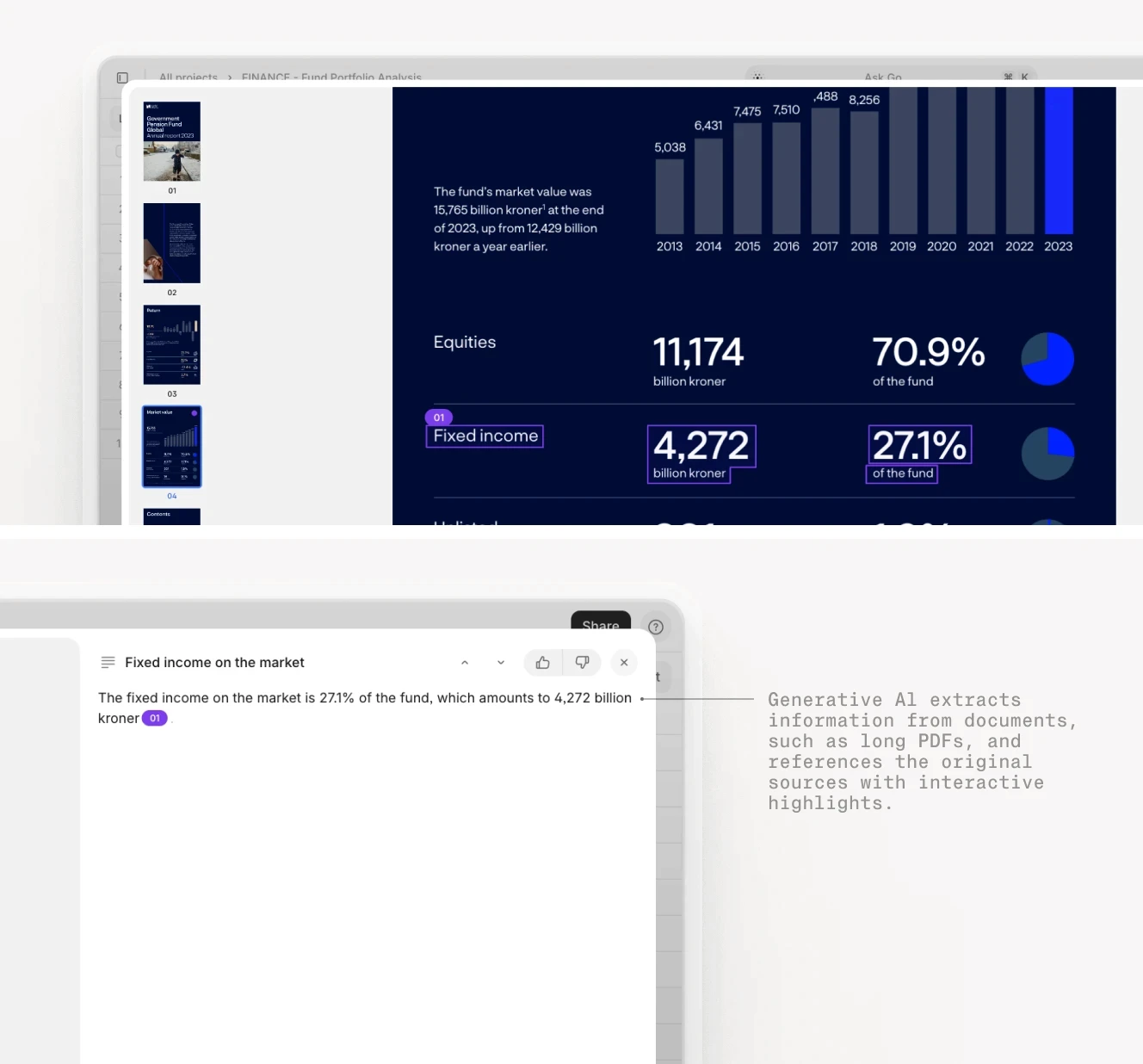
AI extraction with visual grounding showing exact source locations for each extracted field.
The real bottleneck is not extraction. It is reconciliation and validation. A tax analyst needs to verify that the taxable value from the assessor's report matches the tax bill, cross-reference parcel numbers against property records, and flag discrepancies for manual review. This requires contextual understanding, not just character recognition.
The Modern Solution: Agent-Based Workflows
Leading firms in 2025 are moving away from monolithic OCR platforms toward composable, agent-based systems that separate concerns. Before mapping documents to tools, it helps to understand the three distinct layers that must work together.
The Intelligence Layer (Extraction and Classification): Tools like V7 Go that use LLMs and visual grounding to extract data from variable-format documents, classify document types automatically, and handle edge cases like handwritten notes or poor-quality scans.
The Validation Layer (Reconciliation): AI agents that cross-reference extracted data against multiple sources, flag inconsistencies, and route exceptions to human reviewers with full audit trails.
The Integration Layer (ERP and Accounting Systems): APIs and connectors that push validated data into existing systems like QuickBooks, NetSuite, or Yardi, eliminating manual re-keying.
V7 Go's agent library showing pre-built workflows for invoice processing, OCR extraction, and batch document analysis.
What Tax Documents Actually Look Like
Before evaluating software, map the specific artifacts your team processes. Tax document processing is not a single workflow. It is a collection of related but distinct tasks, each with unique challenges and field requirements.
Primary Document Types and Key Fields
Tax Bills (County/Municipal): These are the final invoices from taxing authorities. They contain the tax amount owed, payment deadlines, and often reference multiple parcels.
Key fields to extract: Bill number, parcel number(s), tax amount by installment, due dates, penalty amounts, remittance address, rate code, and prior year comparison. The challenge: formats vary wildly by jurisdiction, and bills often arrive as scanned PDFs with poor OCR quality. Some counties split first and second installments across separate bills; others combine them. A single property may have five to twenty parcels, each with its own line item.
Assessor's Reports: These documents show the assessed value of a property (often split into land value and improvement value) and the taxable value after exemptions.
Key fields to extract: Assessor Parcel Number (APN) in jurisdiction-specific format, full cash value, limited property value, assessed value, taxable value, exemption amounts and types, assessed year, and mill rate components. The challenge: assessor websites use inconsistent terminology ("full cash value" vs. "market value" vs. "assessed value"), and data may be spread across multiple web pages or PDFs. In Arizona, "limited property value" caps annual increases; in California, Proposition 13 creates a different calculation. Your extraction logic must account for these jurisdiction-specific rules.
Broker Pro Formas: In real estate transactions, brokers provide projected tax expenses based on historical data and market assumptions.
Key fields to extract: Projected tax amount, assumptions notes, variance rationale, reference pages within the offering memorandum, and line-item detail by expense category. The challenge: these are often embedded in larger offering memorandums, use non-standard formatting, and may include footnotes or assumptions that require manual interpretation. The Vice President at one investment firm we spoke with described the process: "I want to pull that info. For example, repair and maintenance pro forma projects 350 USD per unit in line with market comparables. If the note isn't in a sentence, refer to the OM. No need for complex tables. Just pull simple sentences."
Rent Rolls and Operating Statements: These documents show property-level income and expenses, including tax line items.
Key fields to extract: Unit number, tenant code, lease status (occupied, vacant, model unit), lease start and end dates, monthly rent, security deposit, and property tax allocation. The challenge: tax expenses may be aggregated or split across multiple properties, and reconciling them against actual tax bills requires matching property identifiers (addresses, parcel numbers) that may not be standardized. Bedrooms and bathrooms are often missing from rent rolls, requiring supplementary data from property websites or floor plan documents.
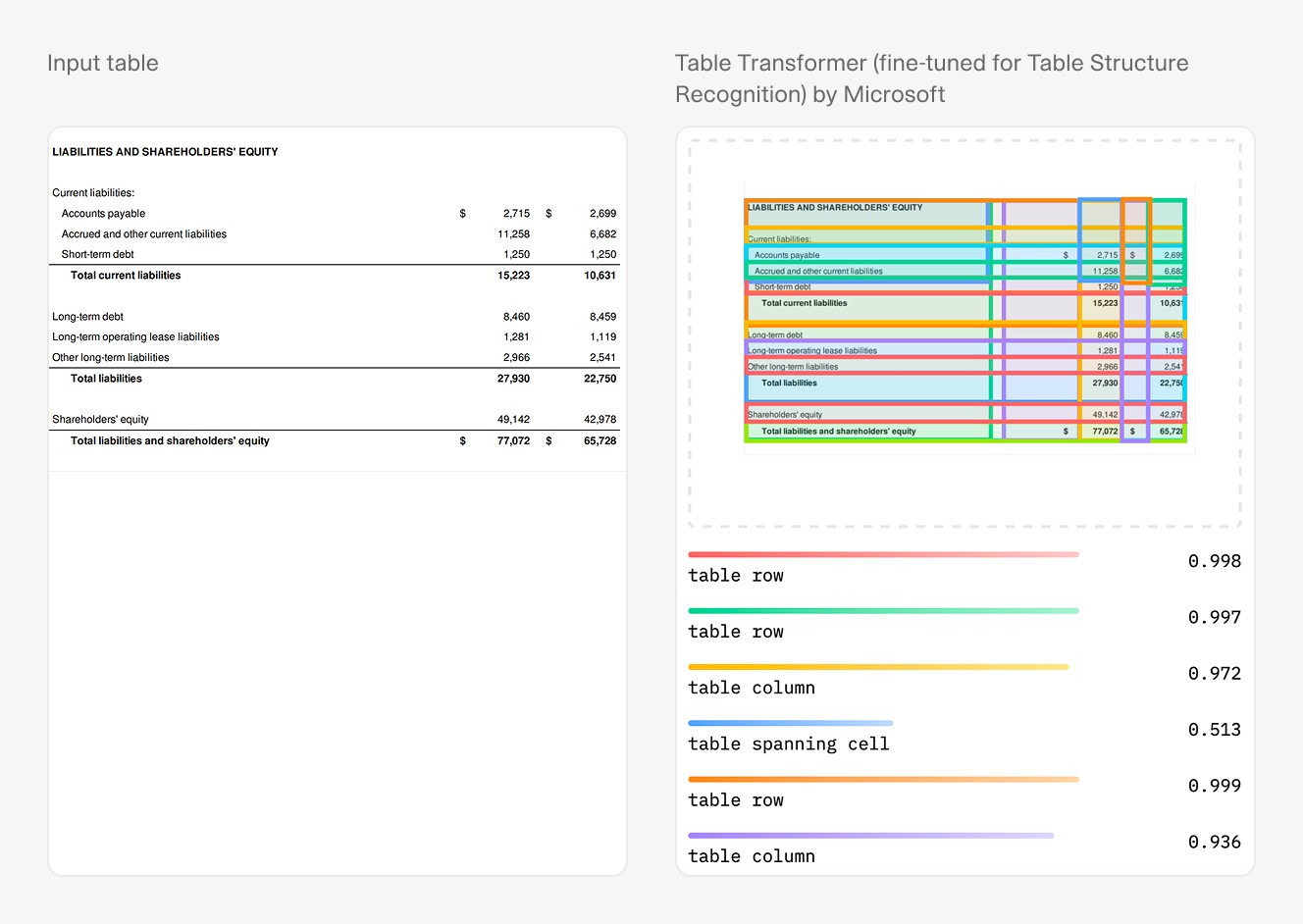
Raw vs. AI-parsed financial table comparison showing extraction accuracy.
The Hidden Complexity: Parcel Numbers
One of the most underestimated challenges in tax document processing is parcel number management. A single property may have multiple tax parcels (especially for large commercial or multifamily assets), and each parcel may have a different assessed value, tax rate, and billing cycle.
Parcel numbers are not standardized across jurisdictions. In Arizona, a parcel number might be "123-45-678". In California, it could be "APN 1234-567-89-0". Worse, parcel numbers may appear in different formats on different documents (with or without dashes, leading zeros, or suffixes).
An effective AI solution must: extract parcel numbers from multiple document types (tax bills, assessor reports, title commitments); normalize formatting variations ("123-45-678" equals "12345678"); match parcels across documents even when identifiers are incomplete or inconsistent; and aggregate tax data across multiple parcels for a single property.
This is where traditional OCR fails and where AI agents with contextual understanding excel. As one Solutions Engineer explained during a client implementation: "We can have collections of documents. Treat multiple tax forms as a bundle. Extract info from the bundle regardless of how many parcels exist. If there's only one OM, no problem. For uncertain numbers of parcels, the bundle approach works."
The Manual Workflow You Are Trying to Replace
To understand the value proposition of AI automation, map the current manual process that most tax teams follow. This workflow applies whether you are processing 50 properties or 500.
Step 1: Document Collection (2-5 hours per property). A tax analyst logs into multiple county assessor websites, downloads PDFs, saves email attachments from property managers, and organizes files into folders by property and tax year. For properties with multiple parcels, this requires navigating both the assessor's site (for assessed values) and the treasurer's site (for tax bills). One Director of Finance described the challenge: "Two places for taxes: assessor's website for assessed value, treasurer's website for tax bill. Assessor shows property worth; treasurer shows what's paid. Need taxable value and tax bill."
Step 2: Data Entry (3-8 hours per property). The analyst opens each document, manually types key fields (parcel number, assessed value, taxable value, tax amount, due date) into an Excel spreadsheet. For properties with multiple parcels, this step repeats for each parcel. The effective tax rate must be calculated (tax amount divided by taxable value) and validated against jurisdiction norms.
Step 3: Reconciliation (1-3 hours per property). The analyst uses VLOOKUP formulas to match tax bill amounts against assessor data, flags discrepancies, and investigates mismatches (often requiring phone calls to county offices or property managers). Common issues include: parcel count mismatches versus last year, scanned bills below OCR threshold, and assessor versus treasurer amounts that diverge due to timing or exemptions.
Step 4: Validation and Approval (1-2 hours per batch). A senior analyst or controller reviews the reconciled data, spot-checks a sample of documents, and approves the batch for entry into the accounting system.
Step 5: ERP Entry (30 minutes to 2 hours per batch). The validated data is manually entered into the ERP system (or uploaded via CSV if the system supports it), and journal entries are created for tax accruals.
For a portfolio of 50 properties, this process can consume 200-400 hours of analyst time per quarter. The error rate compounds: a mistyped parcel number in Step 2 creates a mismatch in Step 3, which requires investigation in Step 4, which delays Step 5. According to industry benchmarks, AI extraction can reduce manual data entry errors by 70-90% when properly implemented.

Traditional financial analysis workflow showing manual bottlenecks at each stage.











Deep Dive: Comparing AI Tax Document Processing Tools
Understanding which software fits your firm requires examining how each solves the core challenges: extraction accuracy, reconciliation automation, and integration flexibility. The tools below are ordered by their suitability for complex, multi-jurisdiction tax workflows.
V7 Go: Best for Complex, Multi-Source Tax Workflows
Website: https://www.v7labs.com
Core Positioning: V7 Go is an AI work automation platform designed for document-heavy, knowledge-work processes. Unlike traditional OCR tools, V7 Go uses LLMs combined with visual grounding to extract data from variable-format documents with high accuracy.
Top 3 Features for Tax Processing:
Tax Bill Extraction Agent: Pre-built agent workflow that automatically classifies tax documents (assessor reports vs. tax bills vs. exemption certificates), extracts key fields (parcel number, taxable value, tax amount, due date), and validates data against expected ranges.
Visual Grounding with Citations: Every extracted field is linked back to the exact location in the source document, providing full audit trails. When an analyst reviews extracted data, they can click on any field and see the exact page, paragraph, and highlighted text that supports it. This is critical for tax compliance and internal controls.
Knowledge Hubs for Reconciliation: V7 Go's Knowledge Hub feature allows you to upload historical tax data, property records, and jurisdiction-specific rules. Agents use this context to flag anomalies (for example, "This property's tax rate increased 15% year-over-year, which exceeds the jurisdiction's statutory cap").
CIM due diligence workflow showing Cases interface with extracted fields and entity analysis. The same workflow applies to tax document processing with property-specific fields.
Pricing Model: Custom/Enterprise (contact sales for quote)
Real User Pros:
Handles highly variable document formats (scanned PDFs, web screenshots, handwritten notes) better than template-based tools
Visual grounding provides audit-ready citations for every extracted field
Agent workflows can be customized without coding (for example, "If parcel count exceeds 5, route to senior analyst for review")
Real User Cons:
Requires initial setup time to configure agents and Knowledge Hubs
Best suited for teams processing 100+ documents per month; may be overkill for smaller portfolios
Best For: Real estate investment firms, private equity funds, and corporate tax departments processing tax documents across multiple jurisdictions with variable formats.
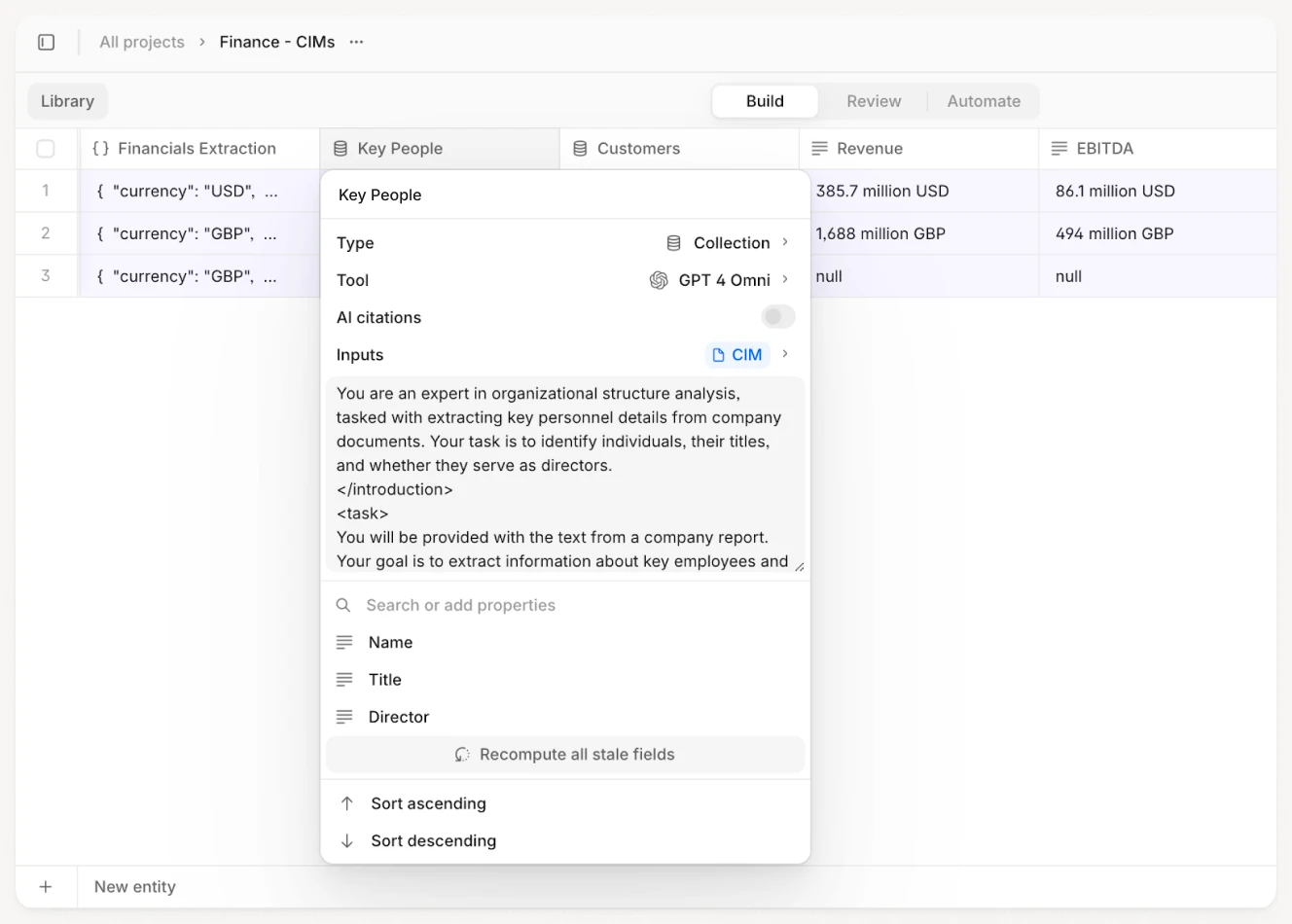
V7 Go extracting structured data from unstructured documents with field-level validation.
Parseur: Best for Small Teams with Standardized Documents
Website: https://www.parseur.com (see V7 Go vs. Parseur comparison)
Core Positioning: Parseur is a template-based extraction tool designed for small to medium teams that process documents with consistent formats (for example, invoices from the same vendor, tax bills from a single county).
Top 3 Features:
Template-Based Extraction: You create a template by highlighting fields in a sample document, and Parseur applies that template to future documents with the same layout.
Email Attachment Processing: Parseur can monitor an email inbox, automatically extract data from attachments, and send results to your accounting system or spreadsheet.
Cloud Integrations: Pre-built connections to Google Sheets, Zapier, and webhooks for easy data routing.
Pricing Model: Starts at 149 USD/month for 300 documents
Real User Pros:
Very fast setup for standardized documents (can be live in under an hour)
Intuitive drag-and-drop interface requires no technical expertise
Good value for small teams processing fewer than 100 documents per month
Real User Cons:
Struggles with variable-format documents (for example, tax bills from different counties)
No built-in reconciliation or validation logic; outputs raw extracted data
Limited ability to handle multi-page documents or documents with multiple parcels
Best For: Small property management firms or accounting practices that process tax documents from a single jurisdiction with consistent formatting.
Rossum: Best for High-Volume, Standardized Tax Forms
Website: https://rossum.ai
Core Positioning: Rossum is an AI data capture platform that uses self-learning algorithms to improve extraction accuracy over time. It is designed for high-volume processing of semi-standardized documents.
Top 3 Features:
Self-Learning Extraction: Rossum's AI learns from corrections made by human reviewers, improving accuracy with each batch processed.
REST API Integration: Well-documented API allows for custom integrations with ERP systems, data warehouses, and workflow tools.
Cloud-Based Scalability: Can handle thousands of documents per day with minimal infrastructure overhead.
Pricing Model: Custom/Enterprise (pricing based on document volume)
Real User Pros:
High accuracy after initial training period (typically 500-1,000 documents)
Minimal manual intervention once models are trained
Strong API for custom integrations
Real User Cons:
Requires significant upfront training data (not ideal for low-volume use cases)
Complex pricing structure can make cost prediction difficult
Implementation can be challenging for teams without technical resources
Best For: Large enterprises processing thousands of tax documents per month with relatively consistent formats (for example, payroll tax forms, sales tax returns).
ABBYY FlexiCapture: Legacy Leader for Enterprise-Scale OCR
Website: https://www.abbyy.com/flexicapture/
Core Positioning: ABBYY FlexiCapture is an enterprise-grade document processing platform with advanced OCR capabilities and multi-language support. It has been a market leader for over a decade.
Top 3 Features:
Powerful OCR with Multi-Language Support: Industry-leading OCR accuracy, especially for printed text in multiple languages.
Flexible Document Classification: Can automatically classify documents into categories (tax bills, assessor reports, exemption certificates) based on layout and content.
Detailed Reporting and Analytics: Comprehensive dashboards for tracking processing volumes, error rates, and user activity.
Pricing Model: Custom/Enterprise (typically 50,000 USD+ for initial license plus annual maintenance)
Real User Pros:
Proven reliability in complex enterprise environments
High accuracy for structured forms (W-2s, 1099s, property tax bills with consistent layouts)
Comprehensive support and training options
Real User Cons:
Expensive relative to newer AI challengers (often 3-5x the cost of cloud-native alternatives)
Requires significant technical expertise to configure and optimize
Struggles with highly variable or unstructured documents (for example, handwritten notes, web screenshots)
Best For: Large enterprises with dedicated IT resources and high-volume processing needs (10,000+ documents per month) who require on-premise deployment options.
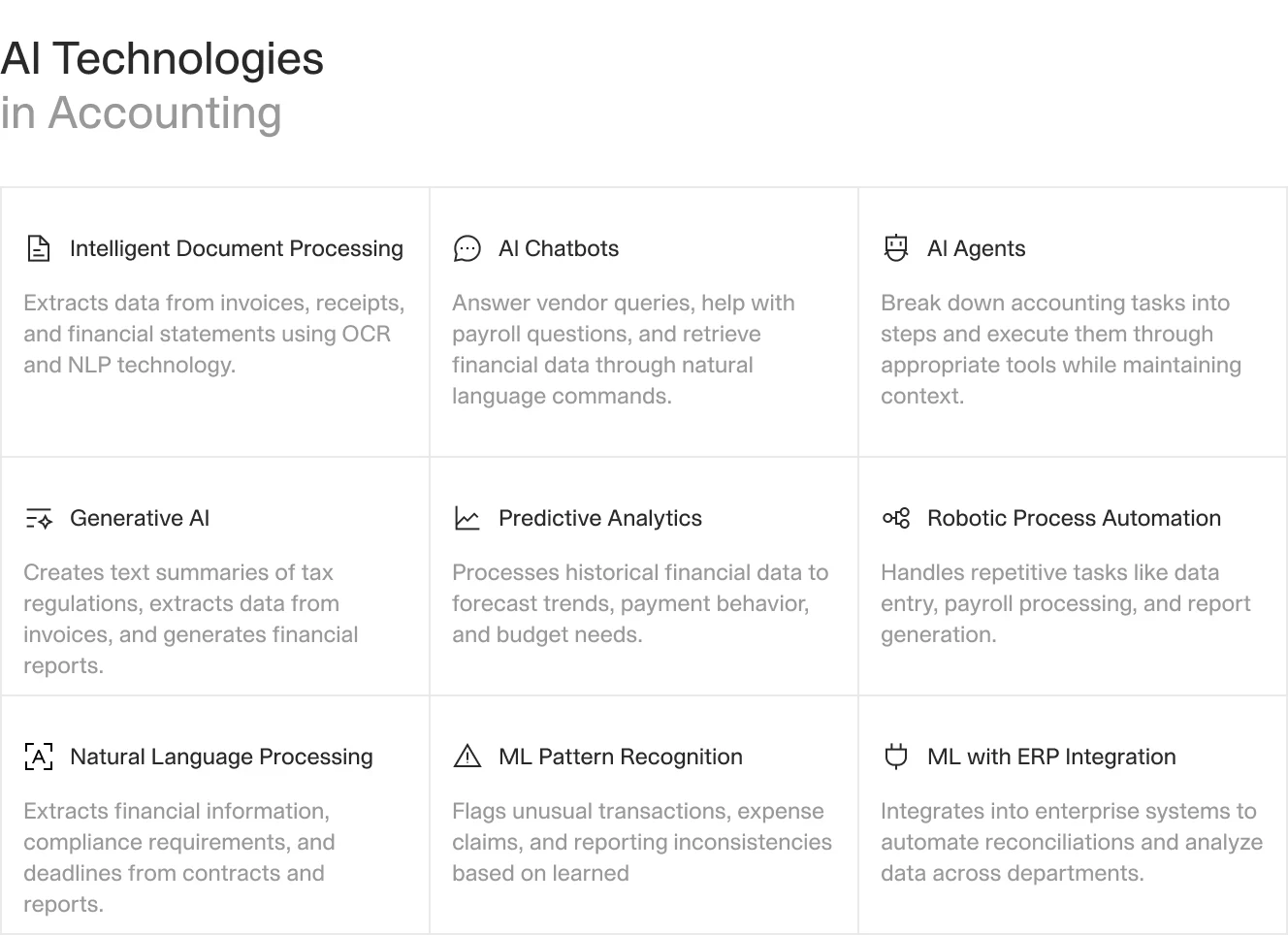
AI technologies in accounting and tax processing workflows.
Advanced Use Cases: Beyond Basic Extraction
With a tool selected, the value comes from the workflows you build on top of it. Once you have solved the basic extraction problem, modern AI tax document processing opens up high-value capabilities that go beyond simple data entry. Three patterns consistently pay off.
1. Multi-Jurisdiction Tax Rate Validation
One of the most time-consuming tasks for tax teams managing multi-state portfolios is validating that the tax rate applied on each bill matches the jurisdiction's published rate. This requires cross-referencing tax bills against county assessor websites, state tax databases, and historical records.
With an AI-enabled stack, this becomes a simple validation rule. V7 Go can ingest tax bills, extract the effective tax rate (tax amount divided by taxable value), and compare it against a Knowledge Hub containing jurisdiction-specific tax rates. Any discrepancies are flagged for review with full citations showing the source of both the bill rate and the reference rate.
In one pilot with a real estate investment firm managing 200+ properties across 15 states, this validation workflow caught 47,000 USD in overbilled taxes in the first quarter. These were errors that would have been missed in manual review because the bills "looked right" at a glance. The AI flagged them because the effective rate exceeded the statutory cap for the jurisdiction.
2. Automated Parcel Aggregation for Multi-Parcel Properties
Large commercial properties often have 5-20+ tax parcels, each with its own assessed value and tax bill. Manually aggregating these parcels is error-prone and time-consuming.
An AI Tax Due Diligence Agent can be configured to: extract parcel numbers from all tax bills associated with a property address; match parcels across assessor reports and tax bills (even when formatting differs); sum taxable values and tax amounts across all parcels; and flag any parcels that appear in historical records but are missing from current bills (indicating potential billing errors or exemptions).
This workflow is particularly valuable for properties undergoing ownership transitions, where parcel-level detail is critical for purchase price allocation and tax basis calculations.
Batch document processing workflow showing how V7 Go handles multiple documents simultaneously. This applies directly to processing tax bills for multi-parcel properties.
3. Tax Projection Reconciliation for Acquisitions
In real estate acquisitions, brokers provide tax projections in offering memorandums (OMs) based on historical data and market assumptions. Buyers need to validate these projections against actual tax bills and assessor data to avoid overpaying.
This is a prime use case for intelligent document processing. An AI workflow can: extract tax projections from the OM (often buried in footnotes or appendices); pull actual tax data from county assessor websites; calculate variance between projected and actual tax amounts; and flag properties where variance exceeds a threshold (for example, greater than 10%) for deeper due diligence.
One Vice President of Acquisitions described the priority this way: "Watch out: OM includes tax projections which I don't want to use instead of assessor's data. We can apply filters upstream to select documents by type for extraction." The AI can be configured to prioritize tax data from assessor documents first, then fall back to OM projections only when assessor data is unavailable.
Implementation Guide: What to Expect
Implementing AI tax document processing is not a flip-the-switch event. It requires planning, data preparation, and change management. Here is what a typical implementation looks like, including the acceptance criteria and QA protocols that separate successful deployments from abandoned pilots.
Phase 1: Scoping and Data Audit (2-4 weeks)
Before selecting a vendor, conduct an internal audit of your tax document landscape:
Document Volume: How many tax documents do you process per month, quarter, and year?
Document Variety: How many different jurisdictions, document types, and formats?
Current Workflow: Map the existing manual process (see "The Manual Workflow" section above)
Integration Requirements: What systems need to receive the extracted data (ERP, property management system, data warehouse)?
This audit determines whether you need a simple template-based tool (like Parseur) or a more sophisticated AI platform (like V7 Go or Rossum).
Phase 2: Pilot Implementation (4-8 weeks)
Start with a pilot covering a subset of your portfolio (for example, one state or one property type). This allows you to test extraction accuracy on real documents, identify edge cases and document variations, train your team on the new workflow, and measure time savings and error reduction.
For V7 Go implementations, this phase typically involves: configuring the Tax Bill Extraction Agent with your specific field requirements; uploading sample documents to validate visual grounding and confirm each field's citation to source text; setting up Knowledge Hubs with jurisdiction-specific tax rates and property records; and defining validation rules and exception routing workflows.
Acceptance Criteria for Pilot: Define specific, measurable thresholds before starting. For example: APN extraction accuracy must exceed 98% on clean scans; total tax amount must match bill within plus or minus 1%; parcel count must match historical records for 95% of properties; and extraction confidence scores below 85% must route to human review. These criteria prevent the pilot from becoming an endless optimization exercise.
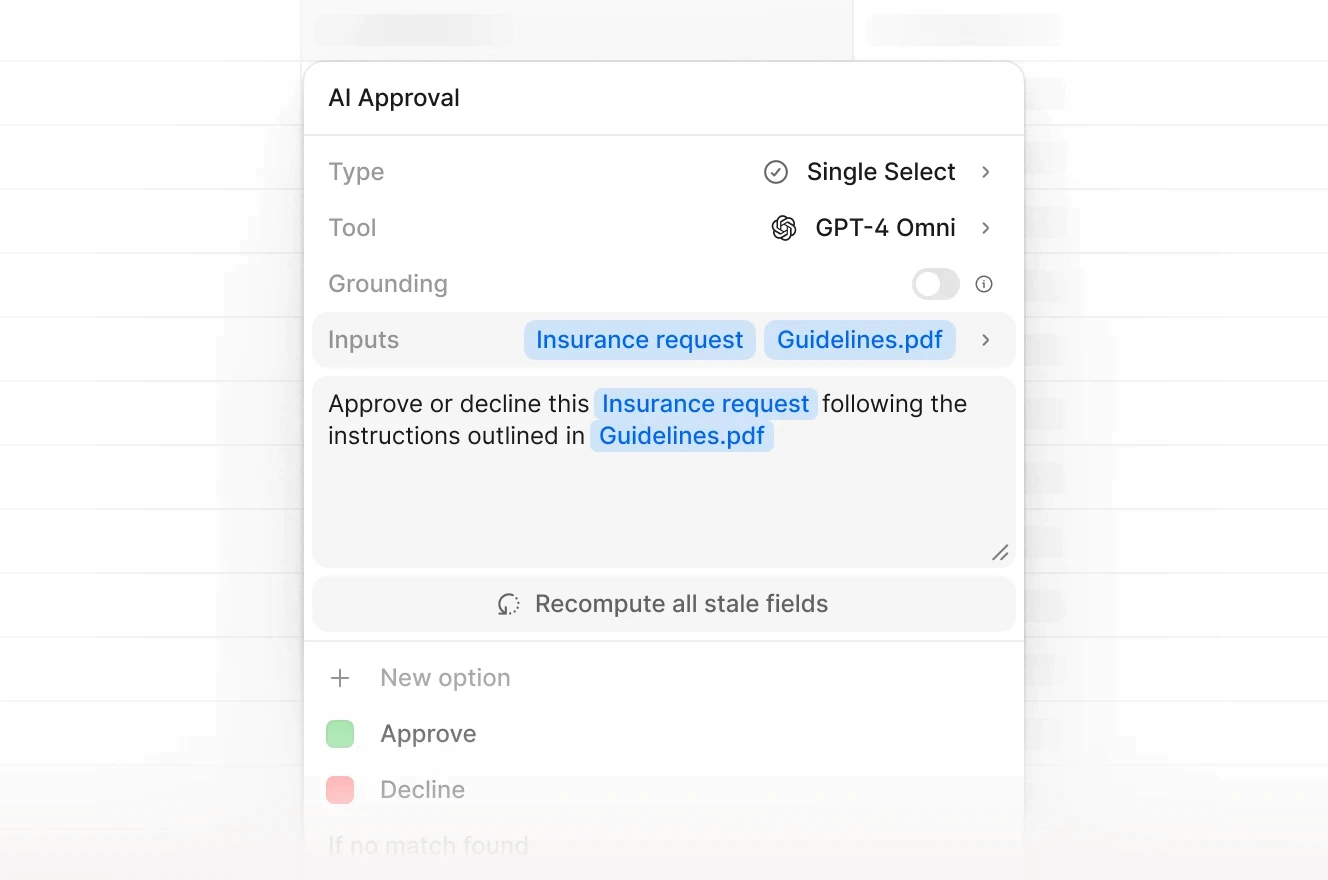
AI agent approval workflow showing validation and routing logic. Similar exception handling applies to tax document review.
Phase 3: Full Rollout (8-12 weeks)
Once the pilot validates your acceptance criteria, expand to your full portfolio. Key considerations:
Change Management: Tax analysts may be skeptical of AI. Emphasize that the tool augments their work (eliminating data entry) rather than replacing their expertise (validation and exception handling).
QA Sampling Plan: Implement a sampling protocol where a senior analyst spot-checks extracted data. For the first 2 months, review 20% of all extractions. After accuracy stabilizes, reduce to 5-10% ongoing. Track error rates by document type and jurisdiction to identify problem areas.
Continuous Improvement: Use feedback from QA reviews to refine agent configurations and add new validation rules.
Phase 4: Optimization and Expansion (Ongoing)
After 3-6 months of production use, you will have enough data to optimize:
Accuracy Metrics: Track field-level accuracy rates and identify problem areas (for example, "Parcel number extraction is 95% accurate, but tax amount extraction is only 85%").
Workflow Efficiency: Measure time savings per document and identify remaining manual bottlenecks.
Expansion Opportunities: Apply the same AI workflows to related documents (property insurance certificates, utility bills, CAM reconciliations).
The most significant gains come from firms that expand AI automation beyond tax processing to adjacent workflows. A platform like V7 Go can handle property operating statements, rent rolls, and due diligence documents using the same agent infrastructure.
Error Handling Playbook
Even the best AI will encounter documents it cannot process reliably. Build an error-handling playbook before you go live:
Parcel count mismatch: When extracted parcel count differs from last year's records, route to human review with both counts displayed. Possible causes: parcel split, parcel merger, or extraction error.
Missing parcels: When a parcel from historical records does not appear in current bills, flag for investigation. Possible causes: exemption granted, billing error, or document not uploaded.
Scanned bills below OCR threshold: When OCR confidence falls below 70%, re-scan the original document at higher resolution or request a cleaner copy from the county.
Assessor vs. treasurer amount divergence: When assessed value implies a different tax amount than the actual bill, calculate the effective rate and compare to jurisdiction norms. Divergence may indicate timing differences, exemptions applied after assessment, or supplemental bills.
The Future of Tax Document Processing: From Extraction to Intelligence
The next frontier in tax document processing is not better OCR. It is contextual intelligence. The most advanced firms are moving beyond simple data extraction to AI agents that provide decision support and proactive insights.
Predictive Tax Accruals
Instead of waiting for tax bills to arrive, AI agents can predict tax amounts based on historical data, assessed value changes, and jurisdiction-specific rate trends. This allows finance teams to accrue taxes more accurately throughout the year, reducing quarter-end surprises.
For example, if a property's assessed value increased 8% in the latest assessor report, an AI agent can calculate the expected tax increase (factoring in rate caps, exemptions, and historical billing patterns) and flag properties where the actual bill deviates significantly from the prediction.
Tax Optimization Recommendations
AI agents with access to jurisdiction-specific tax rules can identify optimization opportunities that human analysts might miss:
Properties eligible for exemptions (homestead, agricultural, historic preservation) that are not currently claimed
Jurisdictions where filing an appeal is statistically likely to succeed based on comparable properties
Timing opportunities for property transfers to minimize transfer taxes
This shifts the tax team's role from data entry and reconciliation to strategic tax planning, a much higher-value use of their time.
Integration with Broader Financial Workflows
The most sophisticated implementations integrate tax document processing with broader financial workflows:
Budgeting and Forecasting: Extracted tax data feeds directly into annual budget models, with AI-generated variance explanations when actuals differ from budget.
Investor Reporting: Tax data is automatically aggregated and formatted for quarterly investor reports, with drill-down capabilities to source documents.
Audit Preparation: All extracted data includes citations back to source documents, creating audit-ready documentation with zero manual effort.
Building an AI agent from start to finish. This demonstrates the configuration process for custom tax processing workflows.
What Changes on Monday Morning
If you implement AI tax document processing correctly, here is what changes for your team:
For Tax Analysts: Instead of spending 60% of their time on data entry and 40% on analysis, they spend 10% on data validation and 90% on exception handling, tax planning, and strategic projects. The work becomes more interesting and higher-value. One Director of Finance put it simply: "We do it once. Then the AI handles it going forward."
For Controllers: Month-end close accelerates by 2-5 days because tax accruals are ready on day 1 instead of day 5. Audit preparation becomes trivial because every number has a citation back to the source document.
For CFOs: Tax forecasting becomes more accurate because AI agents can predict tax amounts based on assessed value changes before bills arrive. Budget variance explanations are automated, freeing up time for strategic decision-making.
The competitive advantage does not come from having the same software as everyone else. It comes from information advantage: the ability to process, validate, and act on tax data faster and more accurately than your peers.
To see how you can automate the extraction and reconciliation of your tax documents, from assessor reports to tax bills to broker pro formas, book a demo with V7 Go.
What is the difference between OCR and AI document processing for tax documents?
<p>Traditional OCR (Optical Character Recognition) reads text from scanned documents and outputs raw text. It works well for clean, printed documents with consistent layouts. AI document processing goes further by using LLMs and visual grounding to understand context, handle variable formats, and extract structured data even from poor-quality scans or handwritten notes. For tax documents, this means AI can extract "taxable value" even when the label is "assessed value" or "full cash value" depending on the jurisdiction.</p>
+
Can AI fully automate tax document processing?
<p>No, and you should be wary of anyone claiming it can. AI automates the <em>extraction</em>, <em>classification</em>, and <em>initial validation</em> of tax data. It removes the manual friction of data entry and basic reconciliation. However, exception handling (for example, investigating why a tax bill is 20% higher than expected), strategic decisions (for example, whether to file an appeal), and final approval remain human tasks. The goal is to shift your team's time from low-value data entry to high-value analysis and decision-making.</p>
+
How accurate is AI extraction for tax documents?
<p>Accuracy varies by document quality and AI platform. For clean, printed tax bills with consistent layouts, modern AI platforms (like V7 Go, Rossum, or ABBYY) achieve 95-99% field-level accuracy. For variable-format documents (for example, assessor reports from different counties) or poor-quality scans, accuracy drops to 85-95%. The key is implementing validation workflows that flag low-confidence extractions for human review. With visual grounding, reviewers can quickly verify extracted data by seeing the exact source location in the document.</p>
+
What is the ROI of AI tax document processing?
<p>ROI depends on your document volume and current labor costs. A typical mid-sized real estate firm processing 500 tax documents per quarter might spend 200-300 hours of analyst time on manual data entry and reconciliation. At a fully-loaded cost of 75 USD/hour, that is 15,000 USD-22,500 USD per quarter in labor costs. AI automation can reduce this by 70-90%, yielding 40,000 USD-80,000 USD in annual savings. Additional benefits include faster month-end close (reducing opportunity cost), fewer errors (reducing audit risk), and better tax forecasting (reducing budget variance).</p>
+
How long does it take to implement AI tax document processing?
<p>Yes, provided the vendor meets strict enterprise security standards. Look for SOC 2 Type II certification (annual third-party audit of security controls), ISO 27001 certification (international information security standard), and GDPR/CCPA compliance. Enterprise-grade platforms like V7 Go include encryption in transit (TLS 1.3) and at rest (AES-256), role-based access controls, and audit logging. Vendors often provide regional data hosting options; confirm this during security review if your firm has specific data residency requirements.</p>
+
Is it safe to put sensitive tax data into cloud-based AI software?
Go is more accurate and robust than calling a model provider directly. By breaking down complex tasks into reasoning steps with Index Knowledge, Go enables LLMs to query your data more accurately than an out of the box API call. Combining this with conditional logic, which can route high sensitivity data to a human review, Go builds robustness into your AI powered workflows.