39 min read
—


From calendar management to due diligence automation, here are the AI agent implementations that are actually delivering results in finance, legal, insurance, and operations.

Casimir Rajnerowicz
Content Creator
V7 Go
A smarter way to manage due diligence and underwriting
If you search for "AI agents" today, you will find thousands of tutorials explaining what they are. You will find far fewer examples of people actually using them to get work done.
The gap between theory and practice is wide. Most AI agent demos show a chatbot answering questions or a script that sends an email. But the real question is: what happens when you point an agent at your actual work—the messy PDFs, the inconsistent data, the workflows that involve three different systems and two manual approval steps?
This article documents 21 real-world AI agent implementations that are working today. These are not hypothetical use cases but workflows that real people have built, tested, and deployed in finance, legal, insurance, real estate, and operations.
Some are simple. Some are complex. All of them solve a specific, high-value problem.
In this article:
Personal Productivity Agents: Calendar management, email triage, meeting prep, and daily admin automation
Finance & Investment Agents: CIM analysis, 10-Q processing, fund performance tracking, and due diligence workflows
Legal & Contract Agents: NDA review, lease abstraction, contract redlining, and compliance monitoring
Insurance & Underwriting Agents: Risk assessment, claims triage, policy analysis, and submission processing
Content & Research Agents: News aggregation, SEO optimization, job application automation, and investigative research
Operations & Workflow Agents: Invoice matching, receipt processing, code review, and data validation
The State of AI Agents in 2025
According to Gartner research, 40% of enterprise apps will integrate AI agents into their workflows by 2026. But planning and deploying are different things. The gap between intention and execution is where most AI projects fail.
The agents that succeed share three characteristics. First, they solve a narrow, well-defined problem. Second, they integrate with tools people already use. Third, they have clear success criteria that can be measured in hours saved or errors reduced.
The agents that fail try to do too much. They promise to "handle all your legal work" or "automate your entire finance function." They require users to change their workflows to fit the tool instead of the other way around. They produce outputs that still require extensive manual review, which defeats the purpose.
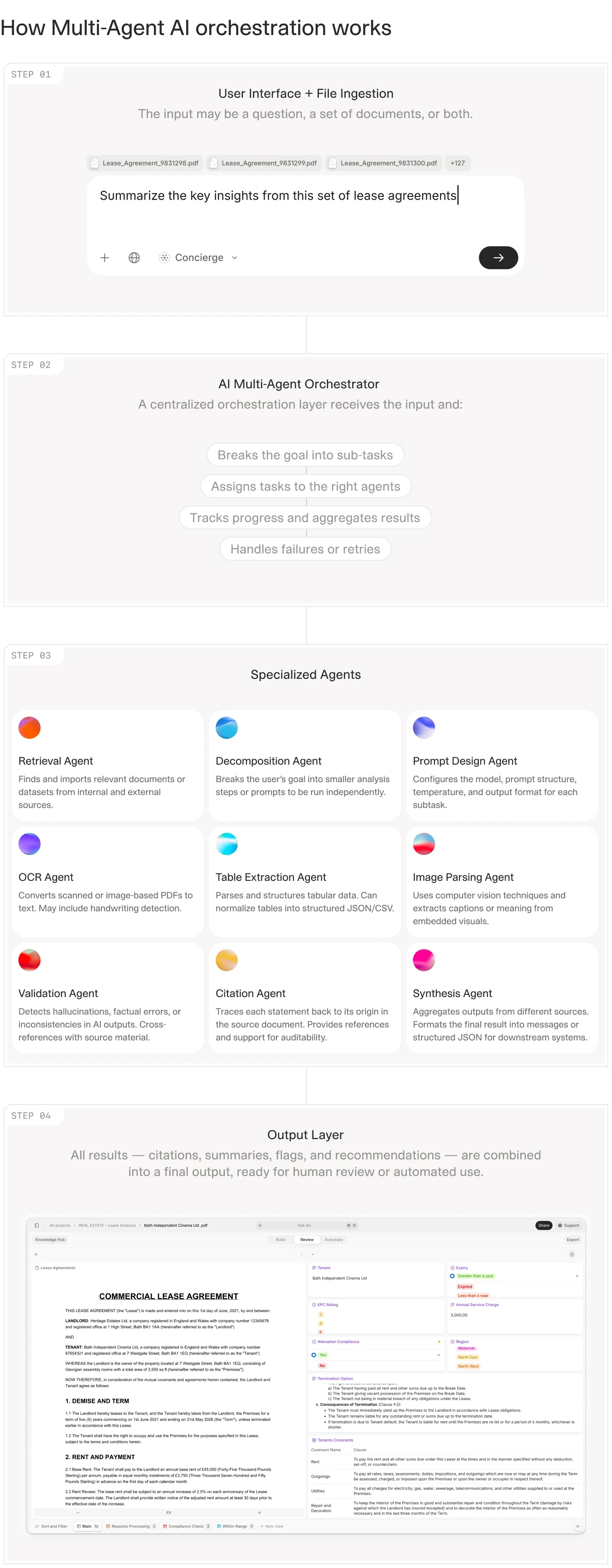
Modern AI agent architectures use specialized agents for specific tasks rather than building one generalist system.
What Makes an Agent Suitable for Real-World Scenarios
For this article, a real-world agent meets four criteria. First, it processes actual business documents or data, not demo files. Second, it runs on a regular schedule or in response to real triggers, not just when someone remembers to test it. Third, it produces outputs that people actually use to make decisions or take action. Fourth, someone is willing to put their name on it and say it works.
This eliminates most of what you see in tutorials. A script that summarizes a single PDF is not an agent. A chatbot that answers questions about a knowledge base is not an agent. An agent takes action. It extracts data, generates documents, triggers workflows, or makes decisions based on defined rules.
V7 Go's agent dashboard showing invoice processing, OCR extraction, and batch document analysis workflows.
The Three Categories of Working Agents
The agents documented in this article fall into three categories based on complexity and integration depth.
Category 1: Personal Productivity Agents handle individual workflows like email, calendar, and meeting prep. They typically integrate with Gmail, Outlook, Slack, and Telegram. They save 30-60 minutes per day through elimination of context switching and manual summarization.
Category 2: Document Processing Agents extract data from PDFs, images, and scanned documents. They handle invoices, contracts, financial statements, and insurance policies. Recent research demonstrates that integrating AI agents with IDP reduces end-to-end processing time by more than 80% in the evaluated enterprise workflow.
Category 3: Workflow Orchestration Agents coordinate multiple steps across different systems. They handle due diligence, underwriting, compliance monitoring, and portfolio reporting. They require the most setup but deliver the highest ROI by automating entire processes that previously required multiple people and several days.
Personal Productivity Agents
The most common AI agent implementations are personal productivity tools. These agents handle the administrative work that fills the gaps between meetings: reading emails, scheduling calls, preparing briefing documents, and tracking action items.
1. Calendar + Email + Docs Agent
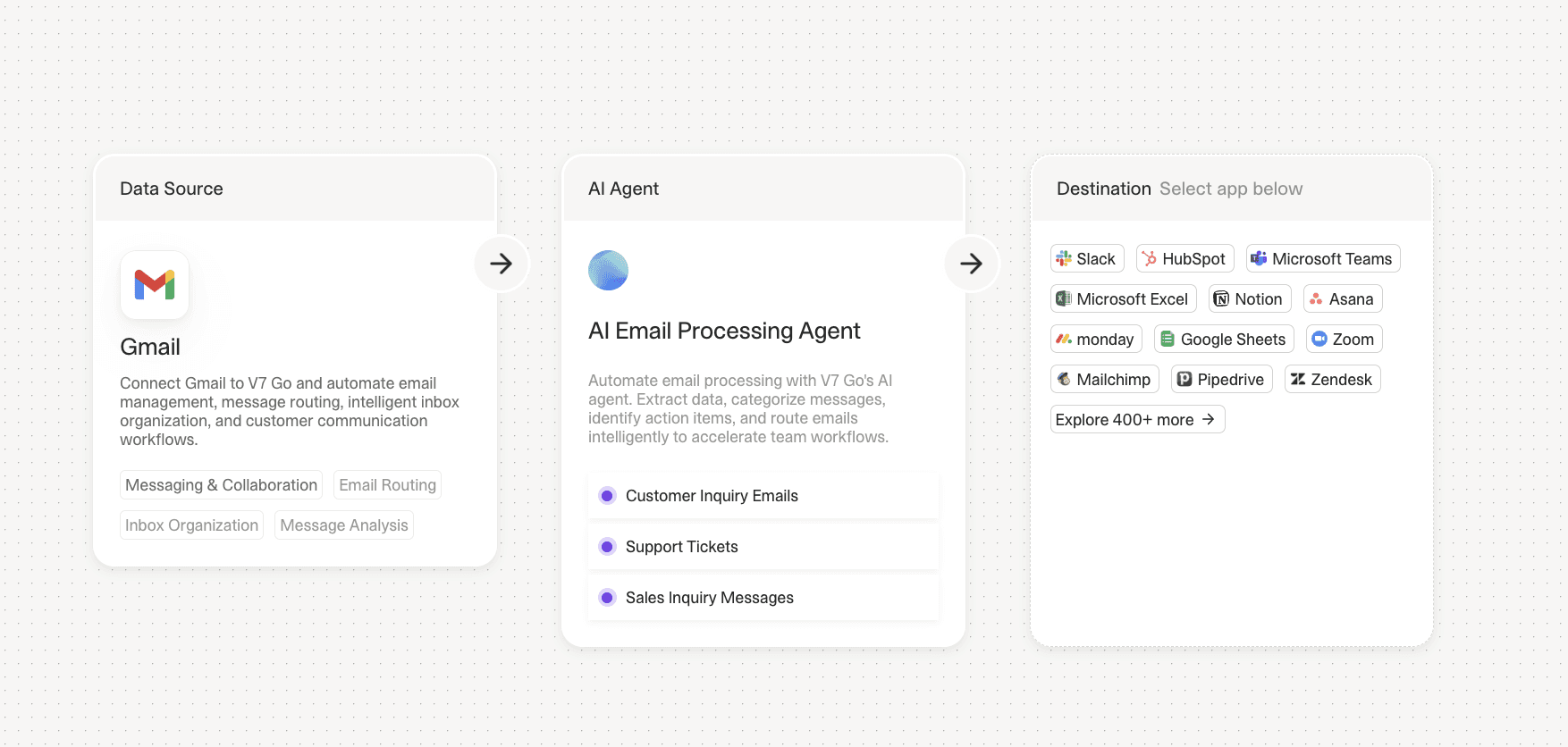
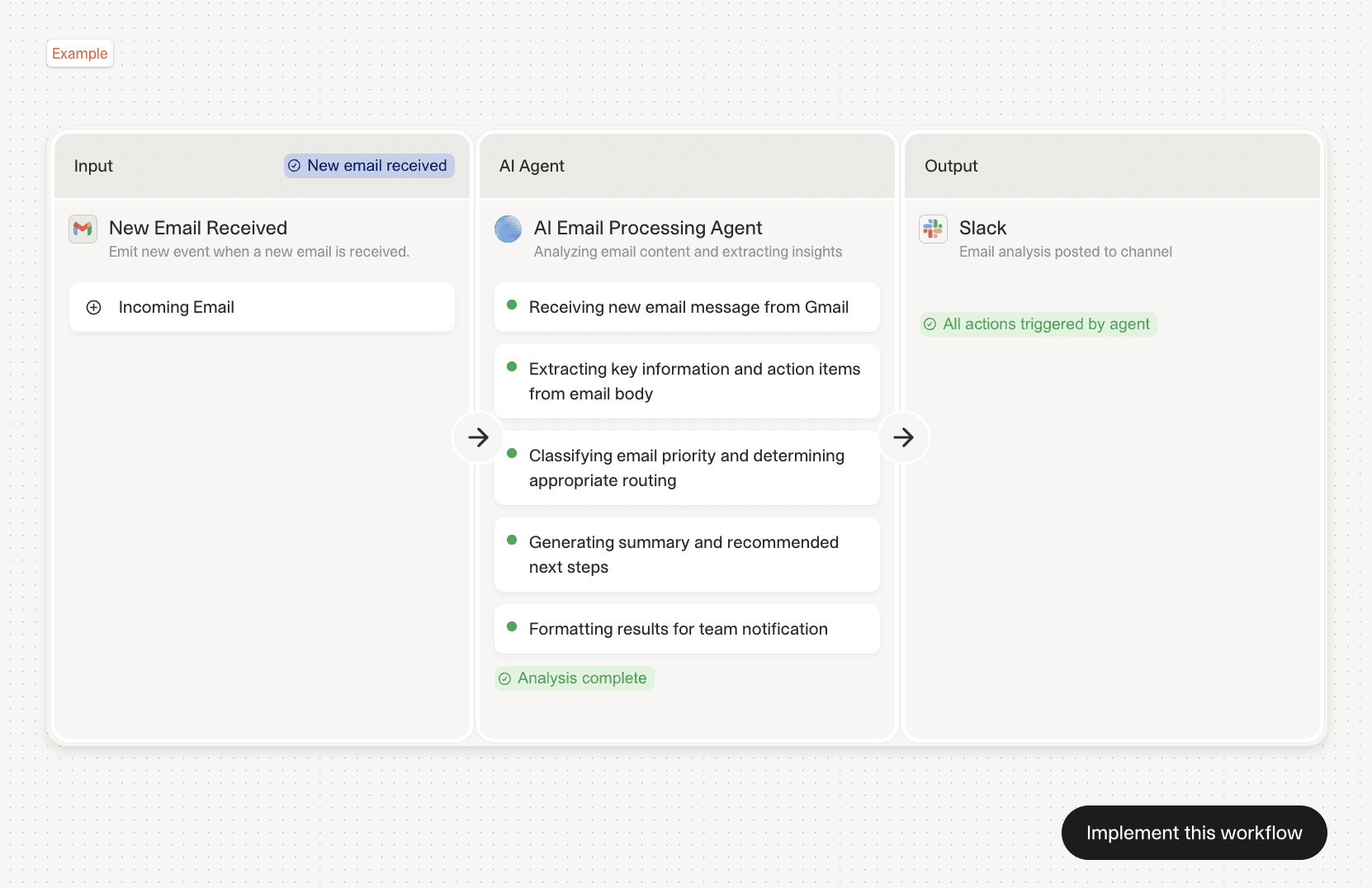
This agent connects to your email, calendar, and document storage to handle three tasks. First, it summarizes your inbox daily and flags messages that require action. Second, it books and reschedules meetings via email without manual calendar checking. Third, it prepares briefing documents before calls by pulling the last meeting notes, LinkedIn profiles, and recent email threads.
Implementing this agent could mean saving 60-120 minutes per day through elimination of context switching. The agent runs on a schedule, processing overnight emails before the workday starts. It uses natural language processing to identify action items and calendar conflicts, then drafts responses for review.
The technical implementation typically uses Gmail API, Google Calendar API, and a document storage connector (Google Drive or Notion). The agent uses an LLM to parse email content, extract meeting requests, and generate summaries. The key is setting clear rules for what constitutes an "action item" versus informational content.
Implementation specifics: The agent can maintains a database of past interactions to provide context when drafting responses. It tracks reply patterns and learns which types of emails require immediate responses versus which can wait. Acceptance criteria include 95% accuracy in flagging urgent emails and zero missed calendar conflicts. The agent logs all actions and provides a daily summary showing time saved and decisions made.
2. Meeting Intelligence Agent
This agent processes meeting recordings and transcripts to extract action items, decisions, and follow-up tasks. It integrates with Zoom, Google Meet, or Microsoft Teams to automatically capture audio, transcribe it, and generate structured outputs.
The agent identifies who committed to what by analyzing speaker attribution and verb tenses. It flags deadlines, assigns tasks to participants based on email addresses, and sends follow-up summaries within an hour after the meeting ends.
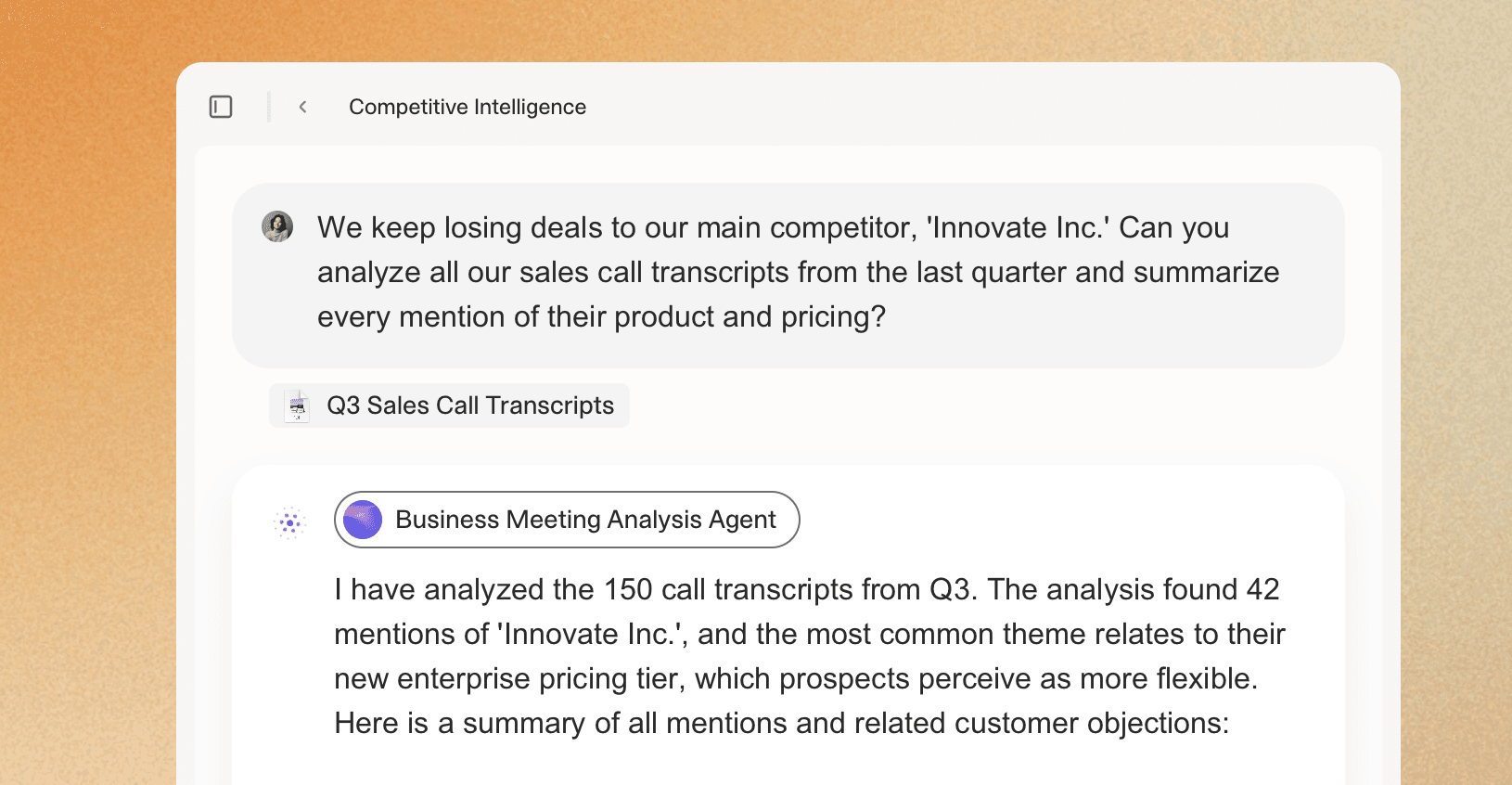
One implementation reported a 40% reduction in "what did we decide?" follow-up emails. The agent maintains a running log of decisions across multiple meetings, making it easy to track how a project evolved over time.
Technical architecture: The agent uses speaker diarization to separate speakers, then applies named entity recognition to identify people, dates, and deliverables. It cross-references calendar data to link action items to specific individuals. The system integrates with Asana, Linear, or Jira to automatically create tasks with due dates extracted from the transcript. Error handling includes flagging ambiguous commitments for human review and maintaining a confidence score for each extracted item. Users report 85-90% accuracy on action item extraction with minimal false positives.
3. Personal Assistant Agent (Telegram/WhatsApp)
Several users have built personal assistant agents that operate through messaging apps. These agents handle requests via text or voice messages, performing tasks like searching for news, planning trips, booking reservations, and managing to-do lists.
One implementation uses Telegram as the interface. The user sends a voice message asking for a summary of recent news about a specific company. The agent searches multiple sources, synthesizes the results, and returns a structured summary with links to original articles.
The agent also handles recurring tasks like daily briefings, weather updates, and calendar reminders. It uses a combination of web search APIs, calendar integrations, and task management tools (Todoist, Notion) to execute commands.
The key advantage is accessibility. Users can interact with the agent from their phone without opening multiple apps or switching contexts. The agent becomes a single interface for multiple backend systems.
Architecture details: The agent runs on a serverless platform (AWS Lambda or Google Cloud Functions) triggered by webhook calls from Telegram. It maintains conversation context using a simple state machine stored in Redis. The voice-to-text pipeline uses Whisper for transcription, then routes requests to specialized sub-agents based on intent classification. Response times average 3-5 seconds for text queries and 8-12 seconds for complex multi-source research. The system handles rate limiting and implements retry logic for failed API calls. Users report 92% satisfaction with response quality and cite the hands-free mobile interface as the primary value driver.











Finance & Investment Agents
Finance teams were early adopters of AI agents because their workflows involve high volumes of structured documents with clear extraction targets: revenue figures, EBITDA, covenant terms, and portfolio company metrics. The shift from spreadsheets to agents happens when document volume exceeds what a small team can process manually while maintaining quality.
4. CIM Triage & Due Diligence Agent
Private equity and venture capital firms receive hundreds of Confidential Information Memorandums (CIMs) each quarter. Reading each one takes 2-3 hours. An AI agent can triage them in minutes.
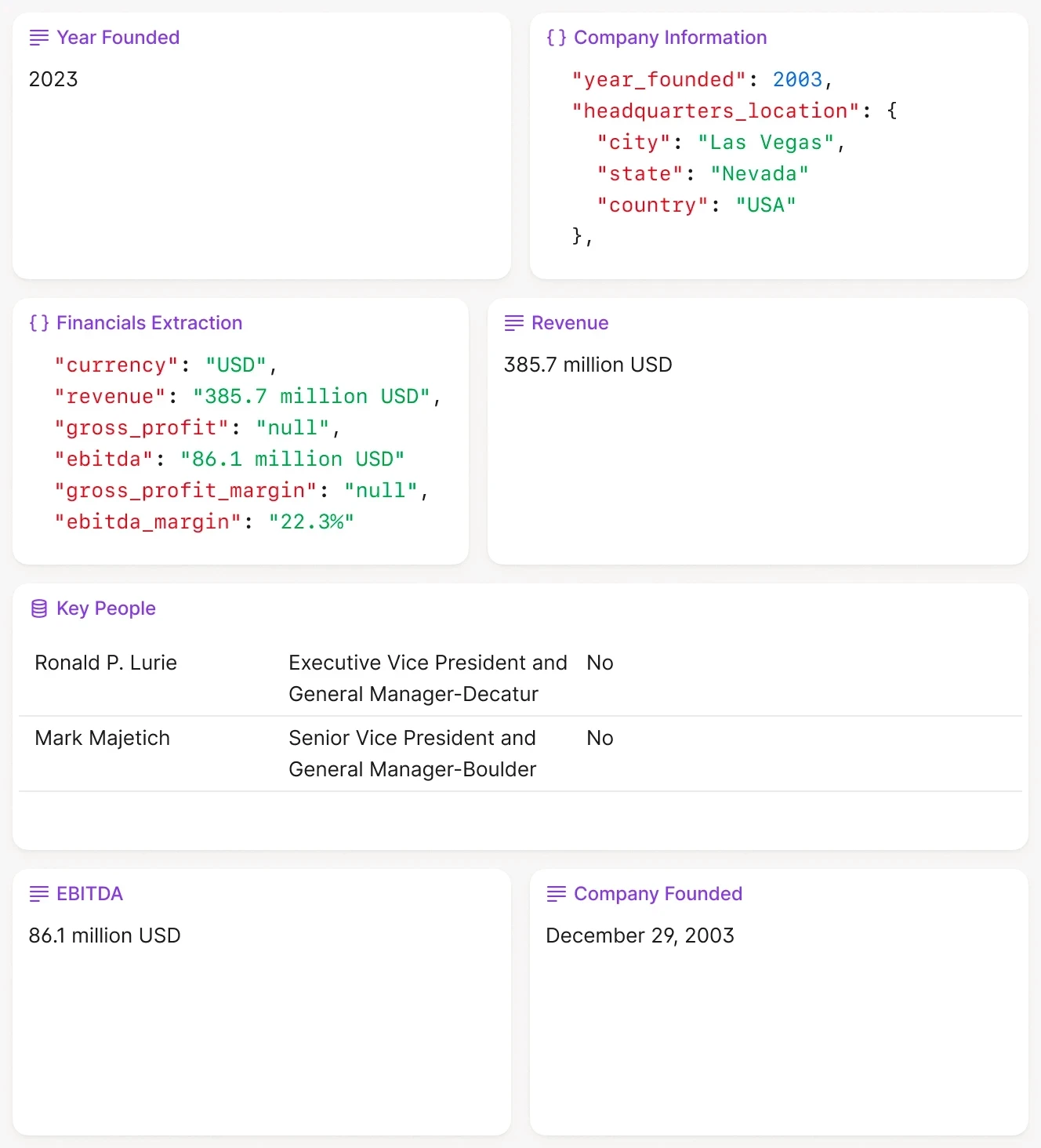
The agent reads the CIM, extracts key metrics (revenue, EBITDA, growth rate, industry, geography), compares them against the firm's investment criteria, and assigns a pass/fail/review score. For deals that pass the initial screen, the agent generates a one-page summary with the most relevant data points.
One firm reported reducing initial screening time from three days to a single afternoon. The agent processes 50 CIMs in parallel, extracting standardized fields and flagging inconsistencies (e.g., revenue growth claims that do not match the financial tables).
CIM due diligence workflow showing split-screen analysis with extracted company data and entity relationships.
The technical implementation uses intelligent document processing to handle the variety of CIM formats. The agent uses OCR for scanned PDFs, table extraction for financial statements, and LLMs for narrative sections. It outputs structured JSON that feeds directly into the firm's deal pipeline database.
Detailed workflow: The agent first classifies document sections (executive summary, financials, market analysis, management team) using layout analysis. For financial tables, it extracts rows and columns while preserving hierarchical relationships (e.g., Revenue → Product Lines → Geography). The agent compares stated growth rates against calculated figures from historical data tables and flags discrepancies above 5%. For qualitative sections, it identifies risk factors, competitive positioning claims, and customer concentration. The output includes confidence scores for each extracted field, with low-confidence items flagged for human review. Firms using this workflow report 40-50% time savings in initial deal screening and higher consistency in early-stage evaluation criteria.
5. 10-Q/10-K Financial Statement Analysis
Public company filings contain hundreds of pages of financial data, footnotes, and risk disclosures. An agent can extract the key figures, compare them to prior quarters, and flag material changes.
One implementation processes 10-Q filings in batch. The agent extracts revenue, net income, cash flow, and debt levels from the financial statements. It compares these figures to the previous quarter and the same quarter last year, calculating percentage changes. It also scans the MD&A section for risk factors and material events.
The output is a structured summary with the top five changes and a list of new risk disclosures. Analysts use this to prioritize which filings require deep review versus which can be skimmed.
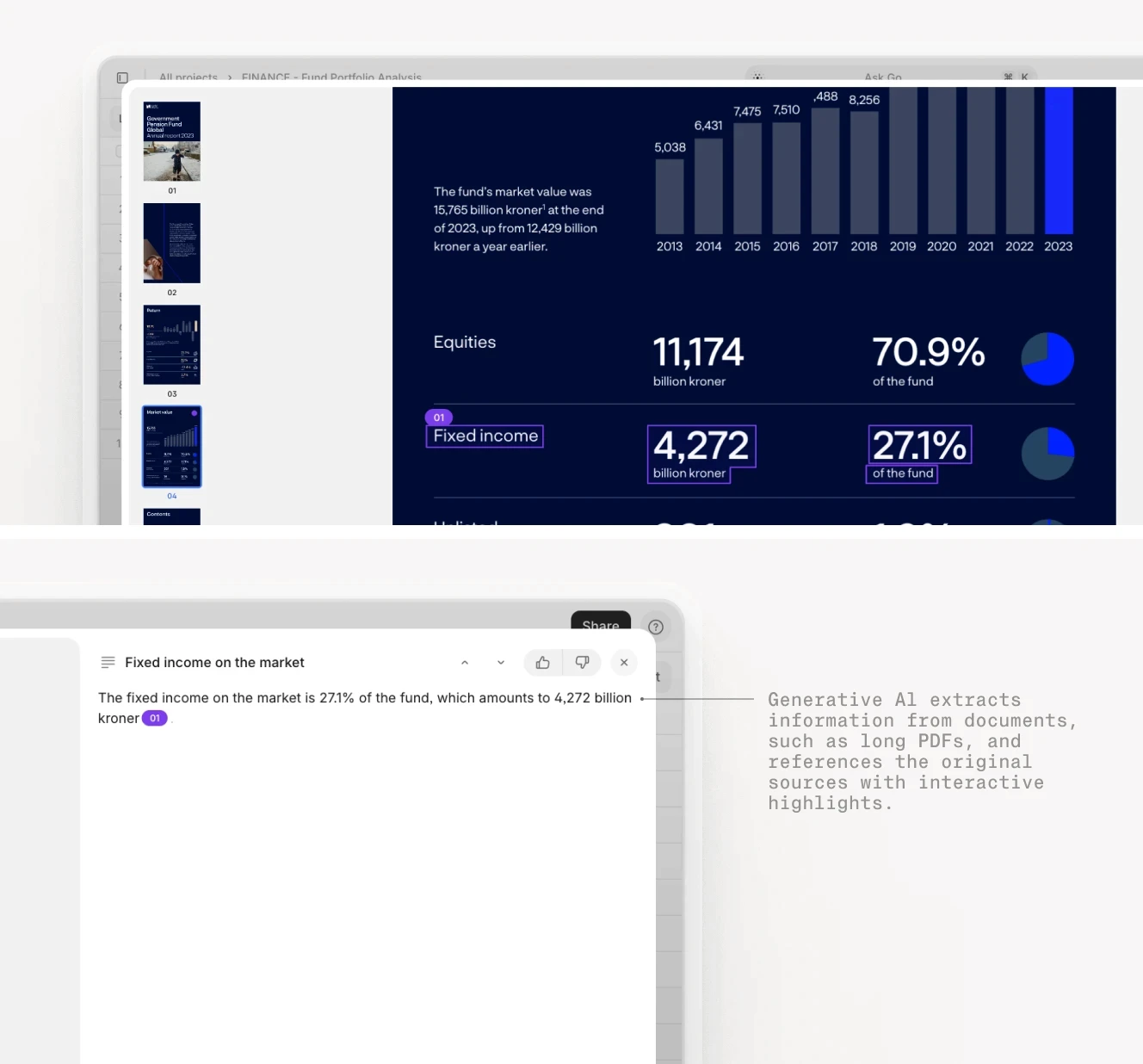
Financial statement analysis agents extract key metrics and provide source citations for every figure.
Technical implementation details: The agent uses XBRL tags when available to extract standardized financial metrics. For PDFs without XBRL, it uses table detection to identify the consolidated statements of income, balance sheet, and cash flow. The agent maintains a historical database of prior filings to enable quarter-over-quarter and year-over-year comparisons. For MD&A analysis, it uses semantic search to identify paragraphs discussing new risks, legal proceedings, or material changes in operations. The system flags significant movements (>10% change in key metrics) and provides page citations for every extracted figure. Acceptance criteria include 98% accuracy on financial statement extraction and zero missed material risk disclosures. Firms report processing 20-30 quarterly filings per day versus 3-5 manually.
6. Fund Performance Reporting Agent
Asset managers spend significant time each quarter compiling performance reports for investors. An agent can automate most of this process by pulling data from portfolio management systems, calculating returns, and generating narrative summaries.
A possible implementation could connect to the firm's PMS (Addepar, eFront, or Allvue), extract position-level data, calculate fund-level IRR and MOIC, and generate a draft quarterly letter. The fund performance agent uses templates for the narrative sections, filling in performance figures, top contributors, and portfolio company updates.
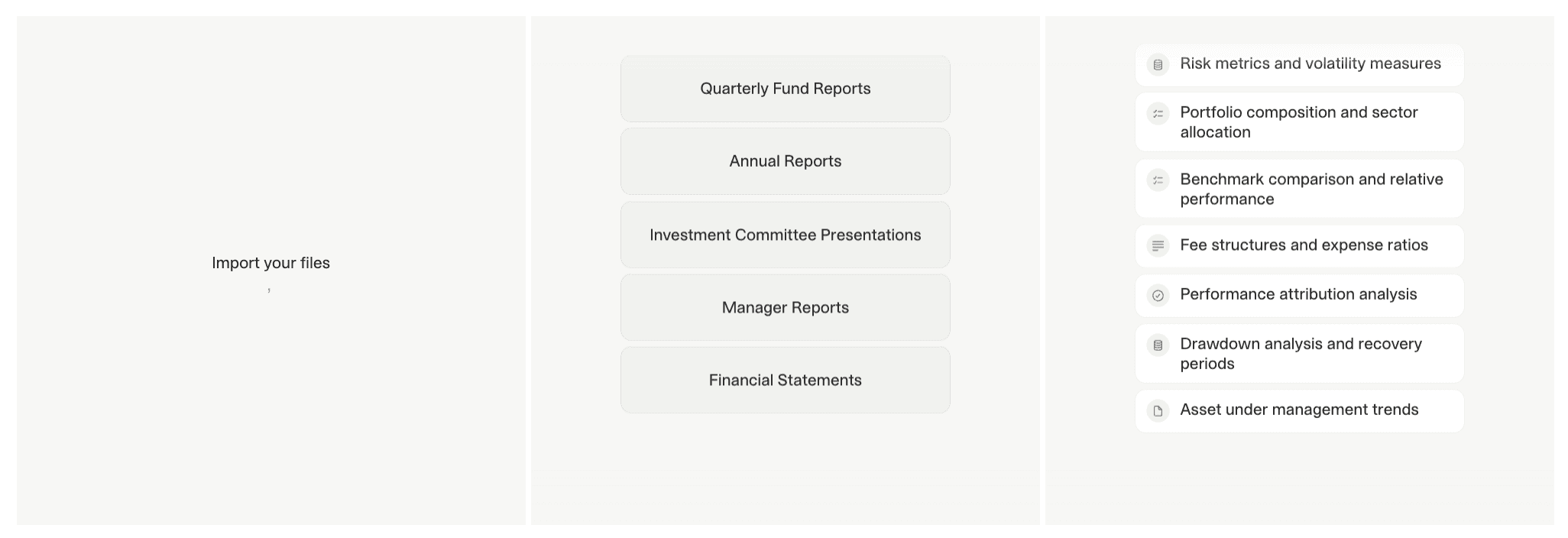
The agent also generates charts showing performance attribution, sector allocation, and geographic distribution. The output is a draft PowerPoint deck and a Word document that the investment team reviews and edits before sending to LPs.
This reduces report preparation time from two weeks to three days. The agent handles the data aggregation and formatting, allowing the team to focus on the narrative and strategic commentary.
Workflow specifics: The agent runs on a monthly trigger five days after month-end close. It queries the PMS API for all transactions, positions, and valuations for the reporting period. It calculates net IRR using the XIRR formula and handles distributions, capital calls, and recallable capital correctly. For performance attribution, the agent groups companies by sector and vintage year, then calculates contribution to total return. The narrative generator uses a template library with conditional logic: if the fund had a down quarter, it inserts commentary on macro headwinds and portfolio resilience; if up, it highlights top performers and deployment pace. The agent drafts three versions (conservative, neutral, optimistic) and flags which one matches the quarter's actual performance. Investment teams report 60-70% reduction in manual data compilation and formatting time, with the agent handling all calculations and chart generation automatically.
7. Job Application Agent
One of Reddit users built an agent that monitors job boards (LinkedIn, Indeed) for positions matching their criteria, reads the job descriptions, ranks them based on fit, and generates tailored cover letters for high-scoring opportunities.
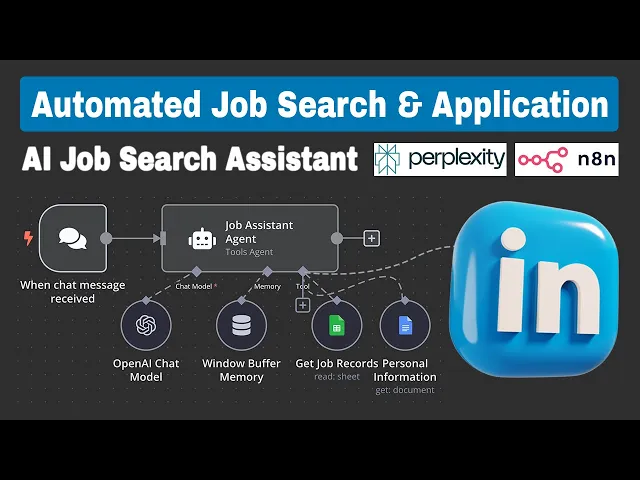
The agent uses RSS feeds and web scraping to collect new postings. It uses an LLM to analyze the job description, extract required skills and experience, and compare them to the user's resume. It assigns a score based on keyword overlap and seniority level.
For jobs above a threshold score, the agent generates a cover letter using the user's background and the specific requirements mentioned in the posting. The user reviews the letter, makes edits, and submits the application.
This agent processed over 200 job postings in a month, identified 15 strong matches, and generated draft cover letters for each. The user reported that the agent saved approximately 10 hours of manual searching and application writing.
Technical details: The agent runs daily scans of target job boards, filtering by location, industry, and keywords. It uses TF-IDF scoring to compare job descriptions against a master profile of the user's skills and experience. The ranking algorithm weighs exact keyword matches, similar terminology (e.g., "Python" and "Django"), and seniority indicators (junior/mid/senior/principal). For cover letter generation, the agent uses a three-paragraph template: introduction with job title and company name, body paragraph highlighting 2-3 relevant experiences that match the job requirements, and closing paragraph expressing interest. The agent extracts specific requirements from the job posting (e.g., "5+ years in SaaS sales") and references corresponding experiences from the user's resume. Users report a 30-40% increase in interview callbacks compared to generic cover letters, attributing this to the highly customized approach at scale.
Legal & Contract Agents
Legal teams deal with high volumes of contracts, each requiring careful review for specific clauses, risks, and deviations from standard terms. AI agents excel at this type of structured analysis. The transformation happens when legal departments realize they spend more time on routine contract review than on strategic legal work.
8. NDA Review & Redlining Agent
Non-disclosure agreements are one of the most common contracts in business, and they follow predictable patterns. An agent can review an NDA, flag non-standard terms, and suggest redlines in minutes.
One implementation reads the NDA, identifies the governing law, confidentiality term, and exclusions. It compares these to the company's standard playbook and flags any deviations. For example, if the NDA specifies a five-year confidentiality term when the standard is three years, the agent highlights this and suggests alternative language.
The agent also checks for missing clauses (e.g., return of confidential information, no solicitation) and generates a redlined version with tracked changes. The legal team reviews the output, approves or modifies the suggestions, and sends the redlined document to the counterparty.
NDA review workflow showing automated clause identification, risk flagging, and redline suggestions.
This reduces NDA review time from 30 minutes to 5 minutes. The agent handles the initial analysis, allowing attorneys to focus on negotiation strategy rather than clause-by-clause comparison.
Implementation specifics: The agent uses clause classification to identify standard NDA sections: definition of confidential information, permitted disclosures, term duration, return of materials, and remedies. It extracts key parameters (e.g., confidentiality period, governing law jurisdiction) and compares them against the company playbook stored as structured rules. For deviations, the agent generates specific redline suggestions using the company's preferred language. The system tracks negotiation history: if the same counterparty has previously agreed to three-year terms, the agent flags this precedent. Acceptance criteria include 100% detection of non-standard confidentiality terms and zero false negatives on missing critical clauses. Legal teams report 80% of NDAs are now processed without attorney involvement, with the remaining 20% requiring review only for unusual provisions or high-stakes deals.
9. AI Legal Research Agent
Legal teams spend significant time searching for precedents, reading lengthy opinions, and synthesizing arguments across multiple jurisdictions. An AI legal research agent automates the initial research phase by interpreting complex queries written in natural language and retrieving the most relevant cases, statutes, and regulatory materials. Instead of returning long lists of search hits, the agent produces structured summaries of the controlling law and identifies how these authorities apply to the user's specific question.
The agent reads case law, statutes, administrative codes, and internal firm memos to generate a synthesized view of the legal landscape. It identifies the key issues, extracts relevant passages from judicial opinions, and highlights the reasoning that courts rely on when ruling on similar matters. It also distinguishes between supporting and conflicting precedents and surfaces fact patterns that closely match the user’s scenario. Legal teams use this to accelerate drafting motions, preparing arguments, and validating the strength of a position early in the research process.
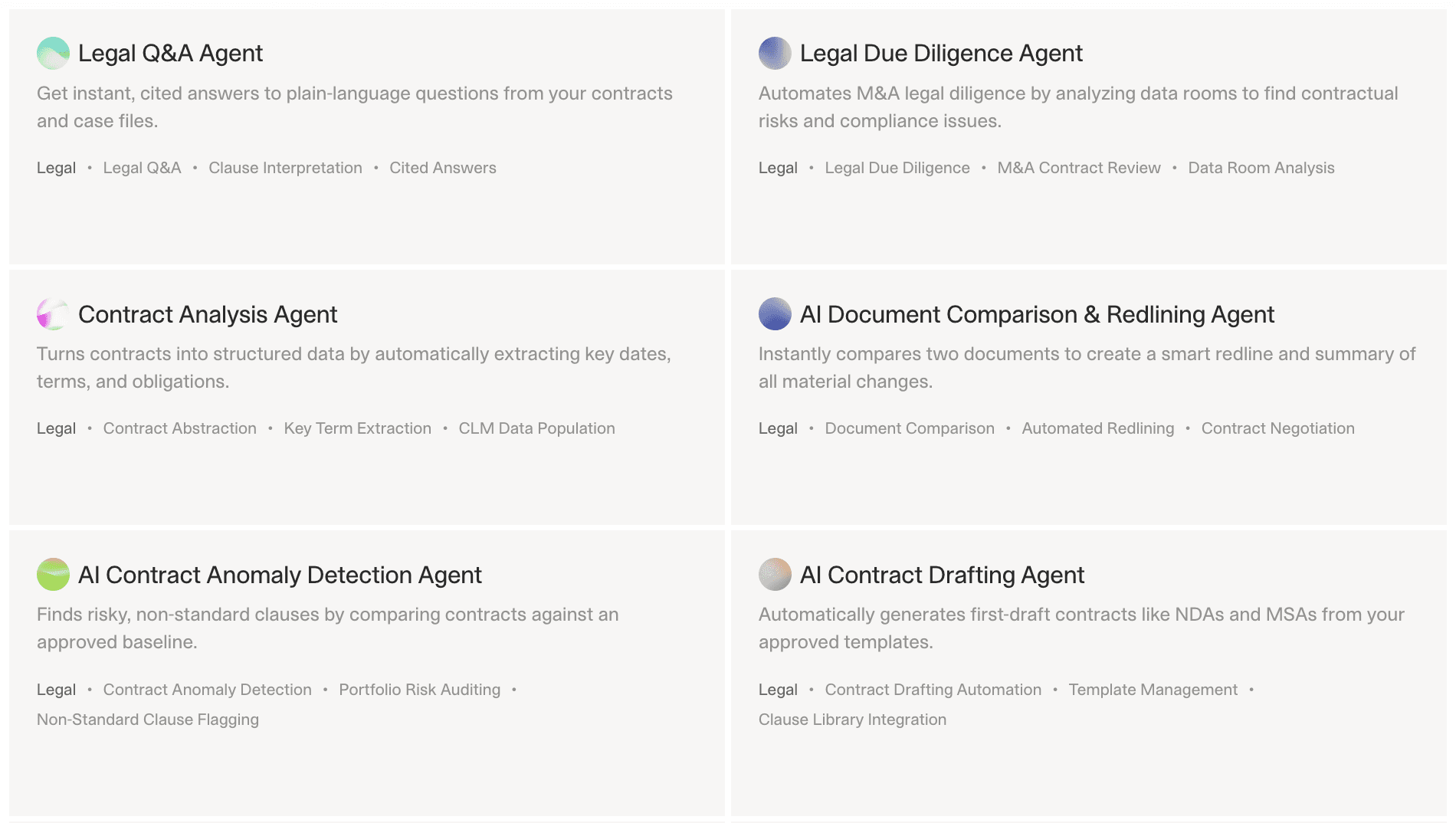
This reduces research time from hours to minutes. Attorneys shift their effort from locating cases to evaluating arguments, improving both efficiency and consistency. The agent becomes particularly valuable for rapidly evolving practice areas or when working across multiple jurisdictions.
Implementation details: The agent connects to legal research databases through existing firm subscriptions and uses semantic search to retrieve cases and statutes that align with the intent of the query rather than keyword overlap. It parses judicial opinions to extract the facts, issues, holdings, and reasoning, then links each summarized point directly to the original source text for verification. The agent compares retrieved authorities to the firm’s historical work product, identifying past arguments, briefs, and expert analyses that relate to the current matter. It presents a structured output that includes a synthesized argument summary, relevant supporting and contradictory precedent lists, statutory excerpts, and direct citations with pinpoint references. The system logs each query, tracks confidence scores, and flags low-certainty interpretations for attorney review. Legal teams report significant reductions in initial research time and improved consistency in how similar legal questions are approached across the firm.
10. Lease Abstraction Agent
Commercial real estate firms manage hundreds of leases, each with different terms for rent escalations, renewal options, and tenant responsibilities. An AI Real Estate Lease Abstraction & Analysis Agent can extract these terms and populate a structured database.
One implementation processes lease agreements in batch, extracting key dates (commencement, expiration, renewal options), financial terms (base rent, CAM charges, rent escalations), and special provisions (early termination, expansion rights). The agent outputs a standardized lease abstract that feeds into the property management system.

This eliminates the need for paralegals to manually read and abstract each lease. The agent processes 50 leases in the time it would take a person to abstract five. The accuracy rate is 95% for standard clauses, with human review required for non-standard provisions.
Detailed workflow: The agent first identifies the lease type (gross, net, triple-net) based on expense allocation language. It extracts all monetary values and categorizes them (base rent, CAM, taxes, insurance, utilities). For rent escalations, it identifies the escalation method (fixed percentage, CPI-indexed, fair market value) and calculates projected rent over the lease term. The agent maps renewal options including notice periods, rent adjustment mechanisms, and number of option periods. For special provisions, it uses keyword extraction combined with contextual understanding to flag unusual clauses like co-tenancy requirements, exclusive use provisions, or kick-out clauses. The output includes a standardized abstract in Excel format plus flagged items requiring attorney review. Property management teams report 70% reduction in lease administration time and improved accuracy in rent roll reporting.
11. Contract Repository Analysis Agent
Many companies have thousands of contracts stored in shared drives with no centralized tracking. An agent can scan the repository, classify contracts by type, extract key terms, and build a searchable database.
One implementation crawled a SharePoint folder containing 3,000 contracts. The agent classified each document (NDA, MSA, SOW, purchase agreement), extracted parties, effective dates, and termination clauses, and flagged contracts approaching renewal or expiration.
The output was a master spreadsheet with contract metadata and risk flags. The legal team used this to identify contracts that needed renegotiation and to ensure compliance with data retention policies.
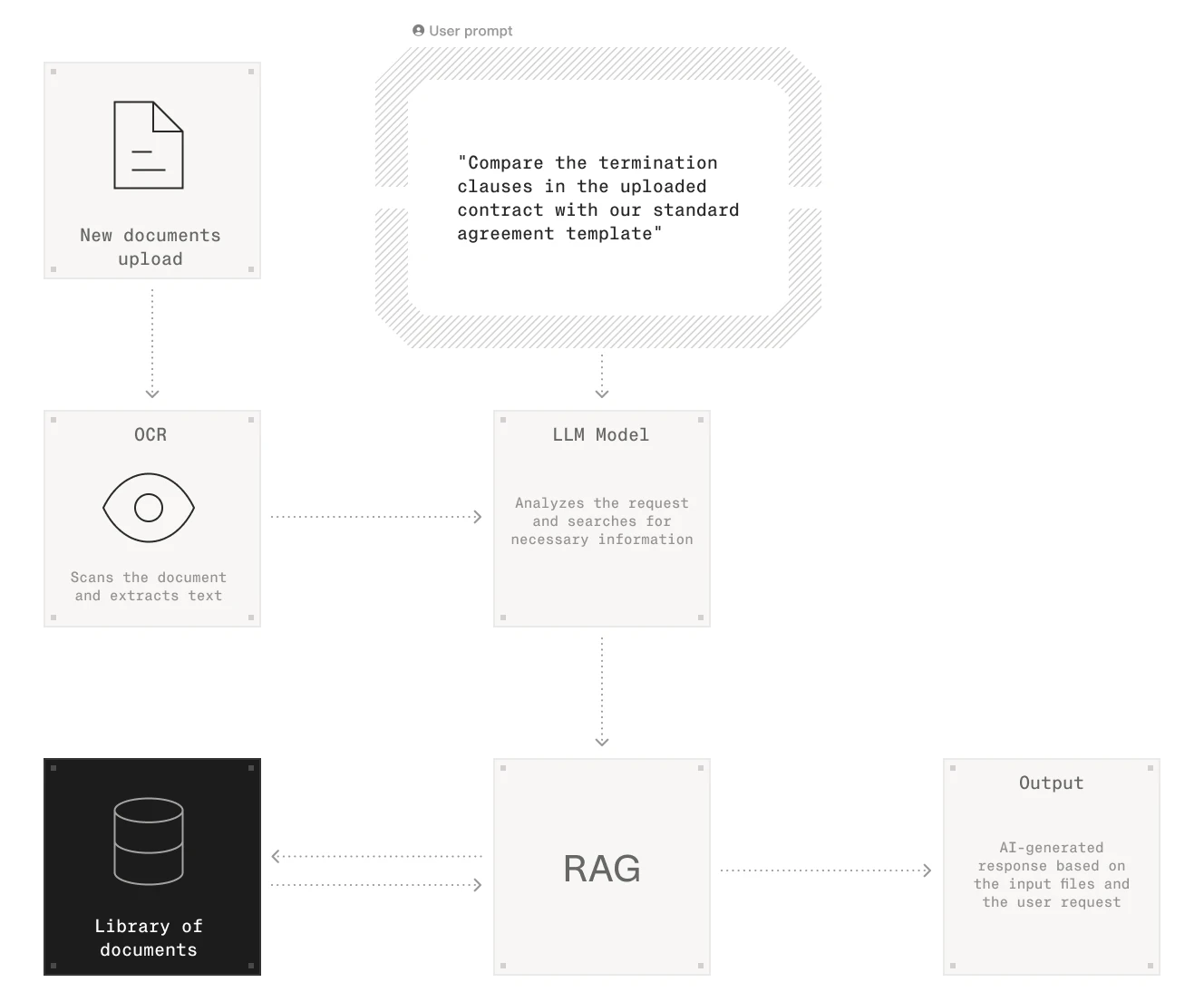
Contract repository analysis agents scan large document sets to extract metadata and identify risks.
Technical implementation: The agent uses document classification to categorize each file. It extracts party names using named entity recognition, then validates them against a known list of vendors and customers. For dates, it identifies effective date, expiration date, and any renewal deadlines, then calculates days until expiration. The agent scans for automatic renewal clauses and flags contracts that require notice 60-90 days before renewal. For termination provisions, it identifies termination for cause, termination for convenience, and notice periods. The system creates a database with full-text search capability across all extracted terms. Legal teams report discovering hundreds of forgotten contracts, identifying $500K+ in annual spend with expired agreements that were auto-renewing at unfavorable rates, and building a complete contract inventory for the first time. The agent runs quarterly to catch new contracts added to shared drives.
Insurance & Underwriting Agents
Insurance workflows involve processing submissions, policies, and claims—all of which follow structured formats but vary in complexity. AI agents can handle the initial triage and data extraction, allowing underwriters to focus on risk assessment. The business case emerges when submission volume exceeds underwriter capacity during busy seasons.
12. Underwriting Submission Triage Agent
Insurance brokers submit hundreds of applications each week. An agent can read the submission, extract key risk factors (industry, revenue, loss history), and route it to the appropriate underwriter.
One implementation processes email submissions with attached PDFs. The agent extracts the applicant's name, industry, coverage requested, and prior claims. It compares these to underwriting guidelines and assigns a risk tier (preferred, standard, declined). For standard risks, it routes the submission to the underwriter's queue. For declined risks, it generates an automated response explaining why the application does not meet guidelines.
This reduces submission processing time from 24 hours to 2 hours. The agent handles the initial triage, allowing underwriters to focus on evaluating risks rather than sorting emails.
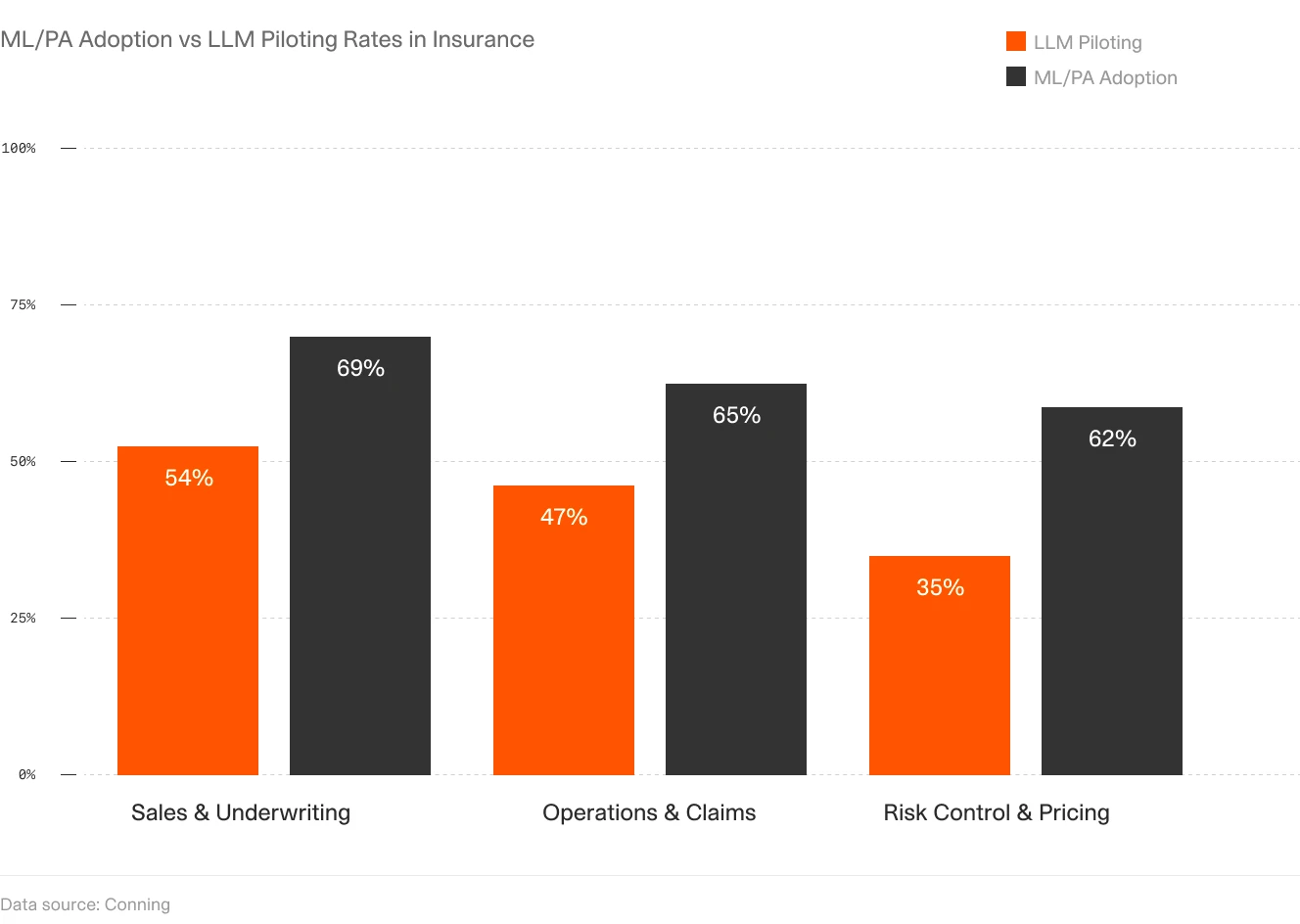
Implementation details: The agent monitors a dedicated submission inbox and triggers on new emails with PDF attachments. It uses OCR to extract text from broker submissions, then identifies key fields: named insured, business description (mapped to SIC/NAICS codes), revenue, employee count, desired coverage limits, and loss runs. The agent compares extracted data against underwriting appetite rules stored as decision trees: e.g., "Decline if industry = nightclub OR revenue > $50M OR loss ratio > 75% in past 3 years." For submissions that pass initial filters, the agent calculates a priority score based on premium potential and broker relationship. It automatically assigns submissions to underwriters based on current workload and specialization. For declined submissions, it generates a templated email citing specific guideline violations. Underwriting teams report processing 3x more submissions during peak season without adding staff, and broker satisfaction improved due to faster initial responses.
13. Risk Engineering Report Analysis Agent
Property insurance underwriting often requires risk engineering reports that assess fire protection, building construction, and loss prevention measures. An agent can read these reports and extract the key findings.
One implementation processes risk engineering PDFs, extracting the Estimated Maximum Loss (EML), identified hazards, and recommended mitigations. The agent flags high-risk findings (e.g., inadequate sprinkler coverage, combustible storage) and provides citations to the specific pages where these issues are mentioned.
Risk engineering agent calculating EML and extracting mitigation recommendations with source citations.
The output is a structured summary that underwriters use to make coverage decisions. The agent reduces report review time from 45 minutes to 10 minutes, allowing underwriters to process more submissions per day.
Technical workflow: The agent uses document structure analysis to identify standard report sections: property overview, construction details, fire protection systems, exposures, and recommendations. For EML calculation, it extracts the stated figure and validates it against the property's total insured value (TIV). The agent identifies fire protection features (sprinkler type, pump capacity, detection systems) and compares them to protection class standards. For hazard identification, it scans for keywords like "impaired protection," "combustible storage," "lack of separation," and "vacant building." Each identified hazard is extracted with its page number, severity rating, and recommended mitigation. The agent calculates an overall risk score based on the number and severity of identified issues. For recommendations, it categorizes them by time frame (immediate, 60 days, 90 days) and tracks whether the insured has completed required improvements. Underwriters report that the agent catches 95% of critical risk factors and enables them to review twice as many engineering reports per day with better consistency in risk selection.
14. Claims Intake & Triage Agent
Insurance claims arrive via email, web forms, and phone calls. An agent can standardize the intake process by extracting claim details and routing them to the appropriate adjuster.
One implementation processes email claims with attached photos and police reports. The agent extracts the policy number, date of loss, type of damage, and estimated loss amount. It checks the policy for coverage and deductibles, then routes the claim to the adjuster's queue with a pre-filled claim form.
This eliminates manual data entry and reduces claim processing time from 48 hours to 4 hours. The agent handles the administrative work, allowing adjusters to focus on investigating and settling claims.
Implementation specifics: The agent monitors claims@company.com and processes incoming emails. It extracts structured data: policy number, insured name, date of loss, loss location, peril (fire, water, wind, theft), and claimant statement. For attached photos, it uses image classification to identify damage type (roof damage, water intrusion, vehicle collision). For police reports or incident documentation, it extracts report numbers, officer names, and third-party information. The agent validates the policy number against the policy administration system and retrieves coverage details, deductibles, and limits. It performs an initial coverage check: was the policy active on the date of loss? Is the reported peril covered? Are there any exclusions that apply? Based on claim type and complexity, the agent routes to the appropriate adjuster queue (property, auto, liability) and assigns a priority level. For straightforward claims below a threshold (e.g., <$5,000 with clear coverage), the agent can even generate a preliminary settlement offer for adjuster review. Insurers report 40-50% reduction in cycle time from first notice of loss to adjuster assignment, improved data quality (zero missing policy numbers or dates), and higher adjuster satisfaction due to better-prepared files.
Content & Research Agents
Content creation and research involve gathering information from multiple sources, synthesizing it, and producing structured outputs. AI agents can automate much of this process, though the value emerges primarily for teams producing content at high volume rather than occasional one-off pieces.
15. News Aggregation & Summarization Agent
One V7 Go user built an agent that monitors RSS feeds from multiple news sources, filters articles by topic, and generates a daily summary email. The agent runs every morning, collecting articles published in the last 24 hours, categorizing them by subject (finance, technology, politics), and summarizing the key points.
The output is a structured email with headlines, summaries, and links to full articles. The user reported saving 30 minutes per day through elimination of manual news scanning.
Technical implementation: The agent uses RSS feed parsing to collect articles from 20-30 sources including major news outlets, industry publications, and company blogs. It filters articles using keyword matching and relevance scoring based on the user's interest profile. For each relevant article, the agent generates a 2-3 sentence summary using extractive summarization (identifying key sentences) combined with abstractive summarization (paraphrasing for clarity). Articles are grouped by category and ranked by relevance score. The email template includes direct links to source articles and estimated reading time. The agent maintains a deduplication database to avoid summarizing the same story from multiple sources. Users report staying better informed on relevant industry news while spending significantly less time scanning multiple websites.
16. SEO Content Workflow Agent
One implementation automates the process of creating SEO-optimized blog posts. The agent performs keyword research using Perplexity or similar tools, scrapes the top three ranking articles for the target keyword, generates an outline, and drafts the article using Claude or GPT-4.
The agent then runs the draft through an SEO analysis tool, identifies optimization opportunities (missing keywords, thin sections), and generates a revised version. The output is a draft article ready for human review and editing.
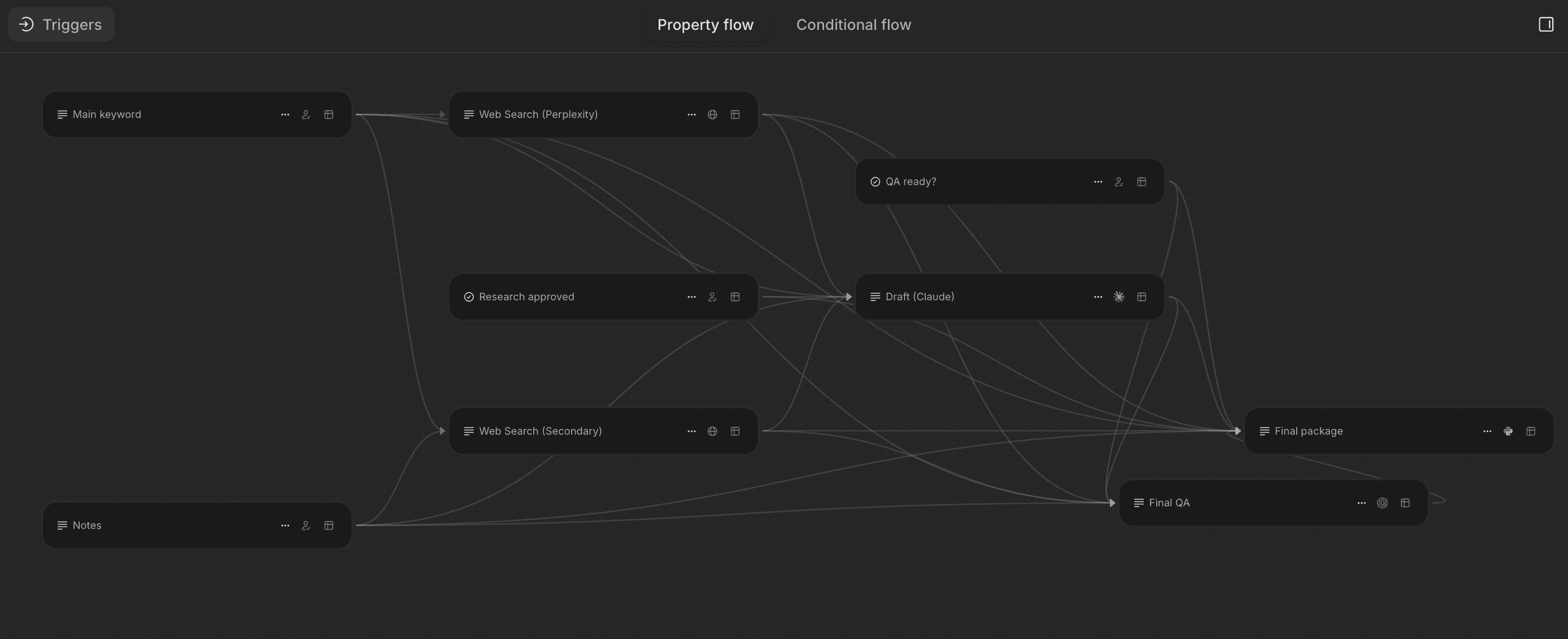
This reduces content creation time from 8 hours to 2 hours. The agent handles research and drafting, allowing the writer to focus on refining the narrative and adding unique insights.
Workflow details: The agent starts with a target keyword and uses SEO tools to identify related keywords, search volume, and difficulty scores. It analyzes the top-ranking articles to extract their structure (H2/H3 headings), word count, and key topics covered. The agent generates an outline that matches or exceeds the depth of top-ranking content. For each section, it conducts targeted research to gather facts, statistics, and examples. The first draft is generated section by section, with each section reviewed for keyword density, readability, and factual accuracy. The agent then performs an SEO audit checking title tags, meta descriptions, header hierarchy, internal linking opportunities, and image alt text. It generates a revision focused on improving thin sections and adding missing semantic keywords. The final output includes the article in HTML format, suggested internal links, and a list of external sources to cite. Content teams report 60% time savings on initial drafts while maintaining quality standards, with human editors focusing on brand voice refinement and fact-checking rather than blank-page writing.
17. LinkedIn Personal Branding Agent
The agent generates post ideas based on trending topics in the user's industry, drafts posts in the user's voice, and suggests edits based on engagement patterns.
The agent operates through WhatsApp or Slack integration. The user sends a message with a topic idea, and the agent returns three draft posts with different angles. The user selects one, makes edits, and the agent schedules it for posting. This reduces the friction of content creation, making it easier to maintain a consistent posting schedule.
Technical architecture: The agent monitors trending topics in the user's industry using LinkedIn API and news aggregation. It maintains a profile of the user's writing style based on past posts, including preferred sentence length, use of questions, emoji usage, and formatting patterns. When the user submits a topic via WhatsApp, the agent generates three variations: educational (sharing insights), provocative (challenging conventional wisdom), and personal (sharing experience). Each draft includes a hook (first line designed for engagement), body content (3-5 short paragraphs), and a call to action (question or request for comments). The agent analyzes the user's historical engagement data to predict which style will perform best. For scheduling, it recommends optimal posting times based on when the user's network is most active. Users report maintaining a consistent 3x per week posting cadence versus previous sporadic posting, with measurably higher engagement rates due to better hooks and more strategic timing.
Operations & Workflow Agents
Operational workflows often involve repetitive tasks that follow clear rules but require attention to detail. AI agents can handle these tasks with higher accuracy and speed than manual processes. The ROI case becomes compelling when error rates or processing delays create downstream costs.
18. Invoice & Purchase Order Matching Agent
Accounts payable teams spend significant time matching invoices to purchase orders and receipts (the "three-way match"). An agent can automate this process by extracting data from all three documents and flagging discrepancies.
A popular implementation processes invoices as they arrive via email. The agent extracts the vendor name, invoice number, line items, and total amount. It searches the ERP system for the corresponding purchase order, compares the quantities and prices, and checks for a matching receipt.
If everything matches, the agent approves the invoice for payment. If there are discrepancies (e.g., invoice quantity exceeds PO quantity), the agent flags the invoice for manual review and provides a summary of the differences.
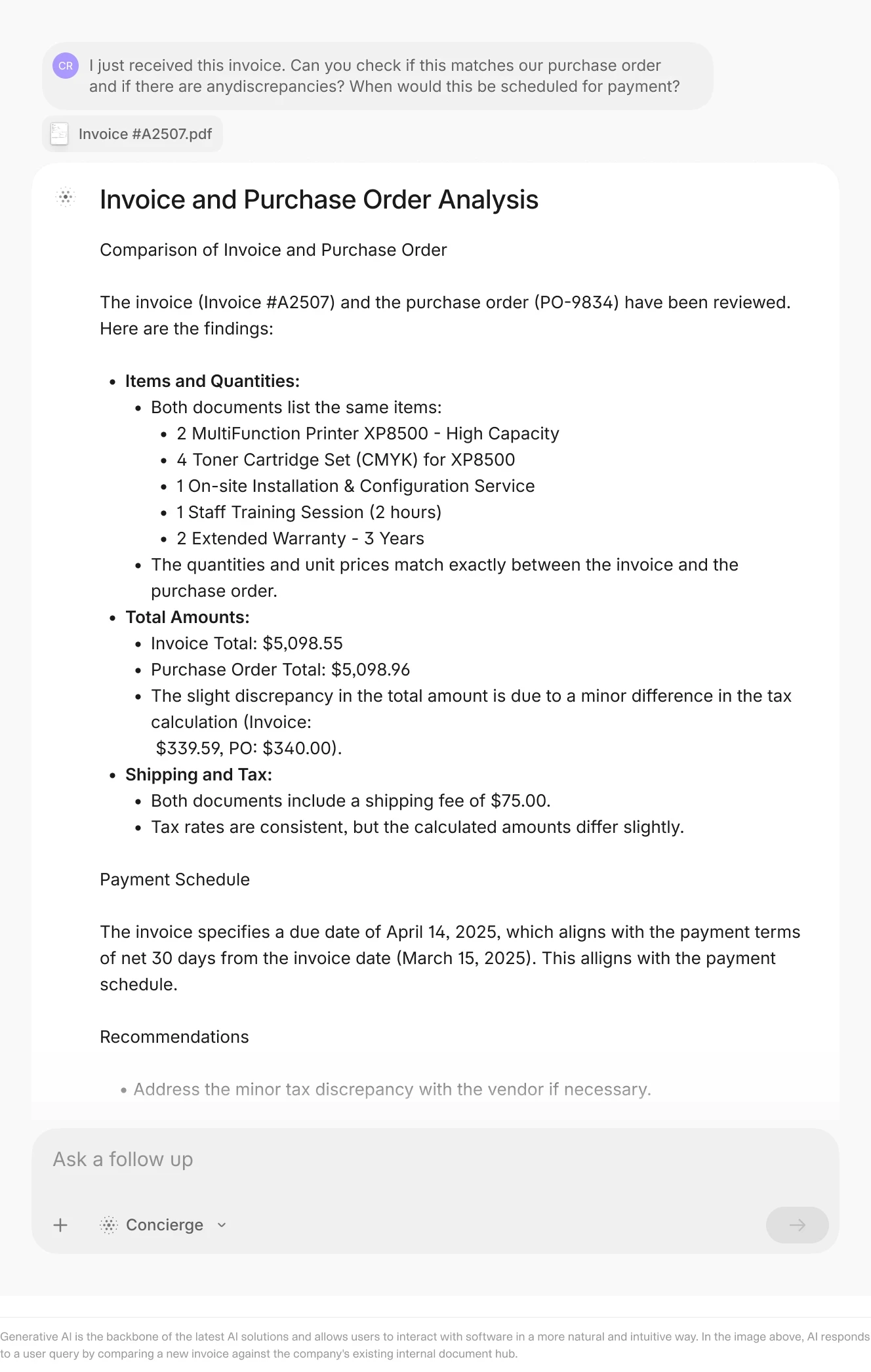
Invoice matching agents automate three-way match processes and flag exceptions for review.
This reduces invoice processing time from 48 hours to 4 hours and cuts error rates by 60%. The agent handles the routine matches, allowing AP staff to focus on resolving exceptions.
Implementation details: The agent monitors the AP inbox for invoice emails and extracts PDFs from attachments. It uses OCR to extract invoice header data (vendor name, invoice number, date, total) and line item details (description, quantity, unit price, extended price). The agent queries the ERP system API using the PO number extracted from the invoice. It performs field-by-field comparison: PO line item 1 quantity vs. invoice line item 1 quantity, PO unit price vs. invoice unit price. For receipts, it checks that goods were received and accepted before the invoice date. The matching logic allows for tolerance thresholds (e.g., price differences under 2% auto-approve). For discrepancies exceeding thresholds, the agent creates an exception report detailing: which line items don't match, the magnitude of the difference, and potential causes (partial delivery, pricing change, duplicate invoice). It assigns exceptions to AP staff based on vendor or dollar amount rules. For approved invoices, the agent updates the ERP system, changes invoice status to "approved," and queues it for payment according to payment terms. AP teams report processing 5x more invoices per person, reducing late payment penalties by 80%, and improving early payment discount capture by taking advantage of 2/10 net 30 terms more consistently.
19. Receipt Processing Agent
Expense reporting requires employees to photograph receipts, extract the date, vendor, and amount, and submit them for reimbursement. An agent can automate the extraction and categorization. The agent uses OCR to extract the text, identifies the vendor, date, and total amount, and categorizes the expense (meals, travel, supplies). The agent then creates an expense report entry and routes it for approval.
This eliminates manual data entry and reduces expense report preparation time from 30 minutes to 5 minutes. The agent handles the tedious work, allowing employees to focus on their core responsibilities.
Technical workflow: The mobile app captures receipt images and uploads them to cloud storage. The agent processes each image using OCR optimized for receipts (which often have poor scan quality). It extracts merchant name, transaction date, line items, subtotal, tax, and total. For merchant names, it uses fuzzy matching against a database of known vendors to standardize names (e.g., "Starbucks #5234" becomes "Starbucks"). The agent categorizes expenses using rule-based logic: receipts from airlines go to Travel, grocery stores to Office Supplies, restaurants to Meals & Entertainment. It applies company policy rules: meals over $75 require manager approval, alcohol purchases are flagged, and mileage reimbursement uses IRS standard rates. The agent detects potential duplicates by comparing date, amount, and merchant across all receipts in the system. For missing information (illegible receipt, unclear category), it flags the item for employee review. The expense report is generated in the company's expense management system with all fields pre-populated. Finance teams report 70% reduction in expense report errors, faster reimbursement cycles, and better compliance with expense policies due to automated policy enforcement.
20. Code Review Agent
One developer built an agent that monitors pull requests in GitHub, fetches the changed files, analyzes the code for bugs and security issues, and posts a review comment with findings.
The agent uses an LLM to understand the code changes, identify potential issues (null pointer exceptions, SQL injection risks, performance bottlenecks), and suggest improvements. It also checks for adherence to coding standards and flags deviations.
The output is a review comment on the pull request with a list of issues and suggested fixes. The developer reported that the agent catches 70% of common bugs before human review, reducing the time spent on code review by 40%.
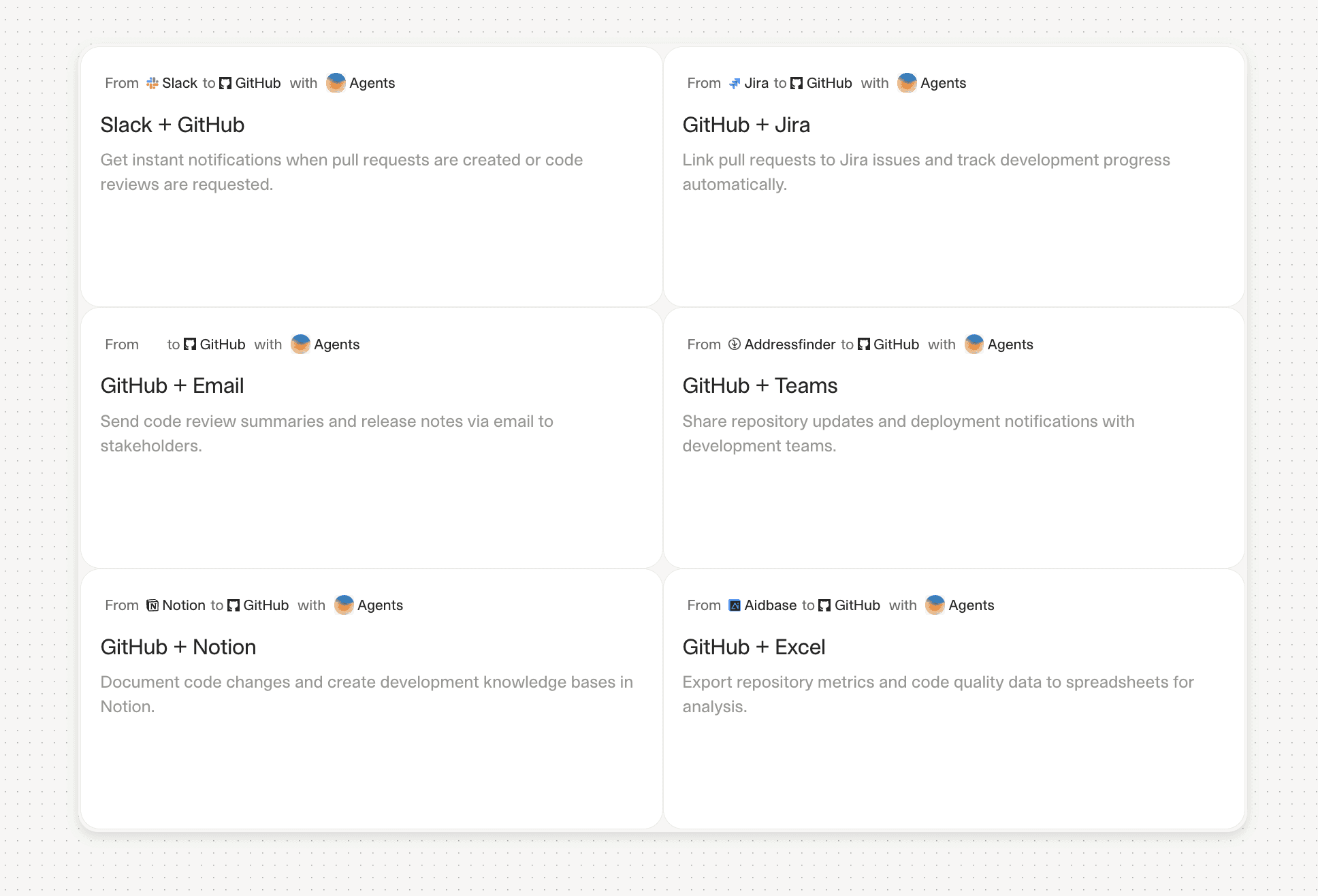
Implementation specifics: The agent uses GitHub webhooks to trigger on new pull requests. It fetches the diff using the GitHub API and analyzes both added and modified lines. For each changed function, the agent performs static analysis checking for: common bugs (off-by-one errors, unhandled exceptions, resource leaks), security vulnerabilities (SQL injection, XSS, insecure deserialization), performance issues (N+1 queries, inefficient algorithms), and style violations (naming conventions, file length, complexity thresholds). The agent uses an LLM to understand code context and identify logical errors that static analysis might miss. For each identified issue, it provides: severity level (critical/high/medium/low), specific line number, description of the problem, and suggested fix with code example. The agent posts findings as a review comment, grouped by severity. It also calculates overall code quality metrics: cyclomatic complexity, test coverage impact, and technical debt introduced. Development teams report catching security vulnerabilities earlier (reducing bugs reaching production by 60%), improving code review consistency across reviewers, and allowing senior developers to focus on architectural review rather than syntax checking.
21. Data Validation Agent
One user built an agent that monitors a Google Sheet where team members enter data. The agent checks for formatting errors, missing required fields, and invalid values (e.g., country names that do not match a standard list).
When the agent detects an error, it highlights the cell, adds a comment explaining the issue, and suggests a correction. For example, if someone enters "USA" instead of "United States," the agent flags it and suggests the standard value.

Data validation agents monitor spreadsheets and flag errors in real-time.
This reduces data quality issues by 80% and eliminates the need for manual data cleaning before analysis. The agent enforces standards automatically, ensuring that downstream reports are accurate.
Technical architecture: The agent uses Google Sheets API to monitor the spreadsheet via polling every 60 seconds. When it detects new or modified cells, it runs validation rules defined for each column. Rules include: format checks (dates in YYYY-MM-DD format, phone numbers matching pattern), required field checks (no blank values in mandatory columns), range checks (numeric values within expected ranges), and reference data checks (country names against ISO list, product codes against master catalog). For each validation failure, the agent uses the Sheets API to add a cell comment with: description of the error, expected format or value range, and suggested correction. It also changes cell background color to yellow for warnings or red for critical errors. The agent maintains a validation log tracking all errors detected and whether they were corrected. For systematic issues (e.g., 10 rows with the same country name error), it alerts the sheet owner to update the data entry instructions. Teams report dramatic improvement in data quality: 80% fewer errors in downstream reports, elimination of the monthly "data cleaning sprint," and faster analysis cycles since analysts spend less time troubleshooting data issues.
What Makes These Agents Work
The agents documented in this article share several characteristics that explain their success.
Narrow Scope: Each agent solves one specific problem. The calendar agent does not try to also handle contract review. The CIM triage agent does not try to also generate investment memos. Narrow scope means clear success criteria and easier debugging when something goes wrong.
Integration with Existing Tools: The agents connect to systems people already use: Gmail, Slack, Google Sheets, Salesforce. They do not require users to learn a new interface or change their workflows. The agent fits into the existing process, not the other way around.
Clear Output Format: The agents produce structured outputs that can be directly used or easily reviewed. A summary email, a filled spreadsheet, a redlined contract. The output is not a vague recommendation or a wall of text. It is actionable.
Human Review Loops: Most of these agents do not make final decisions. They triage, extract, summarize, and suggest. A human reviews the output and decides whether to approve, edit, or reject. This reduces risk and builds trust.
Measurable Impact: The users can quantify the benefit. Fifty minutes saved per day. Invoice processing time reduced from 48 hours to 4 hours. Error rates cut by 60%. These are concrete metrics that justify the effort of building and maintaining the agent.
Common Failure Patterns
Not all agent implementations succeed. The failures follow predictable patterns.
Trying to Do Too Much: Agents that try to handle multiple unrelated tasks (e.g., "automate all of finance") fail because they lack focus. Each additional task increases complexity and reduces reliability.
Poor Data Quality: Agents that process scanned PDFs with low resolution or handwritten notes with inconsistent formatting struggle. Garbage in, garbage out. If the input data is messy, the agent will produce unreliable outputs.
No Clear Success Criteria: Agents built without a specific goal ("let's see what AI can do") rarely deliver value. Without clear metrics, it is impossible to know if the agent is working or needs improvement.
Ignoring Edge Cases: Agents that work 90% of the time but fail catastrophically on edge cases create more work than they save. Users lose trust and revert to manual processes.
Lack of Monitoring: Agents that run without logging or error tracking fail silently. Users do not know when the agent stops working until they notice missing outputs or incorrect data.
Building Your Own Agent: Where to Start
If you want to build an AI agent for your own workflow, start with these steps.
Step 1: Identify a High-Volume, Low-Complexity Task
Look for tasks you do repeatedly that follow a predictable pattern. Reading emails and flagging action items. Extracting data from invoices. Summarizing meeting notes. These are good candidates because they have clear inputs, outputs, and success criteria.
Step 2: Define the Input and Output Format
Be specific. The input is "an email with a PDF attachment." The output is "a JSON object with vendor name, invoice number, line items, and total amount." Vague definitions lead to vague results.
Step 3: Choose Your Tools
For document processing, use a platform like V7 Go that combines OCR, LLMs, and visual grounding. For email and calendar automation, use APIs from Gmail, Outlook, or Google Calendar. For workflow orchestration, use tools like Zapier, n8n, or custom Python scripts.
Step 4: Build a Prototype
Start with a small sample of data. Process 10 invoices, not 1,000. Test the agent on known inputs where you can verify the output. Measure accuracy and identify failure modes.
Step 5: Add Human Review
Do not deploy an agent that makes final decisions without review. Build a review step where a human checks the output before it is used. This reduces risk and builds trust.
Step 6: Monitor and Iterate
Log every run. Track success rates, error types, and processing times. Use this data to identify patterns and improve the agent. An agent is not a one-time build. It requires ongoing maintenance and refinement.
How to Launch Your First Agent This Week
Most teams spend months planning their first AI agent. The planning never ends because they are trying to solve too much at once. Here is a better approach: ship something small in the next five days.
Monday: Pick One Workflow
Choose a task that happens at least 10 times per week and takes at least 20 minutes each time. Good candidates: reading and categorizing support emails, extracting data from invoices, summarizing meeting notes. Bad candidates: tasks that happen once a month or require creative judgment.
Tuesday: Define Acceptance Criteria
Write down exactly what success looks like. For an email categorization agent: "Correctly assigns category (billing, technical, sales) to 95% of emails. Flags fewer than 5% as 'unsure.' Processes emails within 2 minutes of receipt." For an invoice extraction agent: "Extracts vendor name, invoice number, date, and total with 98% accuracy. Flags invoices with poor scan quality for human review."
Wednesday: Build Version 1
Use the simplest possible implementation. For document processing, use V7 Go to build an agent that extracts your target fields. For email processing, connect Gmail API to a simple classification prompt. Test on 10 sample inputs. Fix the most obvious errors.
Thursday: Add Logging and Review
Set up a system where every agent action is logged: input received, output generated, confidence score, processing time. Add a human review step: outputs go to a "pending review" queue where a person can approve or reject. This is critical. Never deploy an agent that makes irreversible decisions without oversight.
Friday: Go Live with 20 Items
Process 20 real items through the agent. Invoices, emails, meeting notes—whatever you chose on Monday. Review each output. Track: how many were correct without edits, how many needed minor edits, how many were completely wrong. If accuracy is above 85%, keep running. If below, identify the top three error patterns and fix them next week.
This five-day sprint gets you from zero to a working agent faster than a month of planning meetings. Most teams discover that the act of building reveals assumptions they did not know they had. You learn more from 20 real outputs than from 100 hypothetical scenarios.
The Future of AI Agents
The agents documented in this article represent current best practice. They are practical, focused, and delivering measurable value. But they are also just the beginning.
Next-generation agents will handle more complex workflows and coordinate steps across systems. Expect them to move from extraction to recommendations and to integrate with wider toolsets while covering more edge cases.
But the core principles will remain the same. Narrow scope. Clear outputs. Human review. Measurable impact. The agents that succeed will be the ones that solve real problems for real people, not the ones that promise to do everything.
The competitive advantage will not come from having an AI agent. Everyone will have agents. The advantage will come from deploying them faster, measuring them better, and iterating them more aggressively than competitors. The teams that ship an imperfect agent this month and improve it weekly will outperform teams that spend six months planning the perfect agent.
Start small. Ship fast. Measure everything. Iterate based on what breaks. That is how these 21 agents went from concept to production. That is how yours will too.
What is the difference between an AI agent and a chatbot?
A chatbot responds to questions. An AI agent takes action. A chatbot might tell you what is in a document. An agent extracts the data, validates it, and populates a database. The key difference is autonomy. Agents execute workflows without constant human prompting.
+
How long does it take to build an AI agent?
It depends on complexity. A simple email summarization agent can be built in a few hours using existing APIs and LLMs. A complex due diligence agent that processes CIMs and generates investment memos might take several weeks to build and refine. The key is starting small and iterating. Most successful agents begin with a narrow use case and expand over time as the team gains confidence.
+
Do AI agents require coding skills?
Not always. Platforms like V7 Go, Zapier, and n8n offer no-code or low-code interfaces for building agents. However, more complex agents that require custom logic or integration with proprietary systems will require programming skills (Python, JavaScript). The trend is toward lower technical barriers, but custom implementations still need developer involvement.
+
What are the biggest risks of using AI agents?
The biggest risks are inaccurate outputs, lack of transparency, and over-reliance on automation. Agents can hallucinate data, misinterpret documents, or fail silently. The mitigation is human review, clear logging, and well-defined success criteria. Never deploy an agent that makes final decisions without oversight. Results vary by input quality and review setup. Target 95%+ accuracy before removing human review.
+
Can AI agents handle unstructured data?
Measure time saved, error reduction, and throughput improvement. For example, if an agent reduces invoice processing time from 48 hours to 4 hours, calculate the labor cost savings. If it cuts error rates from 10% to 2%, estimate the cost of fixing those errors. ROI should be measurable in hours or dollars, not vague productivity gains. Track metrics weekly and adjust the agent based on what you observe.
+
How do I measure the ROI of an AI agent?
Go is more accurate and robust than calling a model provider directly. By breaking down complex tasks into reasoning steps with Index Knowledge, Go enables LLMs to query your data more accurately than an out of the box API call. Combining this with conditional logic, which can route high sensitivity data to a human review, Go builds robustness into your AI powered workflows.
