13 min read
—


How modern enterprises are replacing manual data entry with AI agents that extract, validate, and route documents at scale, without the legacy complexity.

Imogen Jones
Content Writer
V7 Go
A smarter way to manage due diligence and underwriting
Somewhere inside a large enterprise, right now, a document is stalled.
In some organizations, it’s an invoice sitting in a shared inbox, waiting for someone to manually key the numbers into a system of record. In others, it’s a contract or form that technically went through “automation,” but failed on an edge case and dropped back into a human queue… again.
Both are common, and both point to the same underlying reality. These are workflows that, despite best attempts and painful 'digital transformations', remain deeply manual bottlenecks.
This year, we’ve moved beyond basic OCR and brittle RPA. A new generation of automated document processing combines intelligent document processing, large language models, and thoughtful human-in-the-loop design to handle the complexity enterprises actually face.
This guide explains how automated document processing works in 2026, including what’s changed, why previous approaches fell short, and how enterprises are deploying it at scale without repeating the mistakes of the past.
In this article:
The difference between OCR, IDP, and modern AI extraction.
The real bottlenecks in invoice processing, contract review, and compliance workflows.
Hyperscience, Docsumo, ABBYY, UiPath, Rossum, and legacy incumbents like SAP and Oracle.
How V7 Go's LLM agents solve the problems that traditional IDP cannot.
What to expect when migrating from manual processes to automated workflows, including pilot structure, acceptance criteria, and exception handling.
What Is Automated Document Processing?
Automated document processing (ADP) is the use of software to extract, classify, validate, and route data from unstructured documents without manual intervention. The goal is simple: turn a PDF invoice, a scanned contract, or a handwritten claim form into structured data that can be fed into downstream systems like ERPs, CRMs, or data warehouses.
The confusion around ADP comes from the fact that the term covers a wide spectrum of technologies, from basic OCR (optical character recognition) that digitizes text, to intelligent document processing (IDP) that adds classification and extraction rules, to modern AI agents that use large language models to understand context and handle edge cases.
We explore these further below.
Automated Document Processing Technologies: OCR → IDP → AI Agents
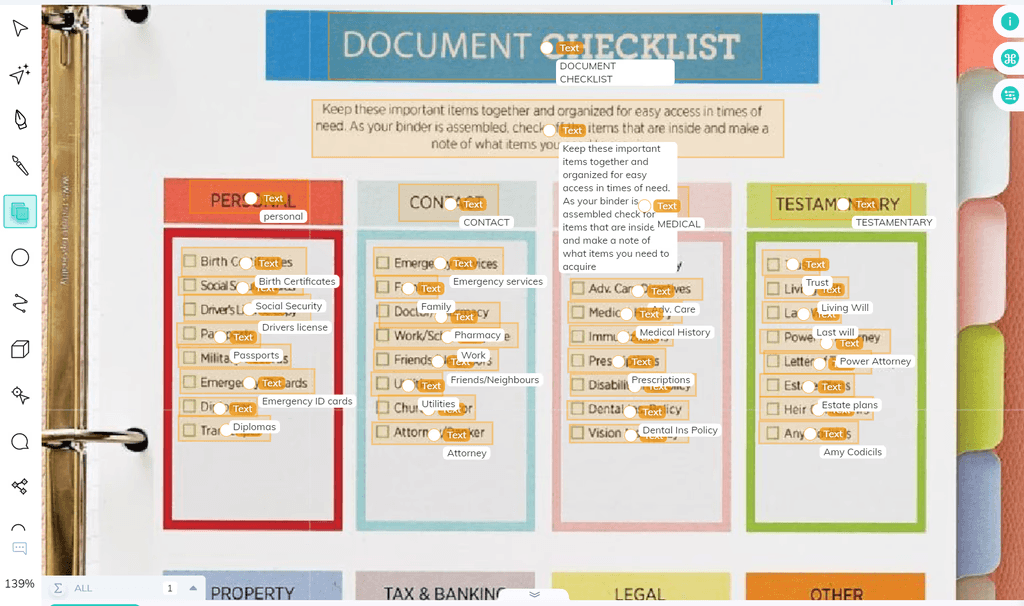
OCR (1990s–2010s): The first generation of document automation. OCR software like ABBYY FineReader or Tesseract could read printed text from scanned images and convert it into machine-readable characters. The problem: OCR does not inherently understand what it is reading. If an invoice has a line item table, OCR will give you a wall of text. You still need a human to parse it. A typical OCR output for an invoice looks like this: "ABC Corp Invoice 12345 Date 01/15/2025 Total $5,432.10," with no indication of which field is which.
Intelligent Document Processing (2010s–2020s): The second generation of document automation layered OCR with machine learning and NLP models trained to classify document types (e.g. invoice vs. purchase order vs. receipt) and extract predefined fields such as vendor name, invoice number, totals, and line items. These IDP systems relied on supervised training, configuration, and rules to handle variation. Tools like Kofax, Hyperscience, and UiPath Document Understanding fall into this category.
AI Agents (2023–present): The current generation builds on IDP foundations but moves beyond extraction. Agentic systems use large language models alongside deterministic tools, business logic, and integrations to reason over documents, make decisions, and take actions across an entire workflow.
An AI agent can be given a goal (e.g. “process incoming invoices”), a set of skills (read documents, validate data, query systems, apply policies), and the ability to execute actions (create records, route exceptions, request clarification, trigger approvals). It can adapt to new document formats without retraining by interpreting content in context and following instructions rather than templates.
To browse V7's comprehensive library of agents for finance, real estate, insurance and legal, all of which can be completely customized, click here: Agent Library.
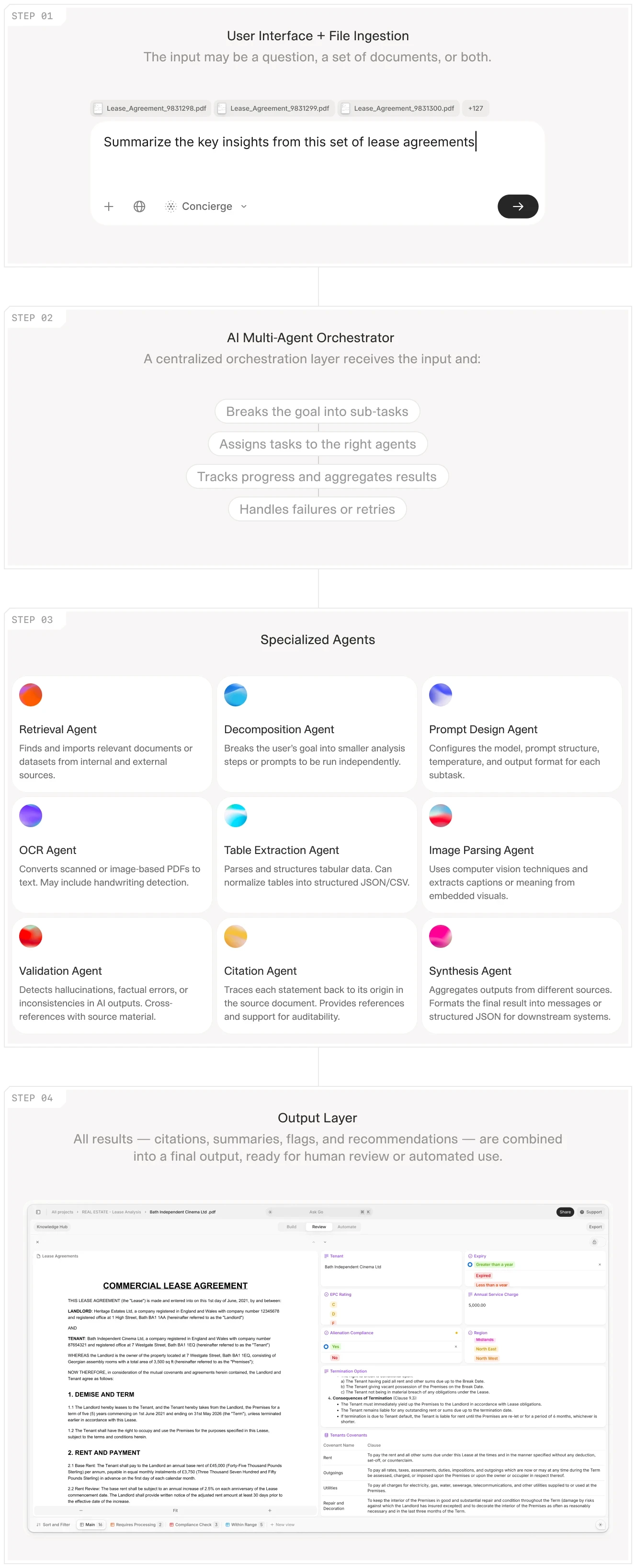
V7 Go's agent orchestration workflow showing how documents move from ingestion to extraction to validation.











Common Enterprise Use Cases for Automated Document Processing
The previous sections explored the technology and the pain points at a high level. This section makes it tangible. Below are concrete enterprise workflows where Automated Document Processing (ADP) replaces manual effort, including the documents involved, typical bottlenecks, and the before/after metrics that operational leaders actually care about.
The use cases below are not exhaustive. In fact, the most valuable automation opportunities often come from mapping your own internal workflows, identifying bottlenecks, and quantifying where time, accuracy, and control are being lost.
The highest ROI often sits in the processes your team has simply accepted as “the way things are done.”
Invoices and Accounts Payable
Invoice processing is one of the most common document processing automation use cases, and for good reason. It’s high-volume, repetitive, time-sensitive, and directly tied to cash flow and supplier relationships.
A typical invoice workflow looks like this:
A vendor sends an invoice via email (PDF attachment) or uploads it to a portal.
An AP clerk opens the file and manually keys in vendor name, invoice number, dates, line items, tax, and totals into the ERP.
The invoice is matched against the corresponding purchase order (PO) and goods receipt (GRN) to confirm delivery. This is the classic three-way match.
If everything aligns, it’s approved for payment. If not, it’s flagged for exception handling (missing PO, quantity mismatch, price variance, incorrect entity, or coding errors.)
Many organizations already have some form of automation in place, be it basic OCR, template-based capture, or ERP add-ons. These tools reduce manual typing but often struggle when invoice formats vary, when line items are complex, or when vendors change layouts. As a result, teams still spend significant time reviewing, correcting, and routing exceptions manually. Even a simple invoice can take 2–3 minutes to process; complex invoices can take 5–10 minutes or more.
Agentic AI reframes invoice automation as an end-to-end workflow rather than a pure document-reading task. An AI agent can:
Extract structured invoice data, including detailed line items
Retrieve the corresponding PO and receipt from the ERP
Perform the three-way match automatically
Apply your internal rules: auto-approve low-risk invoices, flag threshold breaches, suggest GL codes and cost centres
Route exceptions to the correct budget owner
Update dashboards, accruals, and cash flow forecasts
All while keeping a human in the loop for edge cases and judgment-based decisions.
As a result, the team can focus on the 10-20% of invoices that require human judgment (vendor disputes, missing POs, pricing discrepancies, non-standard payment terms) instead of spending 80% of their time on data entry.
You can learn more about invoice automation in our blog, Invoice Automation: 10 Platforms That Actually Work (And How to Choose).
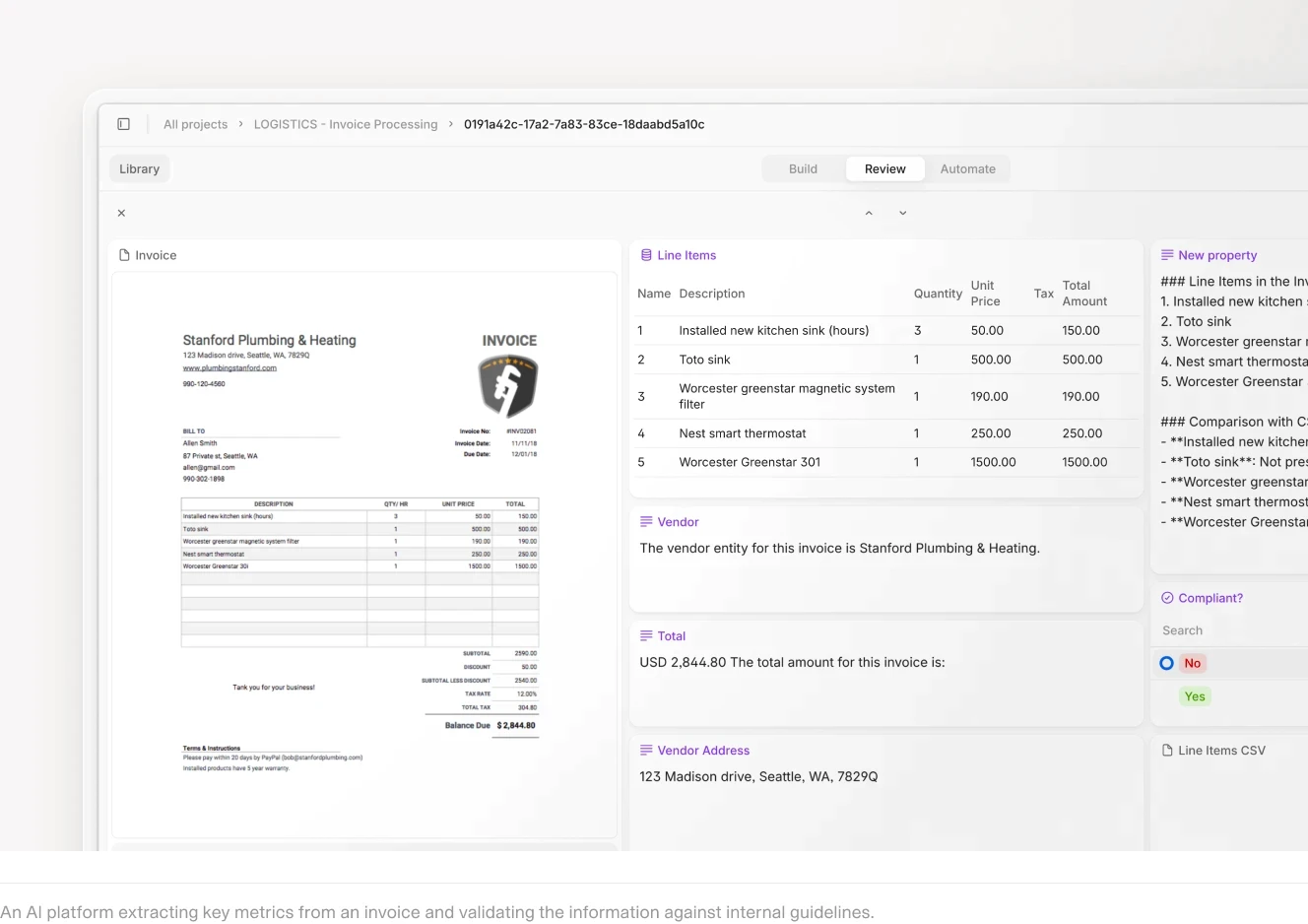
V7 Go's invoice extraction agent pulling vendor, line items, and totals from a scanned invoice.
Contracts and Legal Documents
Contract review is another common ADP use case, but it is fundamentally different from invoice processing. Invoices are transactional. You extract the data, validate it, and move on. Contracts are analytical; you need to understand the terms, identify risks, and compare them to your playbook.
A typical contract review workflow can look like this:
Legal receives a 40-page NDA, MSA, or lease agreement from business development or procurement.
Associate counsel reads through the document, highlights key clauses (indemnification, liability caps, termination rights, governing law, assignment restrictions), and flags any deviations from the company's standard terms.
Associate drafts a summary memo for senior counsel, outlining the key terms and recommending approval, rejection, or redlining.
Senior counsel reviews the memo, makes a decision, and sends redlines back to the counterparty or approves the contract.
The bottleneck is step 2. Reading and summarizing a 40-page contract takes 1-2 hours, even for an experienced associate. For a legal team reviewing 200 contracts per month during a busy M&A period, that is 400 hours of manual review, before any negotiation or drafting even starts!
An ADP system, specifically, an AI agent designed for contract analysis, can automate chunks of this workflow. The agent reads the contract, extracts the key clauses (who is liable for what, what triggers termination, what law governs disputes), compares them to the company's playbook, and generates a summary memo with flagged risks. The associate reviews the memo in 15-20 minutes, makes any necessary edits, verifies the flags against the source document, and sends it to senior counsel.
That means the associate spends their time on the 10-20% of contracts that require deep legal analysis (complex indemnification carve-outs, unusual IP assignment clauses, multi-jurisdictional governing law) instead of spending 80% of their time on boilerplate review.
To see this in action, click here: AI Contract Review Agent.
V7 Go's NDA review agent identifying governing law, term violations, and suggesting redlines with source citations.
Claims, Policies, and Underwriting (Insurance)
Insurance is one of the most document-intensive industries in the world. Every claim, every policy, and every underwriting submission generates a stack of PDFs, from medical records and repair estimates to police reports and supplemental applications.
The traditional claims workflow looks like this:
Claimant submits a claim form (sometimes handwritten or filled out on a low-quality scan) along with supporting documents (photos of damage, repair estimates from body shops, medical bills, police reports).
Claims adjuster reviews the documents, verifies coverage against the policy (is this a covered peril? is the claimant within the coverage period? are there any exclusions?), calculates the payout based on the policy limits and deductibles, and approves or denies the claim.
If approved, the claim is sent to the payment team. If denied, the adjuster drafts a denial letter citing the specific policy language.
Modern automated document processing, particularly agentic AI, accelerates this workflow by treating the claim as an end-to-end workflow rather than a document-reading task. An AI Claims Processing Agent can:
Extract key data from claim forms and supporting documents
Cross-reference policy terms to verify coverage
Identify exclusions or potential pre-existing conditions
Perform calculations on treatment invoices or repair estimates
Flag discrepancies for review
Route the claim appropriately within the workflow
Real-World Example: Trent-Services
Trent-Services, a UK-based third-party administrator handling claims and policy management, recently implemented V7 Go to automate parts of their claims workflow. Before automation, each of their six assessors processed around 15 claims per day (roughly 90 total). With V7 Go, they increased that to approximately 20 claims per assessor, an additional 30 claims per day. That’s the equivalent capacity of two additional full-time assessors, without hiring.
Beyond throughput gains, they’ve seen reduced administrative errors, improved SLA performance, and greater confidence in consistency and compliance.
Reports, Forms, and Unstructured PDFs
The final category is the catch-all: any document that does not fit neatly into a predefined template. This includes:
Quarterly reports: Portfolio company financials, fund performance reports, regulatory filings (10-K, 10-Q, 8-K).
Inspection reports: Property inspections, environmental site assessments, safety audits, engineering reports.
Research reports: Market research, competitive intelligence, due diligence memos, third-party valuations.
Meeting notes: Board meeting minutes, investment committee memos, client call summaries.
These documents share one important characteristic: they’re unstructured. There’s no universal template for a due diligence memo. One due diligence memo is neatly organized with clear tables; another buries key figures in dense footnotes. One property inspection report is photo-heavy and narrative-driven; another is table-based and highly technical.
Legacy document processing systems often struggle with unstructured documents because they rely on templates. If the document does not match a known template, the system fails or produces garbage output. V7 Go AI agents, by contrast, can read and understand unstructured documents because they use LLMs to infer meaning from context, the same way a human analyst would.
For example, V7 Go's AI Financial Reporting Agent can read a 10-K filing, extract the key financial metrics (revenue, EBITDA, net income, operating cash flow, debt levels), and generate a summary, even if the 10-K uses non-standard section headers or buries the financials in footnotes. The agent understands that "Total Net Revenue" and "Net Sales" mean the same thing, even though they appear differently in different filings.
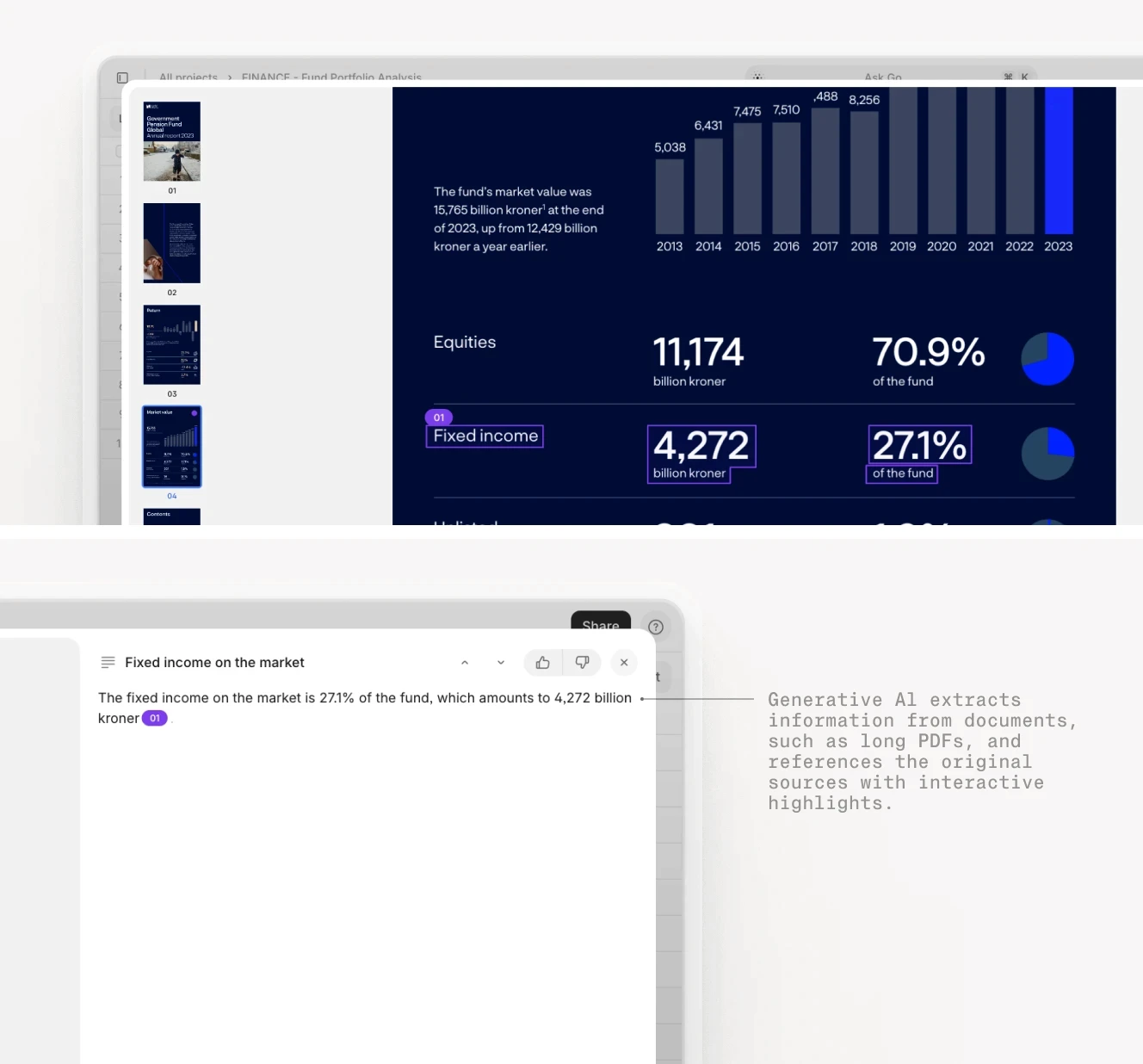
V7 Go extracting financial data from a 10-K filing with visual grounding showing the source of each metric.
Key Features of Enterprise-Grade Automated Document Processing Solutions
The previous sections covered the "what" and "why" of document processing. Now let us turn to the "how": what separates a tool that saves your team 10 hours per week from a tool that creates more work than it solves.
Accuracy on Complex, Unstructured Documents
The first test of any ADP system is accuracy. Can it extract the right data from the right fields, even when the document is poorly scanned, handwritten, or formatted in an unusual way?
Modern AI systems like Hyperscience, Docsumo, Rossum, and V7 Go achieve accuracy rates of 95-99% on the same documents. The difference is that they use LLMs to understand context. If an invoice has a smudged total, the AI can infer the correct value by adding up the line items. If a contract has a typo in the effective date ("January 32, 2025"), the AI can flag the anomaly rather than blindly extracting garbage.
Human-in-the-Loop Review and Validation
No ADP system is 100% accurate, and no system should try to be. The goal is not to eliminate human review. The goal is to eliminate unnecessary human review and make necessary review faster.
A well-designed ADP system includes a human-in-the-loop (HITL) workflow that routes low-confidence extractions to a human reviewer. The reviewer sees the extracted data alongside the source document, verifies that the data is correct, and either approves it or corrects it. The correction feeds back into the system's confidence calibration over time.
The key is to make the review process as fast as possible. The reviewer should not have to re-read the entire document. They should only have to verify the flagged fields, and see exactly where in the document those fields came from.
Explainability and Source Citations
For regulated industries, it is not enough to extract the right data. You need to be able to prove where the data came from. If an auditor asks, "How did you arrive at this revenue figure?" you need to be able to point to the exact page, paragraph, and sentence in the source document.
This is where visual grounding becomes critical. Visual grounding is the ability to link every extracted data point back to the exact location in the source document. V7's Citation feature does this automatically. When the AI extracts a field, it highlights the text or table cell that it used to extract the value. The reviewer can click on the field and see exactly where it came from.

Security, Privacy, and Access Controls
Enterprise documents contain sensitive data, from financial records to personal information, trade secrets to legal strategies. Any ADP system that processes these documents needs to meet strict security and privacy standards.
The baseline is SOC 2 Type II certification, which verifies that the vendor has implemented controls for security, availability, processing integrity, confidentiality, and privacy. This is the minimum requirement for any enterprise vendor.
Beyond that, look for:
Encryption in transit and at rest
Role-based access controls (RBAC)
Audit logs
Appropriate data residency
V7 Go meets all of these requirements and is SOC 2 Type II certified. For enterprises with strict data residency requirements, V7 offers deployment options to meet regional compliance needs.
Integration with Existing Systems (ERP, CRM, Core Systems)
An ADP system is only useful if it can feed data into the systems you already use. If you have to manually copy data from the ADP system into your ERP, you have not automated anything. You've just added another step!
Document Processing for Enterprises
For enterprises specifically, selecting a new document processing solution can feel complex and high-stakes. Large organizations operate across multiple entities, systems, jurisdictions, and control frameworks, meaning any change touches finance, IT, compliance, procurement, and operations at once.
But in 2026, standing still carries its own risk. Modern platforms now offer materially higher speed, accuracy, and auditability than legacy or partially automated setups. The real opportunity is the ability to rethink how documents flow across the organization end to end.
For large enterprises, the real value comes from considering automation holistically, and improving extraction, workflow routing, controls, integrations, reporting, and governance together rather than optimizing each piece in isolation. Done well, this reduces processing time, strengthens financial controls, improves visibility, and creates a more scalable operating model.
To see how V7 Go can automate your document processing and workflows, book a demo.
What is the difference between OCR and intelligent document processing?
OCR (optical character recognition) converts scanned images into machine-readable text. It can read the characters on a page, but it does not understand what they mean. Intelligent document processing (IDP) adds classification and extraction on top of OCR. It can identify document types (invoice vs. contract), extract specific fields (vendor name, total amount), and validate the data against business rules. Modern AI IDP uses large language models to understand context and handle edge cases that traditional template-based systems cannot—like inferring a smudged total by summing line items.
+
How accurate are automated document processing systems?
Accuracy varies by document type and system. Legacy OCR systems achieve 70-85% accuracy on clean, printed documents. Modern AI systems like Hyperscience, Docsumo, Rossum, and V7 Go achieve 95-99% accuracy on the same documents. On handwritten or low-quality scans, accuracy drops to 85-95%. The key is to set realistic expectations and design a human-in-the-loop workflow to handle the 1-5% of documents that require manual review. Accuracy should be measured at the field level, not just the document level.
+
Is it safe to put sensitive financial data into cloud-based document processing software?
Yes, provided the vendor meets strict enterprise security standards. The baseline requirement is SOC 2 Type II certification, which verifies that the vendor has implemented controls for security, availability, and confidentiality. Also look for ISO 27001 certification, GDPR/CCPA compliance, encryption in transit and at rest (AES-256), role-based access controls, and audit logs. V7 Go meets all of these requirements. For companies with strict data residency requirements, ask vendors about regional deployment options.