10 min read
—


A practical guide to automating real estate workflows with AI agents. From lease abstraction to property valuation, discover how modern platforms eliminate manual data entry and change back-office operations.

V7 Go
A smarter way to manage due diligence and underwriting
Real estate has always been a high-touch, high-stakes business, all too often held together by a patchwork of substandard technology.
The “front office” of real estate can look glamorous, with showings, negotiations, relationships, dealmaking. But the “back office” is where the chaos lives: the endless email threads, the missing signatures, the last-minute lender condition, the inspection addendum version that somehow got renamed “FINAL_final_v7.pdf,” the rent roll that doesn’t match the T-12, the owner statement that needed to go out yesterday.
The promise of real estate automation has always been clear. Eliminate repetitive tasks, reduce errors, and free analysts for higher-value work. What has changed in the past two years is the arrival of AI agents that can actually deliver on that promise.
Morgan Stanley believes AI innovations could lead to $34 billion in efficiency gains for the real estate industry by 2030. Here's a practical guide to being the firm leading the market, rather than the one still searching for the right version of the PDF.
In this article:
Generative AI and AI agents for real estate automation.
5 workflows you can automate today: Lease abstraction, property valuation, vendor invoice matching, inspection report analysis, and tenant screening.
What real estate professionals and investors need to know about implementing automation.
A 5-step guide to scoping, building, testing, and scaling automation.
Despite the global real estate software market reaching USD 2.45 billion in the U.S. alone, most firms still rely on manual data entry and sluggish processes to manage their portfolios.
Legacy property management systems were built for structured data. They excel at tracking rent payments, generating financial reports, and managing tenant records. They fail when confronted with the reality of real estate operations: scanned lease amendments, handwritten inspection reports, vendor invoices in dozens of formats, and property appraisals that mix tables, charts, and narrative text.
Consider a typical lease abstraction at a commercial real estate firm.
A new property acquisition comes with 150 lease documents.
Each lease contains base rent figures, CAM reconciliation terms, renewal options, co-tenancy clauses, exclusive use provisions, and termination rights.
The leases span 30 years of formats: some typed, some handwritten amendments, some scanned at angles that make OCR unreliable.
First-generation OCR tools promised to bridge this gap, but they largely failed at the deeper problem. OCR converts images to raw text; it does not understand context. It cannot distinguish a base rent figure from a CAM charge, identify which party is responsible for repairs, or flag an unusual clause that deviates from standard terms.
The critical leap from raw text to actionable, validated data remained unmade. This was the initial "hard part."
Real Estate Automation: Generative AI
Then Generative AI arrived, and Large Language Models (LLMs) fundamentally changed the equation. These models can read a lease agreement and grasp that "Tenant shall pay Base Rent of $50,000 per month" means the monthly rent is $50,000. They can identify the tenant, landlord, lease term, and renewal options. They can even flag clauses that require legal review.
Gen AI is opening up use cases that were never before possible and are relevant to dimensions of the real estate value chain that technology did not previously touch.
— McKinsey
This capability was a breakthrough, enabling automation for document-heavy workflows previously deemed impossible. Across the real estate industry, many firms began adopting these tools for front-office functions like generating property listings, drafting marketing emails, and creating basic content. While helpful, these applications barely scratch the surface of AI's potential.
To unlock some of the most powerful applications of AI for real estate, including automating complex back-office workflows, you need AI agents.
Real Estate Automation: Back-Office Automation with Agentic AI
Agentic AI is different from chatbots or simple automation tools. An agent is a specialized workflow designed to complete a specific business process from start to finish, with supervision, much like a junior worker.
An artificial intelligence (AI) agent is a system that autonomously performs tasks by designing workflows with available tools. AI agents can encompass a wide range of functions beyond natural language processing including decision-making, problem-solving, interacting with external environments and performing actions.
— IBM
For real estate firms, this means automating workflows that have resisted automation for decades. Lease abstraction, property valuation, vendor invoice matching, inspection report analysis, and tenant screening all involve reading unstructured documents, extracting specific data points, and making decisions based on business rules.
These are exactly the tasks that AI agents handle well.
V7 Go's agent dashboard showing invoice processing, OCR extraction, and batch document analysis capabilities.











5 Real Estate Workflows You Can Automate with AI Agents
Whether you're a real estate agent in a suburban market, a property manager running hundreds of doors, or an investment team underwriting acquisitions, you’re likely dealing with the same friction; document-heavy manual workflows.
From leases to operating statements, invoices to inspection reports, most of the “work” isn’t hard because it’s intellectually challenging. It’s hard because it’s high-volume, detail-sensitive, and scattered across PDFs, email threads, and portals.
That’s why a lot of the “post‑2023 AI buzz” has felt underwhelming in real estate. Plenty of people can generate a listing description now, but fewer can reliably answer: Did we capture every co‑tenancy clause across the portfolio? Which invoices don’t match the PO? Which contingency deadline moves if the PSA gets amended?
The workflows below are the most consistently high‑ROI opportunities for automation, from across the industry.
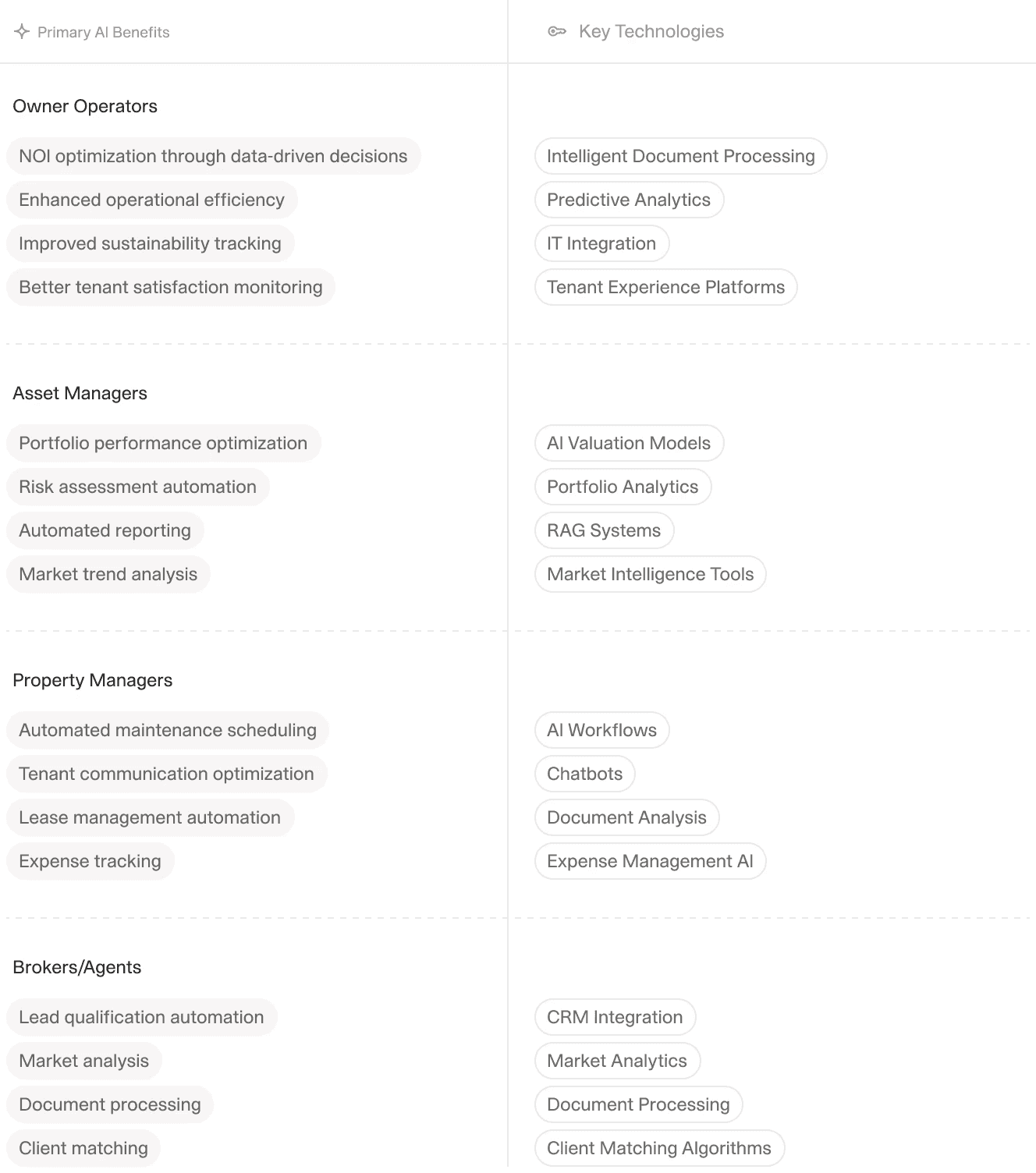
AI can enhance workflows across every level and part of the real estate industry.
According to Deloitte's Commercial Real Estate Trends report, 80% of real estate professionals report that automation in lease administration helps reduce manual errors. Yet most firms still rely on manual processes for the majority of their document workflows.
Lease abstraction is the process of reading a commercial lease and extracting key terms into a structured format. The extracted fields typically include:
Financial terms: Base rent, percentage rent, CAM charges, real estate taxes, insurance contributions, tenant improvement allowances, free rent periods, rent escalation schedules (CPI, fixed percentage, or stepped increases), and security deposits.
Key dates: Lease commencement, expiration, renewal option deadlines, termination notice periods, and rent adjustment dates.
Rights and restrictions: Renewal options (terms and rental rates), expansion rights, right of first refusal, co-tenancy requirements, exclusive use provisions, prohibited uses, and assignment/subletting restrictions.
Operating provisions: Maintenance responsibilities (landlord vs. tenant), common area definitions, gross-up provisions, expense stop amounts, and audit rights.
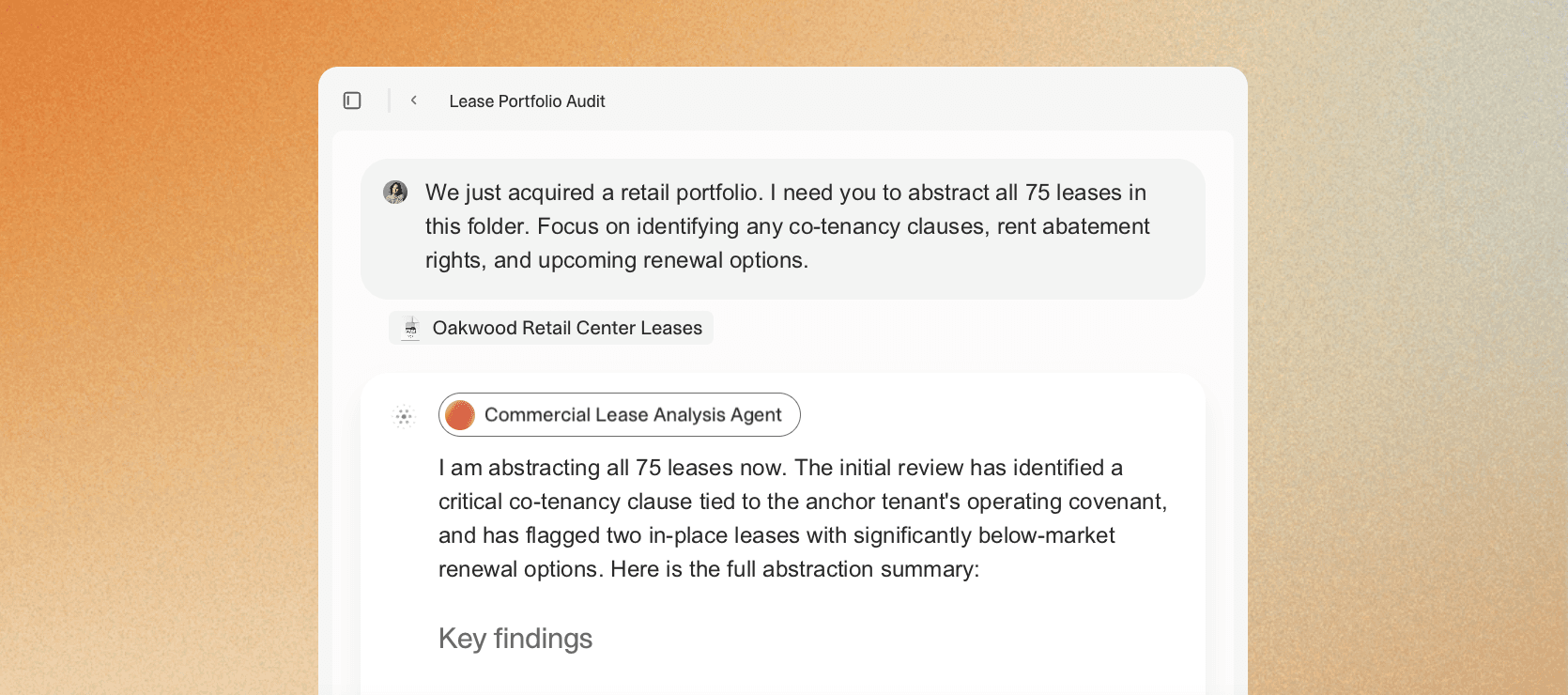
Done manually, this can be highly time-consuming and error prone. An AI agent can automate this process end-to-end. The Commercial Lease Analysis Agent reads the lease, identifies the relevant clauses, extracts the data, and validates it against your firm's standard terms. It flags unusual clauses for legal review and feeds the structured data directly into your property management system.
V7 Go's AI Citations feature is particularly helpful for lease abstraction. It offers visual grounding by linking every extracted data point to the source document, enabling greater transparency and more efficient human-in-the-loop review. The Knowledge Hub allows users to upload entire libraries of leases, effectively creating a dynamic, searchable knowledge base that AI can query to deliver contextually precise answers.
Property valuation requires analyzing comparable sales, rental rates, occupancy trends, and market conditions. Traditionally, this involves manually reviewing appraisal reports, broker opinions of value, and market research documents.
An AI agent can automate the data extraction and synthesis. For example, V7 Go offers:
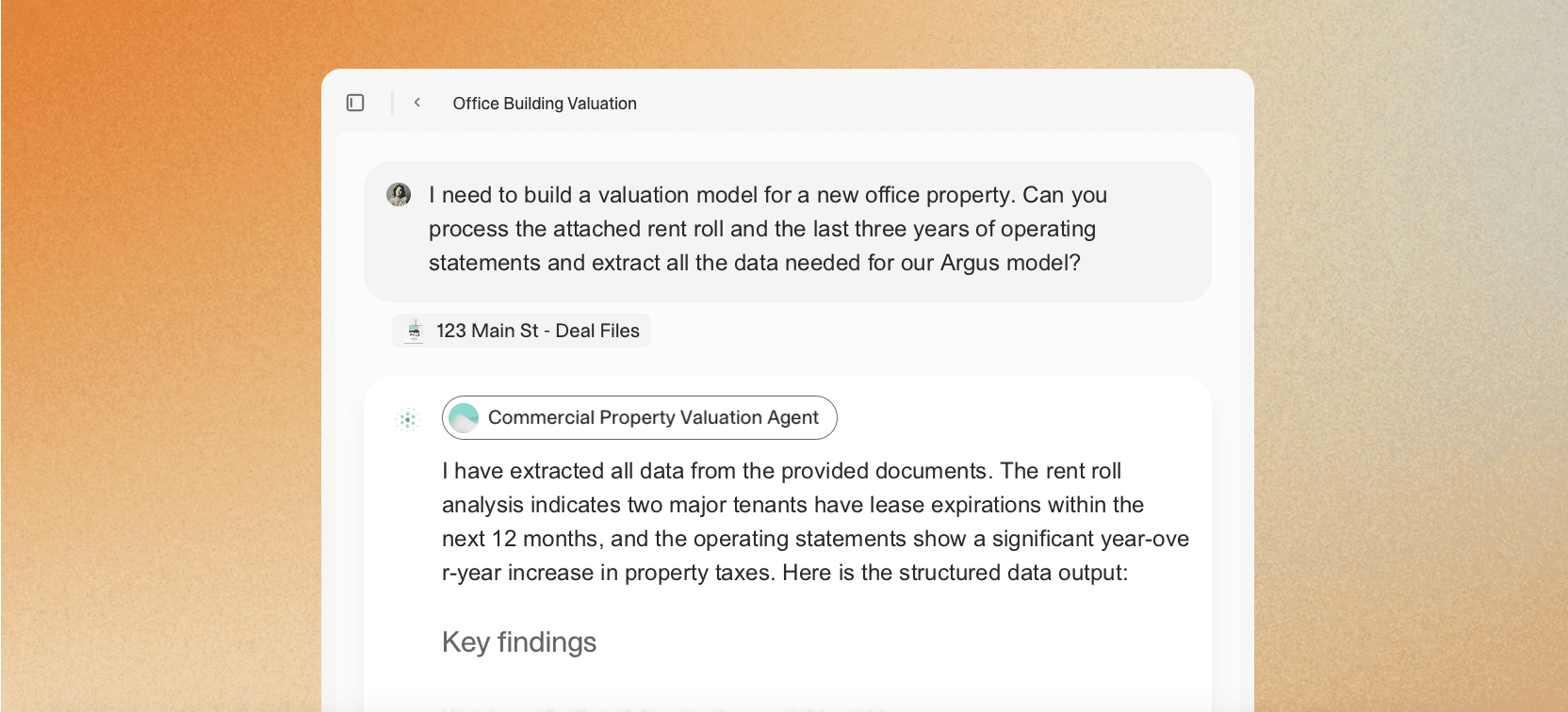
A Commercial Property Valuation Agent focused on extracting data from rent rolls, operating statements, and leases to populate Excel/Argus valuation workflows
A Real Estate Market Analysis Agent that can synthesize submarket comps and trends from data sources like public records and commercial datasets.
Appraisal-report automation for extracting values and flagging discrepancies.
AI and AI agents offer the ability to analyze vast property datasets, revealing valuation patterns that can escape even experienced appraisers. By applying consistent algorithmic criteria across every transaction (with human oversight and insight), these tools help produce valuations that are evidence-based and defensible.
Tasks that once took days like collecting property data, finding comps, running calculations can be done in hours or minutes. When appraisals are accelerated, loans close sooner and firms can handle a greater volume.
Learn more in our blog: AI in Property Appraisal: Use Cases, Risks, and ROI
If you manage property operations at any scale, accounts payable becomes its own mini‑industry: landscaping, turns, HVAC, plumbing, cleaning, security, trash, utilities, capital projects, recurring contracts. Each invoice must be matched against a purchase order, verified for accuracy, and coded to the correct property and expense category.
The workflow is repetitive, rule-based, and document-heavy— in other words, a perfect candidate for automation. The AI Invoice Agent reads the invoice, extracts the vendor name, invoice number, line items, and total amount. It matches the invoice against the purchase order, flags discrepancies, and routes approved invoices for payment.
V7 Go processing a batch of invoices, extracting vendor details and line items for reconciliation.
Learn more about how organizations are using V7 Go to automate invoice processing in our case study, Why Charter Auctions Chose V7 Go to be the “Beating Heart” of Their Operations.
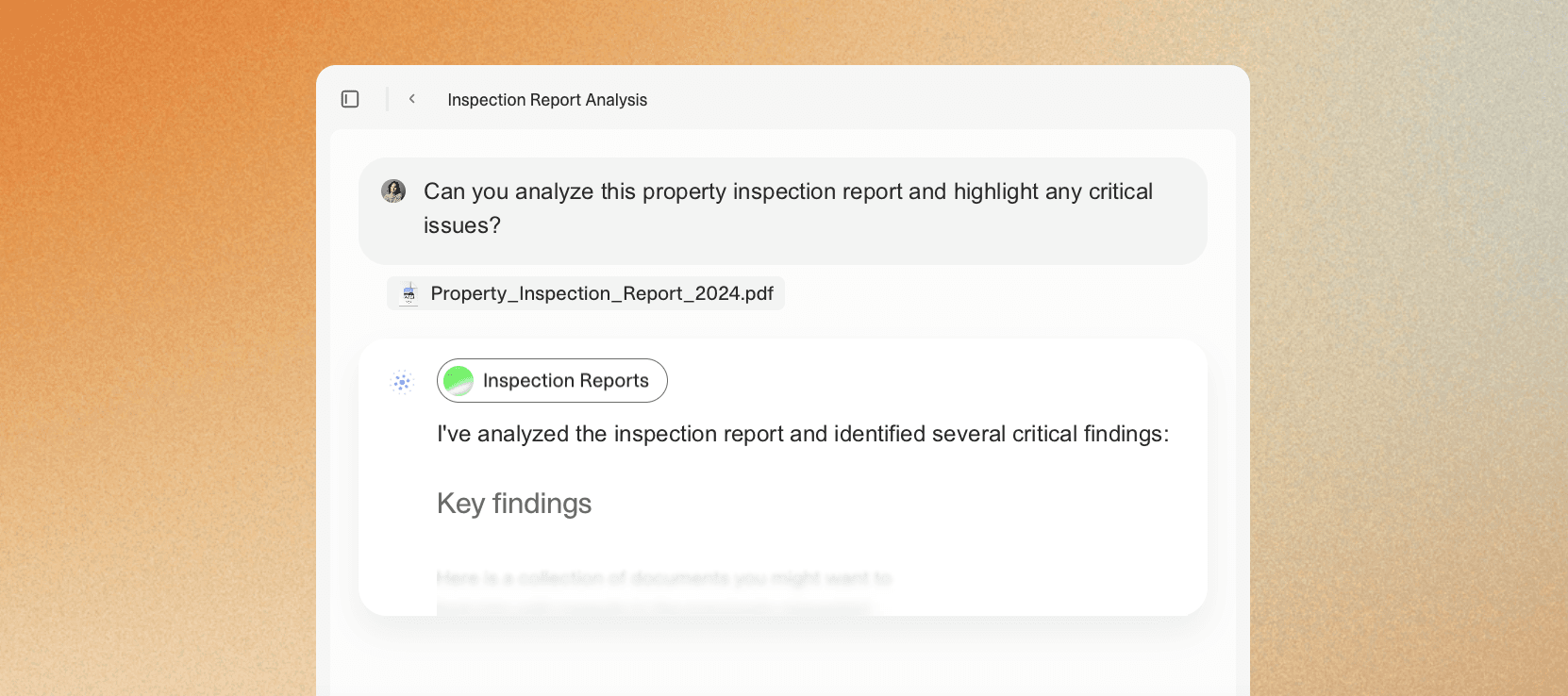
Property inspections generate detailed reports covering structural condition, mechanical systems, safety compliance, and deferred maintenance. These reports often run 20-50 pages of narrative text, photos, and tables. Extracting actionable data from them requires significant time.
An AI agent reads the inspection report, identifies critical issues, extracts cost estimates for repairs, and prioritizes them by urgency, mapping extracted issues to SLA requirements automatically.
For portfolio-level analysis, this capability is particularly valuable. Instead of reading 100 inspection reports manually, an analyst reviews the agent's summary.
During the 30–60 days between contract signing and closing, there's a juggling act with contingency deadlines, loan commitment dates, appraisal scheduling, title work and more. Each of these has a deadline. Miss one, and the deal can fall apart.
If the buyer requests a deadline extension, you often have to remember to update the checklist. If the lender asks for additional documentation, you have to add a new task.
With V7 Go, on the other hand, an AI agent can:
Read the PSA and addenda.
Extract critical dates (inspection, financing, appraisal, title objections, closing, possession).
Build a timeline and push tasks into your calendar/CRM/transaction platform.
Re-read amendments and automatically recalculate downstream deadlines.
Flag missing signatures, missing exhibits, or inconsistent terms for human review.
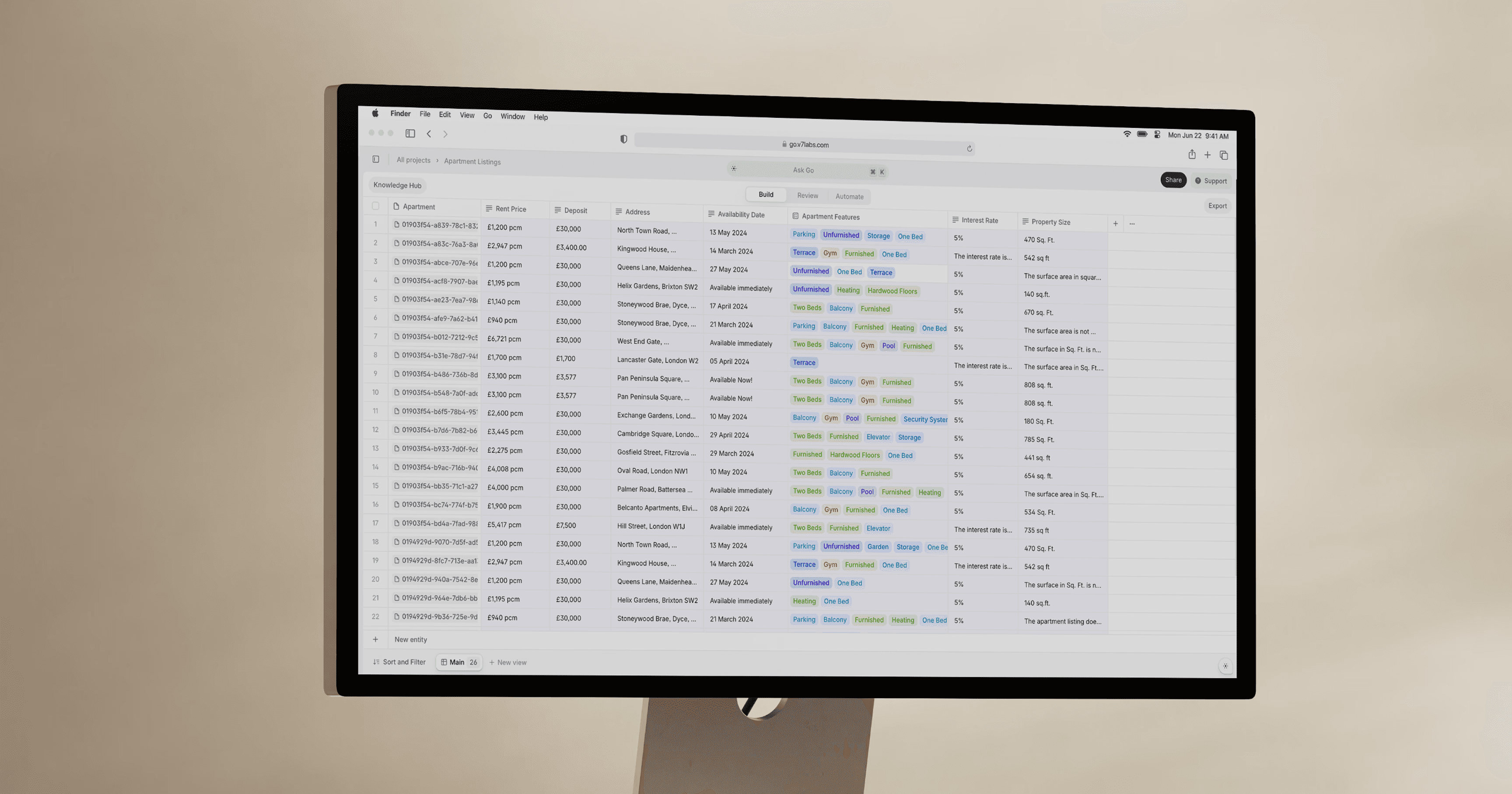
You review the output, make any necessary adjustments, and send. The entire process takes minutes instead of hours.
Explore how V7 can be used to automate real estate transactions in our case study: Relos streamlines $100M in real estate transactions with V7 Go contract intelligence.
How Real Estate Professionals Can Become AI-Ready
AI agents won’t replace real estate professionals. But they will change where the value of your time lives, and evolve the required skillset for some positions.
“If concerns about significant job losses materialize and the labor force shrinks, then the majority of real estate sectors may face top-line pressure… however our economists have argued that productivity gains and new tasks and jobs created by AI could have a positive impact on labor demand.”
— Ronald Kamdem, Head of U.S. REITs and Commercial Real Estate Research at Morgan Stanley
The professionals who remain competitive won’t be the ones who simply “use AI,” but those who understand where automation actually belongs in their workflows. That starts with identifying bottlenecks (manual, repetitive tasks that consume time without adding proportional value) and being willing to test new tools against those constraints.
NAR’s 2025 Technology Survey is a useful signal here. Real estate agents are widely using digital tools (like eSignature), and many are experimenting with AI, but a large share still report “no noticeable impact” from AI so far. That’s consistent with an industry that’s used AI for content, but hasn’t fully operationalized it into workflows.
When routine work is handled reliably, you get time back to focus on what you do best: advising clients, negotiating deals, building relationships, and exercising judgment in moments that truly matter.
How to Automate Your First Workflow: A 5-Step Guide
Implementing AI automation is partially a technology project, but it's just as much a process improvement project that happens to use AI.
This guide walks you through the five steps to automate your first real estate workflow.
Step 1: Scope the Right Type of Workflow
Not all workflows are good candidates for automation. The best workflows are repetitive, document-heavy, and rule-based. They involve reading unstructured documents, extracting specific data points, and making decisions based on clear criteria, like the ones outlined above.
Poor candidates include relationship management and one-off tasks (e.g., analyzing a single unique document).
The key question: does this workflow involve reading the same type of document repeatedly and extracting the same type of data? If yes, it is a good candidate for automation.
Step 2: Define Success Criteria and Baseline Metrics
Before you start, define what success looks like. This should include quantitative metrics (time savings, error reduction, cost savings) and qualitative metrics (user satisfaction, process reliability).
Example success criteria for lease abstraction: reduce average processing time from 2 hours to 15 minutes per lease; achieve 95% accuracy on key fields (rent, term, renewal options); reduce manual review time by 70%; achieve 80% user satisfaction score.
Measure your baseline before you start. How long does the current process take? What is the current error rate? How many documents do you process per month? This data will help you measure the impact of automation and justify the investment.
Step 3: Build/Configure the Agent
V7 Go provides a library of pre-built agents for common workflows, so you don't always have to build from scratch. You configure the agent to match your specific requirements.
You can learn more about how simple it can be to automate your real estate workflow with a V7 agent in our blog, How to Create an AI Agent Without Code: A Practical Guide.
Complete tutorial on building a Financial Analysis Agent from start to finish in V7 Go.
Once automation is in place, the next step is building guardrails and approvals where risk lives. A practical way to think about this is the NIST AI Risk Management Framework’s four functions: govern, map, measure, manage. In real estate terms, that means: decide who owns the workflow (govern), document where data comes from and where it goes (map), track accuracy/exception rates (measure), and continually tighten rules and escalation paths (manage).
Step 4: Test, Validate, and Iterate
Once the you have your automated workflow built out, go for a test drive! Start with a small batch (such as 10-20 documents) and review the results carefully. Check for accuracy, completeness, and edge cases. Identify patterns in errors and refine the configuration.
Include poor scans and atypical clauses in your test set to verify reliability. The agent should either extract correctly or flag for review.
Step 5: Deploy, Monitor, and Expand
Once the agent meets your success criteria, deploy it to production. When your first workflow is stable, expand to additional workflows. Use the lessons learned from the pilot to accelerate implementation. Build a library of agents that cover your most common document types and workflows.
The Future of Real Estate Operations
For decades, firms have invested in property management systems that digitized accounting and tenant records but left document processing as a manual task. The arrival of AI agents changes that equation. For the first time, it is possible to automate the extraction and validation of data from unstructured documents at scale.
The technology is ready. The question is whether your firm is ready to adopt it. Start with a single workflow. Measure the results. Iterate and expand.
To see how V7 Go can automate your real estate workflows, book a demo.
What is the difference between traditional OCR and AI document extraction?
Traditional OCR converts images to text but does not understand context. It can read the words "Base Rent: $50,000" but cannot identify that $50,000 is the monthly rent amount versus an annual figure or a CAM charge. AI document extraction uses large language models to understand document structure and meaning. It can identify the landlord, tenant, lease term, and renewal options, then extract them into structured fields with appropriate normalization. This makes it suitable for complex documents like leases, appraisals, and inspection reports where context determines meaning.
+
What happens when an AI agent makes a mistake?
AI agents are not perfect. They make mistakes, especially on edge cases or non-standard documents. The solution is to build review workflows into the automation. The agent flags low-confidence extractions for human review. A person reviews the flagged items, makes corrections, and approves the output. The goal is not zero errors. It is reducing manual work by 70-90% while maintaining acceptable accuracy through human-in-the-loop review.
+
Can AI agents handle handwritten documents or poor-quality scans?
Modern AI agents can handle handwritten text and low-quality scans, but accuracy varies. Include poor scans in your test set to understand how the agent performs on your specific document mix.
+
Imogen is an experienced content writer and marketer, specializing in B2B SaaS. She particularly enjoys writing about the impact of technology on sectors like law, finance, and insurance.