21 min read
—
A practitioner's guide to choosing the right LLM agent framework for multi-step reasoning and workflow automation. We evaluate N8N, Atomic Agents, Mastra, and how V7 Go solves the visibility gap that legacy frameworks ignore.

Casimir Rajnerowicz
Content Creator
V7 Go
A smarter way to manage due diligence and underwriting
Ask a VP of Operations at a mid-sized insurance company what tool they use to process claims intake, and they might point to a slide deck showing LangChain or a custom-built orchestration layer. Ask the analyst who actually runs the workflow where the real processing happens—the system they trust when a complex claim needs manual review at 6:00 PM on a Friday—and they will point to a spreadsheet and a series of email threads.
This gap defines the current state of the LLM agent framework market. Despite the explosion of tools promising autonomous multi-step reasoning, most production workflows still rely on brittle combinations of manual oversight and opaque automations you cannot debug. The core problem is not the LLM itself. It is the lack of visibility into what the agent actually did and control over how it executes multi-step workflows.
The situation is made worse by marketing confusion. Every software vendor now labels their features "agentic AI." Grammarly calls its proofreader "an agent." Salesforce calls its email auto-responder "an agent." This is not what practitioners mean when they search for LLM agent frameworks. They want platforms that let them build, inspect, and customize multi-step workflows with real visibility into each decision point.
In this article:
What LLM Agent Frameworks Actually Are: Cutting through marketing noise to define what practitioners mean by agent frameworks—and what they do not.
The Current State: Deep dives into N8N, Atomic Agents, Mastra, Google's ADK, and why legacy frameworks like LangChain are falling behind.
The Visibility Gap: Why most frameworks fail in production and how V7 Go solves the debugging and auditability problem.
Implementation Playbook: A step-by-step guide to migrating from manual workflows to agent-driven automation, including acceptance criteria and monitoring strategies.
What Are LLM Agent Frameworks? (And What They Are Not)
The term "AI agent" has become diluted to the point of meaninglessness. To understand what practitioners actually need, we must separate the marketing hype from the operational reality.
The Real Definition
When a finance team, legal department, or operations manager searches for an LLM agent framework, they are looking for a system that can execute multi-step reasoning workflows. This means more than answering a single question. It means performing a sequence of tasks: extract data from a document, validate it against a knowledge base, flag exceptions, and route them to the right reviewer.
A true LLM agent framework provides visibility into each step. It shows exactly what the agent did, which LLM was called, what context was retrieved, and where the workflow branched. Most critically, it allows customization of the workflow. You can define the steps, the decision points, and the fallback logic rather than accepting whatever the vendor pre-configured.
This is fundamentally different from the "agentic AI" marketing craze. A vendor calling their proofreader "an agent" does not make it useful for processing 200 CIMs during a private equity deal surge. What matters is whether you can see and modify the underlying workflow.
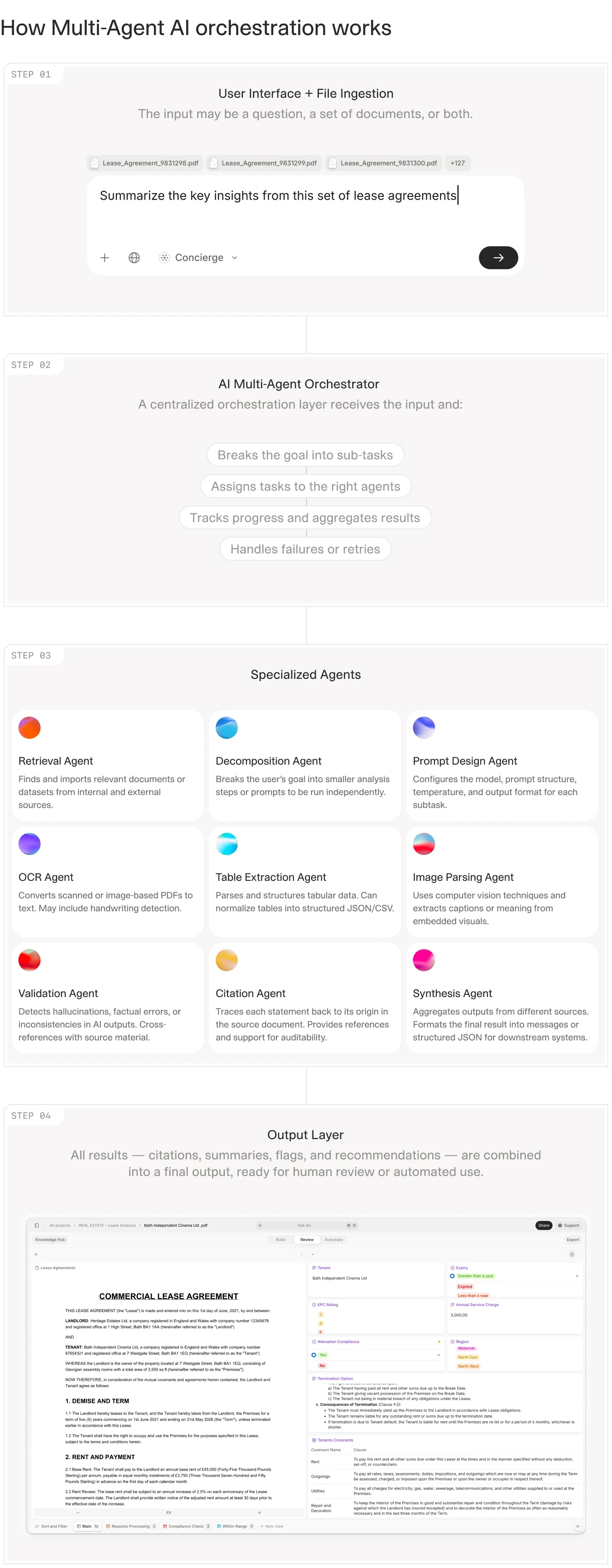
Multi-agent orchestration requires clear visibility into each step, not just a final output.
The Market Reality
The AI agents market was valued at $7.84 billion in 2025 and is projected to reach $52.62 billion by 2030, growing at a CAGR of 46.3%. North America holds 41.7% of the global LLM market, with the U.S. as the central hub for both development and enterprise adoption.
The market is saturated with options. The challenge is not finding a framework. It is finding one that works in production, with documents that vary wildly in format, quality, and structure. A framework that demos well on clean PDFs often fails when you feed it scanned documents with handwritten annotations, legacy system exports, or 80-page CIMs with nested tables.
V7 Go's agent library showing pre-built workflows for invoice processing, OCR extraction, and batch document analysis.
The Core Problem: Why Most Frameworks Fail in Production
Before evaluating specific frameworks, you need to understand why so many implementations fail. The pattern is consistent: a team builds a proof-of-concept that works beautifully in a demo, then watches it fall apart when exposed to real production data.
The Prototype vs. Production Gap
Most LLM agent frameworks are designed for rapid prototyping. They excel at demos. You can build a proof-of-concept in an afternoon that extracts data from a PDF and summarizes it. The problems emerge when you scale.
Consider what production actually requires. First, auditability: when an underwriter asks why the agent flagged a policy for manual review, you need to show the exact reasoning chain. Which clauses did it read? What thresholds did it apply? Where did it find conflicting information?
Second, error handling: when the agent encounters a scanned document with poor OCR quality—and it will—it should not silently fail or hallucinate. It should route the document to a human reviewer with a clear explanation of what went wrong. This means tracking OCR confidence scores per field and defining thresholds that trigger fallback paths.
Third, workflow customization: when your legal team wants to add a new step to the contract review workflow—say, checking for specific indemnification language in liability caps—you should be able to configure this without rewriting the entire agent.
Most frameworks fail on at least two of these three requirements.
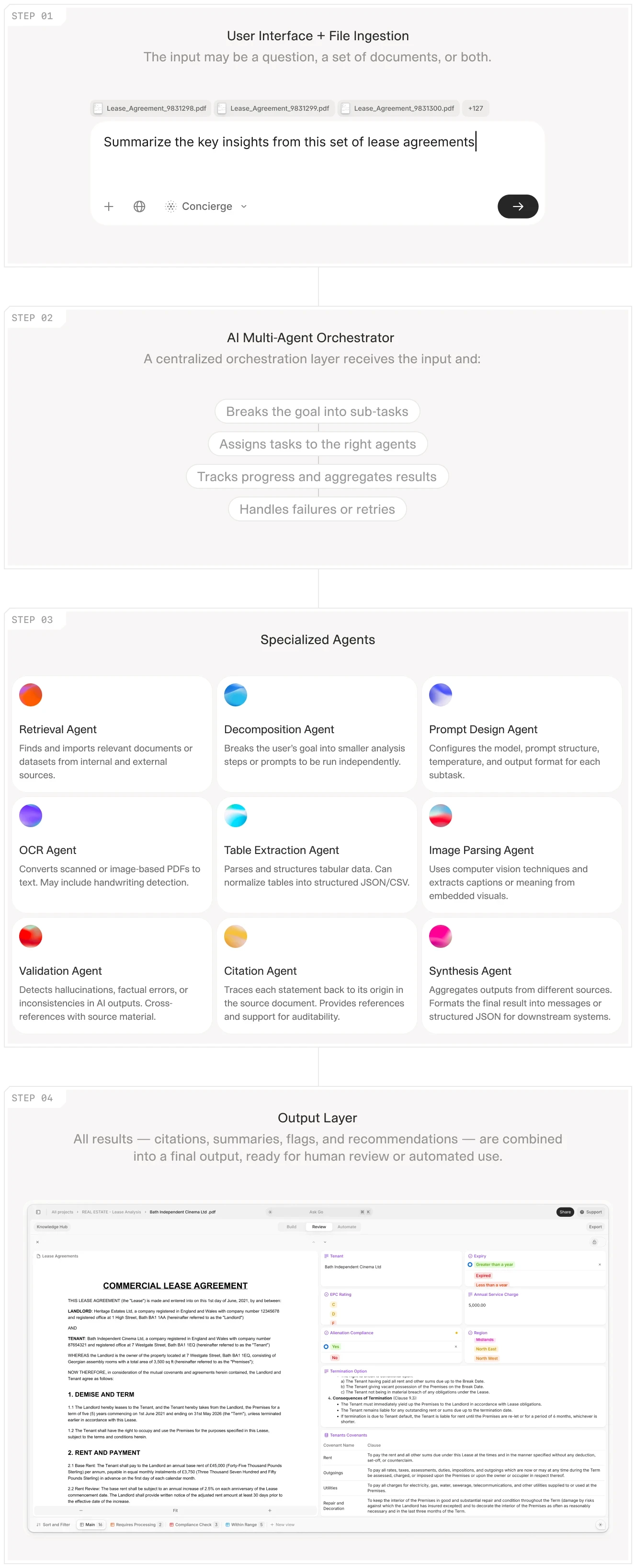
Production workflows require clear decision trees and fallback logic, not just linear processing.
The Visibility Problem
The most common failure mode is the "black box" problem. An agent processes a document, returns a result, and you have no idea how it arrived at that conclusion. This is acceptable for low-stakes tasks like summarizing a news article. It is unacceptable for high-stakes tasks like underwriting an insurance policy or reviewing a legal contract.
Controllers do not trust a black-box summary of a 10-K. They want to see which pages drove each ratio and where the agent flagged inconsistencies. Legal counsel will not sign off on a contract review unless they can trace every flagged clause back to the source document with exact page and paragraph references.
This creates a paradox: the more powerful the agent, the more important visibility becomes. A simple extraction tool can be verified by spot-checking. A complex multi-step agent that makes dozens of intermediate decisions requires a complete audit trail.
The Operational Reality: What Actually Breaks
Teams encounter the same failure patterns repeatedly. Document format drift is one: a supplier changes their invoice template, and the agent that worked perfectly for six months suddenly misparses the line items. Without visibility into which extraction rules failed, you cannot debug the issue.
State management is another common problem. Multi-step workflows need to track where they are in the process. If an agent extracts ten fields from a CIM, validates five of them against external data, and fails on the sixth, what happens? Does it retry? Does it save partial results? Does it alert someone? Most frameworks leave this undefined.
Then there is the versioning problem. When you update an agent's prompts or add a new validation step, how do you test whether the change improves or degrades performance on your existing document corpus? Without regression testing capabilities, teams are flying blind with every update.











The Current State: Next-Generation Frameworks
The LLM agent framework market has evolved rapidly. The first generation, dominated by LangChain and similar tools, focused on making it easy to chain LLM calls together. The second generation focuses on making those chains visible, debuggable, and production-ready. Here is how the leading options compare.
N8N: The Visual Workflow Powerhouse
N8N is an open-source workflow automation platform that has emerged as a leading choice for teams that need flexible, visual orchestration of LLM workflows. Unlike traditional agent frameworks that abstract away the workflow logic, N8N gives you a visual canvas where you can see every step, every decision point, and every integration.
The platform shines in three areas. Its visual workflow builder provides a drag-and-drop interface for building complex multi-step workflows without writing code. Each node represents a discrete action—call an LLM, parse a response, branch on a condition, write to a database—and you can trace data flow through the entire pipeline.
N8N offers native integrations with LLM providers including OpenAI, Claude, and custom API endpoints. The customizable multi-step automation lets you define conditional logic, loops, and error handling directly in the visual interface. This is where the visibility advantage becomes concrete: you can set a breakpoint at any node and inspect the data passing through.
Production Use Case: A private equity firm uses N8N to orchestrate their CIM triage workflow. The workflow reads incoming emails via IMAP, extracts attachments, sends PDFs to an OCR agent, validates extracted EBITDA figures against the stated investment criteria (minimum $5M, maximum $50M), and routes promising deals to analysts while archiving non-fits. When a CIM is misclassified, the team can open the workflow, click on the validation node, and see exactly which field triggered the rejection. The debugging time dropped from hours to minutes.
Operational Considerations: N8N supports retries and error handling at the node level. You can configure exponential backoff for API calls that hit rate limits. State persists in a PostgreSQL database, so workflows survive restarts. However, the platform has a steep learning curve for advanced orchestrations. Complex multi-agent systems with more than fifty nodes become difficult to navigate in the visual interface. Teams often split large workflows into sub-workflows to maintain clarity.
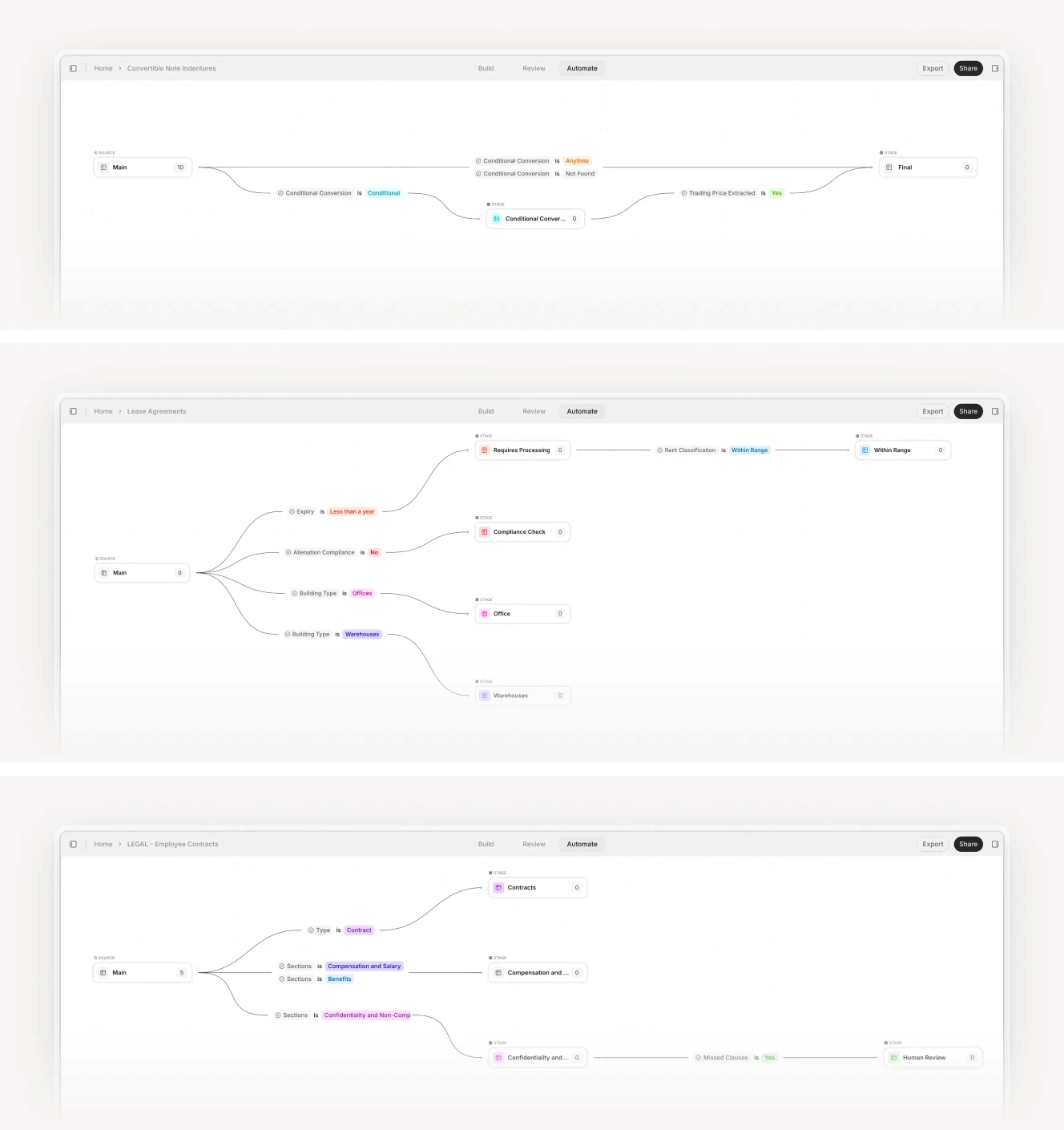
N8N's visual workflow builder makes it easy to see the entire automation pipeline at a glance.
Atomic Agents: The Developer's Framework
Atomic Agents has gained a strong following among developers who prioritize stability and control over ease of use. Built by a team frustrated with the technical debt created by LangChain, Atomic Agents takes a modular, developer-first approach.
The framework's modular architecture means each agent is a self-contained module with clear inputs, outputs, and dependencies. This makes it straightforward to test agents in isolation, debug failures without wading through abstraction layers, and reuse agents across different workflows. One Reddit user reported running Atomic Agents in production for over a year with minimal code changes required when new reasoning models dropped.
Production stability is a core design goal. The framework avoids rapid deprecation of features and maintains backward compatibility. When you upgrade to a new version, your existing agents keep working. Developers can configure every aspect of the agent's behavior: the LLM provider, the retry logic, the error handling strategy, the timeout thresholds.
Production Use Case: An insurance underwriting team processes risk engineering reports using a chain of specialized Atomic Agents. The first agent extracts property details—square footage, construction type, occupancy class. The second identifies hazards from the inspector's narrative—proximity to flood zones, age of electrical systems, sprinkler coverage. The third calculates Estimated Maximum Loss using a formula that references the extracted fields. The fourth flags any discrepancies between stated values and calculated limits. When a new hazard category was added (wildfire proximity scoring), the team updated only the hazard identification agent and ran regression tests against their historical document corpus. The modular design contained the change.
Operational Considerations: Atomic Agents requires more upfront configuration than plug-and-play frameworks. You will need to define your own state management, logging, and observability layers. The documentation, while improving, can be sparse for edge cases. This is a framework for teams with strong engineering resources, not for business users looking for a no-code solution. Plan for at least two weeks of integration work before going live.
CIM due diligence workflow showing Cases interface with extracted fields and entity analysis.
Mastra: The TypeScript-Native Framework
Mastra is a lightweight agent framework optimized for modern TypeScript environments. It has gained traction among teams that already use TypeScript for their backend services and want a framework that integrates with their existing stack without introducing a separate runtime.
Mastra makes multi-agent orchestration straightforward with built-in support for message passing and state management between agents. Pre-built connectors exist for common enterprise systems including Salesforce, HubSpot, and Google Drive. The active community contributes plugins, templates, and best practices.
Production Use Case: A real estate investment firm uses Mastra to automate their lease abstraction workflow. Three agents work in sequence: the first extracts key dates (commencement, expiration, renewal options) and financial terms (base rent, CAM charges, escalation clauses). The second identifies non-standard clauses that deviate from the firm's standard lease playbook—unusual assignment restrictions, co-tenancy provisions, exclusive use clauses. The third generates a summary report formatted for their asset management system. The entire workflow runs in their existing Node.js backend with no need for a separate orchestration layer.
Operational Considerations: Mastra is still relatively new and lacks some advanced features found in more mature frameworks. For very large-scale deployments with hundreds of concurrent workflows, teams may need to build additional infrastructure for monitoring, scaling, and distributed tracing. The community is growing, but enterprise support is limited compared to VC-backed alternatives.
Google's ADK: The Enterprise Bet
Google's Agent Development Kit (ADK) is an early-stage framework that uses Google's infrastructure for scalability and multi-model support. The framework is still emerging, but early adopters report solid results for high-volume use cases.
ADK's asynchronous orchestration provides built-in support for parallel processing and async workflows. When you need to process 500 earnings call transcripts during reporting season, ADK can distribute the work across multiple workers and aggregate results. Multi-model support allows you to use the best model for each task without vendor lock-in—GPT-4 for complex reasoning, Claude for long-document summarization, a smaller open-source model for simple classification.
Production Use Case: A hedge fund processes earnings call transcripts using ADK. The framework coordinates four agents working in parallel: one transcribes the audio, another extracts key financial metrics (revenue, guidance, margin changes), a third identifies forward-looking statements and management tone, and a fourth generates a summary for analysts. The async architecture processes hundreds of transcripts in parallel during earnings season without bottlenecking. A single analyst can monitor the batch job rather than manually processing each transcript.
Operational Considerations: ADK is currently limited to Python and .NET ecosystems, which may be a barrier for teams using other languages. The documentation is still evolving, and some features are marked as experimental. Plan for potential API changes as the framework matures. Enterprise support is available through Google Cloud, which can be attractive for teams already in that ecosystem.
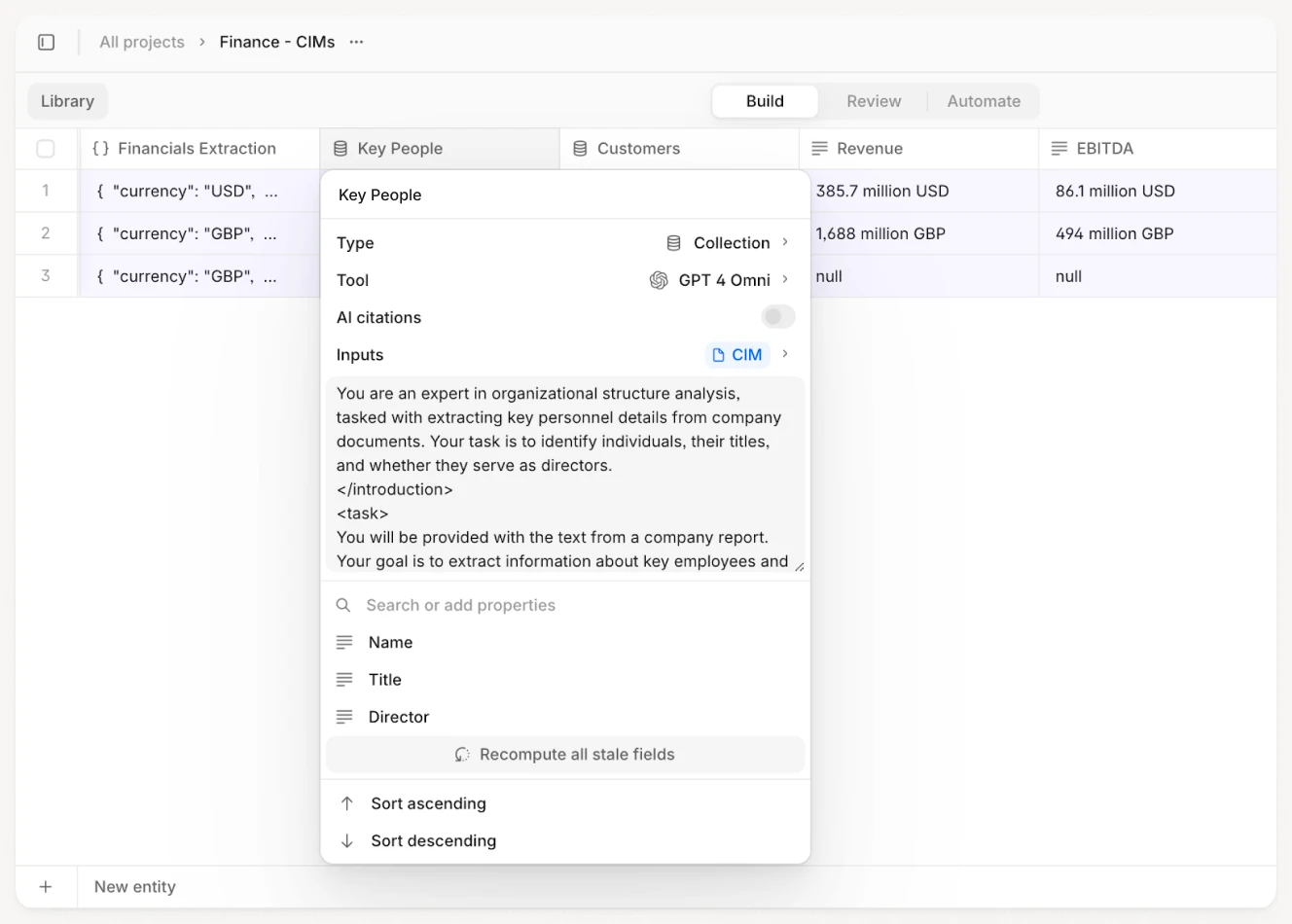
Production workflows require precise extraction with traceable citations, not just summaries.
The Legacy Problem: Why LangChain Is Losing Ground
LangChain was the first major LLM agent framework to gain widespread adoption. It made it easy to prototype LLM workflows and experiment with different models. However, as teams moved from prototypes to production, the limitations became clear. The community sentiment on Reddit is blunt: "I hate LangChain" appears in multiple threads discussing framework selection.
The Technical Debt Problem
LangChain's rapid iteration cycle—a strength during the prototyping phase—became a liability in production. Features were deprecated quickly, breaking existing workflows. The documentation struggled to keep up with the changes, leaving teams to reverse-engineer the framework's behavior from source code. One Reddit user summarized the frustration: "Every time we try to deploy something to production, we spend more time debugging LangChain than debugging our own code."
The Abstraction Problem
LangChain abstracts away too much of the underlying workflow logic. This makes it easy to get started but difficult to debug when something goes wrong. When an agent fails, you often cannot tell whether the problem is with the LLM, the prompt, the retrieval logic, or the framework itself. You end up adding print statements throughout the abstraction layers, trying to find where data gets mangled.
This is the opposite of what production teams need. They need transparency, not abstraction. They need to see exactly what the agent did at each step so they can identify and fix the problem.
The Monolithic Problem
LangChain tries to be an all-in-one solution, handling everything from prompt management to vector databases to agent orchestration. This creates tight coupling between components. If you want to swap out the vector database, you often need to rewrite significant portions of your agent logic. Modern frameworks like Atomic Agents and Mastra take the opposite approach: they provide a modular architecture where each component can be replaced independently.
The V7 Go Difference: Solving the Visibility Gap
The common thread across all the frameworks discussed so far is the visibility problem. Even the best frameworks struggle to provide clear, actionable insights into what the agent actually did. This is where V7 Go takes a different approach.
Visual Grounding: See What the Agent Saw
V7 Go's visual grounding feature allows you to see exactly which parts of a document the agent read when making a decision. When an agent extracts a revenue figure from a financial statement, you can click on the figure and see the exact cells in the spreadsheet that were used. When an agent flags a clause in a contract, you can see the marked text in the original PDF with page and paragraph references.
This is not a nice-to-have feature. It is essential for auditability. When a compliance officer asks why an agent approved a transaction, you can show them the exact data points that drove the decision. When a legal team questions a contract review, you can trace every flagged clause back to the source document.
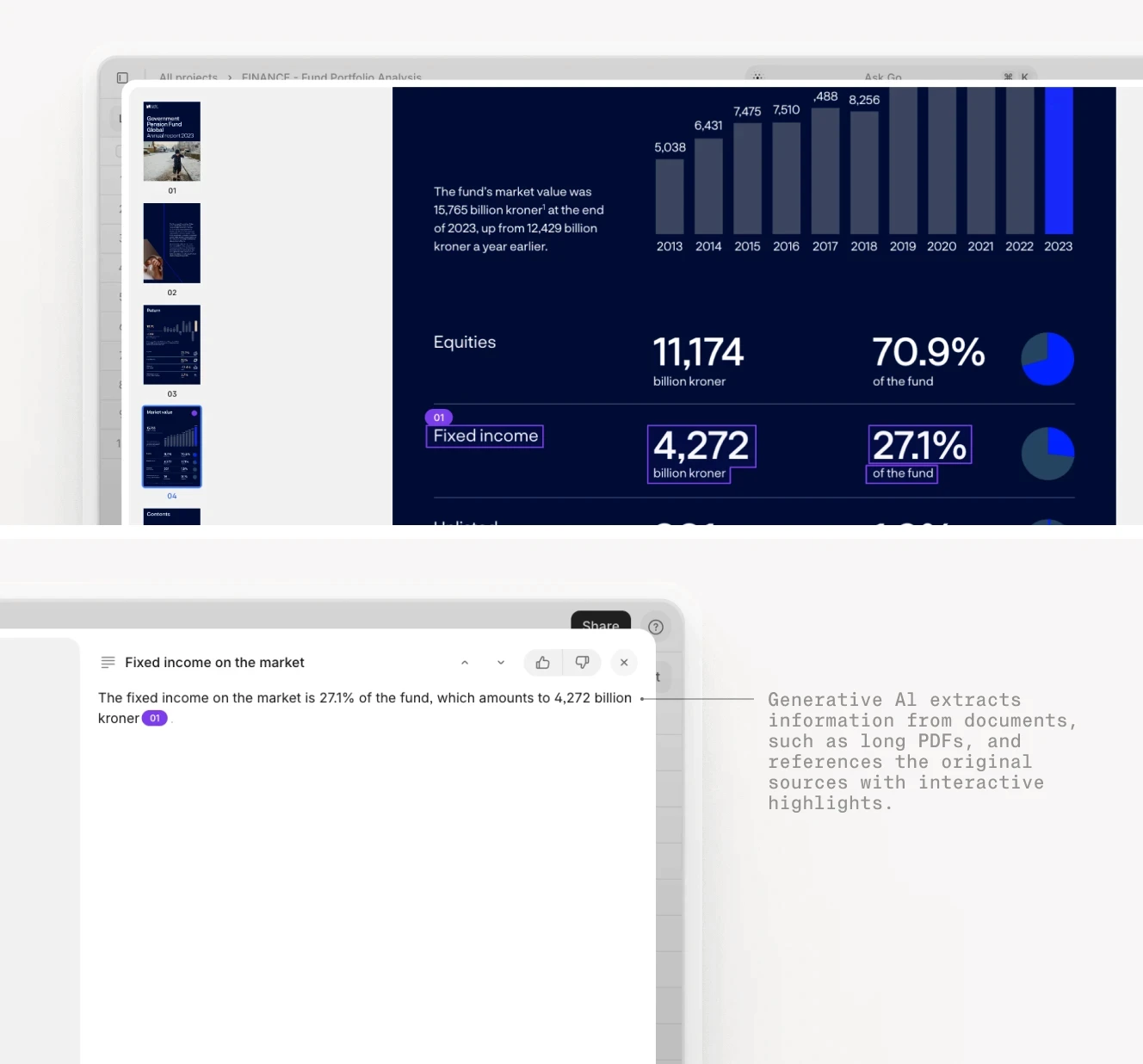
V7 Go's visual grounding shows the exact source of every extracted data point.
Knowledge Hubs: Context Without Training
A common misconception about LLM agents is that they need to be "trained on your data." This is both technically inaccurate and operationally problematic. Training a model is expensive, slow, and raises data privacy concerns. V7 Go uses Knowledge Hubs instead.
Knowledge Hubs are structured document repositories that agents query in real-time. Instead of training a model on your documents, agents use your documents as context. When an agent needs to answer a question about a lease agreement, it retrieves the relevant clauses from the Knowledge Hub and uses them to generate a response.
This approach offers several advantages. Privacy is maintained because your documents never leave your environment. The LLM sees only the specific context needed to answer the current query. Freshness is automatic: when you update a document in the Knowledge Hub, agents immediately have access to the latest version with no retraining required. Traceability is built in: every response includes citations showing which documents and which specific passages were used.
Knowledge Hubs provide the document memory that agents need for accurate, context-aware processing.
Cases: Shareable Workspaces with Audit Trails
V7 Go's Cases feature provides a shareable workspace for each workflow instance. When an agent processes a CIM, it creates a Case that includes the original document, the extracted data, the agent's reasoning, and any manual reviews or edits.
Collaboration becomes straightforward. An analyst can review the agent's work, make corrections, and add notes within the same Case. A manager can review the entire workflow history and see exactly what happened at each step. When discrepancies arise, you can replay the workflow to understand where the issue occurred.
Cases also provide a complete audit trail. When a regulator asks how a decision was made, you can export the entire Case—including the original documents, the agent's reasoning, and any human interventions—as a single package. This is the level of documentation that regulated industries require.
NDA review workflow showing full analysis with flagged clauses, risk assessment, and suggested redlines.
Implementation Playbook: From Manual to Agent-Driven
Migrating from manual workflows to agent-driven automation is not a simple technology swap. It requires rethinking how work gets done, who is responsible for what, and how quality is measured. Here is a step-by-step approach that works.
Step 1: Identify High-Value, High-Volume Workflows
Not every workflow is a good candidate for automation. The best candidates share three characteristics: high volume (repeated dozens or hundreds of times per month), well-defined (clear inputs, outputs, and decision criteria), and document-heavy (involving reading, extracting, or analyzing documents). These workflows are ideal candidates for intelligent document processing.
Strong candidates include processing insurance claims intake forms, reviewing commercial lease agreements for key terms, triaging CIMs for private equity deal flow, and extracting financial data from quarterly reports. Avoid workflows that are highly variable, require deep domain expertise, or involve significant judgment calls. These are better suited for human-in-the-loop approaches where the agent assists rather than replaces the human.
Step 2: Define Acceptance Criteria
Before building an agent, define what success looks like with specific, measurable criteria. For a lease abstraction workflow, your acceptance criteria might include: extract key dates (commencement, expiration, renewal options) with 95% field-level accuracy; flag non-standard clauses for manual review with 90% recall (you can miss some standard clauses but should rarely miss non-standard ones); reduce review time from 30 minutes per lease to 5 minutes.
Define confidence thresholds as well. If the agent's confidence on a particular extraction falls below 0.8, trigger a manual review. This gives you a tunable parameter for balancing automation rate against accuracy.
Step 3: Build, Test, and Iterate
Start with a small pilot. Select 30-50 representative documents and run them through the agent. These should include both typical cases and known edge cases—documents with poor scan quality, unusual formatting, or non-standard terms. Review the results against your acceptance criteria.
For each document, compare the agent's output against a human-created ground truth. Calculate precision and recall per field. Identify patterns in the failures. Did the agent struggle with a particular document format? A specific field type? Handwritten annotations?
Use this feedback to refine the agent's configuration. Adjust prompts, add validation rules, or incorporate additional context from Knowledge Hubs. Run the updated agent against your test corpus and measure improvement. Repeat until you meet your acceptance criteria on the test set.
Step 4: Deploy with Human-in-the-Loop
Even after successful testing, deploy the agent with human oversight. Use a sampling approach: have humans review a random sample of the agent's outputs (10% of all processed documents) to catch any drift in accuracy over time.
For high-stakes workflows, use a two-tier review system. In Tier 1 (Automated), the agent processes the document and flags any exceptions or low-confidence extractions. In Tier 2 (Human Review), a human reviews only the flagged items, not the entire document.
This approach reduces manual work while maintaining quality. An underwriter no longer reads every page of every submission. They focus on the 10-15% of submissions that the agent flagged as requiring expert judgment.
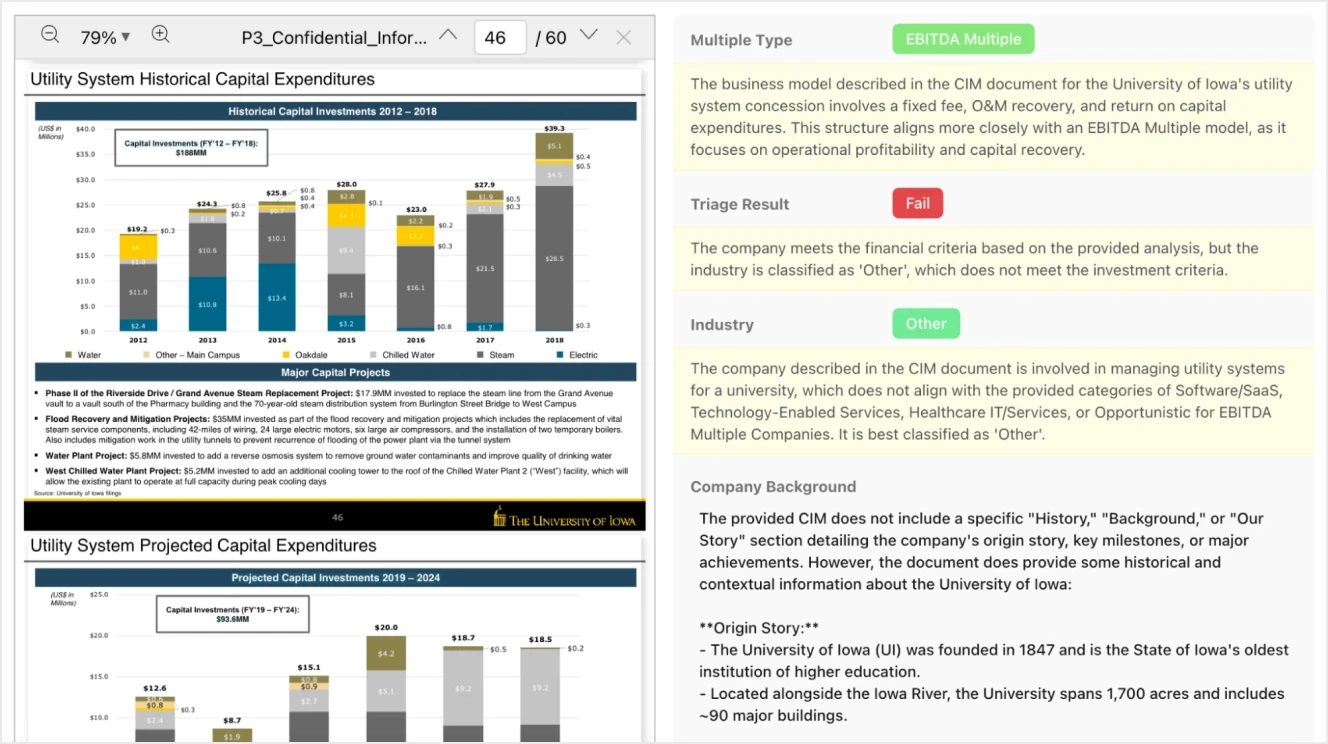
Successful agent workflows balance automation with human oversight for edge cases.
Step 5: Monitor and Maintain
Agent workflows require ongoing monitoring and maintenance. Track accuracy over time. Are the agent's extractions still meeting your targets? If accuracy drops, investigate whether the input documents have changed (a supplier updated their invoice template) or whether the LLM provider has updated their model (which happens more often than you might expect).
Update Knowledge Hubs as your business rules change. When your legal team revises the contract playbook, update the reference documents so agents have access to the latest policies. Set up alerts for anomalies: if the agent suddenly starts flagging 50% of documents for manual review when the baseline is 15%, something has changed.
V7 Go's Cases feature makes this monitoring practical. You can review historical workflows, identify patterns in failures, and use those insights to improve the agent's configuration. When a failure pattern emerges, you can trace it back to specific document types or extraction rules.
What Changes Monday Morning
If you take one thing from this article, let it be this: the competitive advantage will not come from having the same framework as everyone else. It will come from information advantage—the ability to process, validate, and act on unstructured data faster and more accurately than the competition.
Here is your action plan for the next two weeks:
Week 1: Assess and Select
Identify one high-volume, document-heavy workflow in your organization that currently relies on manual processing or brittle automation.
Document the current process: how many documents per month, who touches them, what decisions get made, what the error rate looks like.
Select a framework based on your team's capabilities. If you have strong TypeScript skills and want a lightweight option, try Mastra. If you need visual debugging and integration flexibility, evaluate N8N. If you need production-grade document processing with built-in auditability, book a demo with V7 Go.
Week 2: Pilot and Measure
Gather 30-50 representative documents from your target workflow, including edge cases.
Build a simple agent that handles the core extraction or analysis task.
Create ground truth annotations for your test documents and run the agent against them.
Calculate precision and recall per field. Identify where the agent fails and why.
Decide whether the results justify continued investment or whether you need a different approach.
The teams that will win in the next three years are not waiting for perfect solutions. They are running pilots, measuring results, and iterating. The frameworks exist. The question is whether you will use them.
What is the difference between an LLM agent framework and a chatbot?
A chatbot is designed for single-turn interactions—you ask a question, it gives an answer. An LLM agent framework is designed for multi-step workflows—it can execute a sequence of tasks, make decisions based on intermediate results, and route work to different agents or human reviewers. For example, a chatbot might answer "What is the renewal date in this lease?" An agent framework can extract the renewal date, check if it falls within a notification window, flag any non-standard renewal terms, and route the lease to a reviewer if exceptions are found. The key difference is workflow orchestration and visibility into each step.
+
Do I need to train an LLM on my data to use an agent framework?
No, and you should be cautious of vendors who claim you do. Modern agent frameworks like V7 Go use your documents as context via Knowledge Hubs, not by training models on your data. This approach is faster (no training required), more private (your data never leaves your environment), and more flexible (updates to documents are immediately available to agents). Training custom models is expensive, slow, and creates maintenance burden as your documents change.
+
How do I know if an agent framework is production-ready?
Evaluate three things. First, auditability: can you trace every decision back to the source data with citations? Second, error handling: does the framework handle edge cases like poor-quality scans or missing data gracefully, or does it silently fail? Third, stability: does the vendor maintain backward compatibility, or do they frequently deprecate features and break existing workflows? Frameworks like Atomic Agents and V7 Go prioritize these production requirements. Frameworks like LangChain are better suited for prototyping.
+
Can I use multiple LLM providers in the same workflow?
Yes, and this is often a best practice. Different LLMs have different strengths. You might use GPT-4 for complex reasoning tasks that require nuanced understanding, Claude for long-document summarization where context window matters, and a smaller open-source model for simple classification tasks where cost is a concern. Most modern frameworks including N8N, Mastra, Google's ADK, and V7 Go support multi-model orchestration, allowing you to choose the best model for each step in your workflow.
+
What is the typical ROI timeline for implementing an LLM agent framework?
Pricing varies widely by approach. Open-source frameworks like N8N and Mastra are free to self-host, though you will need to invest in infrastructure and engineering time—budget for two engineers spending 2-4 weeks on integration and ongoing maintenance. Enterprise platforms like V7 Go, Google's ADK, and commercial versions of open-source tools typically use custom pricing based on usage: number of documents processed, API calls, or workflows executed. For mid-sized teams processing thousands of documents monthly, expect annual costs in the range of $50,000 to $200,000, depending on volume and complexity. The key is to evaluate total cost of ownership—including engineering time, infrastructure, and ongoing maintenance—not just the software license fee.
+
How much does an LLM agent framework cost?
Go is more accurate and robust than calling a model provider directly. By breaking down complex tasks into reasoning steps with Index Knowledge, Go enables LLMs to query your data more accurately than an out of the box API call. Combining this with conditional logic, which can route high sensitivity data to a human review, Go builds robustness into your AI powered workflows.