13 min read
—


Your practical guide to evaluating document automation platforms for financial workflows.

V7 Go
A smarter way to manage due diligence and underwriting
In this very moment, someone, somewhere is opening a PDF that an automation already “handled.” The data is mostly there, except for the one column that shifted, the subtotal that didn’t foot, and the handwritten note the system ignored. After five minutes of checking and re-checking, they give up and type the totals into Excel themselves. Multiply that by a few thousand documents a month, and automation hasn’t removed the work. It’s just changed where it shows up.
Despite billions spent on ERP systems, the day-to-day reality for most finance teams is still a fragile mesh of manual workflows. Scanned invoices arrive via email, bank statements come as locked PDFs, loan applications include handwritten notes. Quarterly reports mix tables, charts, and footnotes across 200 pages. Someone (usually a junior analyst or an outsourced team in another timezone) often ends up extracting every figure, validating it, and keying it into the system of record.
In 2026, which platform can truly handle the complexity of real finance workflows without creating new bottlenecks?
In this article:
Why traditional document processing fails in finance and what modern teams actually need.
Deep dives into modern AI challengers and legacy incumbents.
How to assess platforms based on accuracy, integration, cost, and workflow fit, with specific acceptance criteria for different document types.
Why is Automating Financial Document Data Extraction and Analysis So Challenging?
Finance operations generate and consume an extraordinary volume of documents. Invoices, bank statements, loan files, compliance forms, quarterly reports, audit trails; each one a potential source of delay if the data inside cannot be extracted quickly and accurately.
Even if invoices come from the same supplier every month, procurement agents change, formats vary, and typos creep in. And of course, invoices are just the tip of the documentation iceberg. Every day, at every company, at every level of management and operations, employees need to extract details from contracts, leases, tax forms, surveys, and other documents.
— PWC
Critical information is often implied rather than stated outright, split across sections, tables, appendices, or even separate documents, requiring cross-referencing and interpretation rather than simple field capture.
Compounding this, financial data is highly temporal: values change based on effective dates, conditions, thresholds, and exceptions that machines must correctly sequence and reconcile. Small errors are disproportionately costly (a missed clause, misclassified fee, or outdated figure can materially impact valuations, compliance, or investor trust.) That means “mostly right” isn't good enough.
Finally, many workflows rely on human judgment embedded in institutional knowledge: how a firm usually interprets a clause, which number is considered authoritative, or when something warrants escalation. Automating this means encoding not just document understanding, but decision logic, auditability, and risk controls. That's a far harder problem than extraction alone.
The traditional approach to this problem has been to throw people at it. Outsourced business process outsourcing teams manually re-key data from scanned documents into ERP systems. Junior analysts spend their first year building complex Excel workbooks with 40+ tabs of VLOOKUP formulas to reconcile data across systems. Controllers delay month-end close by five days waiting for manual reconciliation to finish.
This is not sustainable, or easily scalable.
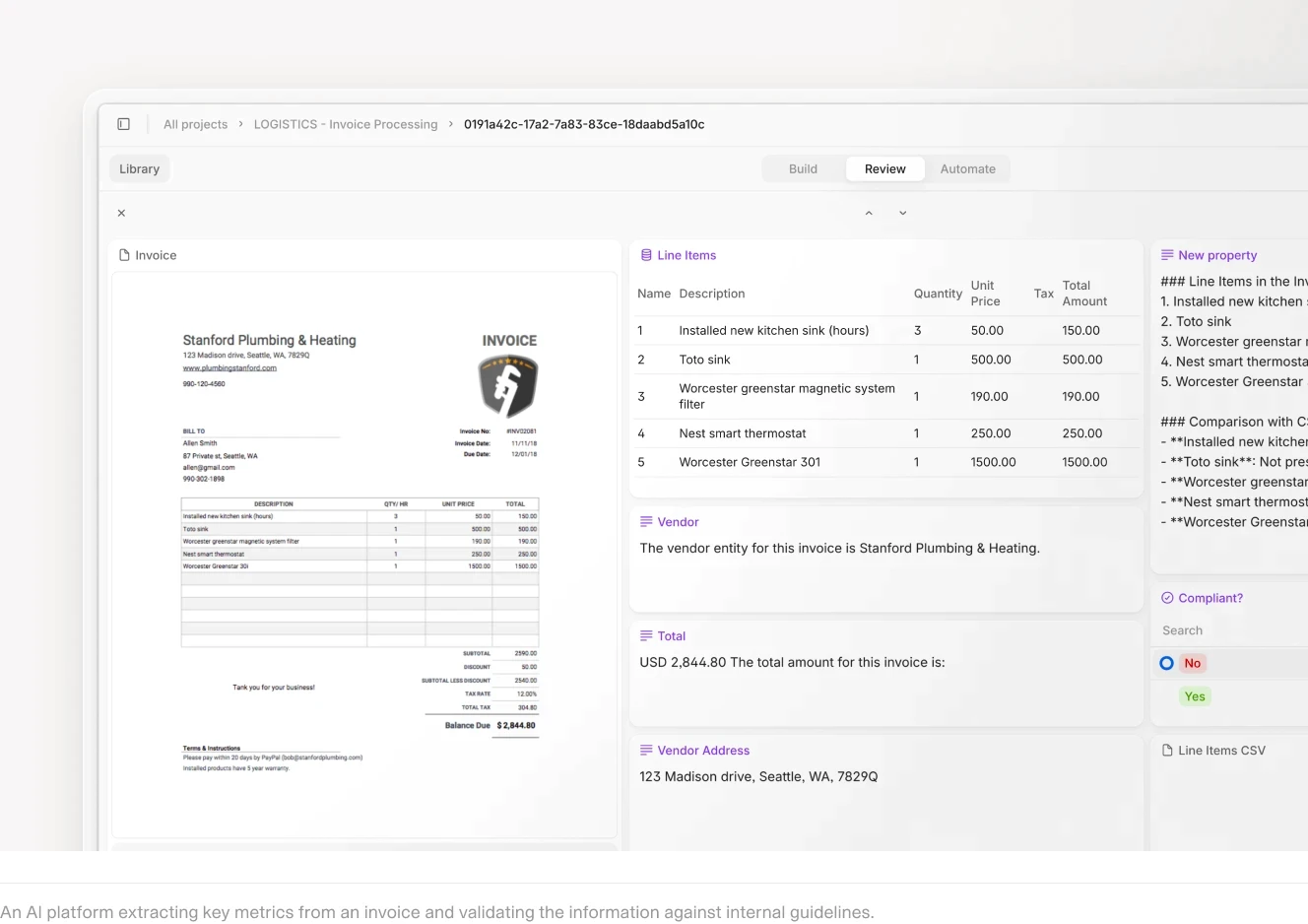
Automated invoice extraction with line-item detail, vendor information, and source citations.
What Finance Teams Actually Need
When evaluating document automation platforms, finance teams care about three things: accuracy on complex documents, explainability for audit, and integration with existing systems.
Accuracy on Complex Documents
In financial workflows, accuracy means correctly interpreting dense, irregular, and often contradictory documents. A single report may mix narrative text, nested tables, footnotes, and exceptions that materially change the meaning of a number. The right platform must go beyond surface-level extraction to understand relationships between fields, apply domain-specific rules, and reconcile information across sections and versions.
Without this depth, automation breaks down precisely where stakes are highest: bespoke deal terms, non-standard fees, or edge-case clauses that don’t fit a template. There are few things more frustrating than an "automated" system that requires manual review for a huge chunk of the overall flow.
Explainability and Traceability
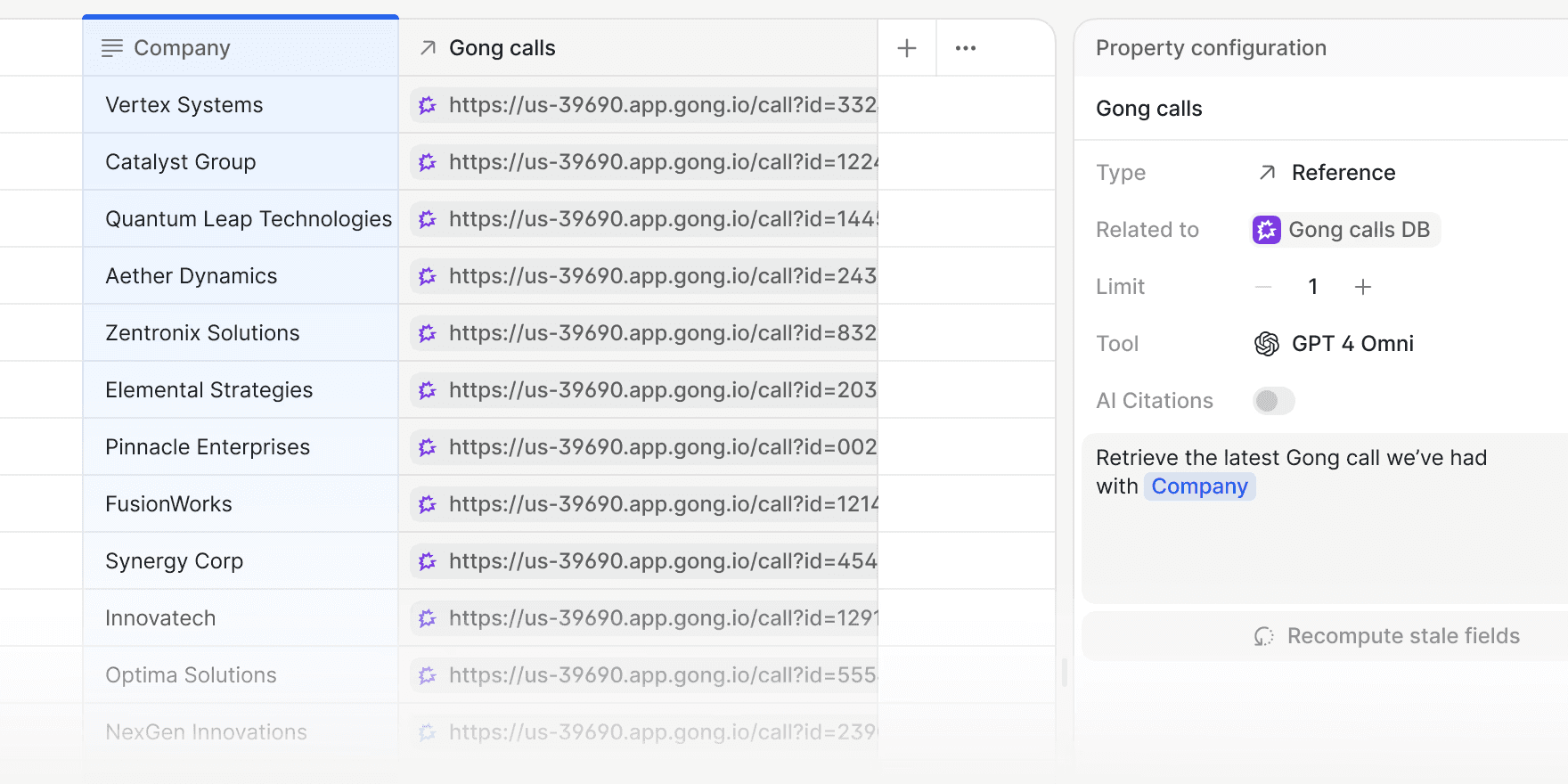
Controllers don't trust black-box summaries. They need to see which pages drove each extracted figure and where the system flagged inconsistencies. This is especially critical during audits, where every number must be traceable back to source documents.
A figure pulled from page 47 of a 10-K needs a citation, a covenant calculation needs to show its inputs, an exception flagged for review needs to explain why it was flagged.
To learn more about citations in V7 Go, click here.
Integration with Existing Systems
In finance, a document processing and analytics solution is only as powerful as its ability to integrate seamlessly with the systems that already run the business.
CFOs and finance teams don’t operate in isolation. They rely on ERPs, accounting platforms, data warehouses, BI tools, CRM systems, procurement platforms, and compliance software. If a document AI solution cannot plug directly into this ecosystem, it risks becoming another silo rather than a strategic asset.











Platform Comparison: Modern AI Challengers vs. Legacy Incumbents
The document automation market in finance is increasingly split between modern AI-native platforms and legacy enterprise incumbents. In the sections that follow, we’ll run through both categories in detail; where each excels, where they struggle, and how to think about fit based on your specific financial workflows and organizational maturity.
Modern AI Challengers
Modern AI-native platforms are built from the ground up to handle unstructured and semi-structured documents using machine learning, large language models, natural language processing, and computer vision.
Unlike legacy systems that rely heavily on templates and rigid rules, newer AI-native platforms typically prioritize:
Faster implementation cycles
Flexible configuration
API-first integration into modern finance stacks
Continuous model improvement
Workflow orchestration beyond simple extraction
This makes them particularly well suited to fast-moving finance teams.
V7 Go
Website: V7 Go
V7 Go sits firmly in the modern AI-native category. It combines powerful extraction with configurable, multi-agent workflow automation tailored to document-heavy financial environments.
It enables financial firms to deploy agentic workflows across use cases such as CIM analysis, NDA review, lease abstraction, invoice reconciliation, management accounts extraction, and portfolio reporting.
Pre-built agents accelerate time to value, while remaining fully configurable, and new agents can be built from scratch to support bespoke investment, fund, or finance processes.
For example here's a glimpse of an AI E-Invoicing Agent in action.
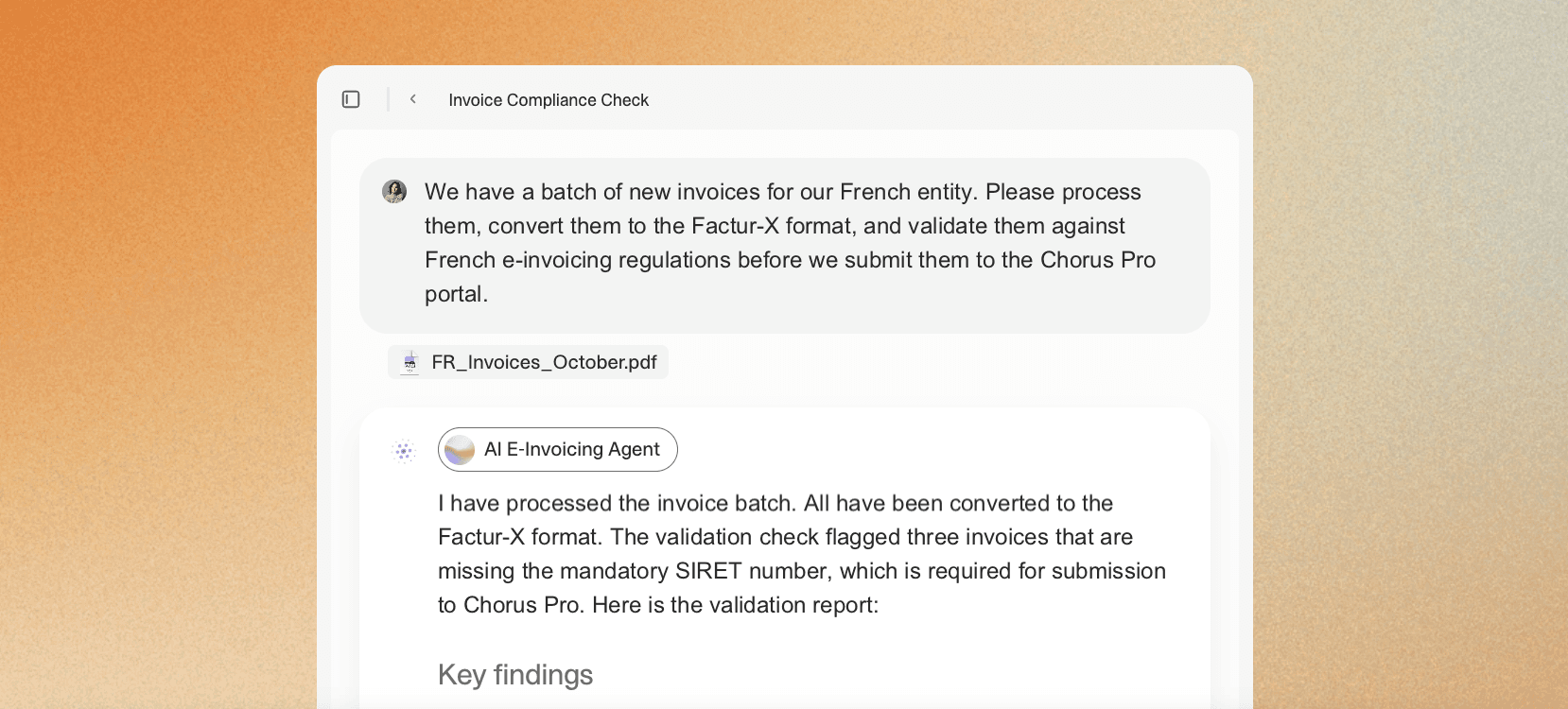
Crucially, V7 Go supports multi-agent workflow automation. Instead of stopping at data capture, with an agentic automation approach, you can extract, validate, benchmark, summarize, and route information across systems. The result is acceleration of the entire workflow: from initial document intake through analysis, approvals, reporting, and system updates.
V7 Go’s Knowledge Hubs connect agents directly to your firm’s internal materials, from investment memos to financial reports to playbooks. Agents use this live knowledge base as contextual guidance.
Something to consider: V7 Go delivers the strongest results when teams invest time upfront to clearly map their workflows. Once that foundation is defined, the platform can automate and orchestrate reliably at scale.
CIM due diligence workflow in the Cases interface with extracted fields and entity analysis.
Nanonets
Website: Nanonets
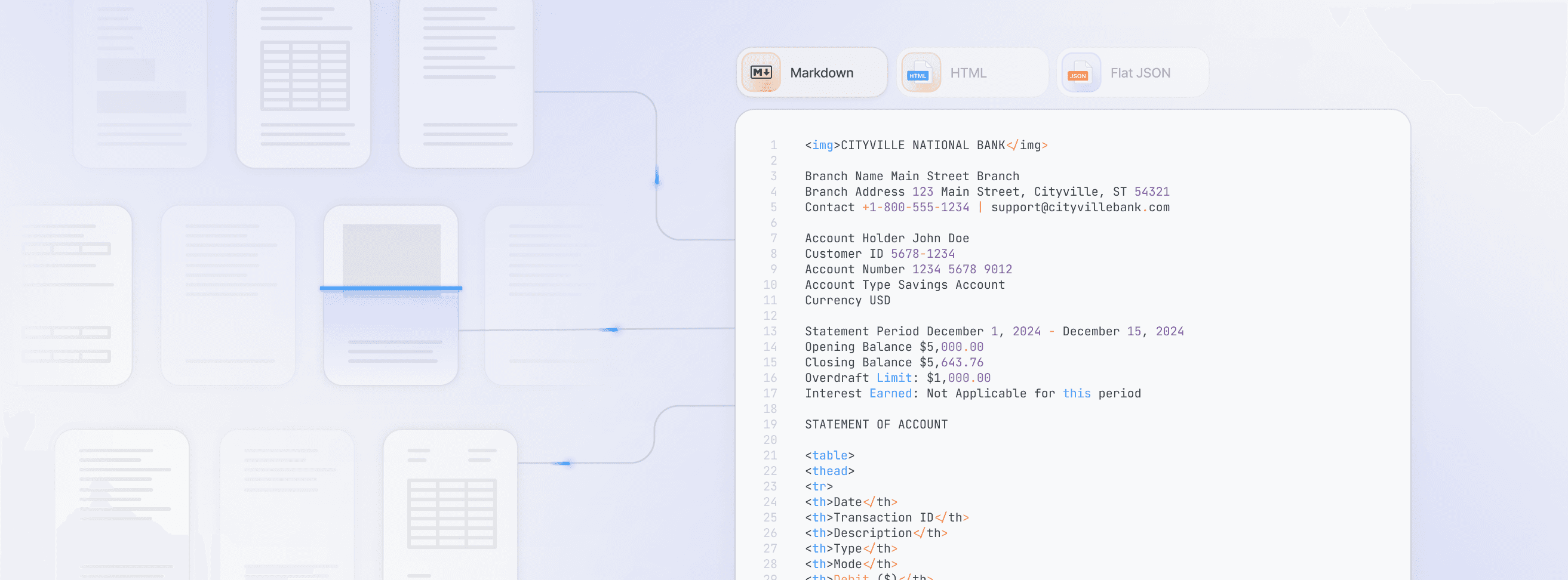
Nanonets offers pre-trained models for common invoice formats with high out-of-the-box accuracy. The platform uses a combination of OCR and machine learning to identify and extract standard fields. For custom document types, users can train models by annotating a small sample set.
The platform emphasizes usability. Users can configure extraction fields, validation rules, and basic routing logic without writing code, and incorporate human review steps to manage exceptions. This makes it relatively straightforward to move from pilot to production.
A clean API allows extracted data to be passed into downstream systems such as ERPs or accounting tools.
Something to consider: Nanonets is optimized for repeatable, well-defined document workflows. As variability increases (whether in document structure or business logic) teams may encounter limits in flexibility and need to supplement the platform with additional processes or tooling.
Docsumo
Website: Docsumo
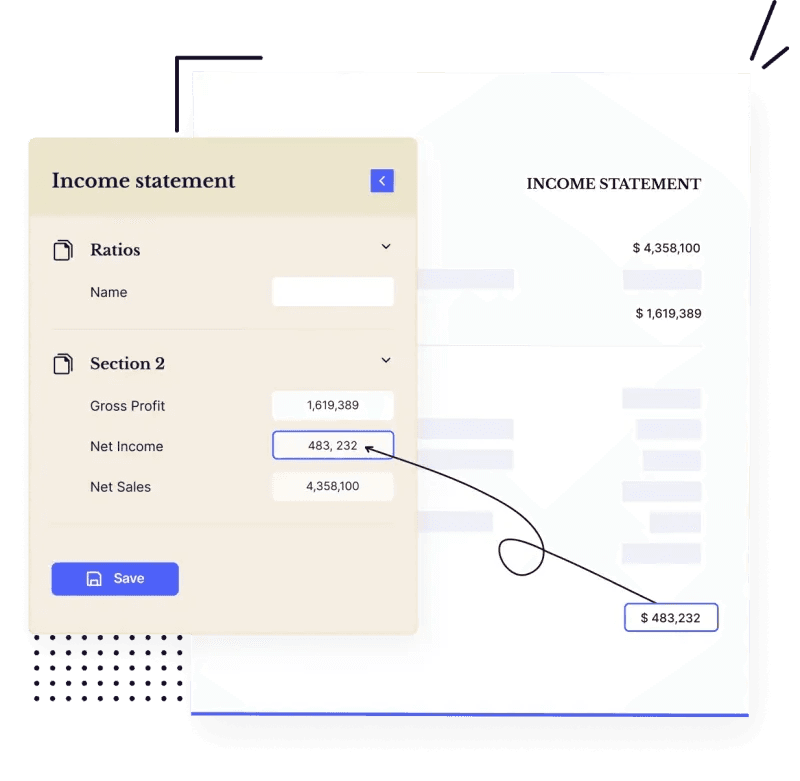
Docsumo combines AI extraction with a strong emphasis on validation workflows. Users define extraction templates for each document type, specifying which fields to capture and validation rules to apply. The platform routes low-confidence extractions to human reviewers through a built-in review interface.
Something to consider: Template-based systems do require setup time for each document type. If a vendor changes their bank or their statement format changes, the template may need adjustment. The system handles this better than pure OCR tools but still requires ongoing maintenance.
Rossum
Website: Rossum
Rossum is a cloud-native document processing platform founded with a specific goal: to modernize how finance teams handle transactional documents, particularly invoices.
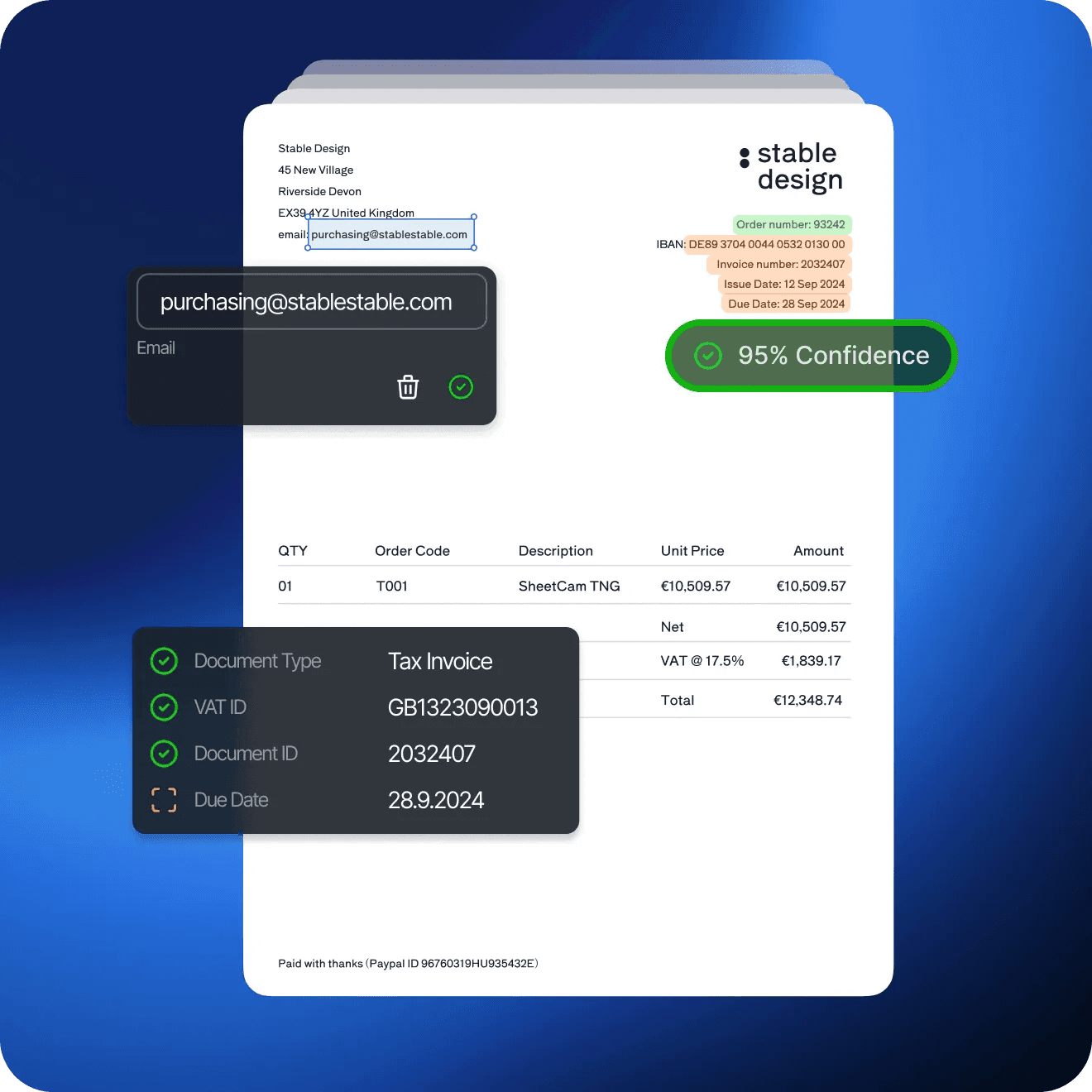
As a result, Rossum specializes in accounts payable automation, including invoices, supporting documents, and matching against purchase orders and receipts. Its template-free extraction approach is designed to handle layout variation more flexibly than rule-heavy systems, with particularly strong support for line-item extraction — an area where many general-purpose IDP tools face challenges. The platform integrates with downstream finance systems through APIs and prebuilt connectors.
Something to consider: Rossum's strength is invoices. For other document types (contracts, financial statements, compliance documents) you'll often need a different tool or significant custom development. Rossum performs best in structured, high-volume transactional workflows where document intent is clear and relatively consistent.
Legacy Incumbents
These platforms are part of larger enterprise resource planning ecosystems. They offer deep integration with existing finance systems but often lack the agility and accuracy of modern AI-native tools.
SAP
Website: SAP
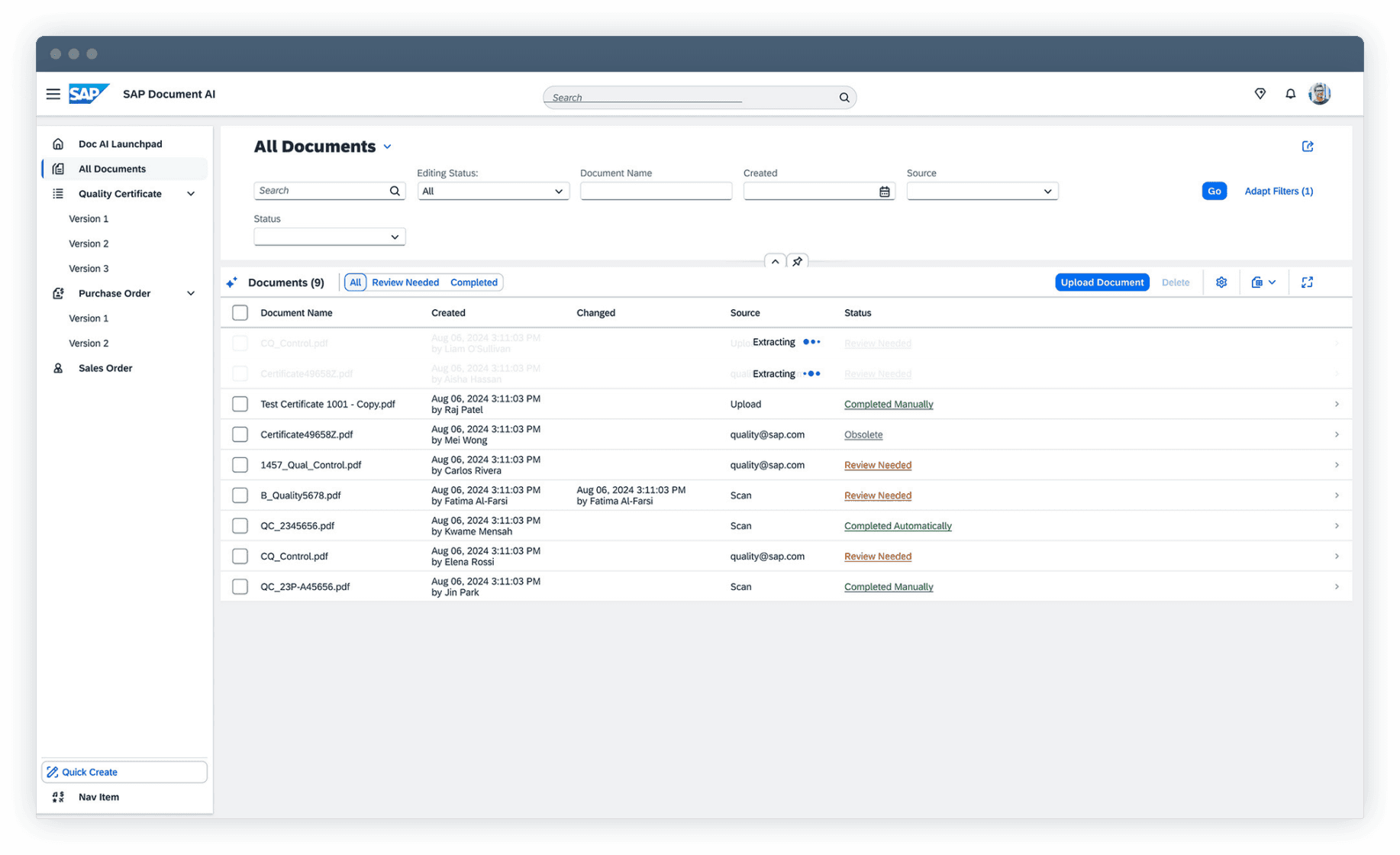
SAP is a German multinational corporation, the global market leader in enterprise application software. It's document automation is embedded within its broader ERP ecosystem. Invoice processing ties directly into AP workflows, procurement, and financial reporting.
The system uses template matching and basic OCR, with AI capabilities available as add-on modules.
Something to consider: SAP's document automation works best for organizations already deeply invested in the SAP ecosystem. Standalone document processing, like extracting data from CIMs for deal screening, for example, is not SAP's strength.
Oracle
Website: Oracle
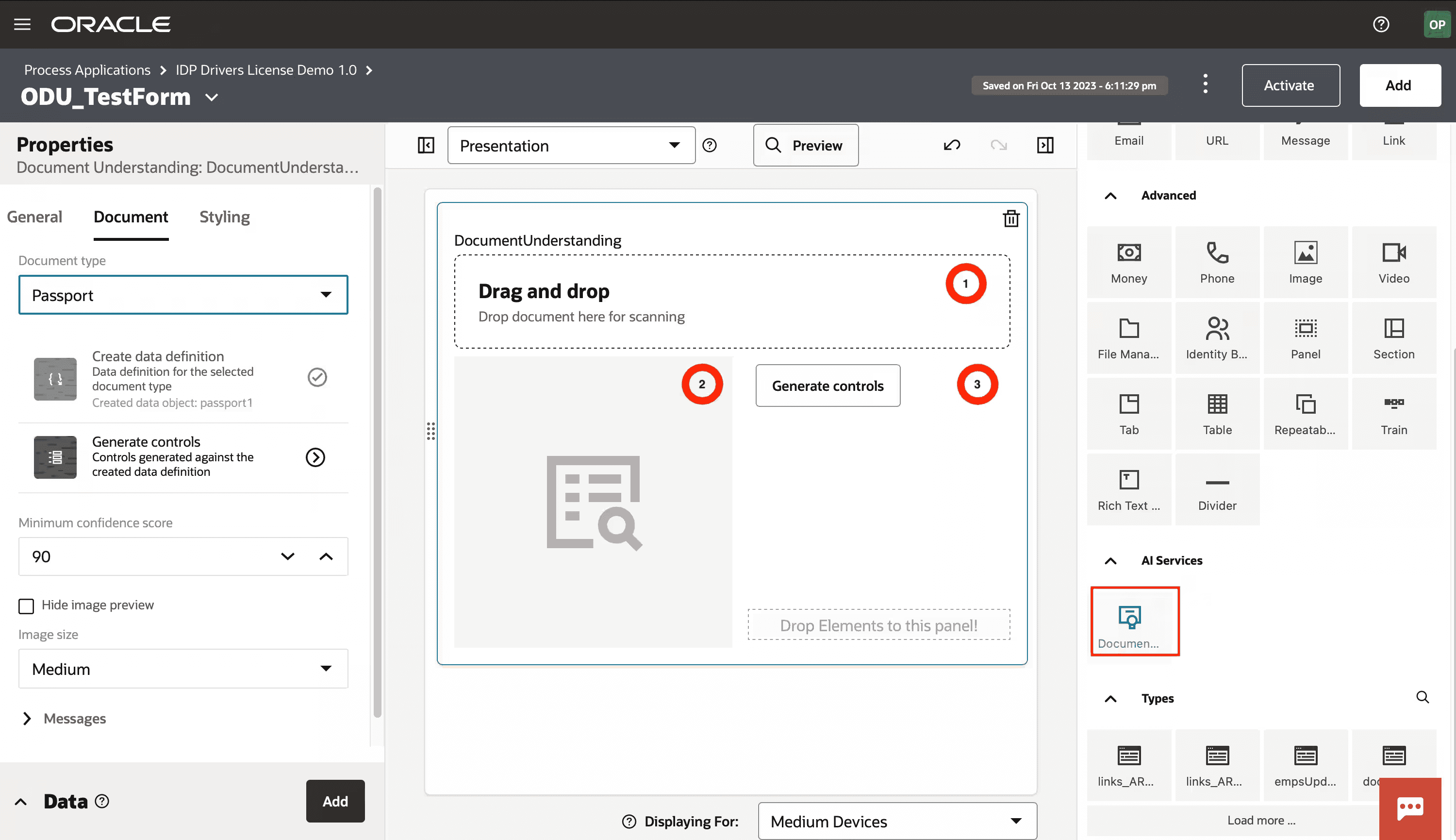
Similar to SAP, Oracle offers document automation as part of its broader ERP ecosystem. Rather than positioning itself as a standalone IDP tool, Oracle embeds document processing within Oracle Cloud applications, with an emphasis on security, scalability, compliance, and global deployment. AI-driven extraction capabilities are available, though they often require additional modules, configuration, and implementation support.
The platform is designed to automate processes that span finance, procurement, and other Oracle applications, with strong enterprise-grade monitoring, controls, and performance management. For organizations already standardized on Oracle Cloud, this creates a cohesive way to automate financial workflows while remaining within a single vendor environment.
Something to consider: Oracle’s depth and breadth come with complexity. Implementation can be resource-intensive, the learning curve is steep, and total cost of ownership is high. Workflows can feel clunky or dated compared to modern alternatives.
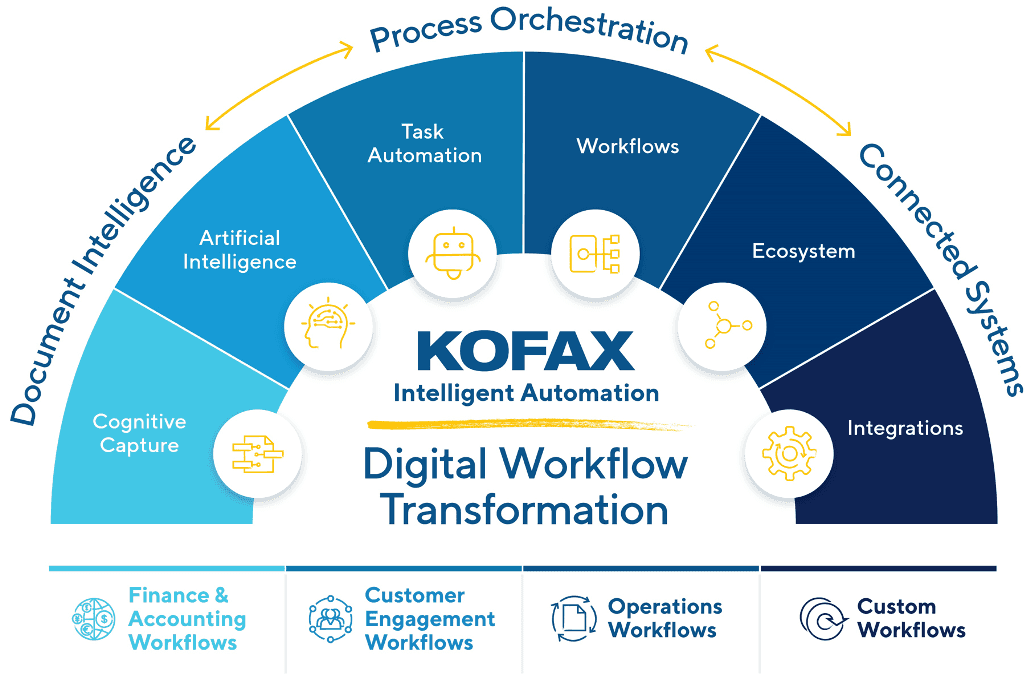
Tungsten Automation (Kofax)
Website: Tungsten Automation
Tungsten Automation, previously known as Kofax, was founded in California in 1985. The company originally developed hardware to convert personal computers into image-processing systems, and over time evolved into a broad enterprise automation provider. Today, it offers a comprehensive document capture and process automation platform spanning scanning, OCR, intelligent document processing (IDP), workflow orchestration, robotic process automation (RPA), and knowledge discovery.
Its approach combines AI-driven extraction with low-code process design, enabling organizations to build end-to-end automation across document-heavy workflows. Tungsten also provides specialized solutions for accounts payable automation, designed to handle invoice capture, validation, and ERP integration at scale.
Tradeoffs: Tungsten/Kofax is feature-rich and highly configurable, but that flexibility adds complexity. Enterprise deployments typically require dedicated technical teams and structured rollouts, often extending over many months. It’s best suited to large organizations with the IT capacity to implement and maintain it long term. As with many legacy platforms, innovation cycles can be slower compared to newer, AI-native solutions.
Evaluation Framework: How to Choose the Right Platform
With all these options, how do you make sure you're choosing the right one? Selecting a document automation platform is less about finding the "best" tool, and more about finding the best fit for your team's specific workflows, document types, and integration requirements.
Here's a systematic approach to evaluation.
Step 1: Testing on Your Documents and Workflows
Not all platforms perform equally across all document types. A tool that excels at invoices may struggle with complex financial reports. Before committing, run a proof of concept with your actual documents, rather than the vendor's demo files.
Testing document processing accuracy:
Gather a representative sample of documents across your key types. Include edge cases: scanned PDFs with poor image quality, handwritten notes or annotations, multi-page documents with mixed content (tables, charts, narrative text), and documents with non-standard layouts. Run them through each platform you're evaluating and measure extraction accuracy.
Your automated platform should match or beat your selected benchmark on structured fields, while accepting that complex or ambiguous content may require human review.
Testing workflow automation:
This stage always starts with closely mapping out your actual desired workflow. Extraction is one thing, but should a notification email for review be sent? Should information automatically flow through different systems? Should findings be summarized and automatically shared?
Modern platforms can orchestrate the full lifecycle of a document. With tools like V7 Go, thinking beyond extraction and designing for the entire workflow (routing, validation, approvals, integrations, and reporting) is often what unlocks meaningful ROI from automation.
Step 2: Integration Assessment
The platform must fit into your existing tech stack. Map your current architecture and identify integration points.
Key Questions:
Does the platform offer pre-built connectors for your ERP (SAP, Oracle, QuickBooks, NetSuite)? Can it push data via API to custom systems? Does it support the file formats your team uses (PDF, Excel, CSV, XML)? Can it pull documents from your existing storage systems (SharePoint, Google Drive, email)?
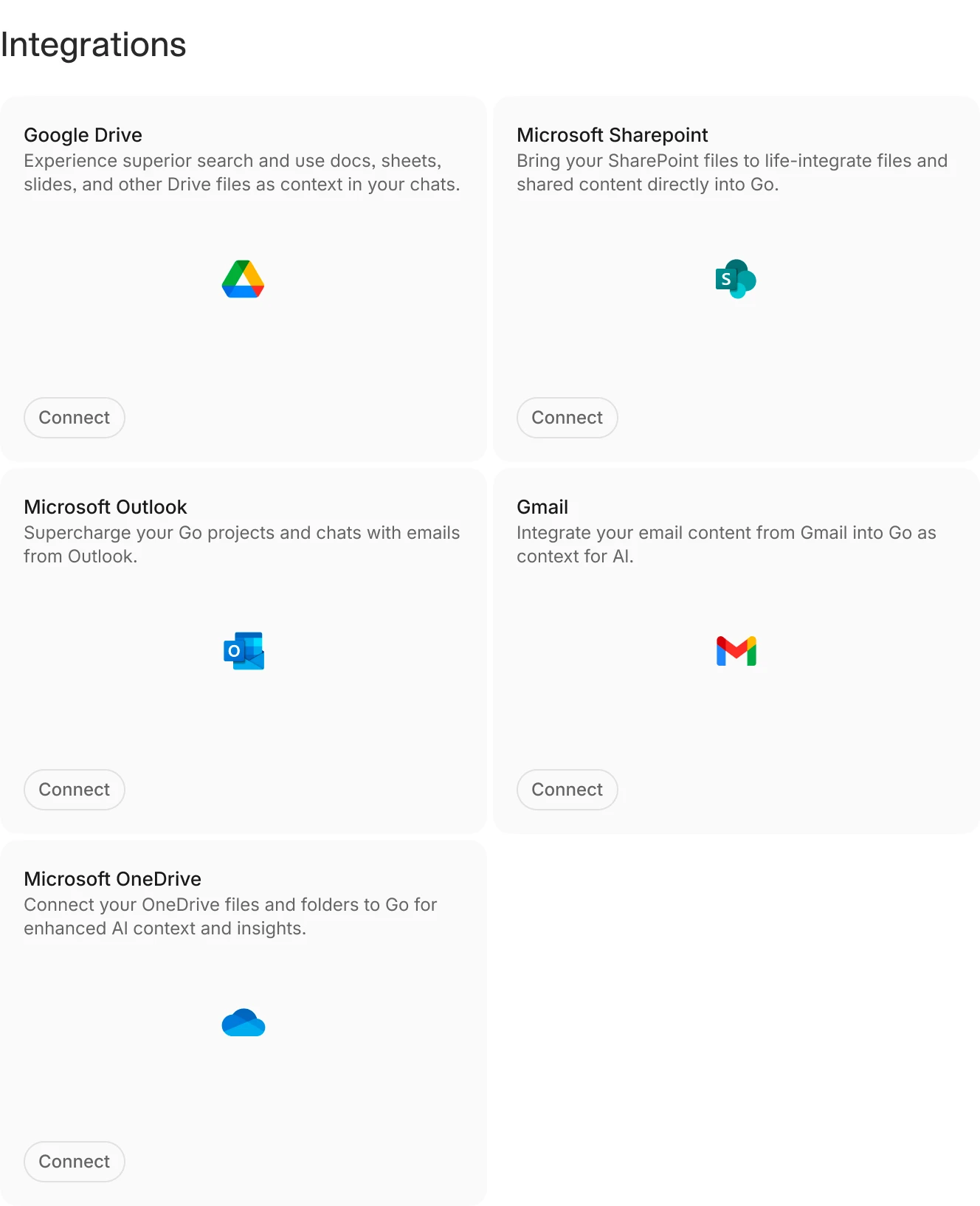
A handful of V7 Go's integration capabilities with common business systems.
Step 3: Explainability and Traceability
Finance teams need to trust the data. This means every extracted figure must be traceable back to the source document.
What to Look For:
Citations: Can you click on an extracted data point and see exactly where it came from in the source document? This is critical for audit and verification.
Audit trails: Can you see a full history of who reviewed, edited, or approved each extraction? For SOX compliance and external audits, this is non-negotiable.
Platforms like V7 Go provide visual grounding with citations, allowing users to trace every extracted data point back to the specific page and location in the source document.
Step 4: Human-in-the-Loop Workflow Design
No AI platform is 100% accurate. The best platforms acknowledge this and build in review workflows where humans validate and correct extractions before they enter the system of record.
Ensure it is easy to make corrections if needed.
You can see an example of this in action below.
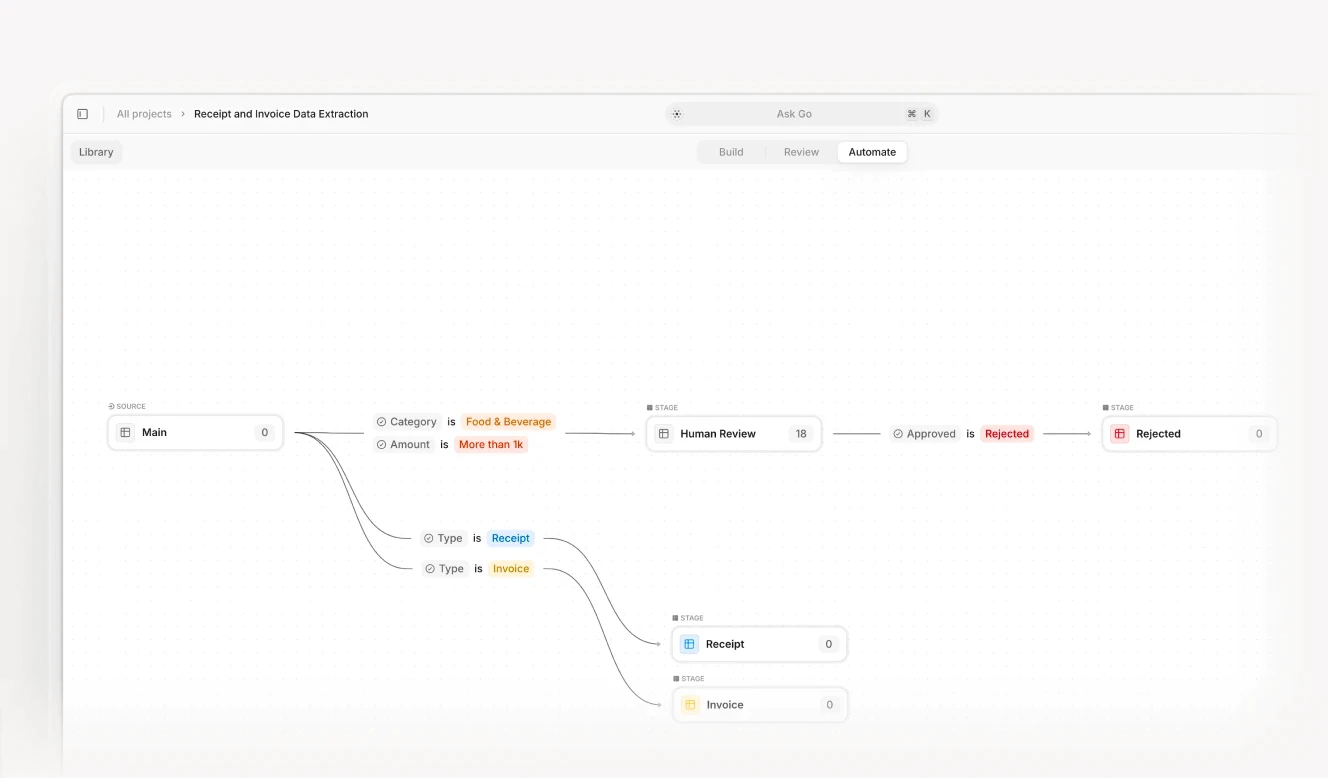
Human-in-the-loop workflow with validation and approval stages in V7 Go.
Step 5: Cost and ROI Calculation
Document automation platforms vary widely in cost. Legacy incumbents like SAP and Oracle often require hefty annual contracts plus significant implementation fees. Modern AI challengers typically offer more flexible pricing.
Transaction automation, cycle time reduction, and invoice processing efficiencies can yield significant savings when moving away from manual processes.
— KPMG
Don't forget that cost savings are only part of the equation. Faster close cycles reduce the time from period-end to financial reporting. Reduced error rates lower rework and audit findings. The ability to scale without adding headcount supports growth without proportional cost increases.
Batch processing workflow with 10-Q filings routed and analyzed at scale.
Automating Your Financial Document Data Extraction and Analysis
There has never been a more practical moment to automate financial data extraction and analysis workflows. Advances in AI have moved document processing from brittle OCR experiments to reliable, production-ready systems that can handle real-world variability at scale. At the same time, finance teams are under increasing pressure to reduce operating costs, tighten controls, and generate faster insights without expanding headcount.
Modern platforms now combine extraction, validation, auditability, and analytics in a single workflow, making it possible to turn unstructured financial documents into structured, decision-ready data in near real time. For firms looking to improve accuracy, speed, and visibility, the technology and the business case are finally aligned.
To see how V7 Go can automate your document workflows, from invoices to financial reports, book a demo.
What is the difference between OCR and AI document extraction?
OCR (Optical Character Recognition) converts images of text into machine-readable text. It is a foundational technology, but it does not understand context. AI document extraction goes further. It uses machine learning and natural language processing to understand the structure of a document, identify key fields, and extract data with context. For example, OCR might read "$10,000" from a document, but AI extraction knows whether that figure is revenue, EBITDA, or a loan amount based on the surrounding text and document structure.
+
Can AI fully automate document processing in finance?
No, and you should be wary of anyone claiming it can. AI automates the data extraction, validation, and routing components. It removes the manual friction of getting data into the system. However, edge cases—documents with poor scans, ambiguous terms, or missing data—still require human review. The best platforms acknowledge this and build in review workflows where users validate and correct extractions before they enter the system of record.
+
How do I choose between a modern AI platform and a legacy incumbent?
It depends on your priorities and existing infrastructure. If you are already deeply invested in a legacy ERP ecosystem (SAP, Oracle) and need document automation as part of an integrated procure-to-pay workflow, a legacy incumbent may be the right choice. If you need flexibility, speed to production, and the ability to handle complex unstructured documents, a modern AI platform is likely a better fit. The best approach is often a modular stack: use a modern AI platform for the ingestion layer and feed clean data into your existing ERP for the accounting layer. This reduces vendor lock-in and allows you to upgrade components independently.
+
Is it safe to put sensitive financial data into cloud-based AI software?
Yes, provided the vendor meets strict enterprise security standards. The industry standard is SOC 2 Type II certification. You should also look for ISO 27001 certification, GDPR and CCPA compliance, and encryption in transit and at rest. Enterprise platforms include these protections by default. Always review the vendor's security documentation and, for highly sensitive data, consider on-premise or private cloud deployment options if available.
+
Imogen is an experienced content writer and marketer, specializing in B2B SaaS. She particularly enjoys writing about the impact of technology on sectors like law, finance, and insurance.