Timeline
Reports That Say Where the Data Starts, GPT-6 Luna and Sol, and Bulk Hub File Moves
A report now says where its data starts instead of drawing zeros over a period it cannot cover. GPT-6 Luna, GPT-6 Sol and Opus 5.5 are available, and Hub files can be moved in bulk.
Reports say what they do not know
Where the data starts: A report shows the point its data begins rather than plotting zeros before it, so a flat start is not mistaken for a quiet month.
Incomplete is marked as incomplete: A range that reaches back before a workspace’s extracted history reads as incomplete, and the earliest extracted hour is recorded on each checkpoint.
Partial data stops being permanent: Spend in a long-deleted chat no longer leaves a report reading Partial data forever.
Freshness checks run in parallel: The freshness check runs its queries concurrently, so a report waits less before it appears.
Models
GPT-6 Luna and GPT-6 Sol: Both are available.
Opus 5.5: Available alongside them.
Longer chats, less lost
Completed tool payloads are compacted in place: A finished tool payload is compacted within the turn it belongs to, so a long turn keeps working instead of running out of room.
Recovery survives context falling away: When earlier exchanges leave the context window, the ability to recover the run survives with it, and compaction budgeting is corrected.
Files it writes are checked: An Office or JSON file produced in a run carries validation warnings rather than arriving quietly broken.
Reporting over the MCP bridge: Reporting can be queried through the MCP bridge, so a usage question can be answered in the conversation.
Hub files
Bulk drag and drop: Several files and folders move together, by dragging or through a bulk move, instead of one at a time.
Reporting detail
Cost share on property reports: A property report carries the workflow cost share, so a field can be read against the workflow it sits in.
API key spend on the Users report: The Users report shows API key spend with attribution filters.
Budgets read against regional settings: A reported budget is linked to the regional settings that define it.
Filters stay where you put them: Filter positions survive an update, and a tooltip drops its footer when there is no breakdown to show.
Interface
The connector catalogue keeps growing: Exa is in the catalogue, with its logo on the connector card.
A model picker that fits: The chat model picker matches its intended size.
Tidier chrome: The workspace logo lines up with the rail icons in the collapsed sidebar, sidebar labels use the space left by hidden action menus, and action menus carry a plain dots icon.
Drafts stop bleeding between tabs: A case draft no longer echoes a stale value from another tab.

Read more
Reports That Say Where the Data Starts, GPT-6 Luna and Sol, and Bulk Hub File Moves
A report now says where its data starts instead of drawing zeros over a period it cannot cover. GPT-6 Luna, GPT-6 Sol and Opus 5.5 are available, and Hub files can be moved in bulk.
Reports say what they do not know
Where the data starts: A report shows the point its data begins rather than plotting zeros before it, so a flat start is not mistaken for a quiet month.
Incomplete is marked as incomplete: A range that reaches back before a workspace’s extracted history reads as incomplete, and the earliest extracted hour is recorded on each checkpoint.
Partial data stops being permanent: Spend in a long-deleted chat no longer leaves a report reading Partial data forever.
Freshness checks run in parallel: The freshness check runs its queries concurrently, so a report waits less before it appears.
Models
GPT-6 Luna and GPT-6 Sol: Both are available.
Opus 5.5: Available alongside them.
Longer chats, less lost
Completed tool payloads are compacted in place: A finished tool payload is compacted within the turn it belongs to, so a long turn keeps working instead of running out of room.
Recovery survives context falling away: When earlier exchanges leave the context window, the ability to recover the run survives with it, and compaction budgeting is corrected.
Files it writes are checked: An Office or JSON file produced in a run carries validation warnings rather than arriving quietly broken.
Reporting over the MCP bridge: Reporting can be queried through the MCP bridge, so a usage question can be answered in the conversation.
Hub files
Bulk drag and drop: Several files and folders move together, by dragging or through a bulk move, instead of one at a time.
Reporting detail
Cost share on property reports: A property report carries the workflow cost share, so a field can be read against the workflow it sits in.
API key spend on the Users report: The Users report shows API key spend with attribution filters.
Budgets read against regional settings: A reported budget is linked to the regional settings that define it.
Filters stay where you put them: Filter positions survive an update, and a tooltip drops its footer when there is no breakdown to show.
Interface
The connector catalogue keeps growing: Exa is in the catalogue, with its logo on the connector card.
A model picker that fits: The chat model picker matches its intended size.
Tidier chrome: The workspace logo lines up with the rail icons in the collapsed sidebar, sidebar labels use the space left by hidden action menus, and action menus carry a plain dots icon.
Drafts stop bleeding between tabs: A case draft no longer echoes a stale value from another tab.
Read more
Spend Attributed to Whoever Triggered It, Active Days, and Named API Keys
Spend is attributed to the person who triggered it, whatever triggered it: the web app, an API key, a schedule or a run acting on someone’s behalf. Reports count active days rather than only spend, and every row says which region it came from.
Who triggered it
Spend follows the trigger: Workflow spend is attributed to the user who triggered the run, so a bill can be read back to the people behind it rather than to the workflow alone.
Named API keys: A user’s spend splits per API key and the keys are named, so machine traffic is legible instead of appearing as one anonymous total.
Trigger source, labelled and filterable: Usage rows carry the channel that started them, the Workflows report filters and facets on trigger source, and the Users view exposes channel and API key attribution.
Automated work points at a person: A row created by automation, a recalculation driven by a structure change, and a row written on someone’s behalf are each attributed to the person or the automation behind them, resolved through sticky, input and owner fallbacks rather than left blank.
Field calculations counted: A user’s field calculations sit beside their chat counts, and the Users report sorts on them.
Active days, not just spend
Active days per member: The Users activity series carries each member’s active days and the Overview ranks top users by them, so someone who uses V7 Go daily without spending much is visible.
Every action counts: Any recorded action counts toward an active day, and readers and chat senders count as active users on a workflow, not only the people who run it.
Workflows with activity and no spend: A workflow people are using without generating spend appears in the list rather than falling out of it.
Reading a report
Every row says where it came from: The Workflows, Chats and Hubs views show each row’s region.
Hub spend, split your way: The Hubs spend series splits by workspace or by hub.
Creation dates on the dimensions: Workflow, hub and user dimensions carry a created_at, so age can be read alongside usage.
Reports open on the last 30 days: Organization reports default to a 30 day window instead of an arbitrary one.
Chat and files
Hand over a file it asked for: When a run asks for a file, you can provide it in the conversation rather than restarting with the file attached.
Drag files into a hub folder: Files and folders can be dragged into Hub folders directly.
Tool errors reach you intact: An MCP tool error passes its detail through to the chat result rather than arriving as a bare failure.
Fixes and interface
Workflow property drag targets: Dragging a property lands where you aimed it.
Read-only configuration history scrolls: A past configuration can be scrolled through rather than clipped.
Steadier Python runs: Duplicate file mounting in a Python run is fixed, and callers are told that V7Go is already defined.
A skip link and a main landmark: The workspace shell carries a main landmark and a skip link, so keyboard and screen reader users can get past the navigation.
Bounded JSON previews: A large JSON preview tile renders within bounds instead of taking the page with it.
Read more
Spend Attributed to Whoever Triggered It, Active Days, and Named API Keys
Spend is attributed to the person who triggered it, whatever triggered it: the web app, an API key, a schedule or a run acting on someone’s behalf. Reports count active days rather than only spend, and every row says which region it came from.
Who triggered it
Spend follows the trigger: Workflow spend is attributed to the user who triggered the run, so a bill can be read back to the people behind it rather than to the workflow alone.
Named API keys: A user’s spend splits per API key and the keys are named, so machine traffic is legible instead of appearing as one anonymous total.
Trigger source, labelled and filterable: Usage rows carry the channel that started them, the Workflows report filters and facets on trigger source, and the Users view exposes channel and API key attribution.
Automated work points at a person: A row created by automation, a recalculation driven by a structure change, and a row written on someone’s behalf are each attributed to the person or the automation behind them, resolved through sticky, input and owner fallbacks rather than left blank.
Field calculations counted: A user’s field calculations sit beside their chat counts, and the Users report sorts on them.
Active days, not just spend
Active days per member: The Users activity series carries each member’s active days and the Overview ranks top users by them, so someone who uses V7 Go daily without spending much is visible.
Every action counts: Any recorded action counts toward an active day, and readers and chat senders count as active users on a workflow, not only the people who run it.
Workflows with activity and no spend: A workflow people are using without generating spend appears in the list rather than falling out of it.
Reading a report
Every row says where it came from: The Workflows, Chats and Hubs views show each row’s region.
Hub spend, split your way: The Hubs spend series splits by workspace or by hub.
Creation dates on the dimensions: Workflow, hub and user dimensions carry a created_at, so age can be read alongside usage.
Reports open on the last 30 days: Organization reports default to a 30 day window instead of an arbitrary one.
Chat and files
Hand over a file it asked for: When a run asks for a file, you can provide it in the conversation rather than restarting with the file attached.
Drag files into a hub folder: Files and folders can be dragged into Hub folders directly.
Tool errors reach you intact: An MCP tool error passes its detail through to the chat result rather than arriving as a bare failure.
Fixes and interface
Workflow property drag targets: Dragging a property lands where you aimed it.
Read-only configuration history scrolls: A past configuration can be scrolled through rather than clipped.
Steadier Python runs: Duplicate file mounting in a Python run is fixed, and callers are told that V7Go is already defined.
A skip link and a main landmark: The workspace shell carries a main landmark and a skip link, so keyboard and screen reader users can get past the navigation.
Bounded JSON previews: A large JSON preview tile renders within bounds instead of taking the page with it.
Read more
Estimated Cost Per Run, Hub Reports, and a Way Back to V7 Connector Credentials
Every workflow now carries an estimated cost per run, and the Workflows report sorts on it. Hub reports cover uploads, files and chat activity. A connector moved onto your own OAuth client can be moved back.
What a run costs
An estimated cost per run, per workflow: Each workflow shows what a single run is expected to cost, so the expensive ones are visible without reconstructing them from usage rows.
Sort and order by it: The Workflows report has a Cost per run column and orders on it, which puts the costly workflows at the top rather than somewhere in the list.
Average field cost: Reporting shows average field cost per run and per entity computation, so a cost can be traced to the field driving it.
Hub reports
Uploads, files and chat activity: Hub reports carry upload counts and their time series, current file counts, and chat activity against a hub, so a hub reads as something in use rather than a name in a list.
Searches are counted as searches: Hub searches, including the ones a run fans out, are counted in hub activity rather than going unrecorded.
Cost over time: Organization hub reports carry a cost time series.
Reporting breakdowns
Spend split by member: The Overview, Users, Chats, Models, Workflows and Workflow detail series each break down by the members behind them, with a top-member breakdown on spend and every bucket filled for a named cohort.
Per-member detail in charts and tooltips: A chart and its tooltip carry the same breakdown, so hovering answers the question the chart raises.
Comparisons hold under a filter: A filtered Models comparison reads against the right periods, and the Models breakdown applies its predicates after the merge rather than before.
Reporting over MCP: A shared Reporting tool is available over MCP with delegated authentication, so a report can be asked for in the place you are already working.
Connectors
Back to V7 credentials in one click: A connector moved onto your own OAuth client can be switched back to the V7 template client, and a connection left unconfigured uses the template credentials rather than failing.
A refused sign-in reads as a refusal: An OAuth access denial is told apart from a credential failure, so the fix is clear from the message.
Gong call listing: Call listing is routed through the API integration.
Chat and reliability
Tool search respects what is actually runnable: Tool search checks capability types and index readiness, and resolves runnable Workflow eligibility in bulk before ranking, so the top result is something you can run.
An overloaded provider is reported as one: A provider reporting itself overloaded comes back as a tool error rather than an unexplained failure.
Steadier long conversations: Thinking replay errors are gone, empty user messages are dropped, and a compaction checkpoint can no longer be written without the message it came from.
Read more
Estimated Cost Per Run, Hub Reports, and a Way Back to V7 Connector Credentials
Every workflow now carries an estimated cost per run, and the Workflows report sorts on it. Hub reports cover uploads, files and chat activity. A connector moved onto your own OAuth client can be moved back.
What a run costs
An estimated cost per run, per workflow: Each workflow shows what a single run is expected to cost, so the expensive ones are visible without reconstructing them from usage rows.
Sort and order by it: The Workflows report has a Cost per run column and orders on it, which puts the costly workflows at the top rather than somewhere in the list.
Average field cost: Reporting shows average field cost per run and per entity computation, so a cost can be traced to the field driving it.
Hub reports
Uploads, files and chat activity: Hub reports carry upload counts and their time series, current file counts, and chat activity against a hub, so a hub reads as something in use rather than a name in a list.
Searches are counted as searches: Hub searches, including the ones a run fans out, are counted in hub activity rather than going unrecorded.
Cost over time: Organization hub reports carry a cost time series.
Reporting breakdowns
Spend split by member: The Overview, Users, Chats, Models, Workflows and Workflow detail series each break down by the members behind them, with a top-member breakdown on spend and every bucket filled for a named cohort.
Per-member detail in charts and tooltips: A chart and its tooltip carry the same breakdown, so hovering answers the question the chart raises.
Comparisons hold under a filter: A filtered Models comparison reads against the right periods, and the Models breakdown applies its predicates after the merge rather than before.
Reporting over MCP: A shared Reporting tool is available over MCP with delegated authentication, so a report can be asked for in the place you are already working.
Connectors
Back to V7 credentials in one click: A connector moved onto your own OAuth client can be switched back to the V7 template client, and a connection left unconfigured uses the template credentials rather than failing.
A refused sign-in reads as a refusal: An OAuth access denial is told apart from a credential failure, so the fix is clear from the message.
Gong call listing: Call listing is routed through the API integration.
Chat and reliability
Tool search respects what is actually runnable: Tool search checks capability types and index readiness, and resolves runnable Workflow eligibility in bulk before ranking, so the top result is something you can run.
An overloaded provider is reported as one: A provider reporting itself overloaded comes back as a tool error rather than an unexplained failure.
Steadier long conversations: Thinking replay errors are gone, empty user messages are dropped, and a compaction checkpoint can no longer be written without the message it came from.
Read more
Apps: Run a Workflow Without Opening It
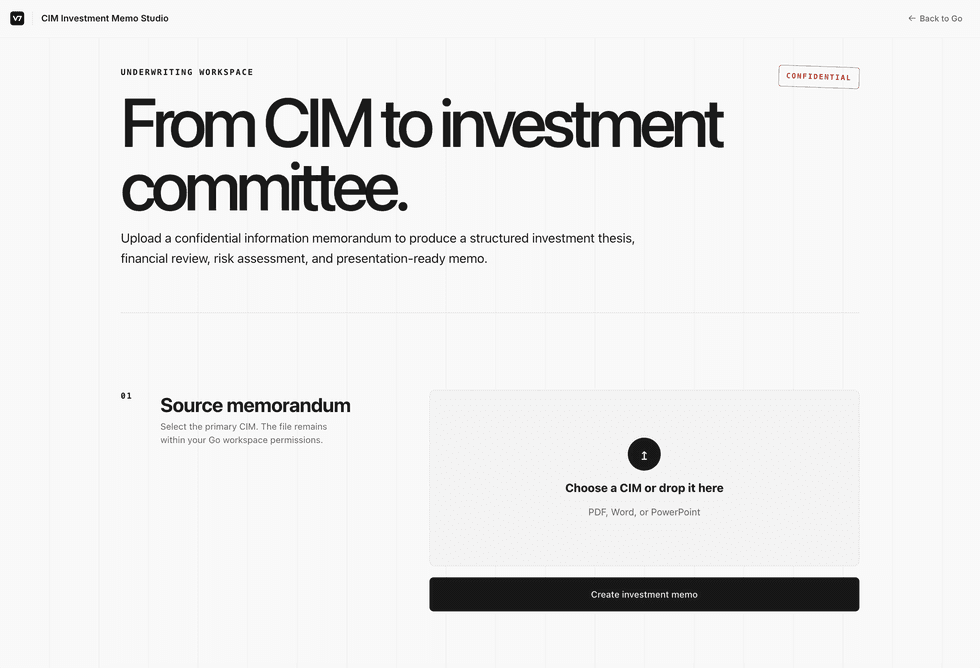
An app is how you hand a workflow to someone without handing over the workflow. They get a page with the inputs it needs and a button to run it. The prompts, the tools and the steps stay behind it, out of view and out of reach.
You can create V7 Go Apps in chats. Describe the app and name the workflow it should run. V7 Go builds it, binds to that workflow, and publishes it when you approve.
What stays behind it
The instructions: Prompts and step instructions are not shown in the app and cannot be read from it.
The tools and the model: No tool list, no model picker. The app runs the configuration you set.
The ability to change any of it: An app is a way to run a workflow, not a way into it. Editing stays with the people who have workflow permissions.
The person running it sees a titled page, the inputs the workflow needs, and the result when it finishes. The run takes the route you configured, every time, and an uploaded file stays inside the workspace permissions it arrived under.
Building an app
In a chat, describe the app and name the workflow it should run.
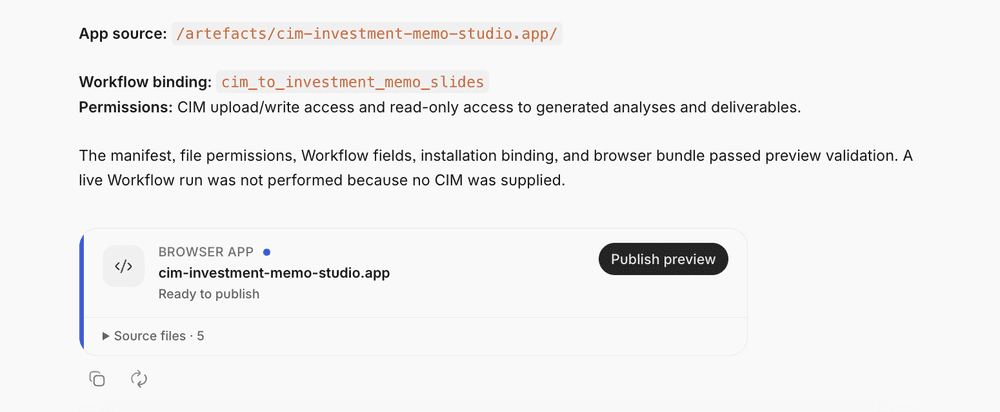
Review what V7 Go reports back: the app source, the workflow it is bound to, and the permissions it needs.
Use Publish preview. The app then appears under Apps in the left navigation, where anyone with access can find and run it.
Availability
Apps are behind a feature flag and switched on per workspace. Ask your V7 contact to enable it.

Read more
Apps: Run a Workflow Without Opening It
An app is how you hand a workflow to someone without handing over the workflow. They get a page with the inputs it needs and a button to run it. The prompts, the tools and the steps stay behind it, out of view and out of reach.
You can create V7 Go Apps in chats. Describe the app and name the workflow it should run. V7 Go builds it, binds to that workflow, and publishes it when you approve.
What stays behind it
The instructions: Prompts and step instructions are not shown in the app and cannot be read from it.
The tools and the model: No tool list, no model picker. The app runs the configuration you set.
The ability to change any of it: An app is a way to run a workflow, not a way into it. Editing stays with the people who have workflow permissions.
The person running it sees a titled page, the inputs the workflow needs, and the result when it finishes. The run takes the route you configured, every time, and an uploaded file stays inside the workspace permissions it arrived under.
Building an app
In a chat, describe the app and name the workflow it should run.
Review what V7 Go reports back: the app source, the workflow it is bound to, and the permissions it needs.
Use Publish preview. The app then appears under Apps in the left navigation, where anyone with access can find and run it.
Availability
Apps are behind a feature flag and switched on per workspace. Ask your V7 contact to enable it.
Read more
Go Agent V2: Pick the Model, Check the Quote, Replay the Run
Chats run on Go Agent V2. You choose the model and how hard it thinks, an answer shows the sentence it came from, and a run that hits a bad step can be replayed instead of started again.
V2 is the second version of what runs a chat, and the difference shows up in long work. It holds a conversation together across many turns and tool calls, keeps the files you gave it readable the whole way through, and records enough of what it did that the run can be read back afterwards.
Choosing the model
Curated models, and how hard they think: Chat carries a model picker and a reasoning setting, so a quick lookup and a long piece of analysis do not have to run the same way. A run uses the model you chose rather than one it inherited.
The settings name the model: The settings tooltip names the concrete model instead of a generic label, so you can tell what a chat is actually running.
A wider list to choose from: GPT-6 Astra, Gemini 3.7 Flash and Gemini 3.8 Flash are all selectable, and Gemini 2.5 Pro has been retired.
Answers carry their source
Quoted, not tagged: A source is attributed by the text it quotes rather than by a citation marker, so checking where an answer came from is a matter of reading it.
Claims in a case are grounded: A response in a case carries references to the documents behind each claim, rather than asking you to take the summary on trust.
Long runs hold together
Your files stay readable: Documents in a conversation remain available as a long chat is compacted, so something attached early is still there late.
The transcript is complete: Every turn is kept, and every tool call is stored alongside the result it returned, so an audit or a playback shows the whole run.
A malformed step is replayable: A run that hits a malformed tool call can be replayed and debugged rather than failing permanently.
A slow tool ends: A tool result that takes too long returns an error instead of leaving the run hanging.
Late work cannot overwrite a finished answer: A background job that arrives after the fact no longer replaces an answer you already have.
It can see your Workflows
Live results: Workflow results can be read while the workflow is still running, rather than only once it finishes.
Rows and fields are navigable: A workflow row or field opens from the chat, so checking a value does not mean leaving the conversation.
Result files arrive in the chat: Files a run produces are attached where you asked for them, and stay attached when a workflow finishes early.
Bounded, and attributable
Runtime limits: Soft and hard limits stop a run from going on indefinitely.
Tool calls count as activity: An MCP tool invocation is recorded as user activity, with the origin and the sign-in route behind it, so a review can attribute it to the person behind it.
Availability
Go Agent V2 is what chats run on. There is nothing to switch on.
Read more
Go Agent V2: Pick the Model, Check the Quote, Replay the Run
Chats run on Go Agent V2. You choose the model and how hard it thinks, an answer shows the sentence it came from, and a run that hits a bad step can be replayed instead of started again.
V2 is the second version of what runs a chat, and the difference shows up in long work. It holds a conversation together across many turns and tool calls, keeps the files you gave it readable the whole way through, and records enough of what it did that the run can be read back afterwards.
Choosing the model
Curated models, and how hard they think: Chat carries a model picker and a reasoning setting, so a quick lookup and a long piece of analysis do not have to run the same way. A run uses the model you chose rather than one it inherited.
The settings name the model: The settings tooltip names the concrete model instead of a generic label, so you can tell what a chat is actually running.
A wider list to choose from: GPT-6 Astra, Gemini 3.7 Flash and Gemini 3.8 Flash are all selectable, and Gemini 2.5 Pro has been retired.
Answers carry their source
Quoted, not tagged: A source is attributed by the text it quotes rather than by a citation marker, so checking where an answer came from is a matter of reading it.
Claims in a case are grounded: A response in a case carries references to the documents behind each claim, rather than asking you to take the summary on trust.
Long runs hold together
Your files stay readable: Documents in a conversation remain available as a long chat is compacted, so something attached early is still there late.
The transcript is complete: Every turn is kept, and every tool call is stored alongside the result it returned, so an audit or a playback shows the whole run.
A malformed step is replayable: A run that hits a malformed tool call can be replayed and debugged rather than failing permanently.
A slow tool ends: A tool result that takes too long returns an error instead of leaving the run hanging.
Late work cannot overwrite a finished answer: A background job that arrives after the fact no longer replaces an answer you already have.
It can see your Workflows
Live results: Workflow results can be read while the workflow is still running, rather than only once it finishes.
Rows and fields are navigable: A workflow row or field opens from the chat, so checking a value does not mean leaving the conversation.
Result files arrive in the chat: Files a run produces are attached where you asked for them, and stay attached when a workflow finishes early.
Bounded, and attributable
Runtime limits: Soft and hard limits stop a run from going on indefinitely.
Tool calls count as activity: An MCP tool invocation is recorded as user activity, with the origin and the sign-in route behind it, so a review can attribute it to the person behind it.
Availability
Go Agent V2 is what chats run on. There is nothing to switch on.
Read more
MCP Connectors: A Growing Catalogue, Guided Setup, and Verified Connections
V7 Go reaches more than forty systems through MCP, and connectors are added regularly. Connecting one is a guided flow now: browse the catalogue, fill in what the connector asks for, and see the connection verified before you rely on it.
The catalogue exists so that connecting a familiar tool is a short job rather than a project. Each connector in it has already been set up against V7 Go, so what is left to you is a short form rather than a server to wire up. Anything not in the catalogue can still be added as a custom connector.
Setting one up
Browse, do not hunt: The catalogue lists what is available with a page per connector, so finding the right one does not start with knowing its name.
The connection is verified, not assumed: A connect attempt is checked and the result reported back, and a failure is stored with its error rather than leaving you to guess why nothing works.
A credential form that checks itself: Each connector asks for what it needs in a form that validates the input as you fill it, rather than accepting anything and failing later.
Fewer steps that do not apply: OAuth client setup is optional rather than required, failed tool loading can be retried, and a streamed response is matched to the request that asked for it.
Connectors come first in tool search: Tool search surfaces MCP connectors ahead of other results, so what you connected is what you find.
What is in the catalogue
Deals and CRM: Affinity, Apollo.io, Attio, Clay, HubSpot and Pipedrive.
Market and portfolio data: Capital IQ, PitchBook and Yardi.
Documents, storage and knowledge: Airtable, Box, Coda, Dropbox, Egnyte, Glean, Google Docs, Google Drive, Google Sheets, Google Slides and Notion.
Email, chat and calls: Fireflies.ai, Gmail, Gong, Google Calendar, Google Chat, Google Contacts, Granola, Intercom, Intercom (EU), Slack and Work IQ.
Projects and engineering: Asana, Atlassian Rovo, ClickUp, Figma, GitHub, LaunchDarkly, Linear and Monday.com.
Contracts and payments: PandaDoc, PandaDoc (EU) and Stripe.
The list keeps growing. New connectors go in as they are built, so it is worth a look even if the tool you wanted was missing last time.
Anything else, as a custom connector
A niche or in-house tool does not have to wait for the catalogue. The custom MCP connector action sits in the top bar: point it at the server and it works alongside the rest. The catalogue is the short path for the tools most teams already use, not the boundary of what V7 Go can reach.
Once it is connected
Tools are scoped to their connector: Tools are discovered per connector and carry a stable identity, so a tool name means the same thing from one run to the next.
Connector names survive the handoff: A connector name, and a mention that cannot be resolved, are both preserved rather than quietly dropped.
Tool use is recorded as activity: An MCP tool invocation is logged as user activity, with the origin and the sign-in route behind it, so a review can answer who used what.
Versions are pinned and visible: The component version behind a workflow is recorded and shown, and a skill pinned to an out-of-date version is flagged before it breaks.
Availability
The catalogue is under Integrations, in MCP connectors, along with the custom connector action.
Read more
MCP Connectors: A Growing Catalogue, Guided Setup, and Verified Connections
V7 Go reaches more than forty systems through MCP, and connectors are added regularly. Connecting one is a guided flow now: browse the catalogue, fill in what the connector asks for, and see the connection verified before you rely on it.
The catalogue exists so that connecting a familiar tool is a short job rather than a project. Each connector in it has already been set up against V7 Go, so what is left to you is a short form rather than a server to wire up. Anything not in the catalogue can still be added as a custom connector.
Setting one up
Browse, do not hunt: The catalogue lists what is available with a page per connector, so finding the right one does not start with knowing its name.
The connection is verified, not assumed: A connect attempt is checked and the result reported back, and a failure is stored with its error rather than leaving you to guess why nothing works.
A credential form that checks itself: Each connector asks for what it needs in a form that validates the input as you fill it, rather than accepting anything and failing later.
Fewer steps that do not apply: OAuth client setup is optional rather than required, failed tool loading can be retried, and a streamed response is matched to the request that asked for it.
Connectors come first in tool search: Tool search surfaces MCP connectors ahead of other results, so what you connected is what you find.
What is in the catalogue
Deals and CRM: Affinity, Apollo.io, Attio, Clay, HubSpot and Pipedrive.
Market and portfolio data: Capital IQ, PitchBook and Yardi.
Documents, storage and knowledge: Airtable, Box, Coda, Dropbox, Egnyte, Glean, Google Docs, Google Drive, Google Sheets, Google Slides and Notion.
Email, chat and calls: Fireflies.ai, Gmail, Gong, Google Calendar, Google Chat, Google Contacts, Granola, Intercom, Intercom (EU), Slack and Work IQ.
Projects and engineering: Asana, Atlassian Rovo, ClickUp, Figma, GitHub, LaunchDarkly, Linear and Monday.com.
Contracts and payments: PandaDoc, PandaDoc (EU) and Stripe.
The list keeps growing. New connectors go in as they are built, so it is worth a look even if the tool you wanted was missing last time.
Anything else, as a custom connector
A niche or in-house tool does not have to wait for the catalogue. The custom MCP connector action sits in the top bar: point it at the server and it works alongside the rest. The catalogue is the short path for the tools most teams already use, not the boundary of what V7 Go can reach.
Once it is connected
Tools are scoped to their connector: Tools are discovered per connector and carry a stable identity, so a tool name means the same thing from one run to the next.
Connector names survive the handoff: A connector name, and a mention that cannot be resolved, are both preserved rather than quietly dropped.
Tool use is recorded as activity: An MCP tool invocation is logged as user activity, with the origin and the sign-in route behind it, so a review can answer who used what.
Versions are pinned and visible: The component version behind a workflow is recorded and shown, and a skill pinned to an out-of-date version is flagged before it breaks.
Availability
The catalogue is under Integrations, in MCP connectors, along with the custom connector action.
Read more
Custom Organization Branding, Audit-Ready Activity Logs, and Raw Deal Exports
An organization can carry its own logo and name. Activity logs record where each action came from and how the person signed in, Co-Investment and DealCloud data exports raw, and a run that hit a malformed step can be replayed instead of written off.
Organization
Your logo and name: An admin can set a custom organization logo and name, so shared spaces and reports carry your branding rather than a default.
Audit and activity
Activity logs record origin and sign-in: Each action carries where it came from and how the user authenticated, including the owner behind an API key, so a review can answer who did what and through which route.
Tool use counts as activity: An MCP tool invocation is recorded as user activity rather than going unattributed.
Exports and files
Raw Co-Investment, Co-Investor and DealCloud exports: The underlying data comes out in its original shape, so it can be analysed or reported on without being unpicked first. The Deal export tolerates schema drift rather than failing on it.
Copy a generated file in one click: A file a run produces can be copied straight from where it appears, without opening or downloading it first.
PowerPoint exports open: A generated deck is valid on download rather than needing repair.
Workflow result files work with read-only tools: A completed output can be inspected directly, with no extra access step.
Workflows
One flow for questions: When a workflow needs your input, questions arrive in a single consistent flow instead of jumping between steps, and sequential extracts stay inline.
Replay a malformed run: A run with a malformed step can be replayed and debugged rather than failing permanently, so a broken run is recoverable.
Duplicate JSON keys are rejected: An output with duplicate keys is caught at validation rather than flowing downstream.
Python results appear after a run: A completed Python run shows its output instead of needing a rerun to see work that already happened.
Integrations
See which component version a workflow uses: The Pipedream component version behind a workflow is recorded and shown, so a change can be traced rather than guessed at.
Stale components are flagged: A skill pinned to an out-of-date component is marked, so an admin catches it before it breaks.
Steadier action setup: Configuration keeps its pinned version and keeps fetching remote options for fields that do not support querying, so a form stops resetting under you.
Integration templates show when they arrived: A template carries its date added, so newer options are easy to spot while browsing.
Reporting
Active users as a chart: The Users report draws active users, so adoption reads as a trend rather than a number.
See who is on a workflow: Hovering a teammate indicator shows who is working on a workflow right now.
Run reports arrive sooner: A report appears when the main run finishes, rather than waiting on background work that is still settling.
The Models report hides what nobody used: Models with no real usage are left out, so the view is about what your team actually runs.
Billing counts Workflows: Usage counts say Workflow rather than Project, matching the rest of the product.
Clearer failures
AskExcel explains itself: A failed AskExcel command says what went wrong, so the request can be adjusted rather than retried blind.
Context assembly stops crying wolf: A context-assembly problem is no longer reported and retried as an internal tool error.
Interface
Readable avatar initials: Initials hold their contrast against the brighter palette backgrounds.
A simpler Home composer: Category shortcuts under the composer are gone, so the starting screen is the composer.
Calmer field card editing: Opening a field card to edit reveals it smoothly, with restyled controls.
Read more
Custom Organization Branding, Audit-Ready Activity Logs, and Raw Deal Exports
An organization can carry its own logo and name. Activity logs record where each action came from and how the person signed in, Co-Investment and DealCloud data exports raw, and a run that hit a malformed step can be replayed instead of written off.
Organization
Your logo and name: An admin can set a custom organization logo and name, so shared spaces and reports carry your branding rather than a default.
Audit and activity
Activity logs record origin and sign-in: Each action carries where it came from and how the user authenticated, including the owner behind an API key, so a review can answer who did what and through which route.
Tool use counts as activity: An MCP tool invocation is recorded as user activity rather than going unattributed.
Exports and files
Raw Co-Investment, Co-Investor and DealCloud exports: The underlying data comes out in its original shape, so it can be analysed or reported on without being unpicked first. The Deal export tolerates schema drift rather than failing on it.
Copy a generated file in one click: A file a run produces can be copied straight from where it appears, without opening or downloading it first.
PowerPoint exports open: A generated deck is valid on download rather than needing repair.
Workflow result files work with read-only tools: A completed output can be inspected directly, with no extra access step.
Workflows
One flow for questions: When a workflow needs your input, questions arrive in a single consistent flow instead of jumping between steps, and sequential extracts stay inline.
Replay a malformed run: A run with a malformed step can be replayed and debugged rather than failing permanently, so a broken run is recoverable.
Duplicate JSON keys are rejected: An output with duplicate keys is caught at validation rather than flowing downstream.
Python results appear after a run: A completed Python run shows its output instead of needing a rerun to see work that already happened.
Integrations
See which component version a workflow uses: The Pipedream component version behind a workflow is recorded and shown, so a change can be traced rather than guessed at.
Stale components are flagged: A skill pinned to an out-of-date component is marked, so an admin catches it before it breaks.
Steadier action setup: Configuration keeps its pinned version and keeps fetching remote options for fields that do not support querying, so a form stops resetting under you.
Integration templates show when they arrived: A template carries its date added, so newer options are easy to spot while browsing.
Reporting
Active users as a chart: The Users report draws active users, so adoption reads as a trend rather than a number.
See who is on a workflow: Hovering a teammate indicator shows who is working on a workflow right now.
Run reports arrive sooner: A report appears when the main run finishes, rather than waiting on background work that is still settling.
The Models report hides what nobody used: Models with no real usage are left out, so the view is about what your team actually runs.
Billing counts Workflows: Usage counts say Workflow rather than Project, matching the rest of the product.
Clearer failures
AskExcel explains itself: A failed AskExcel command says what went wrong, so the request can be adjusted rather than retried blind.
Context assembly stops crying wolf: A context-assembly problem is no longer reported and retried as an internal tool error.
Interface
Readable avatar initials: Initials hold their contrast against the brighter palette backgrounds.
A simpler Home composer: Category shortcuts under the composer are gone, so the starting screen is the composer.
Calmer field card editing: Opening a field card to edit reveals it smoothly, with restyled controls.
Read more
Guided MCP Connector Setup, Two Gemini Flash Models, and Steerable Queued Messages
Connecting an MCP tool is now a guided flow with a browsable catalogue, reusable credentials and a check that the connection actually works. Two new Gemini Flash models are available, and a queued chat message can be steered before it sends.
Connectors
Guided MCP setup: Connecting a tool walks through its own setup: browse the connector catalogue, open a connector page for what it needs, fill a credential form, and see the connection verified before you rely on it.
Credentials are reused: A credential entered once is offered again for the next connector that needs it, rather than being retyped.
Connectors come first in tool search: Tool search surfaces MCP connectors ahead of other results, so the thing you are looking for is at the top.
Fewer dead ends: OAuth client setup is optional where the connector does not need it, failed tool loading can be retried, and a streamed response is matched to the request that asked for it.
Gong call filters are not blocked by setup: Call filters stay available when workspace selection is optional.
Models
Gemini 3.7 Flash and Gemini 3.8 Flash: Both are available for workflows and agent configurations, and are the lighter choice when a run does not need a frontier model.
Chat
Steer a queued message: A message waiting to send can be adjusted or redirected before it goes, so a change of mind does not mean cancelling the turn.
Co-agent chats report progress: A longer interaction shows what is happening while it happens, rather than going quiet until it finishes.
Reporting
One filter control, now with Models and Hubs: Report filters are unified into a single interface and cover models and hubs, instead of a separate control per dimension.
Hub reports say when collection began: A hub report shows the date its data starts, so a trend is read against the right baseline.
Complete model names in CSV exports: An exported CSV carries the full model name rather than leaving the column blank.
Reliability
Python says when capacity is full: A Python run that cannot get capacity explains itself instead of failing silently.
Steadier visual citations: Visual reading caps its rasters and normalises citation boxes, so references come back in a consistent form.
SharePoint requests reach the right tenant: File picking and connected SharePoint workflows route correctly.
Current timezone rules: Timezone data is up to date, so dates and schedules survive the latest daylight saving changes.
Read more
Guided MCP Connector Setup, Two Gemini Flash Models, and Steerable Queued Messages
Connecting an MCP tool is now a guided flow with a browsable catalogue, reusable credentials and a check that the connection actually works. Two new Gemini Flash models are available, and a queued chat message can be steered before it sends.
Connectors
Guided MCP setup: Connecting a tool walks through its own setup: browse the connector catalogue, open a connector page for what it needs, fill a credential form, and see the connection verified before you rely on it.
Credentials are reused: A credential entered once is offered again for the next connector that needs it, rather than being retyped.
Connectors come first in tool search: Tool search surfaces MCP connectors ahead of other results, so the thing you are looking for is at the top.
Fewer dead ends: OAuth client setup is optional where the connector does not need it, failed tool loading can be retried, and a streamed response is matched to the request that asked for it.
Gong call filters are not blocked by setup: Call filters stay available when workspace selection is optional.
Models
Gemini 3.7 Flash and Gemini 3.8 Flash: Both are available for workflows and agent configurations, and are the lighter choice when a run does not need a frontier model.
Chat
Steer a queued message: A message waiting to send can be adjusted or redirected before it goes, so a change of mind does not mean cancelling the turn.
Co-agent chats report progress: A longer interaction shows what is happening while it happens, rather than going quiet until it finishes.
Reporting
One filter control, now with Models and Hubs: Report filters are unified into a single interface and cover models and hubs, instead of a separate control per dimension.
Hub reports say when collection began: A hub report shows the date its data starts, so a trend is read against the right baseline.
Complete model names in CSV exports: An exported CSV carries the full model name rather than leaving the column blank.
Reliability
Python says when capacity is full: A Python run that cannot get capacity explains itself instead of failing silently.
Steadier visual citations: Visual reading caps its rasters and normalises citation boxes, so references come back in a consistent form.
SharePoint requests reach the right tenant: File picking and connected SharePoint workflows route correctly.
Current timezone rules: Timezone data is up to date, so dates and schedules survive the latest daylight saving changes.
Read more
GPT-6 Astra, Quoted Sources, and Complete Run Transcripts
GPT-6 Astra is available in conversations. A source reference now shows the exact quoted text behind an answer, and a run transcript keeps every user turn rather than a summary of them.
Models
GPT-6 Astra: Available for use in conversations.
Answers and sources
Sources show the quote: A source reference is attributed by the quoted text behind the answer rather than by a citation tag, so checking where a response came from is a matter of reading it.
Complete run transcripts: Every user turn in a run is kept, so an audit or a playback shows the whole conversation instead of part of it.
One search for agent skills: Agent Skill discovery runs through a single search across the platform, rather than a separate lookup per surface.
Clearer failures
Temporary and permanent read failures read differently: When content cannot be read, the response says whether it is worth retrying.
Still indexing is not the same as not searchable: Search and grep distinguish content that is still being prepared from content that cannot be searched, so an empty result explains itself.
Speed and reliability
Background results arrive together, sooner: Results are delivered as soon as the final background task finishes, which shows most when several actions run in parallel.
Steadier nested runs: Nested steps no longer reach for tool patterns that are unsupported at that depth, so longer runs complete more predictably.
Reporting
Workflows reports drop backing projects: Projects that back a workflow are excluded from its report, so the figures describe the workflow.
One last-activity time: A user last activity time reads the same wherever it appears.
Report pages stop jumping: Space is reserved for the scrollbar, so content does not shift as a long report loads.
Interface
Tool results render in chat: A message that carries results from a connected tool displays correctly rather than breaking the thread.
Read more
GPT-6 Astra, Quoted Sources, and Complete Run Transcripts
GPT-6 Astra is available in conversations. A source reference now shows the exact quoted text behind an answer, and a run transcript keeps every user turn rather than a summary of them.
Models
GPT-6 Astra: Available for use in conversations.
Answers and sources
Sources show the quote: A source reference is attributed by the quoted text behind the answer rather than by a citation tag, so checking where a response came from is a matter of reading it.
Complete run transcripts: Every user turn in a run is kept, so an audit or a playback shows the whole conversation instead of part of it.
One search for agent skills: Agent Skill discovery runs through a single search across the platform, rather than a separate lookup per surface.
Clearer failures
Temporary and permanent read failures read differently: When content cannot be read, the response says whether it is worth retrying.
Still indexing is not the same as not searchable: Search and grep distinguish content that is still being prepared from content that cannot be searched, so an empty result explains itself.
Speed and reliability
Background results arrive together, sooner: Results are delivered as soon as the final background task finishes, which shows most when several actions run in parallel.
Steadier nested runs: Nested steps no longer reach for tool patterns that are unsupported at that depth, so longer runs complete more predictably.
Reporting
Workflows reports drop backing projects: Projects that back a workflow are excluded from its report, so the figures describe the workflow.
One last-activity time: A user last activity time reads the same wherever it appears.
Report pages stop jumping: Space is reserved for the scrollbar, so content does not shift as a long report loads.
Interface
Tool results render in chat: A message that carries results from a connected tool displays correctly rather than breaking the thread.
Read more
Slideshow Tools for Everyone, Agents in the Tool Picker, and Decide For Me
Slideshow Tools v2 is on for everyone. The property tool picker names agent tools as Agents, and Decide for me answers the question in front of it instead of stepping past it.
Heads up
Gemini 2.5 Pro has been retired: It no longer appears as a selectable model, so nothing can be pointed at a model on its way out.
Tools
Slideshow Tools v2, for everyone: The updated slideshow tools are on by default, with nothing to enable first.
Agents are named in the property tool picker: Agent tools are labelled Agents, so they are easy to tell apart from the other tools a property can use.
Skill mentions read as references: A skill mentioned in a message renders as a clear, clickable reference rather than raw text, so you can see which skill was invoked and open it.
Pass part of an object into a skill: A skill argument can reference specific fields of an object, so one skill covers more cases without a variant for each shape.
Refreshed Salesforce skills: The Salesforce Pipedream skills have been regenerated against current actions.
Chat and questions
Decide for me decides: It answers the question in front of it rather than moving past it, so it completes the choice instead of skipping the work.
Redesigned suggested options: Option cards are cleaner to scan, which makes a run of questions quicker to move through.
Chats resume after a skill finishes: A successful skill run hands back to the conversation on its own, with nothing to restart.
Notifications survive long work: Progress updates and handoffs are delivered durably, so a long run still reports back.
Workflows and reporting
A dedicated card for a workflow run: A run opens in its own card, so progress and the next step sit in one place.
Workspace usage reflects real limits: System limits are included, so remaining capacity reads against the boundary that actually applies.
Internal tools are marked in usage reports: Internal tooling is named and flagged in Mission Control usage, so a line item does not have to be guessed at.
Provider details read consistently: Provider information is presented the same way across reports.
Snapshots keep short-lived users: A report snapshot carries temporary user details, so it matches what was true at the time.
Accessibility
Project tables and inline fields announce properly: The project table grid structure and inline text fields carry the names and roles a screen reader needs.
Read more
Slideshow Tools for Everyone, Agents in the Tool Picker, and Decide For Me
Slideshow Tools v2 is on for everyone. The property tool picker names agent tools as Agents, and Decide for me answers the question in front of it instead of stepping past it.
Heads up
Gemini 2.5 Pro has been retired: It no longer appears as a selectable model, so nothing can be pointed at a model on its way out.
Tools
Slideshow Tools v2, for everyone: The updated slideshow tools are on by default, with nothing to enable first.
Agents are named in the property tool picker: Agent tools are labelled Agents, so they are easy to tell apart from the other tools a property can use.
Skill mentions read as references: A skill mentioned in a message renders as a clear, clickable reference rather than raw text, so you can see which skill was invoked and open it.
Pass part of an object into a skill: A skill argument can reference specific fields of an object, so one skill covers more cases without a variant for each shape.
Refreshed Salesforce skills: The Salesforce Pipedream skills have been regenerated against current actions.
Chat and questions
Decide for me decides: It answers the question in front of it rather than moving past it, so it completes the choice instead of skipping the work.
Redesigned suggested options: Option cards are cleaner to scan, which makes a run of questions quicker to move through.
Chats resume after a skill finishes: A successful skill run hands back to the conversation on its own, with nothing to restart.
Notifications survive long work: Progress updates and handoffs are delivered durably, so a long run still reports back.
Workflows and reporting
A dedicated card for a workflow run: A run opens in its own card, so progress and the next step sit in one place.
Workspace usage reflects real limits: System limits are included, so remaining capacity reads against the boundary that actually applies.
Internal tools are marked in usage reports: Internal tooling is named and flagged in Mission Control usage, so a line item does not have to be guessed at.
Provider details read consistently: Provider information is presented the same way across reports.
Snapshots keep short-lived users: A report snapshot carries temporary user details, so it matches what was true at the time.
Accessibility
Project tables and inline fields announce properly: The project table grid structure and inline text fields carry the names and roles a screen reader needs.
Read more
Skills in Cases for Everyone, Guests in Reports, and Steadier Integrations
Skills work in cases for everyone now, with no access request in the way. Reports name the guests and temporary grants behind your data, and a gate only runs again when something it depends on has actually changed.
Skills
Skills in cases, for everyone: Skills are available in cases without special access, so a connected tool can be used directly in the case where the work is happening.
Workflows
Gates rerun only on a real change: A gate re-runs when something it depends on moves, rather than on every pass, so a run does less work to reach the same result.
Reporting
Guests and temporary access are visible: Reporting tracks temporary grants and identifies guest users, so who had access to what, and when, can be answered from the report.
Column tooltips on the Users report: Hovering a column header explains what the metric counts, without leaving the page.
Integrations
Older integration components keep working: Workflows built on earlier Pipedream component versions continue to run, and the Notion skills have been regenerated against the current SDK.
Connected tools stop disappearing: A broad search no longer hides tools that are enabled on a connector, so an available tool stays available.
Access and interface
Stay signed in through secure app access: A browser session survives, so reaching the product that way no longer signs you out repeatedly.
Consistent initials on avatars: An avatar uses proper name initials rather than the first two letters, so people are easier to tell apart at a glance.
The sidebar control sits where it belongs: The expand and collapse icon is no longer painted behind other elements.
Read more
Skills in Cases for Everyone, Guests in Reports, and Steadier Integrations
Skills work in cases for everyone now, with no access request in the way. Reports name the guests and temporary grants behind your data, and a gate only runs again when something it depends on has actually changed.
Skills
Skills in cases, for everyone: Skills are available in cases without special access, so a connected tool can be used directly in the case where the work is happening.
Workflows
Gates rerun only on a real change: A gate re-runs when something it depends on moves, rather than on every pass, so a run does less work to reach the same result.
Reporting
Guests and temporary access are visible: Reporting tracks temporary grants and identifies guest users, so who had access to what, and when, can be answered from the report.
Column tooltips on the Users report: Hovering a column header explains what the metric counts, without leaving the page.
Integrations
Older integration components keep working: Workflows built on earlier Pipedream component versions continue to run, and the Notion skills have been regenerated against the current SDK.
Connected tools stop disappearing: A broad search no longer hides tools that are enabled on a connector, so an available tool stays available.
Access and interface
Stay signed in through secure app access: A browser session survives, so reaching the product that way no longer signs you out repeatedly.
Consistent initials on avatars: An avatar uses proper name initials rather than the first two letters, so people are easier to tell apart at a glance.
The sidebar control sits where it belongs: The expand and collapse icon is no longer painted behind other elements.
Read more
CSV Report Downloads, Email Alias Verification, and Bulk Issue Actions
Any reporting view can be taken away as a CSV, every view says how fresh its data is, and an email alias can now be verified from a link and used to mail into a case.
Reporting
Views download as CSV: A reporting view can be downloaded as a CSV, so the same numbers can be worked on outside the product.
Each view says how fresh it is: A view reports when its data was last refreshed, so a number can be read with its age attached.
Active users count people: Workflow active users are counted from human actions that can be attributed to someone, rather than from everything that touched the workflow.
Configured properties in workflow reports: Workflow reports show the properties actually configured, and property counts agree wherever they appear.
Dimensions read as names: Reporting rows carry named dimensions, so a breakdown reads as names rather than identifiers.
Series run in order: A reporting series is returned in chronological order.
Faster reports: Labels are resolved once per dimension per slice and a region’s reads run concurrently, which cuts the time a report takes to return.
Accounts and access
Email aliases are verified: An alias is checked during invitation and identity setup, a verification email is sent, and the alias is confirmed from the link in it.
Mail into a case from an alias: Case chat integrations recognize an email alias, so mail sent from one reaches the case it belongs to.
V7 people do not take a seat: A V7 user in your workspace is excluded from the seat limit.
Issues
Act on many issues at once: Issues can be multi-selected and moved through their lifecycle together, including dismissing a batch.
Active count on the list: The Issues list shows how many issues are still active.
Reopened issues keep their history: An issue that has been reopened shows that history in the list.
Chat
Generated files appear as tiles: Files a response produces are shown as tiles in the chat rather than named in the text.
Consistent preview tiles: File previews in chat and in All data are capped as wrapping 4:3 tiles, so a wide file no longer distorts the row.
Answered questions stay in place: An answered question panel renders at its position in the transcript instead of moving to the end.
Context at a glance: A ring on the chat shows how much of the context window is in use.
Interface
Readable subtle text: The lowest-contrast text tone has been raised and the tone below it removed.
Accessible names restored: Counters and tree controls announce their names again.
Filters keep their state: Filter state holds instead of resetting as you move around.
Talk to an expert works: The "Talk to an expert" link points somewhere again.
Reliability
Files that are not UTF-8 read correctly: Go Agent V2 reads plaintext that is not UTF-8 without failing on it.
Steadier context assembly: Todo-state reads are guarded, so assembling context does not fail on a missing or malformed entry.
Integrations stay put: Affected integration action components are pinned to a version, so an upstream change does not alter a step under you.
Read more
CSV Report Downloads, Email Alias Verification, and Bulk Issue Actions
Any reporting view can be taken away as a CSV, every view says how fresh its data is, and an email alias can now be verified from a link and used to mail into a case.
Reporting
Views download as CSV: A reporting view can be downloaded as a CSV, so the same numbers can be worked on outside the product.
Each view says how fresh it is: A view reports when its data was last refreshed, so a number can be read with its age attached.
Active users count people: Workflow active users are counted from human actions that can be attributed to someone, rather than from everything that touched the workflow.
Configured properties in workflow reports: Workflow reports show the properties actually configured, and property counts agree wherever they appear.
Dimensions read as names: Reporting rows carry named dimensions, so a breakdown reads as names rather than identifiers.
Series run in order: A reporting series is returned in chronological order.
Faster reports: Labels are resolved once per dimension per slice and a region’s reads run concurrently, which cuts the time a report takes to return.
Accounts and access
Email aliases are verified: An alias is checked during invitation and identity setup, a verification email is sent, and the alias is confirmed from the link in it.
Mail into a case from an alias: Case chat integrations recognize an email alias, so mail sent from one reaches the case it belongs to.
V7 people do not take a seat: A V7 user in your workspace is excluded from the seat limit.
Issues
Act on many issues at once: Issues can be multi-selected and moved through their lifecycle together, including dismissing a batch.
Active count on the list: The Issues list shows how many issues are still active.
Reopened issues keep their history: An issue that has been reopened shows that history in the list.
Chat
Generated files appear as tiles: Files a response produces are shown as tiles in the chat rather than named in the text.
Consistent preview tiles: File previews in chat and in All data are capped as wrapping 4:3 tiles, so a wide file no longer distorts the row.
Answered questions stay in place: An answered question panel renders at its position in the transcript instead of moving to the end.
Context at a glance: A ring on the chat shows how much of the context window is in use.
Interface
Readable subtle text: The lowest-contrast text tone has been raised and the tone below it removed.
Accessible names restored: Counters and tree controls announce their names again.
Filters keep their state: Filter state holds instead of resetting as you move around.
Talk to an expert works: The "Talk to an expert" link points somewhere again.
Reliability
Files that are not UTF-8 read correctly: Go Agent V2 reads plaintext that is not UTF-8 without failing on it.
Steadier context assembly: Todo-state reads are guarded, so assembling context does not fail on a missing or malformed entry.
Integrations stay put: Affected integration action components are pinned to a version, so an upstream change does not alter a step under you.
Read more
Organization-Wide Reports, Output Previews, and Tracked Manual Edits
Reports can be read across a whole organization instead of one workspace at a time, output samples show on the instructions page with a mark when they have gone stale, and a field edited by hand now lands in the token report with the time it was made.
Reporting
Reports across an organization: Requests carry an organization identity from end to end, so a report can be read for a whole organization, and each report says which organization produced it.
Workspace on every row: Organization reports return the workspace behind each row, so an organization can be broken back down into the workspaces it is made of.
Current month by default: Organization reports open on the current month rather than an arbitrary window.
Manual edits reach token reports: A field edited by hand is recorded at the moment it is written, with a timestamp, and token reports read from it.
The workflow name on the detail view: Opening a single workflow shows its name rather than its identifier.
Cleaner Users and Chats views: Usage that resolves to no user is dropped from the Users view, and usage that resolves to no chat from the Chats view, so the series count only what they claim to.
Field names say what they count: The user fields in the Workflows report are renamed to describe the thing being counted.
Exact report scope: A report returns only what falls inside its scope.
Chat reads are current: A request that reads chats waits on chat lifecycle freshness first, so a chat created or deleted a moment ago is reflected.
One organization per report viewer: A report viewer can no longer end up assigned to more than one organization.
Faster activity extraction: Activity fields are indexed by workspace and time, which cuts the time to extract them.
Workflows
Output samples on the instructions page: The instructions page shows a preview of the output sample, so the shape of what a property returns can be checked in place.
Stale samples are marked: A sample that no longer matches the instructions it was generated from is flagged as stale rather than shown as current.
Chat and agents
Escape closes previews: Chat artifact and file preview overlays close with the Escape key.
Background work finishes: A background sub-agent run stays alive past the turn that started it instead of being cut off with its parent.
Agent Skill search heals itself: The state of the Agent Skill search index is visible and recovers on its own rather than staying silently broken.
Slow tools stop hanging: A tool result that takes too long is bounded in Go Agent V2, so a slow tool fails rather than stalling the run.
Vision rows no longer crash notifications: A replayed vision row no longer brings down Go Agent V2 tail notifications.
Interface
Overflowing filters collapse: Filters past the width of the bar collapse behind a "+N" instead of pushing the layout.
Status dots are announced: Status indicators carry an explicit accessible name, so a screen reader describes them consistently.
Read more
Organization-Wide Reports, Output Previews, and Tracked Manual Edits
Reports can be read across a whole organization instead of one workspace at a time, output samples show on the instructions page with a mark when they have gone stale, and a field edited by hand now lands in the token report with the time it was made.
Reporting
Reports across an organization: Requests carry an organization identity from end to end, so a report can be read for a whole organization, and each report says which organization produced it.
Workspace on every row: Organization reports return the workspace behind each row, so an organization can be broken back down into the workspaces it is made of.
Current month by default: Organization reports open on the current month rather than an arbitrary window.
Manual edits reach token reports: A field edited by hand is recorded at the moment it is written, with a timestamp, and token reports read from it.
The workflow name on the detail view: Opening a single workflow shows its name rather than its identifier.
Cleaner Users and Chats views: Usage that resolves to no user is dropped from the Users view, and usage that resolves to no chat from the Chats view, so the series count only what they claim to.
Field names say what they count: The user fields in the Workflows report are renamed to describe the thing being counted.
Exact report scope: A report returns only what falls inside its scope.
Chat reads are current: A request that reads chats waits on chat lifecycle freshness first, so a chat created or deleted a moment ago is reflected.
One organization per report viewer: A report viewer can no longer end up assigned to more than one organization.
Faster activity extraction: Activity fields are indexed by workspace and time, which cuts the time to extract them.
Workflows
Output samples on the instructions page: The instructions page shows a preview of the output sample, so the shape of what a property returns can be checked in place.
Stale samples are marked: A sample that no longer matches the instructions it was generated from is flagged as stale rather than shown as current.
Chat and agents
Escape closes previews: Chat artifact and file preview overlays close with the Escape key.
Background work finishes: A background sub-agent run stays alive past the turn that started it instead of being cut off with its parent.
Agent Skill search heals itself: The state of the Agent Skill search index is visible and recovers on its own rather than staying silently broken.
Slow tools stop hanging: A tool result that takes too long is bounded in Go Agent V2, so a slow tool fails rather than stalling the run.
Vision rows no longer crash notifications: A replayed vision row no longer brings down Go Agent V2 tail notifications.
Interface
Overflowing filters collapse: Filters past the width of the bar collapse behind a "+N" instead of pushing the layout.
Status dots are announced: Status indicators carry an explicit accessible name, so a screen reader describes them consistently.
Read more
New Analytics Views, Chat-Level Reporting, and a Refreshed Interface
Reporting has a view for each thing you might ask about — workflows, chats, users, and models — and it now answers questions down to the individual chat. The controls you click all day share one refreshed design.
Reporting
Views for workflows, chats, users, and models: Reports has a view for each, so consumption can be read against the thing you are asking about rather than one combined total.
Workflow detail: Open a single workflow from the list and see its own report.
Chat-level reporting: Reporting answers questions down to the individual chat, including its name, its message count, and whether it has been deleted.
Budget snapshots in reports: Reports read budget snapshots, so spend can be read against a cap over time rather than only where it stands now.
Names instead of user IDs: Top users and the Workflows view show reporting user names, and fall back to the email address where a name is missing.
Only attributed usage in the Workflows view: Usage that cannot be attributed is dropped from the view, so the totals reconcile.
More complete report data: Workflow reports return property types, reporting dimensions capture them, and chat rows carry their workspace so multi-workspace analytics separate correctly.
Filter and count fixes: Metrics stay visible when you change the selected period, facet counts are exact across the full scope, measure filters resolve against the merged activity, and the month in the token report date picker is no longer off by one.
Reporting access on your profile: Your profile shows the organization reporting access you have.
Interface
One design pass across the controls: Switches, checkboxes, radio buttons, toggles, badges, tabs, and breadcrumbs share one visual treatment, and the workspace selector has been reworked with them.
Keyboard and screen reader fixes: Menus are navigable by keyboard and announced correctly, and nested menu behaviour works again.
The model is named: The Go Agent V2 settings tooltip names the model actually in use.
Steadier rendering: Workflows render without the flicker on load, dates and times are handled the same way throughout, and action bars match the current design.
Reliability and speed
Faster on wide projects: Adding an entity to a project carrying many properties is substantially faster.
Transient database errors retry: The tool runner retries a transient database error rather than failing the field.
Faster startup: Behaviours load without pulling in every module, which cuts startup time and memory.
MCP routing scoped per message: Connector routing is enforced per message, preventing one connector interfering with another.
Read more
New Analytics Views, Chat-Level Reporting, and a Refreshed Interface
Reporting has a view for each thing you might ask about — workflows, chats, users, and models — and it now answers questions down to the individual chat. The controls you click all day share one refreshed design.
Reporting
Views for workflows, chats, users, and models: Reports has a view for each, so consumption can be read against the thing you are asking about rather than one combined total.
Workflow detail: Open a single workflow from the list and see its own report.
Chat-level reporting: Reporting answers questions down to the individual chat, including its name, its message count, and whether it has been deleted.
Budget snapshots in reports: Reports read budget snapshots, so spend can be read against a cap over time rather than only where it stands now.
Names instead of user IDs: Top users and the Workflows view show reporting user names, and fall back to the email address where a name is missing.
Only attributed usage in the Workflows view: Usage that cannot be attributed is dropped from the view, so the totals reconcile.
More complete report data: Workflow reports return property types, reporting dimensions capture them, and chat rows carry their workspace so multi-workspace analytics separate correctly.
Filter and count fixes: Metrics stay visible when you change the selected period, facet counts are exact across the full scope, measure filters resolve against the merged activity, and the month in the token report date picker is no longer off by one.
Reporting access on your profile: Your profile shows the organization reporting access you have.
Interface
One design pass across the controls: Switches, checkboxes, radio buttons, toggles, badges, tabs, and breadcrumbs share one visual treatment, and the workspace selector has been reworked with them.
Keyboard and screen reader fixes: Menus are navigable by keyboard and announced correctly, and nested menu behaviour works again.
The model is named: The Go Agent V2 settings tooltip names the model actually in use.
Steadier rendering: Workflows render without the flicker on load, dates and times are handled the same way throughout, and action bars match the current design.
Reliability and speed
Faster on wide projects: Adding an entity to a project carrying many properties is substantially faster.
Transient database errors retry: The tool runner retries a transient database error rather than failing the field.
Faster startup: Behaviours load without pulling in every module, which cuts startup time and memory.
MCP routing scoped per message: Connector routing is enforced per message, preventing one connector interfering with another.
Read more
Faster PDFs, Resource Viewer Controls, and Email Alias Sign-In
PDFs open faster, which shows most on the long ones. Resources can be downloaded or opened full screen from the viewer, and any email alias linked to your account will sign you in to it.
Documents
Faster PDFs: PDFs load and render more quickly. The difference is largest on long documents.
Resource viewer controls: Download a resource or open it full screen from the viewer.
Hub files open on click: Click a row in a hub to open the file.
Access and interface
Sign in with an email alias: Any email alias linked to your account signs you in to the right account, which helps where people carry more than one work address.
Report filters as pills: Report filters use pill controls and region selection is a single choice.
Consistent controls: Segmented controls, tabs, and navigation lists share one visual treatment across the product.
Read more
Faster PDFs, Resource Viewer Controls, and Email Alias Sign-In
PDFs open faster, which shows most on the long ones. Resources can be downloaded or opened full screen from the viewer, and any email alias linked to your account will sign you in to it.
Documents
Faster PDFs: PDFs load and render more quickly. The difference is largest on long documents.
Resource viewer controls: Download a resource or open it full screen from the viewer.
Hub files open on click: Click a row in a hub to open the file.
Access and interface
Sign in with an email alias: Any email alias linked to your account signs you in to the right account, which helps where people carry more than one work address.
Report filters as pills: Report filters use pill controls and region selection is a single choice.
Consistent controls: Segmented controls, tabs, and navigation lists share one visual treatment across the product.
Read more
Timezone-Aware Reports, Portable Property Groups, and Faster Collections
Reporting timeframes resolve in a timezone you choose, which matters once a team is spread across regions. Property groups stay with a workflow when you move it somewhere else, and sampling a collection is much faster than it was.
Reporting and cost
Timezone-aware reports: Pick a timezone in the report filters and see timeframes resolved in it. Reports line up with local dates and business hours.
More accurate chat costs: Chat cost is summed from actual token usage, so the number you review is the number you are charged for.
Workflows and collections
Portable property groups: Property groups stay intact when you move or share a workflow between environments, so there is less to rebuild after an import.
Faster collection previews: Sampling a collection loads much faster, which shows most on large ones.
Stuck uploads fail cleanly: An upload that gets stuck fails clearly rather than hanging while the project waits on it.
Administration
Delete unused organizations: Admins can remove an organization they no longer need without a support request.
Workspace ownership stays visible: A mapped workspace still shows the organization that owns it.
Chat and documents
File previews from chat: Click a file reference in chat to preview it in place, without losing the conversation.
Expandable JSON lists: A truncated list expands from its "and N more" summary, and large previews stay capped at a readable size.
Favorites in a collapsed sidebar: Favorites stay reachable when the sidebar is collapsed.
Clearer model errors: When a provider rejects a model, the error names the model instead of leaving you to work it out.
Read more
Timezone-Aware Reports, Portable Property Groups, and Faster Collections
Reporting timeframes resolve in a timezone you choose, which matters once a team is spread across regions. Property groups stay with a workflow when you move it somewhere else, and sampling a collection is much faster than it was.
Reporting and cost
Timezone-aware reports: Pick a timezone in the report filters and see timeframes resolved in it. Reports line up with local dates and business hours.
More accurate chat costs: Chat cost is summed from actual token usage, so the number you review is the number you are charged for.
Workflows and collections
Portable property groups: Property groups stay intact when you move or share a workflow between environments, so there is less to rebuild after an import.
Faster collection previews: Sampling a collection loads much faster, which shows most on large ones.
Stuck uploads fail cleanly: An upload that gets stuck fails clearly rather than hanging while the project waits on it.
Administration
Delete unused organizations: Admins can remove an organization they no longer need without a support request.
Workspace ownership stays visible: A mapped workspace still shows the organization that owns it.
Chat and documents
File previews from chat: Click a file reference in chat to preview it in place, without losing the conversation.
Expandable JSON lists: A truncated list expands from its "and N more" summary, and large previews stay capped at a readable size.
Favorites in a collapsed sidebar: Favorites stay reachable when the sidebar is collapsed.
Clearer model errors: When a provider rejects a model, the error names the model instead of leaving you to work it out.
Read more
Load More