Jul 14, 2026
Workspace and Agent Budgets
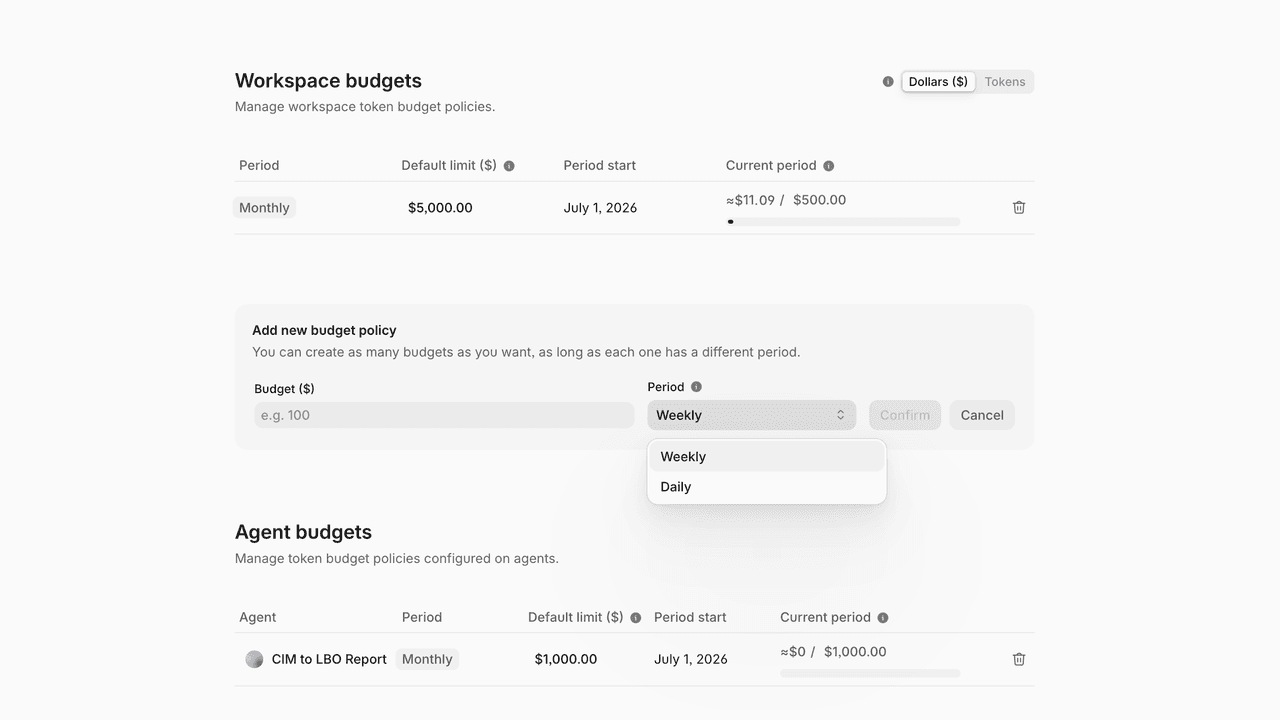
Budgets are now available to every workspace. Set spend limits on AI activity, watch consumption in real time, and stop runaway costs before they happen — all from Settings → Budgets.
Two levels of control
Workspace budgets cap total spend across all Go activity. Agent budgets set per-agent limits scoped to a specific workflow, each with its own live tracking — so one heavy agent can have a tighter leash than the rest.
Dollars or tokens
Every limit and progress bar can be viewed in dollars or in tokens. Dollars is usually the easier number to reason about — you set a cap of $5,000, not a count of tokens — but the token view is there when model consumption is what you care about.
Periods and overrides
Choose a reset cadence of daily, weekly, or monthly. Each period must be unique per policy, but you can stack several on the same agent — a daily and a weekly cap together, for layered protection. A default limit refreshes automatically each period; a current-period override adjusts spend just once, without changing the standing default.
Tracking and alerts
A live progress and a widget in each agent view show current spend, the limit, and the reset date at a glance. Email alerts fire automatically at 75%, 90%, and 100% of a budget, and full spend reporting lives in Reports.

Jade Yip
Senior Product Manager
